

Shop Identification
To access data through the Storefront API, you need to identify which shop-country you are targeting.
Which Shop Identification Should I Use?
We recommend using Shop Identifiers for your implementation. If you are setting up a new integration, use #option-1-shop-identifiers-shopkey-countrycode-locale as it provides a more readable and globally consistent way to identify your shop-country without relying on numeric IDs.
If your team already uses shopId in an existing integration, #option-2-shop-id-shopid remains fully supported and there is no requirement to migrate.
Option 1: Shop Identifiers (shopKey, countryCode, locale)
The recommended approach for all new integrations. Three fields together uniquely identify a shop-country setup.
| Field | Description |
|---|---|
shopKey | A globally unique identifier for your shop (the global shop setup, not country-specific). |
countryCode | Identifies the country-specific shop configuration. Country code must be a two-letter ISO 3166-1 alpha-2 code (e.g. DE, US) |
locale | Specifies the language/locale for the country-specific setup. |
Rules
- All three fields —
shopKey,countryCode, andlocale— are mandatory. Providing only one or two of them is not valid.

Shop Key in SCAYLE Panel

Country Code in SCAYLE Panel

Locale in SCAYLE Panel
Option 2: Shop ID (shopId)
The supported approach for teams that already use a shop-country ID in existing integrations.
Rules
shopIdalone is sufficient. No other fields are needed.- If both
shopIdandshopKeyare present in the same request,shopIdtakes priority andshopKey,countryCodeandlocaleare ignored.
You can find the shop-country ID in the SCAYLE Panel on the Dashboard page of your shop. Make sure the correct shop country is selected in the dropdown menu.
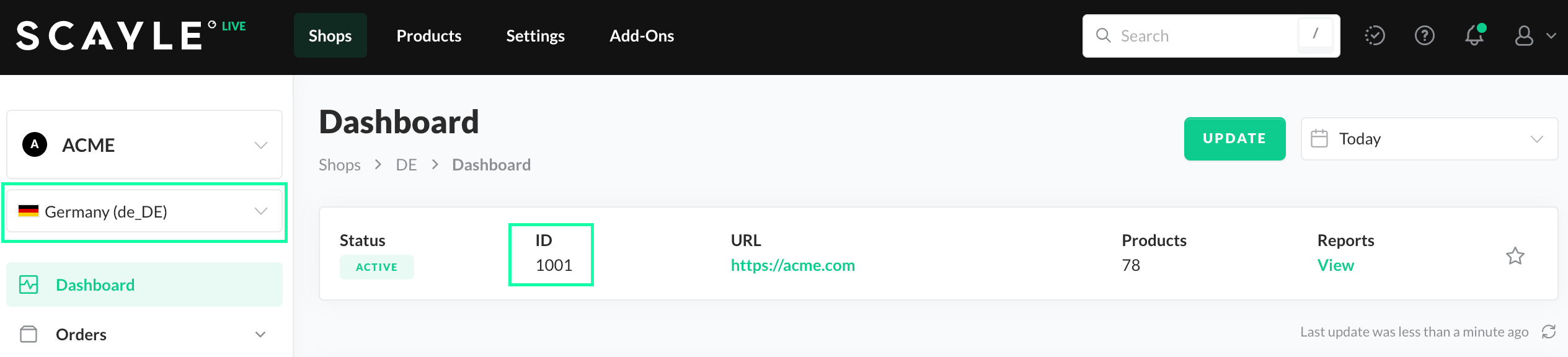
Country ID in SCAYLE Panel.


