

OnBehalf Token
Introduction
SCAYLE’s On-Behalf Login allows trusted applications - such as in-store POS systems or customer service tools - to securely act on behalf of a customer. This enables a true Omnichannel experience, allowing staff to assist customers with orders while maintaining their full history, loyalty points, and personalized pricing without requiring a browser-based login.
How it works
Instead of the customer typing a password into a public terminal, your trusted application requests a short-lived On-Behalf Token for a specific customerId.
- Access Token: Valid for 5 minutes (used to perform immediate actions like adding to cart).
- Refresh Token: Valid for 1 hour (used if the store session lasts longer).
- Context: All orders created using this method are flagged with
on_behalf_session: true, allowing you to track which sales originated from in-store assistance.
Security & Restrictions
Because this feature provides direct access to customer accounts, it is protected by multiple layers of security:
- Trusted Clients Only: Only OAuth clients explicitly granted the
CreateOnBehalfTokenpermission can call this endpoint. - IP Whitelisting: You must define a list of allowed IP addresses or CIDR ranges (e.g., your store's network, trusted applications, etc.) in the SCAYLE Panel. Requests from unauthorized IPs will be rejected.
- Audit Logging: Every time an on-behalf token is issued, it is logged with the specific Client ID and Customer ID for full traceability.
Setup Guide
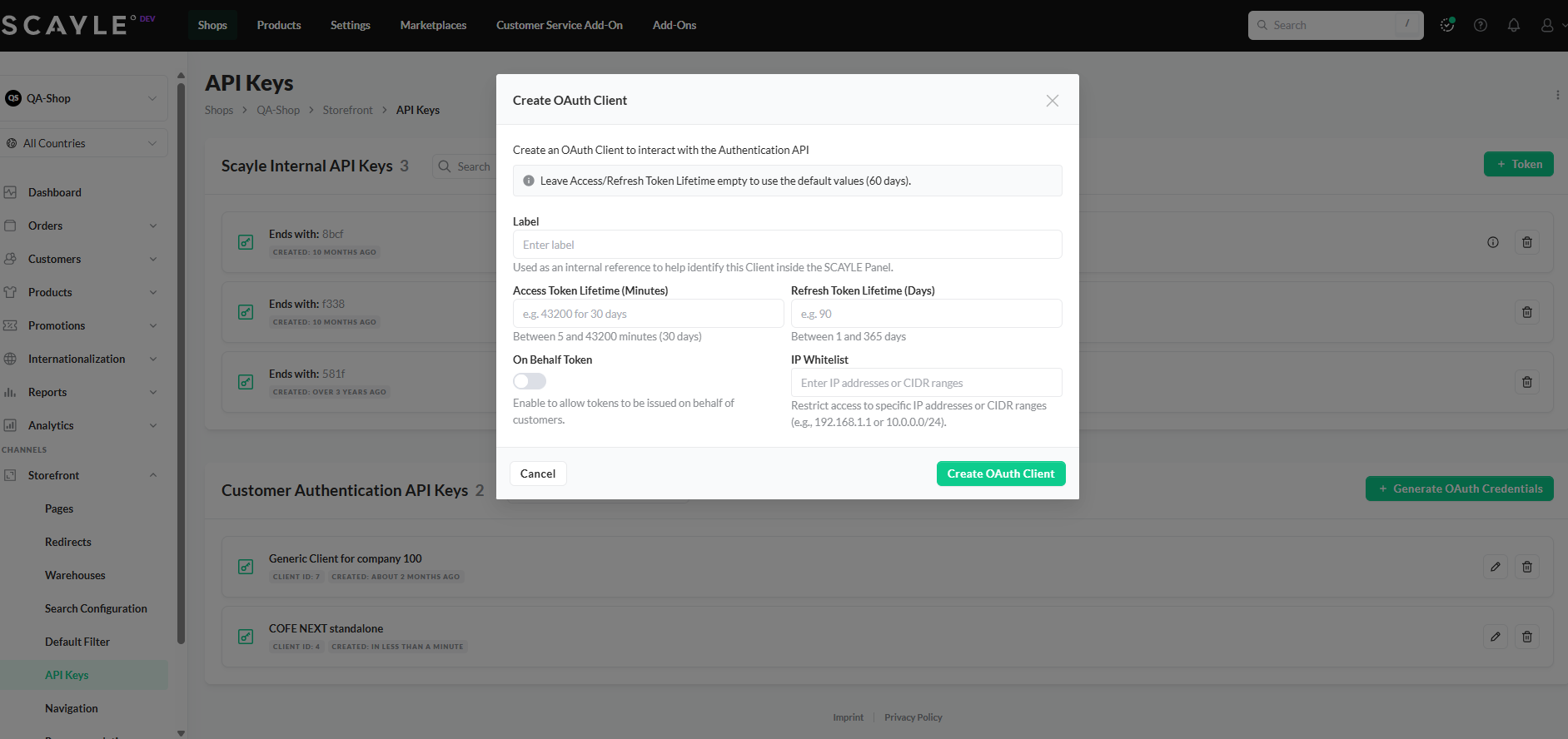
To enable On-Behalf Login for your application, follow these steps in the SCAYLE Panel:
1. Configure the Auth Client
Go to Storefront ➜ API Keys and add or edit the Customer Authentication API Keys.
- Toggle the On-Behalf Token switch to Enabled.
2. Manage IP Whitelist
In the same configuration screen, enter the IP addresses of your trusted applications.
- Enter individual IPs or CIDR ranges (e.g.,
192.168.1.0/24). - Leaving this empty or misconfigured will result in a
403 Forbiddenerror.
Technical Flow
On-behalf login allows an authorised client (e.g. shop backend) to obtain an OAuth2 access token for a customer without the customer’s password. The customer is identified by customerId and then issues an on-behalf token.
Flow for issuing token
.svg)
Security and Constraints
- No customer password is used in this process
- Only OAuth clients with
on_behalf_token_enabledand allowed IPs can call the endpoint - Customer must exist in our infrastructure, be active and is not a guest customer


