

Set up Loyalty Programs
This page describes the API contract for the loyalty middleware endpoints and the SCAYLE Panel settings required to activate the feature.
The implementation is modular; you only need to develop the endpoints for the features you intend to support. For example, if you do not want to offer loyalty program registration during checkout, you do not need to implement the Registration endpoint.
| Type | Operation | Requirement | Purpose |
|---|---|---|---|
| POST | Validate Loyalty Number | Mandatory | Validates the loyalty card number entered by the customer during checkout. |
| GET | Loyalty Points Conversion Rate | Optional | Defines how loyalty points are converted into a monetary value during checkout, enabling SCAYLE to calculate the redeemable order amount based on the customer’s available points. |
| POST | Book Loyalty Points | Mandatory | When an order is confirmed, the corresponding loyalty points must be booked and communicated to the customer through the OSP and the order confirmation email. |
| POST | Register Loyalty Number | Optional | Submits customer data to register a new loyalty card. |
| POST | Verify Loyalty Membership | Optional | Verifies whether a registered customer is an eligible loyalty member by validating the provided card number against the loyalty provider, and matching it with the customer's email address. Can be used to enable earning and redeeming loyalty points during checkout. |
| GET | Check Loyalty Point Balance | Mandatory | Called during checkout after the customer’s loyalty card number has been successfully validated. It returns the current loyalty point balance for that customer. |
| PUT | Capture Loyalty Points | Mandatory | Deducts the appropriate amount of loyalty points from the customer's account based on the final order value. |
| POST | Refund Loyalty Points | Optional | Used when an order is canceled or partially refunded. It restores previously captured loyalty points back to the customer's account, based on the refunded amount. |
| POST | Dynamic Points Calculation | Optional | Calculates the balance and number of points a customer earns for a given order, based on your own business logic (for example, active promotions, vouchers, or customer segments). Used only when Dynamic Points Calculation is enabled for the loyalty program. SCAYLE does not retry failed calls — see Limitations below. |
| Type | Operation | Requirement | Purpose |
|---|---|---|---|
| POST | Validate Loyalty Number | Mandatory | Validates the loyalty card number entered by the customer during checkout. |
| GET | Loyalty Points Conversion Rate | Optional | Defines how loyalty points are converted into a monetary value during checkout, enabling SCAYLE to calculate the redeemable order amount based on the customer’s available points. |
| POST | Collect/Book Loyalty Points | Mandatory | When an order is confirmed, the corresponding loyalty points must be booked and communicated to the customer through the OSP and the order confirmation email. |
| POST | Register Loyalty Number | Optional | Submits customer data to register a new loyalty card. |
| POST | Verify Loyalty Membership | Optional | Verifies whether a registered customer is an eligible loyalty member by validating the provided card number against the loyalty provider, and matching it with the customer's email address. Can be used to enable earning and redeeming loyalty points during checkout. |
| GET | Check Loyalty Point Balance | Mandatory | Called during checkout after the customer’s loyalty card number has been successfully validated. It returns the current loyalty point balance for that customer. |
| PUT | Capture Loyalty Points | Mandatory | Deducts the appropriate amount of loyalty points from the customer's account based on the final order value. |
| POST | Refund Loyalty Points | Optional | Used when an order is canceled or partially refunded. It restores previously captured loyalty points back to the customer's account, based on the refunded amount. |
Loyalty data—such as the loyalty number and, if applicable, the promotional code—is automatically included in the order submission payload and forwarded to your system. No additional configuration is needed to attach it.
SCAYLE sends loyalty data to these endpoints, but it is your middleware’s responsibility to connect to the loyalty provider (e.g., PAYBACK) and return the appropriate validation or registration result.
Loyalty Endpoint Schemas
To begin the integration, you’ll find below the schemas for all mandatory loyalty endpoints required for basic functionality. Optional endpoints are listed at the end for extended use cases.
Validate Loyalty Number
Request
Headers:
X-Shop-Idinteger – Country-shop identifier.Content-Typestring – Must be set toapplication/json.Authorizationstring – The Bearer token configured in the SCAYLE Panel.
| Parameter | Type |
|---|---|
cardKey | string |
type | enum |
email | string |
Response
| Parameter | Type |
|---|---|
valid | boolean |
loyaltyPoints.balance | int |
Status Codes
| Code | Description |
|---|---|
| 200 | The loyalty card has been checked. valid can be true or false; balance can be zero or positive. |
| 400 | Bad request – invalid syntax. |
| 422 | Unprocessable Content – mandatory data is not provided. |
| 500 | Internal Server Error. |
Get Loyalty Points Rate
SCAYLE Checkout sends through the Loyalty API a request to get informed what is the conversion rate for the membership points. The request contains currency and type as parameters.
Headers:
X-Shop-Idinteger – Country-shop identifier.Content-Typestring – Must be set toapplication/json.Authorizationstring – The Bearer token configured in the SCAYLE Panel.
| Parameter | Type |
|---|---|
currency | string |
type | enum |
SCAYLE’s Loyalty API receives the request as stated above, tries to lookup the conversion factor in the database and, if successful, it returns as below:
| Property | Type |
|---|---|
conversionFactor | float |
| SCAYLE Response Code | Description | Response Body |
|---|---|---|
200 | Request was successful | See the requirements here. |
400 | Bad request – invalid syntax. | |
404 | Factor not found | Empty |
422 | Parameters not given | |
500 | Any other error | Error returned by Middleware |
Book Loyalty Points
Upon order confirmation, SCAYLE sends the below request to the Loyalty API:
In case of a successful response, the Checkout shall receive the amount of points for that order:
| SCAYLE Response Code | Description | Response Body |
|---|---|---|
200 | Request was successful | See the sample above |
400 | Bad Request (the information provided is invalid or inaccurate) | Empty |
401 | Unauthorized (unable to verify provided API credentials) | Empty |
422 | Validation failure | Error returned by Middleware |
Check Balance
The loyalty point balance is retrieved during checkout after successful validation of the customer's loyalty number. SCAYLE Checkout will send through the Loyalty API a request to your system to fetch the balance amount following the below schemas:
| Request Parameters | Type | Requirement |
|---|---|---|
cardKey | string | Mandatory |
type | enum | Mandatory |
email | string | Optional |
The customer’s email is an optional parameter provided by SCAYLE Checkout to the Loyalty API. You can use it to enable personalized experiences or support any required internal processes.
For a successful response, SCAYLE expects to receive the card balance as parameter:
| Response Parameters | Type | Requirement |
|---|---|---|
balance | integer | Mandatory |
Upon receiving this information, the Loyalty API will send the information to the SCYALE Checkout as stated in the below example:
Based on the returned amount, the customer can either proceed using loyalty points alone or combine them with another payment method to cover the full order amount.
| SCAYLE Response Code | Description | Response Body |
|---|---|---|
200 | Request was successful | See the requirements here. |
404 | Contact not found | Empty |
500 | Any other error | Error returned by Middleware |
Capture Loyalty Points
The loyalty point balance is captured upon order confirmation, before the order is delegated. SCAYLE Checkout will send a request towards the SCAYLE Loyalty API as follows:
Headers:
X-Shop-Idinteger – Country-shop identifier.Content-Typestring – Must be set toapplication/json.Authorizationstring – The Bearer token configured in the SCAYLE Panel.
| Request Parameter | Type | Requirement |
|---|---|---|
amount | integer | Mandatory |
cardKey | string | Mandatory |
type | enum | Mandatory |
currencyCode | string | Mandatory |
orderId | integer | Mandatory |
transactionKey | string | Mandatory |
email | string | Optional |
The customer’s email is an optional parameter provided by SCAYLE Checkout to the Loyalty API. You can use it to enable personalized experiences or support any required internal processes.
Example of Request body:
For a success capture, the Loyalty Point API expects an empty response body from the middleware.
| Response Parameter | Type | Requirement | Mapping |
|---|---|---|---|
amount | integer | Mandatory | Map to value initially received by Checkout in the /loyalty/capture request |
card | object | Mandatory | |
card.cardKey | string | Mandatory | Map to value initially received by Checkout in the /loyalty/capture request |
card.type | enum | Mandatory | Map to value initially received by Checkout in the /loyalty/capture request |
card.currencyCode | string (max length: 3) | Mandatory | Map to value initially received by Checkout in the /loyalty/capture request |
status | object | Mandatory | - |
card.status.balance | integer | Mandatory | set to 0 (zero) |
card.status.capturedAmount | integer | Optional | set to same value as amount |
card.status.refundedAmount | integer | Optional | set to 0 (zero) |
orderId | integer | Optional | Map to value initially received by Checkout in the /loyalty/capture request |
transactionKey | string | Mandatory | Map to value initially received by Checkout in the /loyalty/capture request |
Upon receiving the response, SCAYLE Loyalty API will transmit the data to the SCAYLE Checkout. Example below:
Response code mapping
| SCAYLE Response Code | Description | Response Body |
|---|---|---|
200 | Request was successful | See response mapping here |
404 | Contact not found | Empty |
409 | Middleware detected a duplicate transactionKey | Empty |
406 | Capture amount exceeds the value of the balance | Empty |
417 | Loyalty point payment not applicable to current Shop, Country or Currency | Empty |
422 | Validation error | Middleware 422 |
500 | Any other error | Middleware 500 |
Refund Loyalty points
Loyalty points are refunded if they were successfully captured, but the capture of the remaining payment via other methods fails and the order is not confirmed. In this case, SCAYLE Checkout will send a refund request towards the SCAYLE Loyalty API with the following schema:
Headers:
X-Shop-Idinteger – Country-shop identifier.Content-Typestring – Must be set toapplication/json.Authorizationstring – The Bearer token configured in the SCAYLE Panel.
| Request Parameter | Type |
|---|---|
amount | integer |
cardKey | string |
type | enum |
currencyCode | string (max length: 3) |
orderId | integer |
transactionKey | string |
Example of request body:
In case of a successful response, SCAYLE Loyalty API expects the following:
| Response Parameter | Type | Requirement | Mapping |
|---|---|---|---|
amount | integer | Map to value initially received by Checkout in the /loyalty/refund request | |
card | object | - | - |
card.cardKey | string | Map to value initially received by Checkout in the /loyalty/refund request | |
card.type | enum | Map to value initially received by Checkout in the /loyalty/refund request | |
card.currencyCode | string (max. length: 3) | Map to value initially received by Checkout in the /loyalty/refund request | |
status | object | - | - |
card.status.balance | integer | Mandatory | Set to 0 (zero) |
card.status.capturedAmount | integer | Optional | Set to 0 (zero) |
card.status.refundedAmount | integer | Optional | Set to amount |
orderId | integer | Optional | Map to value initially received by Checkout in the /loyalty/refund request |
transactionKey | string | Mandatory | Map to value initially received by Checkout in the /loyalty/refund request |
The Loyalty API will send this information to the SCAYLE Checkout as stated in the example below:
Response codes:
| SCAYLE Response Code | Description | Response Body |
|---|---|---|
200 | Request was successful | See example here. |
404 | Contact not found | Empty |
409 | Middleware detected a duplicate transactionKey | Empty |
417 | Loyalty point payment not applicable to current Shop, Country or Currency | Empty |
422 | Validation error | Error returned by Middleware |
500 | Any other error | Error returned by Middleware |
The following endpoints are optional and should be implemented only if your loyalty program requires the related functionality.
Verify Loyalty Membership
Once the customer reaches the payment step in the checkout and the loyalty program slot is available, tenants have the option to perform an additional verification step. This verification ensures that the entered loyalty card number and customer are eligible to earn or redeem points.
This step is optional, and can be used for loyalty programs that require strict customer identification, such as matching the card number against a registered email address.
If the /loyalty/verify endpoint is integrated, SCAYLE Checkout will send a verification request to the loyalty API immediately after the loyalty card number has been validated. The request uses the following schema:
| Request Parameter | Type | Requirement |
|---|---|---|
cardKey | string | Mandatory |
type | string | Mandatory |
email | string | Mandatory |
Example of the request sent from the Checkout to the Loyalty API is available below:
As successful response, SCAYLE Loyalty API expects the following parameters:
| Response Parameter | Type | Requirement |
|---|---|---|
cardKey | string | Mandatory |
type | string | Mandatory |
email | string | Mandatory |
valid | boolean | Mandatory |
loyaltyPoints | object | |
loyaltyPoints.balance | integer |
Example of response body below:
Response code:
| SCAYLE Response Code | Description | Response Body |
|---|---|---|
201 | Validation was successful | See the details here. |
400 | Request could not be processed (invalid JSON) | Empty |
401 | Authentication failed | Empty |
422 | Formal validation failure | Error returned by Middleware |
Register Loyalty Number
During checkout, customers can register for a loyalty program via a dedicated endpoint. Once the registration is successful, the loyalty program is immediately linked to the order. This step is optional and should be implemented only if you want to allow customers to register for a membership or loyalty program directly during the checkout process.
Request
HTTP method: POST
Headers:
X-Shop-Idinteger – Country-shop identifier.Content-Typestring – Must be set toapplication/json.Authorizationstring – The Bearer token configured in the SCAYLE Panel.
Example request body:
Response
Once the registration is completed, the response must use the following format:
cardNumberstring – Unique customer's loyalty identifier.providerstring – The identifier of the loyalty program.
Status Codes
Calculate Earned Points
The Calculate Earned Points endpoint is called by SCAYLE Checkout when Dynamic Points Calculation is enabled for the loyalty program. It allows you to apply your own business logic — for example, awarding bonus points for a promotion, a voucher, or a customer segment — instead of the static calculation factor configured in the SCAYLE Panel.
The request includes order data similar to the order webhook payload. The customer's customData is included so you can branch on attributes such as isVip or hasFreeShipping. The endpoint URL, HTTP method, authentication method, and timeout are configured per loyalty program in the SCAYLE Panel.
Request fields:
| Parameter | Type | Description |
|---|---|---|
orderId | integer | Unique numeric identifier of the order. |
orderReferenceKey | string | External reference set by the client to integrate a 3rd-party system. |
shop.id | integer | Shop (application) ID. |
shop.countryCode | string (3 chars) | Three-letter country code of the shop (ISO 3166-1 alpha-3). |
shop.language | string (2 chars) | Two-letter language code of the shop. |
customer | object | Customer details, including email, firstName, lastName, status, and customData. |
address | object | Billing and shipping address objects. |
cost | string | Order cost breakdown, including the total used as the basis for points calculation. |
currencyCode | array | Currency for the provided cost. |
items | object | Order line items. |
loyaltyCard | object | Loyalty card details, including cardNumber and the membership program identifier. |
payment | object | Payment details associated with the order. |
shipping | object | Shipping details associated with the order. |
createdAt | string (date-time) | Order creation timestamp. |
updatedAt | string (date-time) | Order last update timestamp. |
Example Request body:
Response fields:
SCAYLE expects a 200 OK response with the calculated number of earned points and the cost basis used for the calculation.
| Parameter | Type | Requirement | Description |
|---|---|---|---|
orderId | integer | mandatory | Map to value initially received in the request. |
orderReferenceKey | string | mandatory | Map to value initially received in the request. |
customer | object | mandatory | Customer object containing at least id. May also include email and referenceKey. |
cost.withTaxWithMembershipDiscountForLoyaltyDiscountedProducts | integer | mandatory | Total price (including membership discount and tax) for loyalty-discounted products. This is the cost basis used for points calculation. |
loyaltyCard.cardNumber | string | mandatory | Membership card number. |
loyaltyCard.provider | string | mandatory | Loyalty program identifier / card type. |
loyaltyCard.earnedPoints | integer | mandatory | Number of loyalty points earned for this order. |
Example Response body:
Response codes:
| SCAYLE Response Code | Description | Response Body |
|---|---|---|
200 | Request was successful | See example above. |
400 | Bad request — the payload failed validation | Array of { path, message } objects describing each validation error. |
Limitations
- No retry on failed calls — you must ensure successful responses. SCAYLE calls the Calculate Earned Points endpoint on every basket change before order confirmation, so transient failures are typically self-corrected on the next basket update. SCAYLE does not retry failed calls automatically. It is your responsibility to ensure the endpoint is reachable and returns successful responses; if the latest call before order confirmation failed, the order is confirmed without an earned-points value being set.
- Refunds are not supported. When Dynamic Points Calculation is used, SCAYLE cannot determine how many points to refund on a return or cancellation, because the earning logic lives entirely in your system. The
/loyalty/refundendpoint is therefore not invoked for orders that earned points via this API. - Earned-points preview before a card is attached is not available. With the static calculation, SCAYLE can show the customer the number of points they would earn for the current basket as soon as a loyalty program is configured, even before a card is entered — a useful engagement nudge. Because SCAYLE cannot know in advance whether the final calculation will be static or dynamic, this preview is suppressed when Dynamic Points Calculation is enabled. Customers must enter their loyalty card number first to see the number of points they will earn for the order.
Configure a Loyalty Program
You can implement as many loyalty programs as required. After integrating with the APIs, start by setting up the Loyalty Program in the SCAYLE Panel as following:
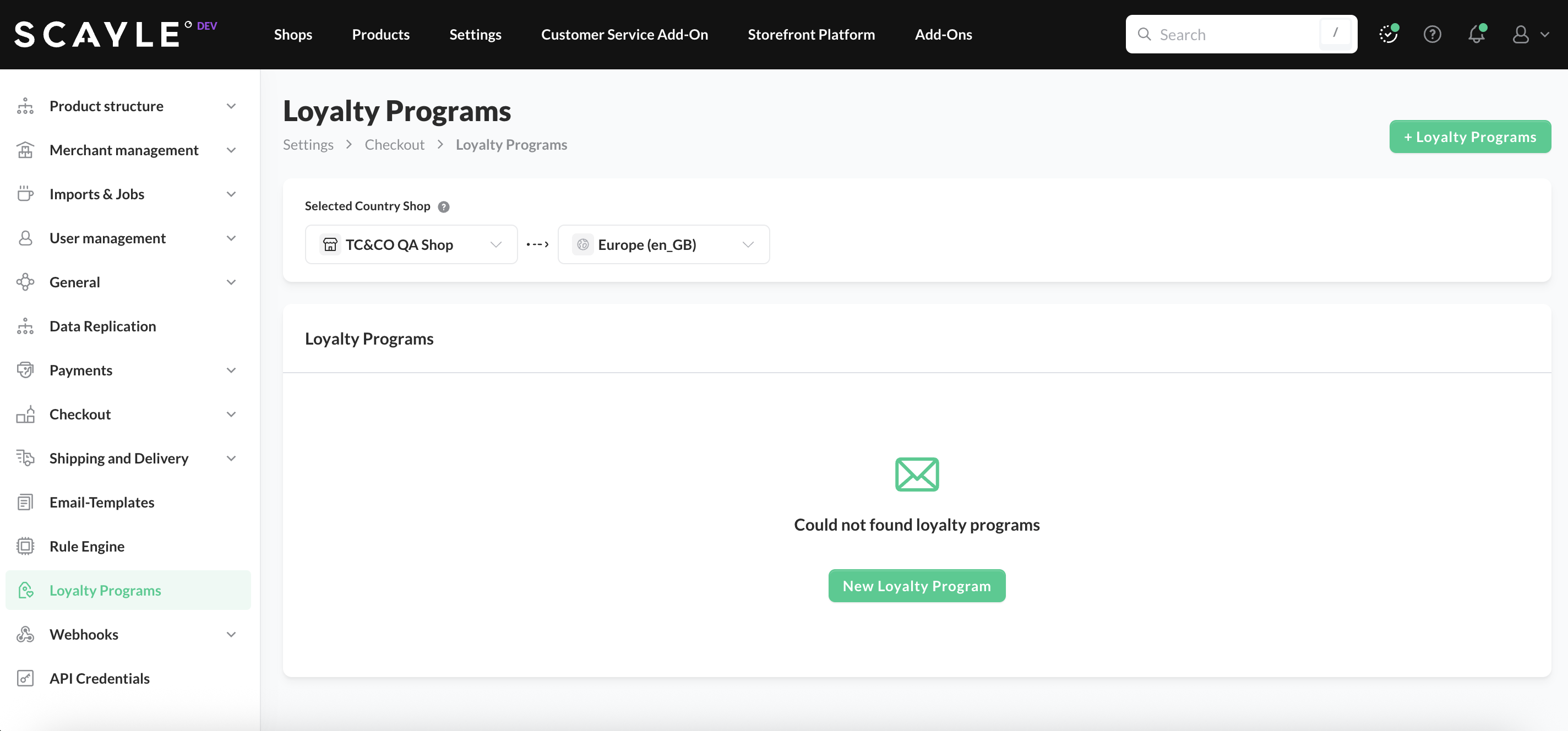
- In the SCAYLE Panel go to Shops ➜ Storefront ➜ Checkout Settings ➜ Loyalty Programs and create/add a new Loyalty Program:
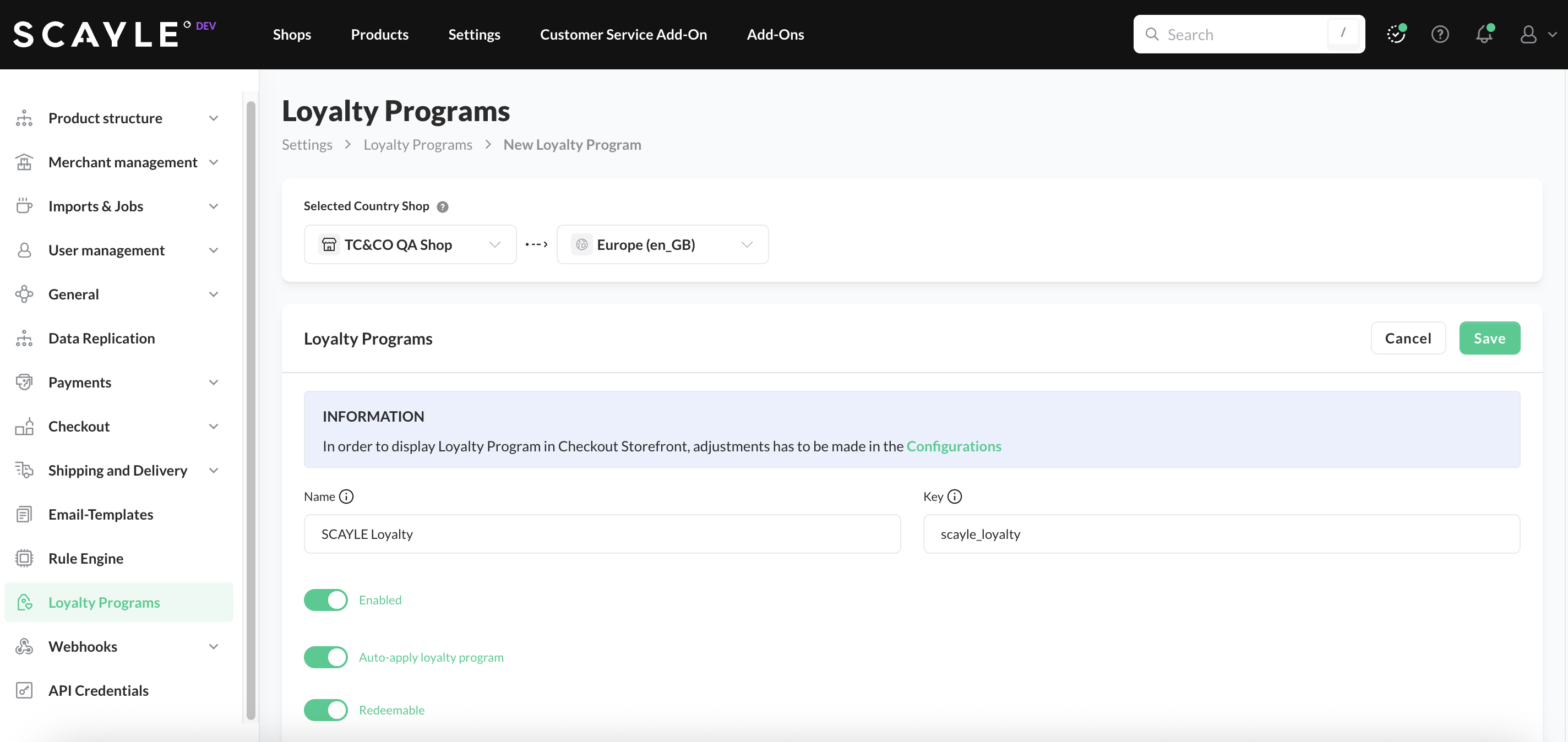
- Enter a Name, which is only used to identify the program within the SCAYLE Panel, and a Key, which serves as the unique identifier transmitted in the payload of all requests to the Loyalty API.
- To activate the program in checkout, switch on the Enable option; if you want to allow redemption of points, also enable the Redeemable setting.
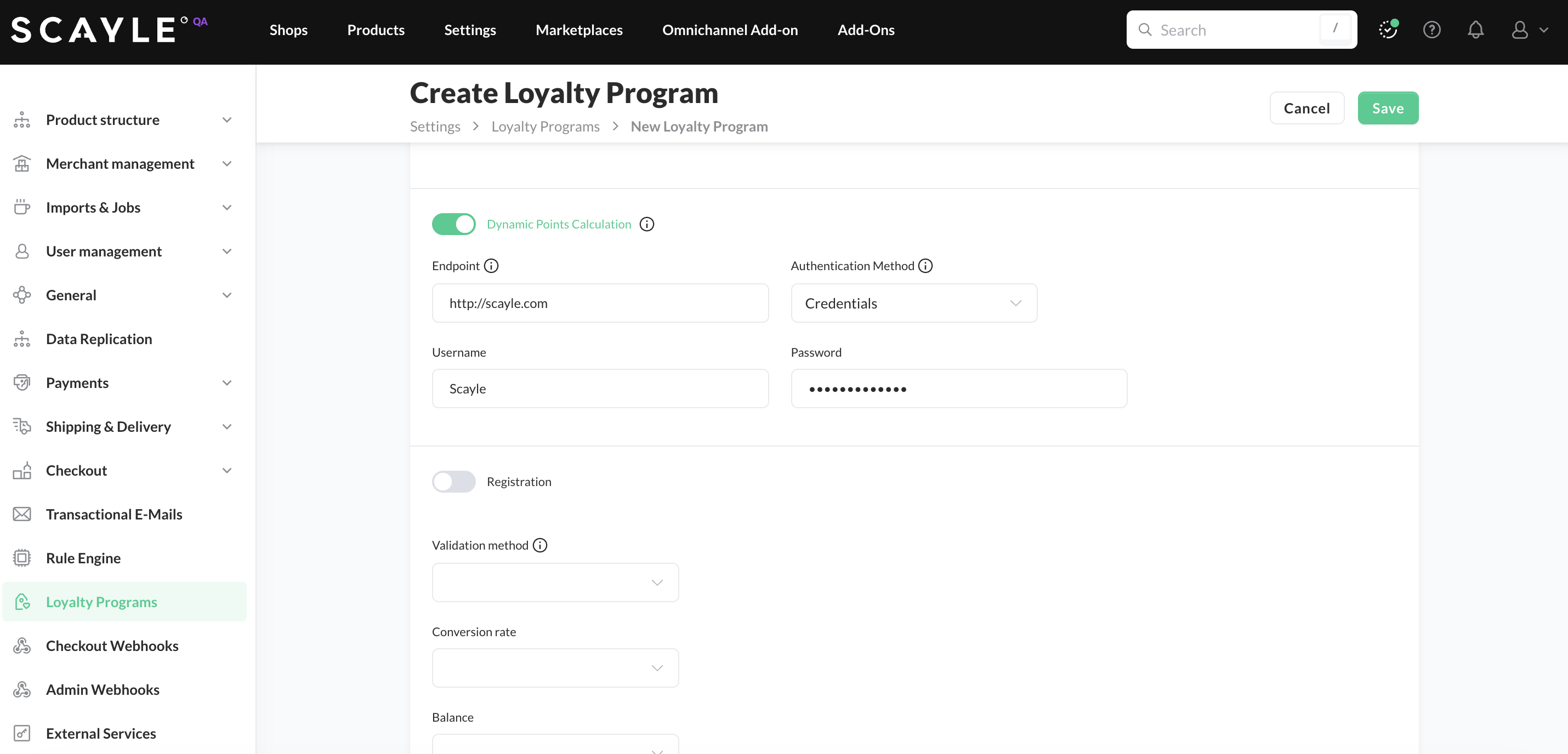
- Next, decide whether to enable Dynamic Points Calculation. By default, the toggle is disabled and SCAYLE calculates earned points using the existing static formula based on the calculation factor and rounding you configure in the next steps.
If you choose to enable the dynamic point calculation, the checkout will delegate points calculation to your external API. To enable this option for your shop:
- Switch on the Dynamic Points Calculation toggle.
- Fill in the API configuration section providing the endpoint URL, the authentication method and credentials. Note that the authentication method depends on how you integrated your external API: For Add-On integrations a Token is used, while Middleware setups use Credentials.
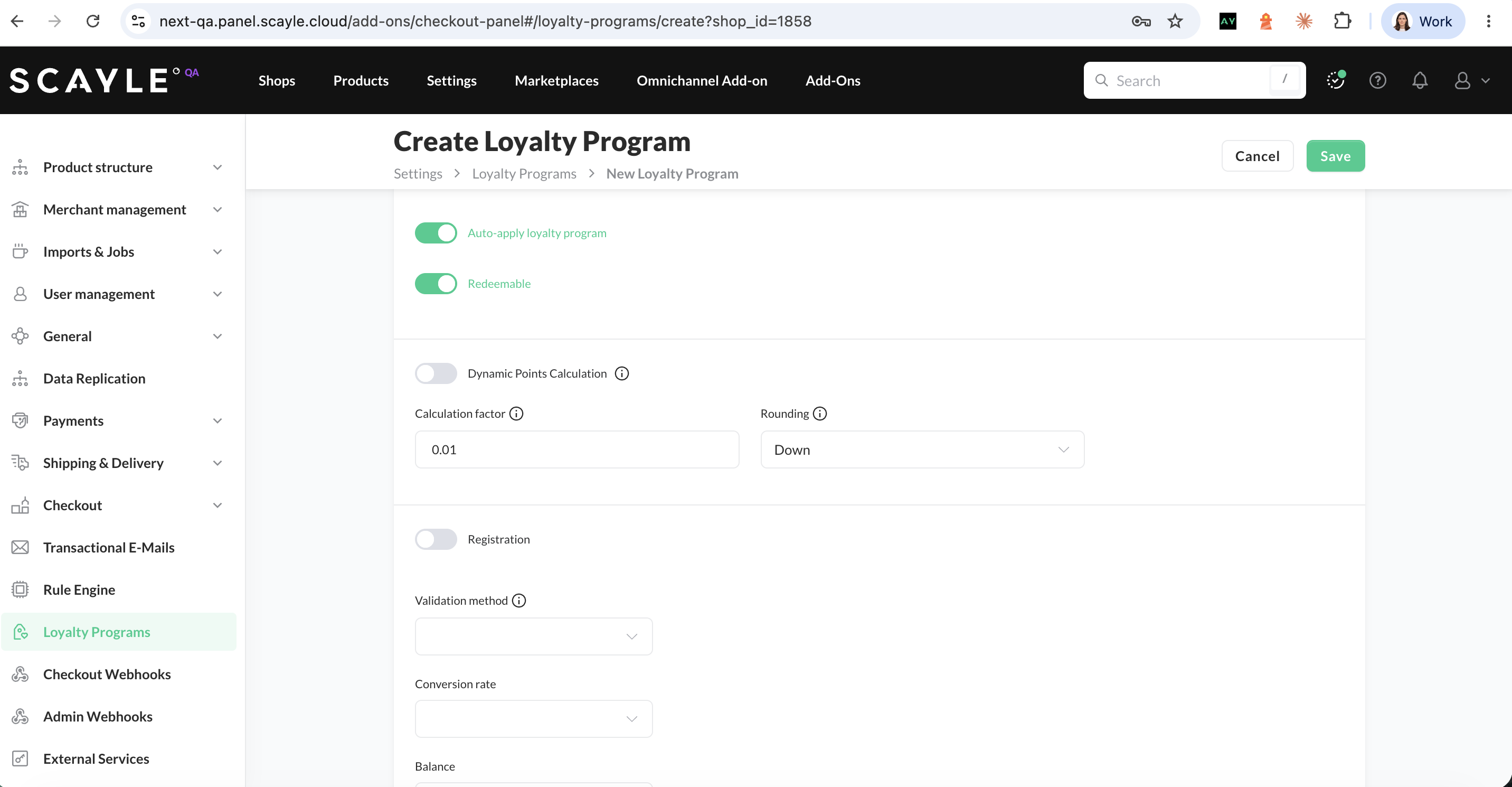
- If you decide for the static formula, ensure the Dynamic Points Calculation toggle is disabled. Then, define the Calculation Factor, which determines how many points a customer earns based on the order total (e.g., with a factor of 0.01, an order of 250 EUR results in 25 points).
Because this calculation may result in decimals, you must also specify a rounding behavior.
Suppose the calculation factor results in 213.2 points for a given order.
- Rounding down: The customer receives 213 points (the decimal part is discarded).
- Rounding up: The customer receives 214 points (any decimal, even below .5, rounds up).
- If you want to enable registration of new customers during checkout, toggle the Registration option, which expands additional fields for entering the required Endpoint and Token for authentication.
- Finally, select the APIs that the loyalty program will use: validation, conversion rate, balance, capture, and refund.
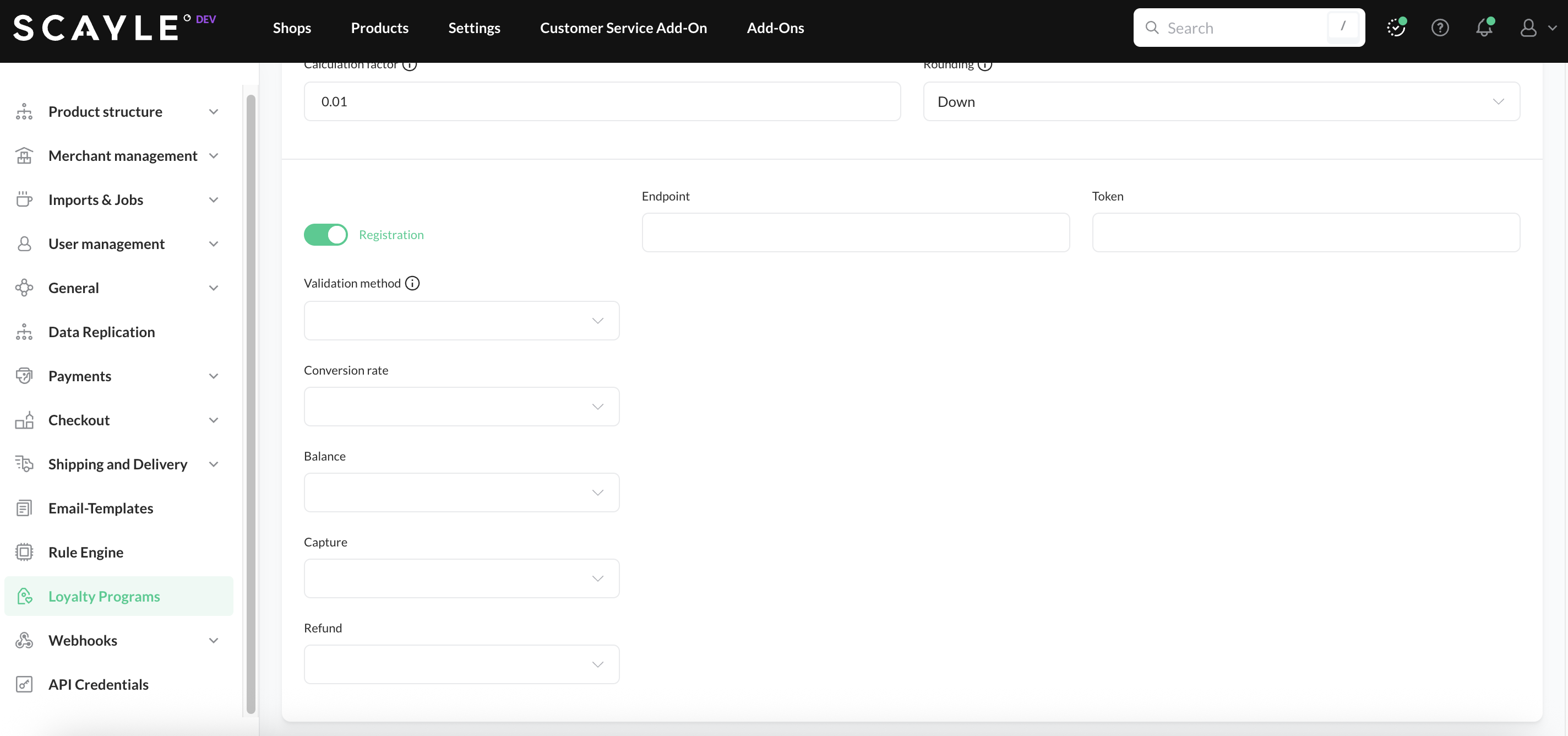
Checkout Frontend Configuration
In addition to the Loyalty Program setup in Panel, you must configure the customer-facing specifications which control the appearance, validation rules, and specific behaviors of the loyalty widgets:
| Setting | Description |
|---|---|
| General Settings | |
| Disable Removal | Prevents a customer from removing a loyalty card once it has been successfully applied to the order. |
| Enabled | The master switch to activate or deactivate the loyalty program features in the Checkout. |
| Format | A regular expression used to validate the loyalty card number format on the frontend. |
| Hide On Review Page | Disables the loyalty program module from the Order Review Page in the Express Checkout flow. |
| Min – Max Length | Sets the character limits for the loyalty card field. |
| Required | When enabled, makes the loyalty card number a mandatory field for completing the checkout. |
| Type | A unique identifier for the loyalty program (for example, your_loyalty_program). This value is critical, as it must exactly match the Key configured in the endpoint specification to link the frontend widget to the correct API endpoints. |
| Illegal Terms | A list of specific strings that are blocked from the input field. |
| Format On Blur | |
| Input – Output | Defines how the input is reformatted (Input → Output) when the customer clicks away from the field (for example, adding hyphens). |
| Redeemable Points | |
| Enabled | Activates the "Redeem Loyalty Program Points" widget, allowing customers to use their balance to reduce the order total. |
| Registration | |
| Disable for guest | Hides the registration option for guest users. |
| Enabled | Displays the registration widget for customers who do not yet have a loyalty card associated with their profile. |
| Tool Tip | |
| Enabled | Displays an informational icon and tooltip next to the loyalty field. |
To configure these settings in the SCAYLE Panel, go to Settings ➜ Checkout ➜ Customization ➜ Payment Step ➜ Payments ➜ Loyalty Program.
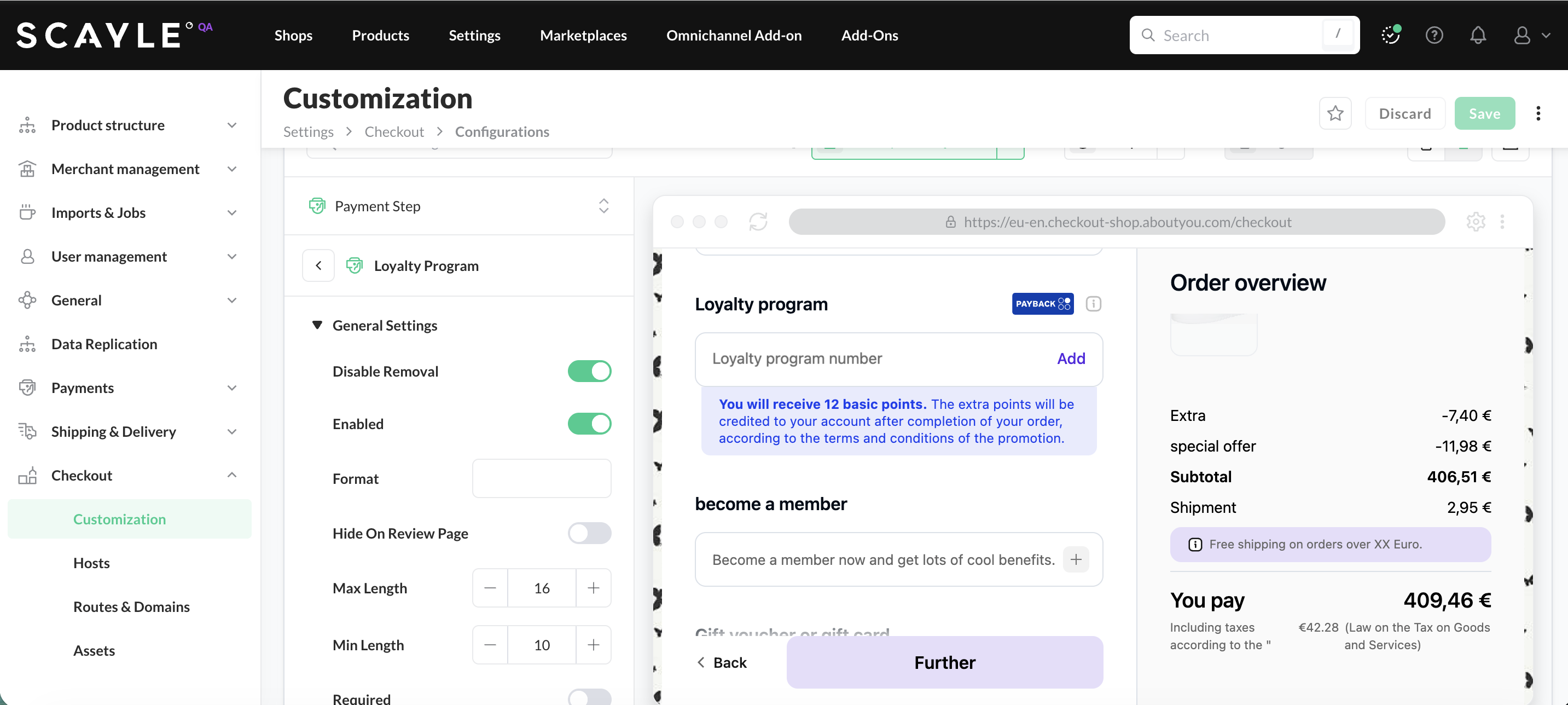
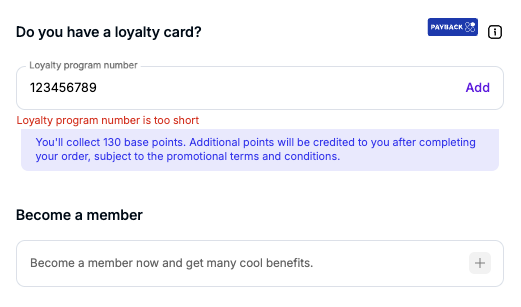
Loyalty Program Number - Input Validation
The available programs are sent in the orderState.memberships.suggestions parameter of the state response.
"loyaltyProgram": {
      "enabled": false,
      "disableRemoval": false,
      "minLength": 10,
      "maxLength": 16,
      "type": "scayle_loyalty",
      "icon": { "enabled": false },
      "redeemablePoints": { "enabled": false },
      "registration": { "enabled": false, "disableForGuest": false }
    },
Set up Excluded Products in SCAYLE Panel
Follow these steps to exclude a product from one or more loyalty programs:
1. In the SCAYLE Panel, navigate to Settings ➜ Product Structure ➜ Attributes and create a new attributeGroup. The group must be named exactly loyaltyCardExclusion. Configure the group as follows:
Group: selectProduct LevelEntity Level: selectProduct- Under Attribute Structure, enable:
- Visible for enhancement process
- Editable on enhancement process
- Defining for Product Level
- Show on the preview of the Product Page
To apply changes, click Save.
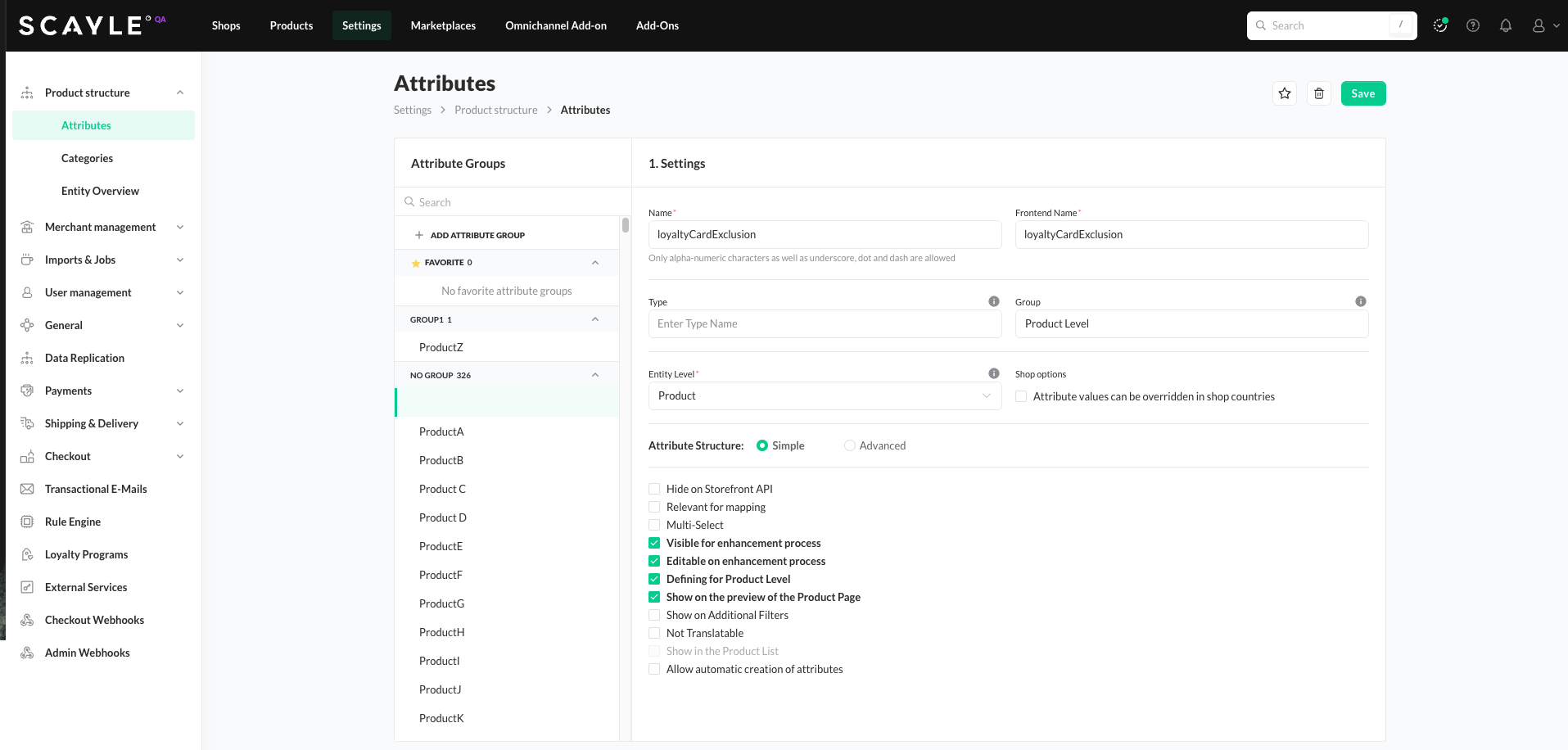
Creating the loyaltyCardExclusion attribute group
2. Open the Attributes tab inside the loyaltyCardExclusion group and click on + Add Attribute. Create an attribute whose name matches the exact name of the loyalty program. The Checkout uses this attribute name to identify which loyalty program the product is excluded from.
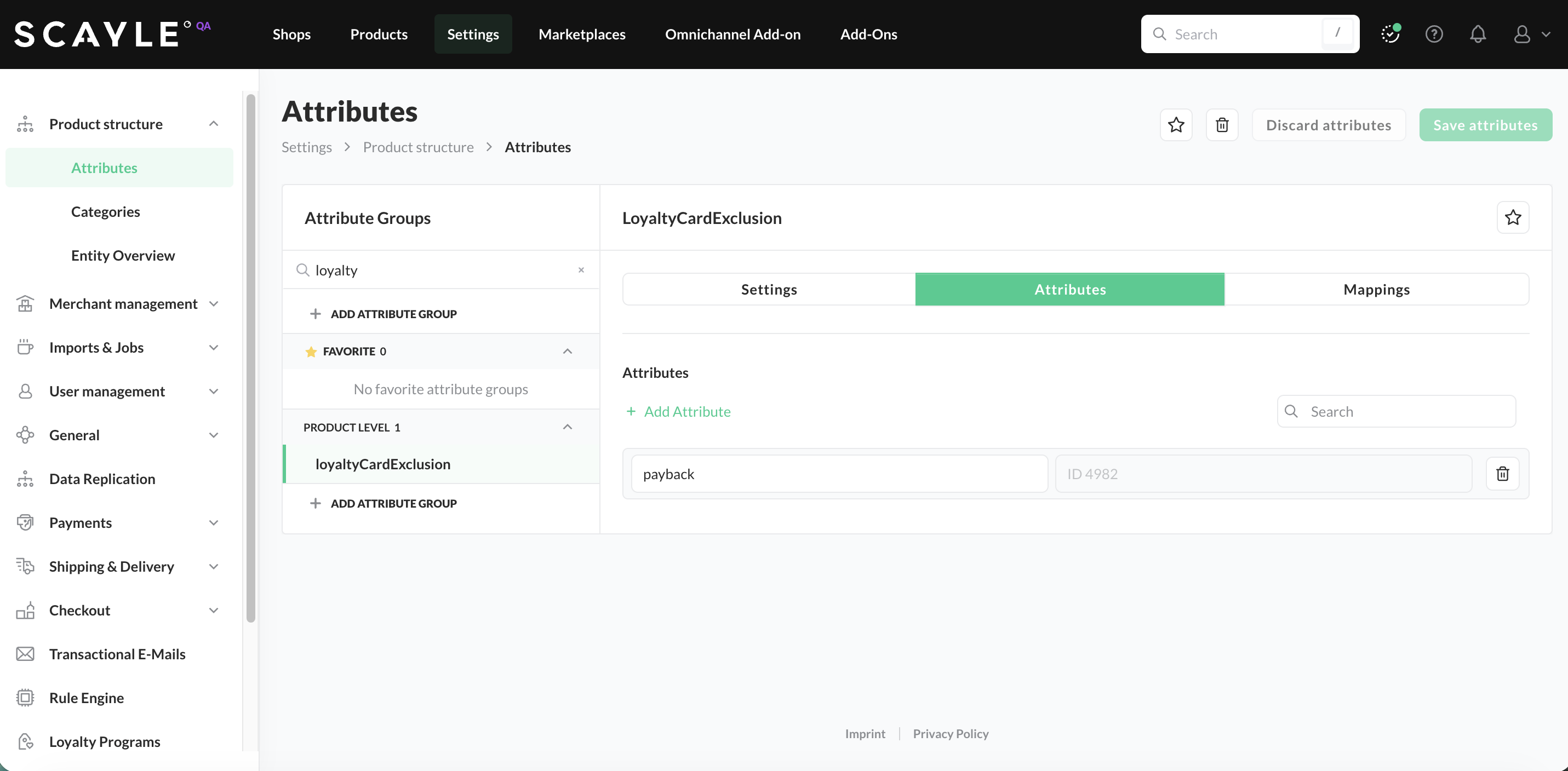
Adding and attribute named after the loyalty program
If you want a product excluded from multiple loyalty programs, create one attribute per program inside the same group, each named after the corresponding loyalty program.
4. Add the attribute group to the relevant product category. Go to Settings ➜ Product Structure ➜ Categories and search for the desired category. Click + Add Attribute Group and link the loyaltyCardExclusion group. If you have multiple loyalty programs enabled, you can optionally disable individual attributes for this category. To save your changes, click Add Attribute Group.
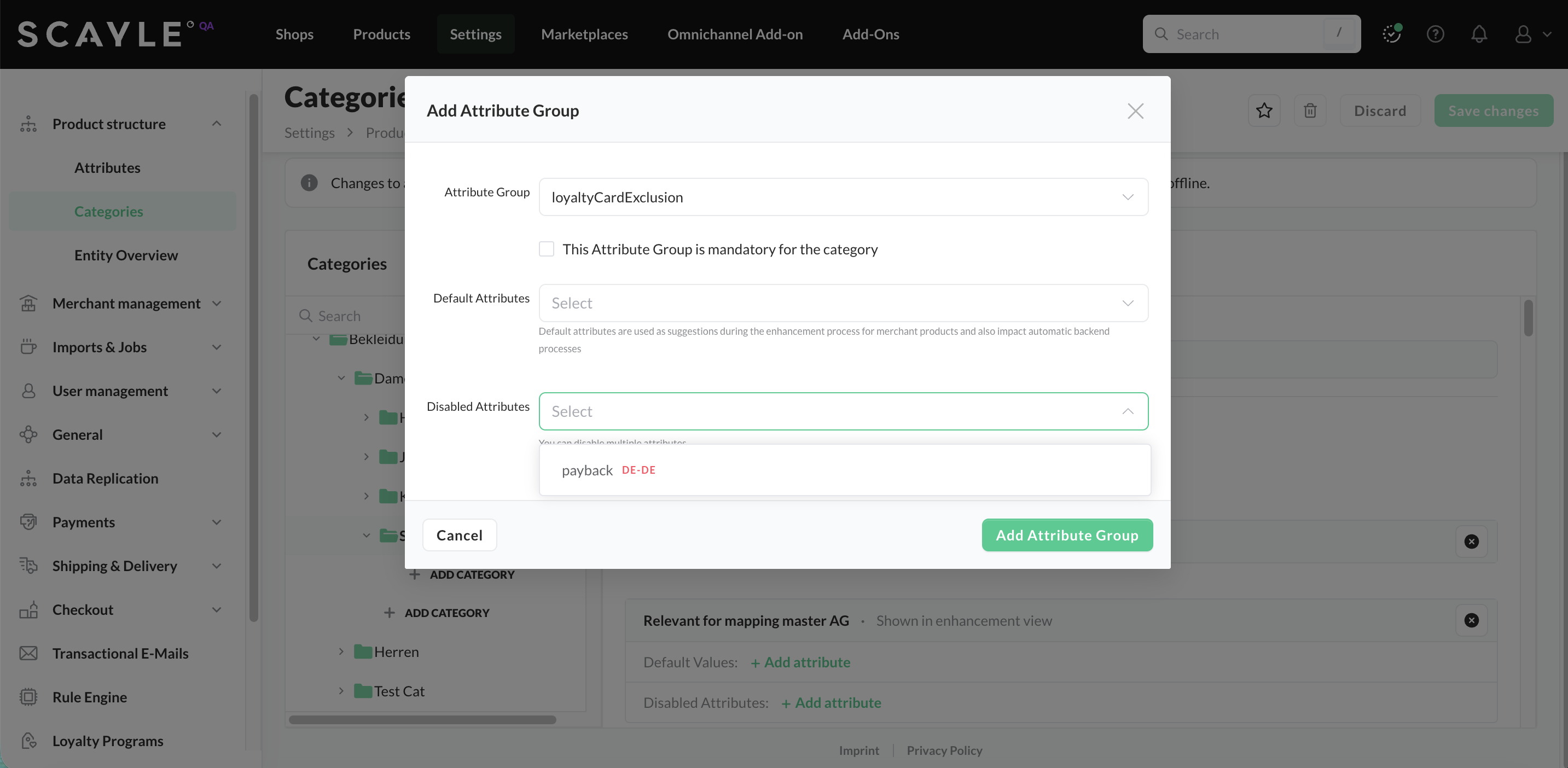
Linking the loyaltyCardExclusion group to a product category
Once added, every product within the modified category receives the loyaltyCardExclusion attribute automatically.
You can optionally remove the attribute for an individual product from within its properties:
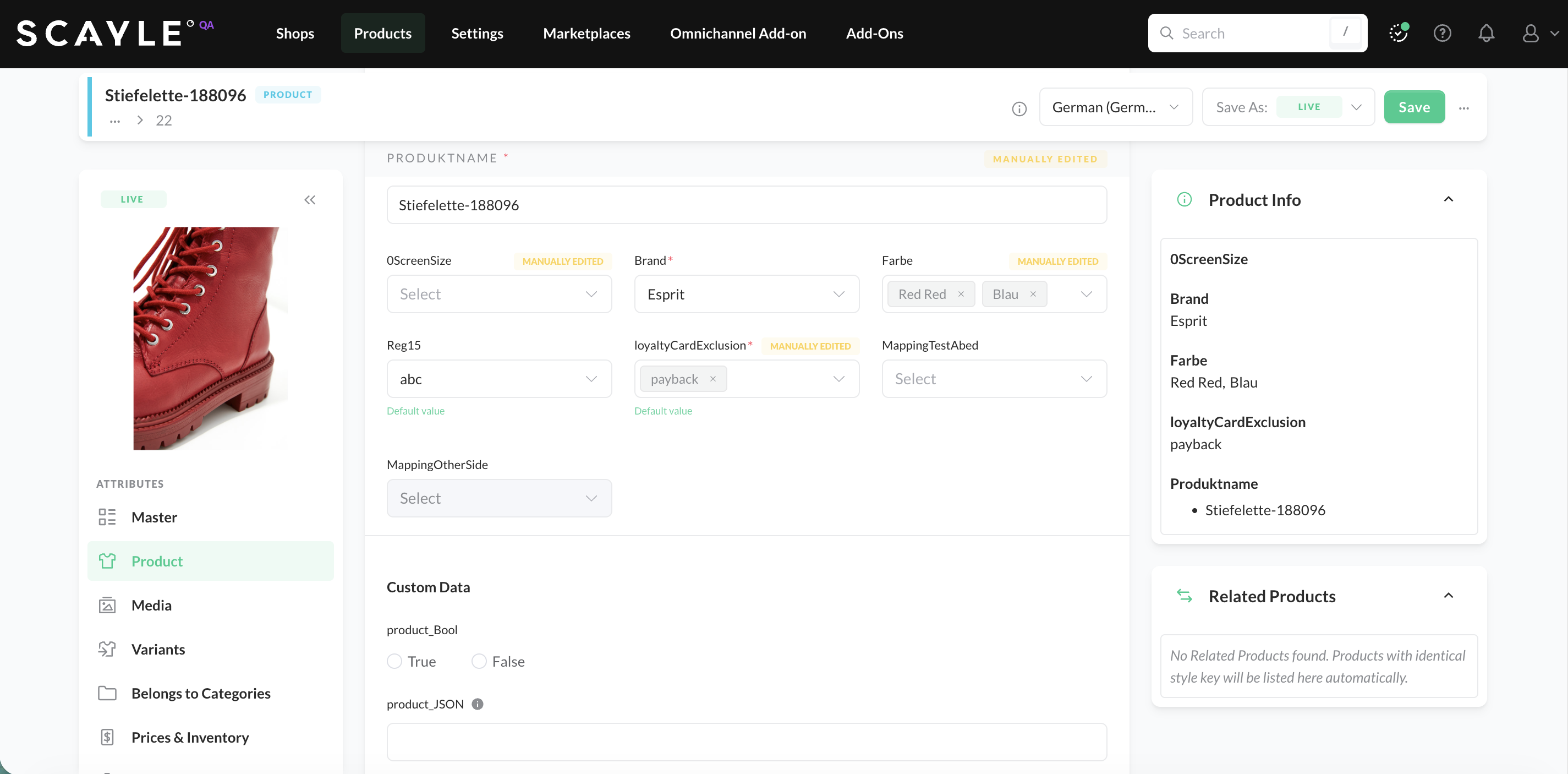
After the cache is reloaded, the changes you made in the SCAYLE Panel take effect in the Checkout.


