

Vulnerability Scanning
Vulnerability Scanning gives you continuous visibility into known security vulnerabilities in your Storefront Application's npm dependencies. SCAYLE scans your application's Software Bill of Materials (SBOM) and surfaces any matching advisories from public vulnerability databases so you know which packages are affected, how severe each finding is, and which version contains the fix.
Findings are advisory only. They do not block deployments and are not auto-remediated. Acting on findings (upgrading dependencies, redeploying) remains your responsibility. Findings that don't require immediate action can be formally accepted with a justification - see Accepting findings.
The scan source is the SBOM generated during your build. See the SBOM page for how the SBOM is produced.
How Scanning Works
Scans run automatically, so there is no manual trigger and no configuration required.
Two scan moments cover every environment:
- At build time - every deployment is scanned as part of the build. The result is a per-deployment snapshot, visible on the Deployment Details page.
- Daily background scan - every active deployment is re-scanned daily against the latest advisory data. This catches newly disclosed vulnerabilities in dependencies that were clean at deployment time.
Each surface shows the Last scanned timestamp and scan Duration so you know how fresh the data is.
Where Vulnerabilities Are Surfaced
Vulnerability information appears in four places in the SCAYLE Panel.
1. Hosting ➜ Overview ➜ Vulnerabilities card
The Overview page shows a Vulnerabilities card in the Security section for the selected environment. The card includes:
- Last Scanned timestamp
- Breakdown of findings by severity
- A Review Vulnerabilities button that takes you to the Security page
- An Advisory Only badge as a reminder of the non-blocking nature of scans

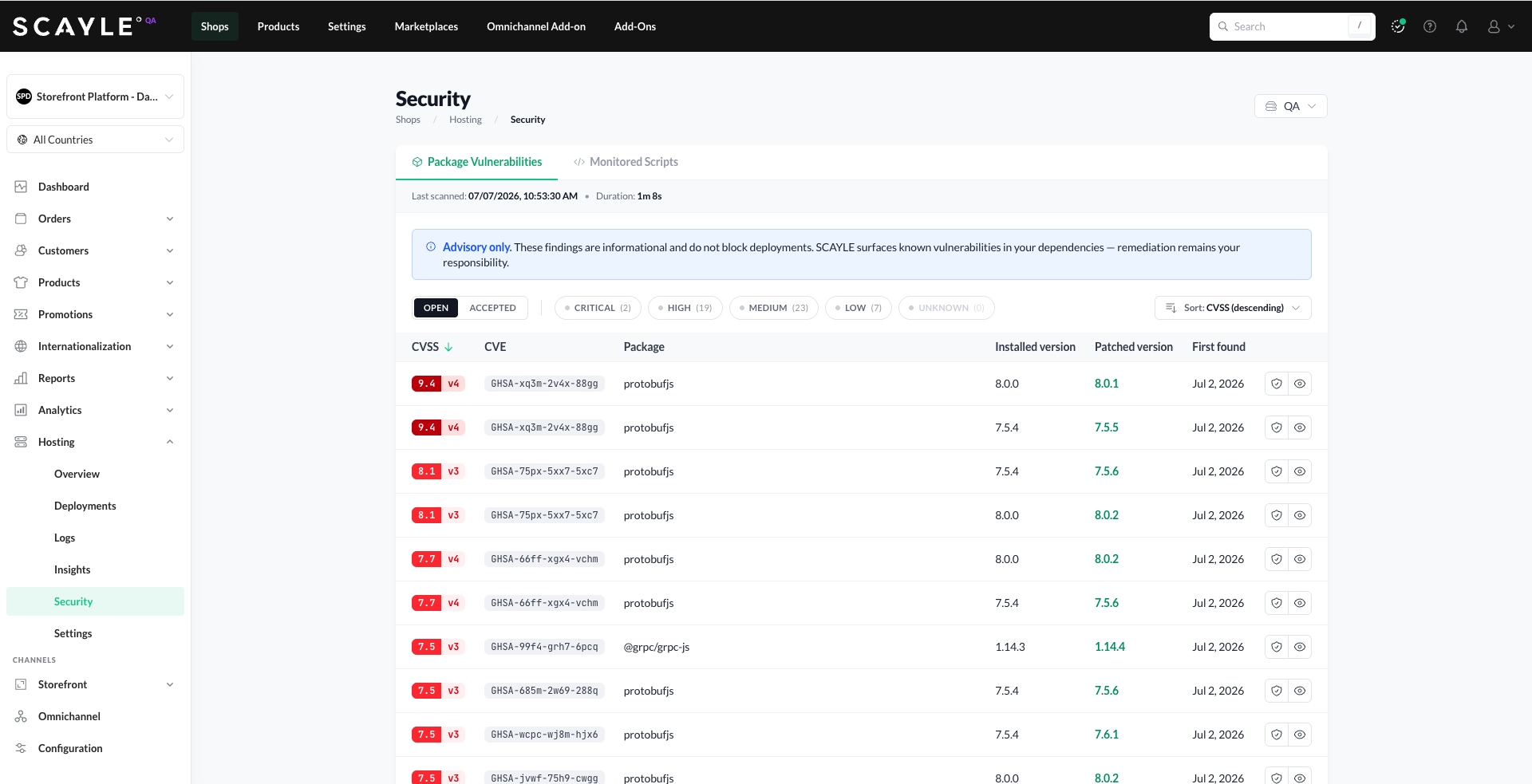
2. Hosting ➜ Security ➜ Package Vulnerabilities tab
The dedicated Security page shows the current state of the selected environment's active deployment. Results are refreshed both by the daily background scan and whenever a new deployment becomes active in the environment.
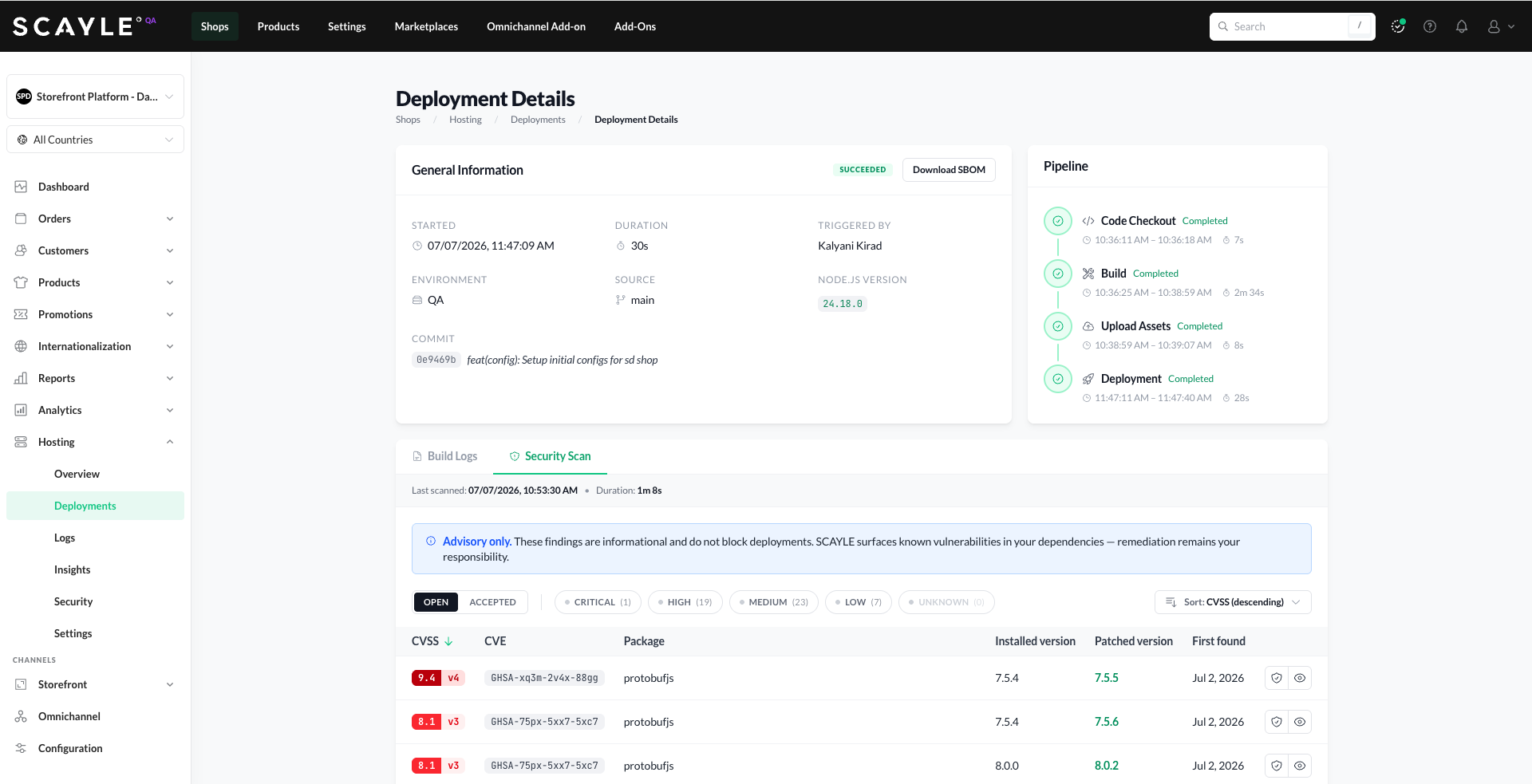
3. Deployment Details ➜ Security Scan tab
Each deployment has its own Security Scan tab showing the findings captured at build time. This snapshot is immutable - it reflects the state of dependencies at the moment of deployment, even if those packages have since been patched in newer deployments.
4. CVE Detail page
Click the eye icon next to any finding to open the CVE detail page, with full information about the advisory, the affected package, and CVSS scoring. The CVE detail page is shared across all surfaces above.

Understanding Findings
Severity
SCAYLE uses the standard qualitative severity rating scale defined by FIRST.org, the maintainer of CVSS. The same bands apply to CVSS v3.x and v4.0 scores.
| Severity | CVSS Score |
|---|---|
| Critical | 9.0 – 10.0 |
| High | 7.0 – 8.9 |
| Medium | 4.0 – 6.9 |
| Low | 0.1 – 3.9 |
| Unknown | Finding exists but no CVSS score is currently published |
The severity filter at the top of each findings list shows the count per level. Findings are sorted by CVSS Score (descending) by default.
Table columns
| Column | What it shows |
|---|---|
| CVSS | Numeric score (0.0–10.0) and CVSS version (v3 or v4). Color-coded by severity. |
| CVE | Advisory identifier (typically a GHSA ID). |
| Package | The affected npm package in your dependency tree. |
| Installed version | The version currently used in your application. |
| Patched version | The first version that resolves the vulnerability. Green styling indicates a fix is available. |
| First found | The date the finding was first surfaced for your application. |
CVE detail page
Opening a finding shows:
- Severity badge, CVSS score and version, and full CVSS vector (e.g.,
CVSS:3.1/AV:N/AC:L/PR:N/UI:N/S:U/C:N/I:N/A:H) - Affected Package - package name, type (npm), CVE ID, affected version range, installed version, patched version
- Description - short summary of the vulnerability
- References - links to upstream advisories (GitHub Security Advisory, NVD, etc.)
- CVSS Base Metrics - Exploitability (Attack Vector, Attack Complexity, Privileges Required, User Interaction, Scope) and Impact (Confidentiality, Integrity, Availability)
- Weaknesses - underlying CWE classifications with links to MITRE documentation
Acting on Findings
When a finding appears, the typical workflow is:
- Review and assess. Open the CVE detail page to check severity, affected version range, description, and references. Judge whether the vulnerability is exploitable in your application's actual usage of the package.
- Upgrade the dependency to the patched version in your source repository.
- Deploy the change. Trigger a new deployment containing the upgraded
- Verify the finding is no longer present in the new deployment.
Packages flagged as vulnerable might not be direct dependencies of your storefront application, but transitive dependencies somewhere within the dependency chain.
Vulnerabilities in SCAYLE-provided packages
Vulnerabilities in SCAYLE-provided packages, including their dependencies, are monitored and patched by SCAYLE on a regular cadence.
When a fix is released, upgrade the affected package in your storefront application and redeploy to apply it. For questions about a specific CVE, start a thread on our GitHub Discussions forum.
Accepting findings
Some findings may not require immediate remediation - the vulnerability may not be exploitable in your application's context. In these cases, findings can be accepted. Accepting removes a finding from the default view and silences it on future scans while preserving a record for auditing.
Every findings list has OPEN and ACCEPTED tabs. Accepted findings remain reviewable under the ACCEPTED tab at any time.
How acceptance works
- Two states. Every finding is either OPEN (the default) or ACCEPTED. Use the OPEN / ACCEPTED tabs at the top of any findings list to switch between them.
- Scope is per package version, per environment. Accepting applies to the specific CVE + affected package + version combination, in the environment where you accepted it. Future scans in that environment suppress the finding as long as the same package version is present. Other environments are unaffected. If you upgrade to a different package version, any findings for that new version surface as OPEN.
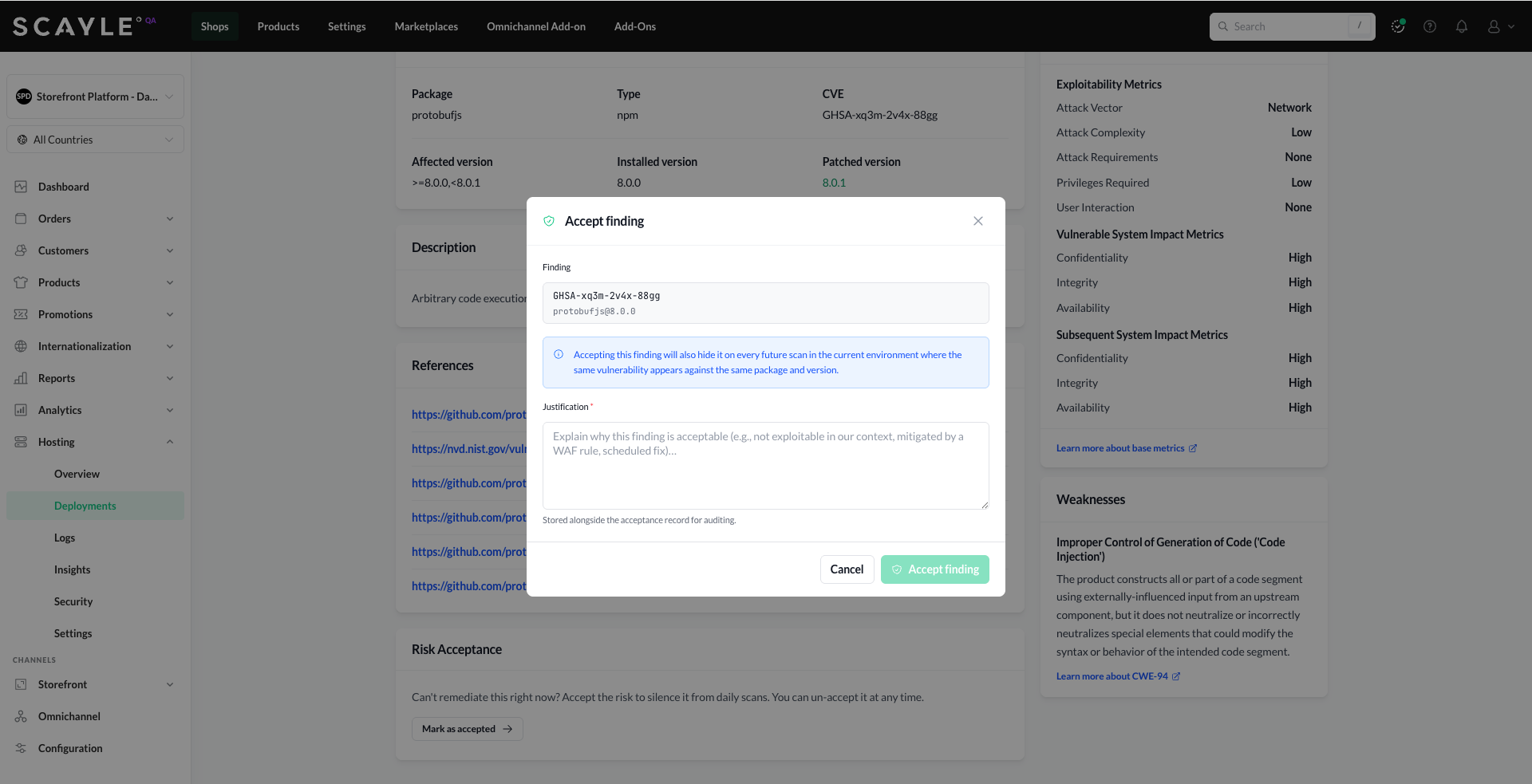
- Justification is required. You must explain why the finding is acceptable. The justification is stored alongside the acceptance record.
- Reversible. An acceptance can be revoked at any time, returning the finding to OPEN.
How to accept a finding
- Open the finding - either click the shield icon in the findings list (shortcut) or click the eye icon and then Mark as accepted in the Risk Acceptance section of the CVE detail page.
- In the Accept finding dialog, enter a Justification - for example, "not exploitable in our context".
- Click Accept finding.
The finding moves from the OPEN tab to the ACCEPTED tab. It is suppressed on future scans in the current environment while the affected package version remains.
Audit trail
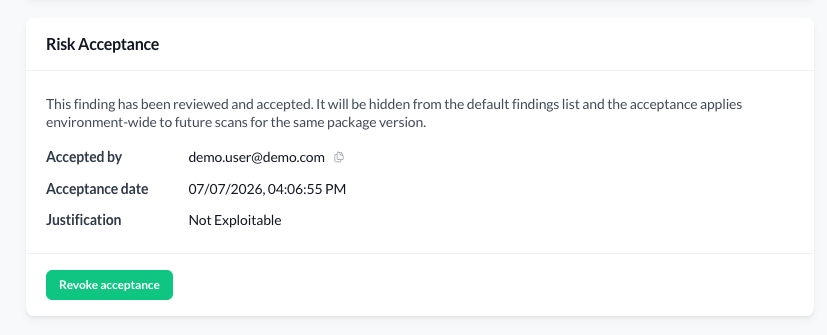
Accepted findings retain a full record on the CVE detail page under the Risk Acceptance section:
- Accepted by - the user account that accepted the finding.
- Acceptance date - date and time of acceptance.
- Justification - the text entered when accepting.
Revoking acceptance
An acceptance can be revoked from either the findings list or the CVE detail page:
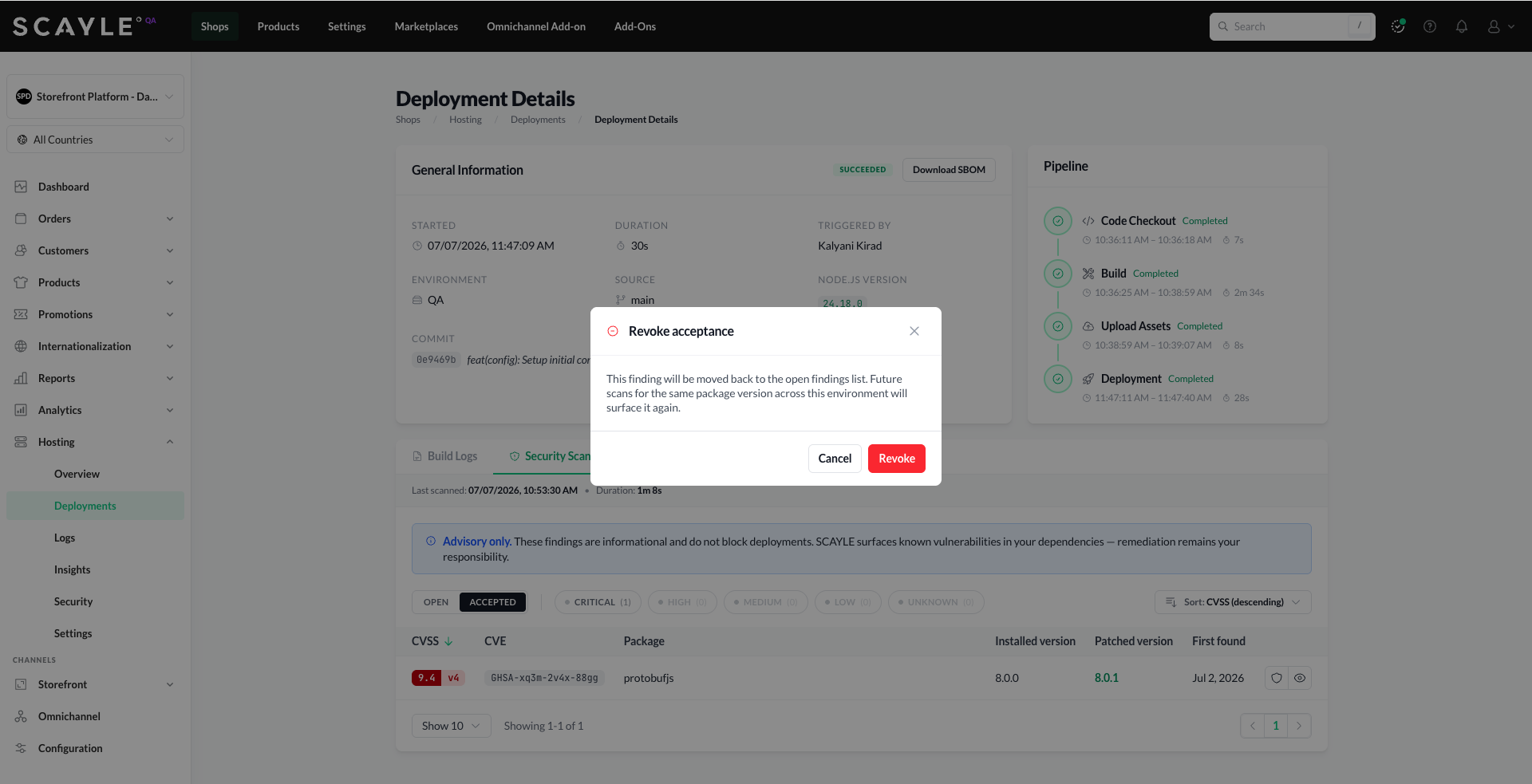
- From the findings list. On the ACCEPTED tab, click the shield icon next to the finding.
- From the CVE detail page. Open the finding, scroll to the Risk Acceptance section, and click Revoke acceptance.
In both cases, a Revoke acceptance dialog appears asking you to confirm. Once confirmed, the finding immediately returns to the OPEN state and appears in future scan results.
Limitations
The following are intentionally out of scope for the current implementation:
- No deployment blocking. Vulnerability findings never prevent a deployment from succeeding.
- npm dependencies only. Container images, system packages, and other runtime artifacts are managed by SCAYLE and secured as part of the platform.
- No auto-remediation. SCAYLE does not upgrade dependencies, open pull requests, or modify your source code.


