

Zero-Value Checkout
SCAYLE supports completing orders with a €0.00 total — or the equivalent zero amount in the shop country's configured currency — when a combination of incentives such as vouchers, promotions, or loyalty points fully covers the basket amount, including any service costs and shipping fees. In this scenario, SCAYLE handles the order confirmation automatically without involving an external payment provider. Customers proceed through checkout without selecting or entering any payment information.
This feature is particularly useful for merchants running 100% discount welcome campaigns, loyalty reward programs, or customer care scenarios where an order should be issued at no charge.
When the order's costCapture value equals 0, SCAYLE injects an internal payment method that handles confirmation synchronously — no redirect or PSP call is made. This mechanism is invisible to customers and does not appear in the storefront payment list.
Enable only when needed. Zero Subtotal Checkout applies automatically to any eligible order that reaches a zero total. The feature does not support time-based scheduling and must be enabled and disabled manually per shop country. We recommend enabling it only for the shop countries and time periods where free orders are intentionally supported, and disabling it as soon as that is no longer the case. For more granular control, you can use the rule engine to restrict the conditions under which free orders are permitted.
Prerequisites
- Feature activation by your Account Manager: Zero Subtotal Checkout must be enabled per shop country before you can configure it in SCAYLE Panel. Contact your Account Manager to request activation for the relevant shop countries.
- No additional SDK installation or API credentials are required.
Step-by-Step Instructions
Enabling/Disabling Zero Subtotal Checkout
Contact your SCAYLE Account Manager and request activation/deactivation of Zero Subtotal Checkout for the relevant shop country.
Once the feature is active for that shop country, when a customer's order total reaches €0.00 through an eligible combination of discounts, the payment step is handled automatically and the order is confirmed without any payment method selection.
How customers experience it
When a customer's basket total reaches €0.00, SCAYLE automatically selects the internal payment method and no payment selection screen is shown. The customer proceeds directly to order confirmation.
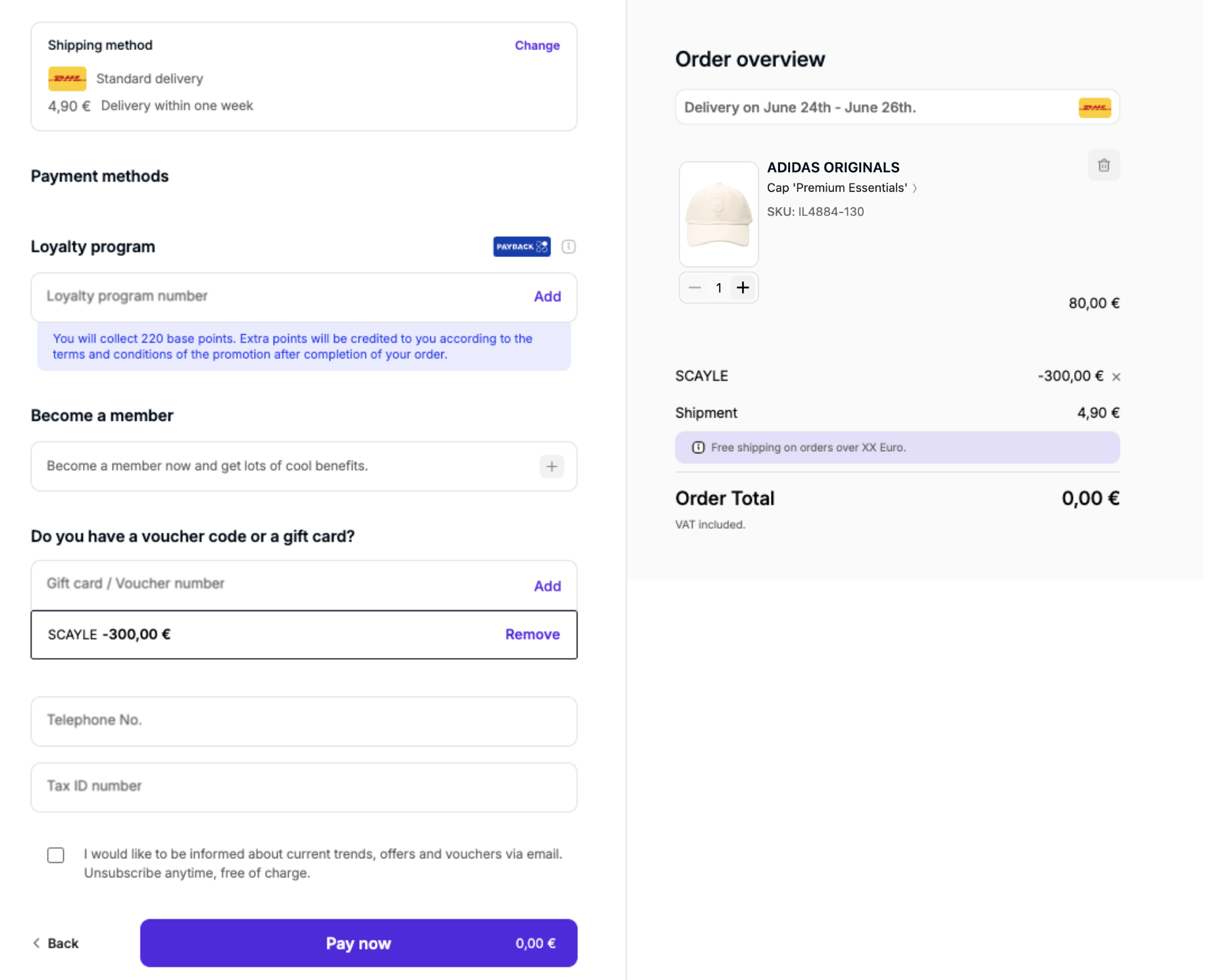
Checkout UI - Zero Value
If the customer later removes a discount that caused the zero total, the basket recalculates and the standard payment flow resumes — the customer is prompted to select a payment method as normal.
If Zero-Value Checkout is not enabled for the shop country and a customer applies an incentive that would bring the order total to €0.00, the incentive will be rejected and an error will be displayed. The customer can still complete the order using the previously applied incentives, as long as the remaining total is above €0.00.
Limitations & Known Constraints
- Relative vouchers with 100% discount. Percentage-based vouchers are, by design, not applicable to shipping fees. This means a relative voucher — even one configured at 100% — will not bring the order total to €0.00 unless shipping is free. Only absolute vouchers, loyalty points, or a combination of incentives that collectively cover the full order amount (products + shipping + service costs) can trigger Zero Subtotal Checkout.
- Gift cards are not combinable with Zero Subtotal Checkout. When a gift card is present on the order — regardless of the redemption amount — Zero-Value Checkout will not be triggered, even if other incentives bring the remaining order total to €0.00.
Note that gift cards covering the full order amount are supported through a separate flow: in that case, the order is confirmed via the standard gift card payment, not via Zero Subtotal Checkout.
- Subscriptions are not supported. Subscription orders require a valid payment method on file for future charges and cannot use Zero Subtotal Checkout.
- Activation is per shop country. The feature must be enabled individually for each shop country through your Account Manager. There is no global activation option.


