

Default Filter
The available system criteria are described below. The meaning of each criterion is the same for every shop. Only which criteria you enable is a per-shop choice.
| Criterion | Products it includes |
|---|---|
sale | Products currently on sale, meaning their price is reduced below their original (strike-through) price. This reflects the regular sale only and does not by itself account for campaign discounts (see the note below). How the sale flag is determined is configured under Sale Calculation. |
max_savings_percentage | Products filtered by their total reduction, expressed as a percentage. When a campaign applies, this is the combined reduction from the original price down to the final campaign price, so it includes both the sale and the campaign discount. |
prices | Products within a price range. The price used is the final price the customer pays: the campaign price when a campaign applies, otherwise the regular (possibly sale-reduced) price. |
has_campaign_reductions | Products that receive an additional price reduction from an active campaign. This is the criterion that specifically captures campaign discounts. |
isNew | Products that are automatically flagged as new. A product is considered new for a configurable period after it goes live in a shop country (30 days by default). See Flag for New Products to configure it. |
isSustainable | Products flagged as sustainable. Not related to price. |
| Criterion | Without a campaign | Within the campaign |
|---|---|---|
sale | Matches. The price is reduced from 100.00 to 80.00. | Matches. |
has_campaign_reductions | Does not match. There is no campaign discount. | Matches. The campaign reduces the price further. |
max_savings_percentage | 20% (100.00 to 80.00). | 40% (100.00 to 60.00, sale and campaign combined). |
prices | Evaluated at 80.00. | Evaluated at 60.00. |
You can define filter criteria that will be applied to your entire shop. Default Filters are set under Shops ➜ [Shop] ➜ Storefront ➜ Default Filter. Default filters are also displayed (as read-only) in the filters section of shop categories.
Default filters are configured on the global shop level and apply to all shop countries. These filters can be chosen from predefined system criteria and/or simple, translatable attribute groups.
System Criteria
The available system criteria are described below. The meaning of each criterion is the same for every shop. The only per-shop choice is which criteria to enable.
| Criterion | Products it includes |
|---|---|
sale | Products currently on sale, meaning their price is reduced below their original (strike-through) price. This reflects the regular sale only and does not by itself account for campaign discounts (see the note below). How the sale flag is determined is configured under Sale Calculation. |
max_savings_percentage | Products filtered by their total reduction, expressed as a percentage. When a campaign applies, this is the combined reduction from the original price down to the final campaign price, so it includes both the sale and the campaign discount. |
prices | Products within a price range. The price used is the final price the customer pays: the campaign price when a campaign applies, otherwise the regular (possibly sale-reduced) price. |
has_campaign_reductions | Products that receive an additional price reduction from an active campaign. This is the criterion that specifically captures campaign discounts. |
isNew | Products that are automatically flagged as new. A product is considered new for a configurable period after it goes live in a shop country (30 days by default). See Flag for New Products to configure it. |
By default, the price-based criteria (sale, prices, and max_savings_percentage) evaluate a product's regular price, with no campaign applied. When products are requested with an active campaign applied, these criteria evaluate the campaign price instead. Price promotions behave the same way as campaigns in this respect.
sale and campaign reductions are separate criteria. A product matches sale when its regular price is marked down, regardless of any campaign. A discount that comes only from a campaign is matched by has_campaign_reductions. The two are combined into a single figure only by max_savings_percentage, and only when the products are requested with an active campaign applied.
Example: Sale and Campaign Discounts
Consider a product with an original price of 100.00, reduced to 80.00 on sale, and further reduced to 60.00 by an active campaign:
| Criterion | No campaign applied | Campaign applied |
|---|---|---|
sale | Matches. The price is reduced from 100.00 to 80.00. | Matches. |
has_campaign_reductions | Does not match. There is no campaign discount. | Matches. The campaign reduces the price further. |
max_savings_percentage | 20% (100.00 to 80.00). | 40% (100.00 to 60.00, sale and campaign combined). |
prices | Evaluated at 80.00. | Evaluated at 60.00. |
In this example, sale reflects the 20% markdown on the regular price, while the campaign's additional reduction is represented by has_campaign_reductions and included in the 40% combined max_savings_percentage.
Add Default Filter
Add default filters as follows:
- Navigate to Shops ➜ [Shop] ➜ Storefront ➜ Default Filter.
- Click + Add Filter.
- Select a filter from the dropdown menu.
- Repeat to add multiple filters.
- Use drag and drop to arrange the filters into the desired order of priority.
- Click Save.
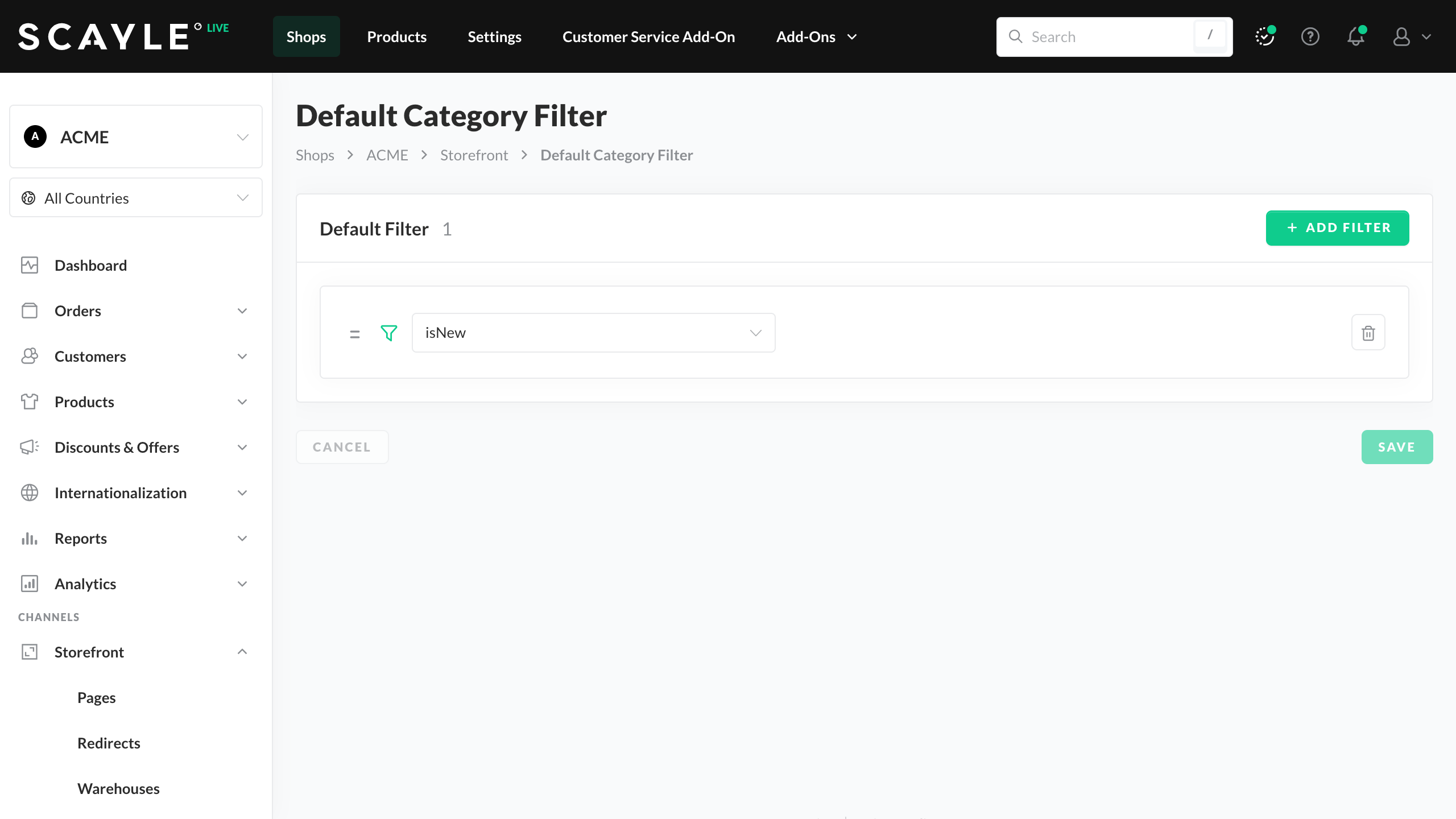
Add Filter
Default Filter Translations
Filters can be translated under Shops ➜ [Shop] ➜ Internationalization ➜ Translations. For details, see Translations.

