

How to integrate a custom Address Check Provider
Introduction
The address validation feature can be used to validate customer's billing and/or shipping address during the checkout flow. With the proper configuration, you can make sure that the important information is being filled correctly, with minimal friction in the checkout flow. The purpose of this tutorial is to cover the integration of a custom Address Check Provider.
Note that the purpose of the Address Validation feature is not to block the customer from proceeding to the next step - instead, the customer should have the ability to select from alternatives.
How it works
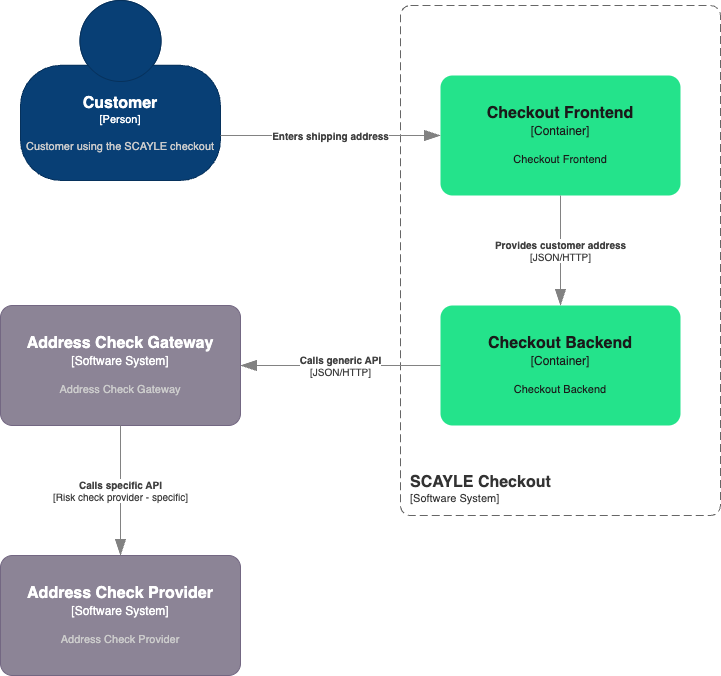
Address check integration in SCAYLE follows a simple gateway pattern. When fully set up, SCAYLE’s checkout invokes an endpoint exposed by the address check gateway provided by you whenever a customer adds or makes a change to his or her shipping or billing address.
Your gateway is expected to implement an interface that can receive address check requests from checkout and respond accordingly. When receiving address check requests from checkout, your gateway is then expected to translate the checkout requests to the external source - your address check provider - and back.
The Generic API
As outlined above, your Address Check Gateway is expected to implement a generic interface for address check requests and responses.
Reference Architecture
See the diagram below for a reference archictecture, with your Gateway handling the communication between SCAYLE Checkout and your Address Check Provider.
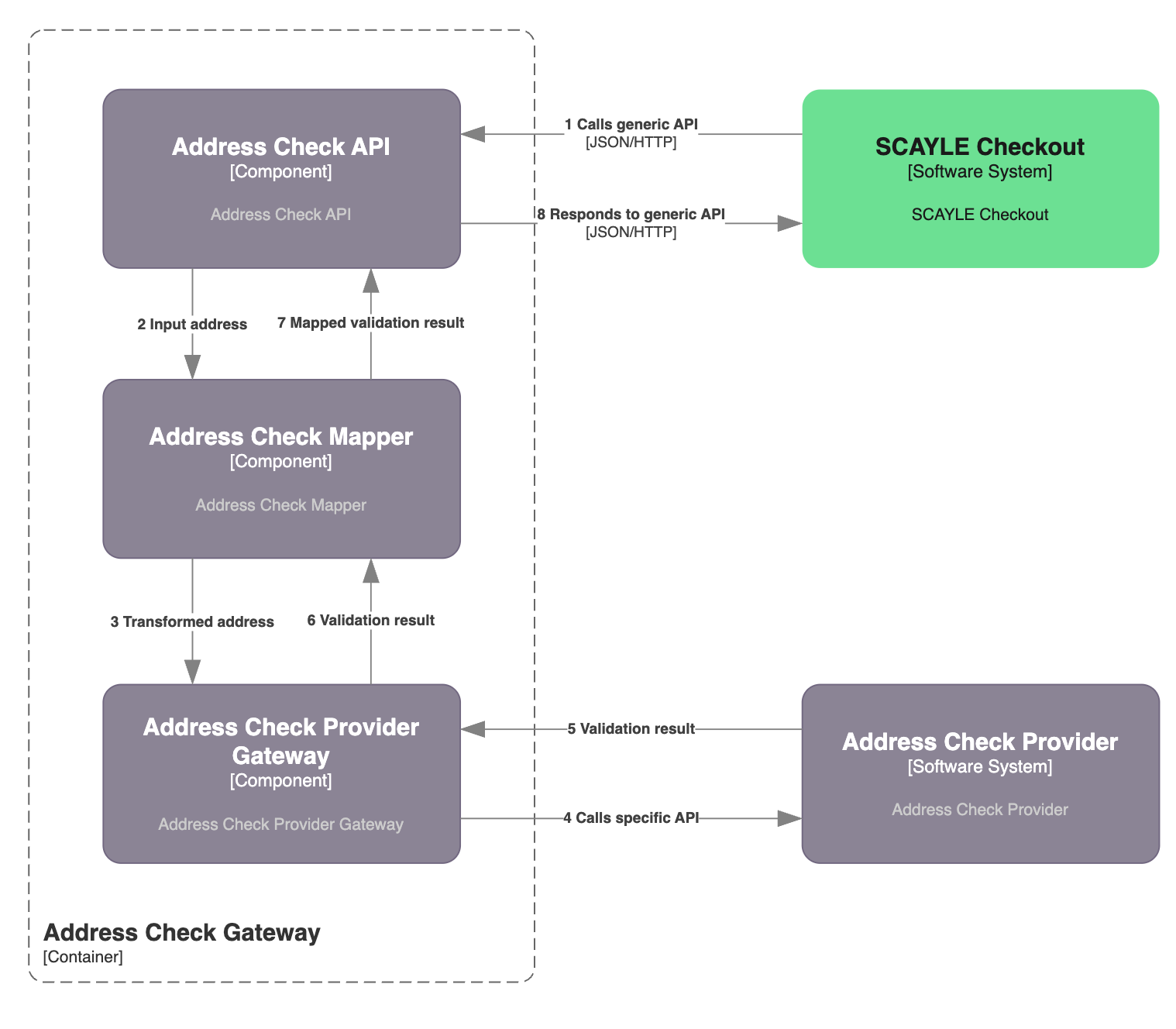
The following sections explore the required interfaces in detail.
Request
When a change is made to an existing address or a new address is created, the following JSON payload is sent as a POST request to your Address Check Gateway.
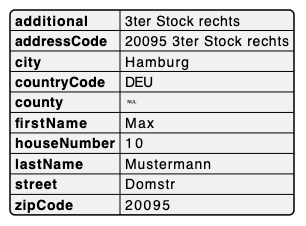
Note that the following fields are optional. Whether these optional fields are provided in the Address Check Request is determined by your checkout configuration.
additionaladdressCodecountyfirstNamelastNamehouseNumberzipCode
Response
After performing the Address Check in your address check provider, your gateway is expected to respond to the Address Check Request following a specific schema.
The SCAYLE checkout can process the following cases.
Address Valid
Use this response when your provider confirms the customer's address as valid and no correction or selection is needed. The checkout will accept the address and proceed to the next step without showing any overlay.
| Response Code | Response Body |
|---|---|
| 204 | (empty — no body) |
This response results in checkout accepting the entered delivery address. The customer proceeds to the next step
Soft Valid
Use this response when your provider could not find a matching address, but you still want the checkout to accept the input as-is (e.g. address is plausible, provider has no data for the region, fallback behaviour). The checkout proceeds without showing suggestions.
| Response Code | Response Body |
|---|---|
| 205 | (empty — no body) |
Suggestion available
Use this response when your provider has one or more alternative addresses to offer. The checkout opens an address‑selection overlay. The customer must pick one of the suggestions (or the original address if allowOriginalAddress is enabled in the Panel) before continuing.
| Response Code | Response Body |
|---|---|
| 200 | [ { "city": "...", "street": "...", "houseNumber": "...", "zipCode": "...", "countryCode": "...", "score": 0.9 }, … ] |
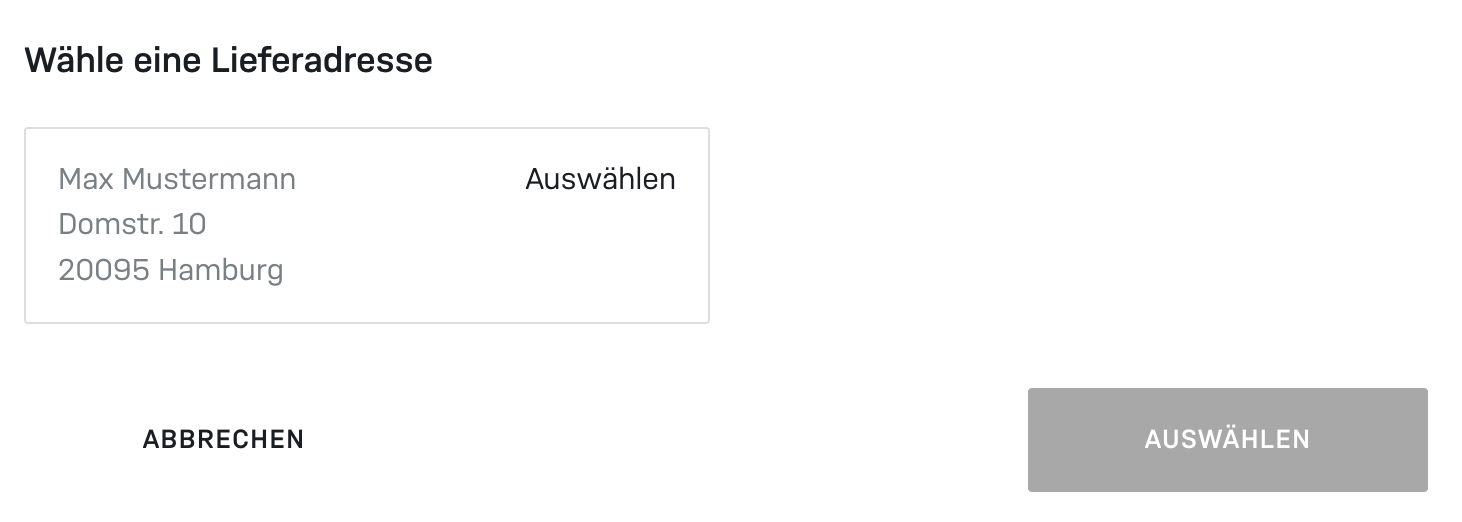
Overlay with address suggestions
Response Codes
Your Address Check Gateway may respond with the following response codes.
| Code | Description | Response Body |
|---|---|---|
200 | Suggestions provided | JSON array of suggested addresses |
204 | Address valid (exact match) | empty |
| 205 | Soft valid (no match, accept as-is) | empty |
| 404 | Invalid address (accepted as-is) | empty |
| 401 | Unauthorized | empty |
| 501 | Service not supported | empty |
| 503 | Service temporarily unavailable | empty |
A 404 response does not block the checkout. The address is treated as invalid by your provider, but the customer can still proceed with the address as entered. To make the customer correct the address, respond with 200 and a list of suggested addresses. The checkout then opens the address selection overlay, and the customer must pick one of the suggestions.
Configuration
Address checks are configured on two layers within the application. The system-to-system integration itself (see section “Endpoint”) and the behaviour in checkout (see section “Checkout”).
The API endpoint used by the checkout can be set up in the SCAYLE Panel under Settings ➜ API Credentials.
The general suggestion configurations can be set under Settings ➜ General ➜ Configuration ➜ Company Based Configurations ➜ Address Suggestion Configuration.
Endpoint
Please refer to address validation on how to configure the integration of your endpoint.
These configuration properties can be provided via the Checkout Configuration API. Reach out to your SCAYLE Account Manager with any questions.
Checkout
After setting up the integration with the Address Check Gateway, the feature can be enabled and customized for the Checkout process.
Please refer to address validation on how to configure checkout.
These configuration properties are set via the Generic Checkout Configuration in the SCAYLE Panel.
Best Practices
Caching
Depending on the amount of address check requests and the amount of potential cache hits, you may reduce the amount of API calls reaching your address check provider by caching address checks. Since address checks are always synchronous, this can significantly improve the speed of address checks.
Authentication & Authorization
To protect your Address Check Gateway and your Address Check Provider from unauthenticated access, you may protect the API endpoints using Basic Authentication.
Resiliency
As address checks are conducted synchronously within the customer’s checkout process, consider implementing your Address Check Gateway using fault-tolerant patterns so that a potential downtime of your Address Check Provider does not negatively influence the customer’s checkout experience. A common pattern to deal with such cases is the implementation of a circuit breaker that closes as soon as the failure rate of your Address Check Provider has reached a certain threshold.
In such cases, consider responding to the Address Check Request with a fallback response that corresponds to the case Exact Match or No Match.

