

Recommendations
Overview
Recommendations guide customers to relevant products throughout their entire shopping journey. By surfacing items that are visually similar or contextually meaningful, you put the right product in front of the right user. This timely placement boosts engagement, simplifies discovery, and drives conversion.
Why Recommendations Matter
- Guide users toward products faster
Reduce the effort needed to explore large assortments and help customers navigate more intuitively. - Increase conversion and retention
Show customers items that match their interests to drive exploration and increase sales. - Adapt to business strategies
Whether suggesting visually similar alternatives or promoting curated selections, recommendations allow you to shape the customer experience according to your preference.
Powered by SCAYLE’s Recommendation Engine
The SCAYLE Recommendation Engine uses different inputs such as product attributes and optional image analysis, to produce meaningful results. It leverages AI to minimize configuration effort and produce the best results naturally.
Each recommendation type uses its own logic, but follows the same core principles:
- Fast integration via Storefront API endpoints
- Flexible configuration to reflect business priorities
Similar Product Recommendations
Similar Product Recommendations help customers discover alternatives that closely match the product they are currently viewing. They combine structured product data with AI-powered image analysis to generate relevant, high-quality suggestions automatically and at scale.
The feature is designed to increase product discovery and conversion while minimizing manual effort on your side.
The advantages provided by the Similar Product Recommendations are:
- AI-assisted discovery: Customers receive relevant alternatives without manually filtering through the catalog.
- Higher conversion: If the viewed item isn’t the right price, size, or style, similar items keep the user engaged.
- Automated merchandising: The logic is automated and improves continuously, reducing manual maintenance.
- Granular customization: Control attribute importance, enable/disable image similarity, and define manual overrides.
- Fast integration: A single API call delivers ranked results, ready to use in your shop.
- Strategic flexibility: Supports predefined relationships for editorial curation or strategic placements.
How Recommendations are Calculated
The recommendation engine evaluates two complementary inputs:
- Attribute matching
Products are compared based on selected attributes (e.g., brand, color, category, material).
You can define how each attribute will be weighted to emphasize attributes that are more relevant to you or provide more conclusive information on product similarity. - AI-powered image similarity (optional)
When enabled, the system compares product images to assess visual closeness.
This produces an image confidence score (0-100), indicating how visually similar two products are.
Image similarity is only available for product images uploaded on our SCAYLE CDN. If image similarity is not available, the product similarity will be calculated on the basis of attribute matching exclusively.
These factors are combined into a single relevance ranking that defines the order of products returned via the Storefront API endpoint.
How Attribute Similarity and Image Similarity Work Together
Attribute similarity and image similarity both produce their own ranked list. Instead of choosing one method over the other, we combine both because each captures different aspects of what “similar” means.
To merge the lists fairly, we use the following ranking technique:
- Products that appear high in either list get rewarded.
- Products that score well in both lists get rewarded even more.
The combined ranking works like this in practice:
- If a product is visually very similar, but the attributes are slightly different, it can still rank highly.
- If a product matches strongly on key attributes, but looks a bit different, it also still has a good chance to appear.
- The best results, those that are similar both in data and appearance, naturally rise to the top.
This approach ensures that the final recommendations are balanced, robust, and the mix of factual product characteristics and visual impression is aligned with how real customers perceive similarity.
Use Cases
The different filter options in /v1/recommendations allow for a wide range of use cases.
Generally, we recommend a Storefront component that shows products similar to the product a user is viewing on the Product Detail Page. You can find further information on the
For example, you can then use request parameters to show:
- Visual alternatives
Show visually similar products in your assortment. - Brand alignment
Display similar products from the same brand. - Category extension
Recommend related items in the same category. - Unavailability fallback
Suggest alternatives for users who find their size of a product out of stock.
You can find a full list of possible request parameters in our API specifications.
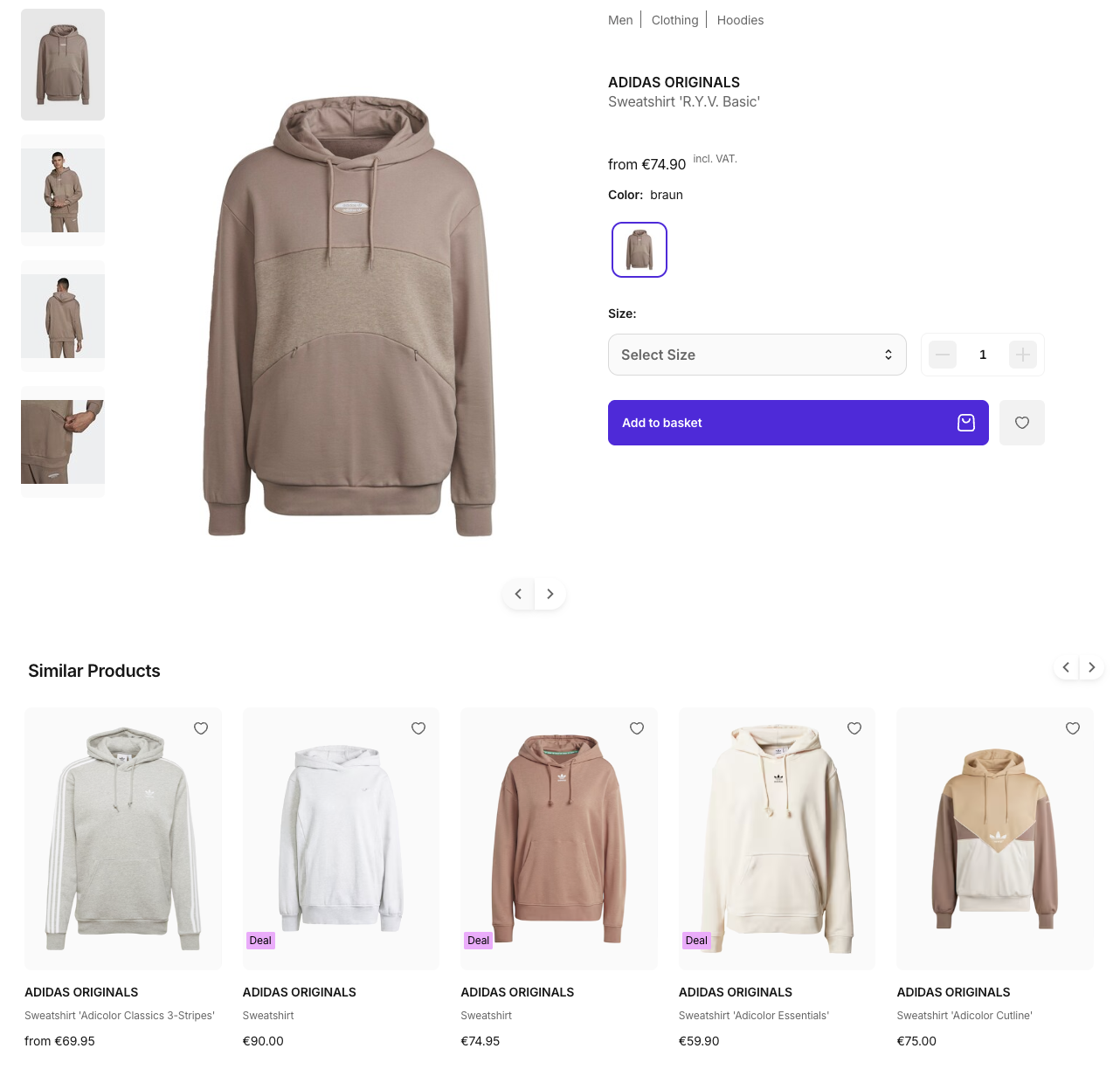
Example: Similar products in the Storefront Application
Setup
Configuration in the SCAYLE Panel
Under Storefront > Recommendations, you can refine recommendation settings for your shop based on Attribute-based Similarity, Image Similarity, or by defining similar products manually.
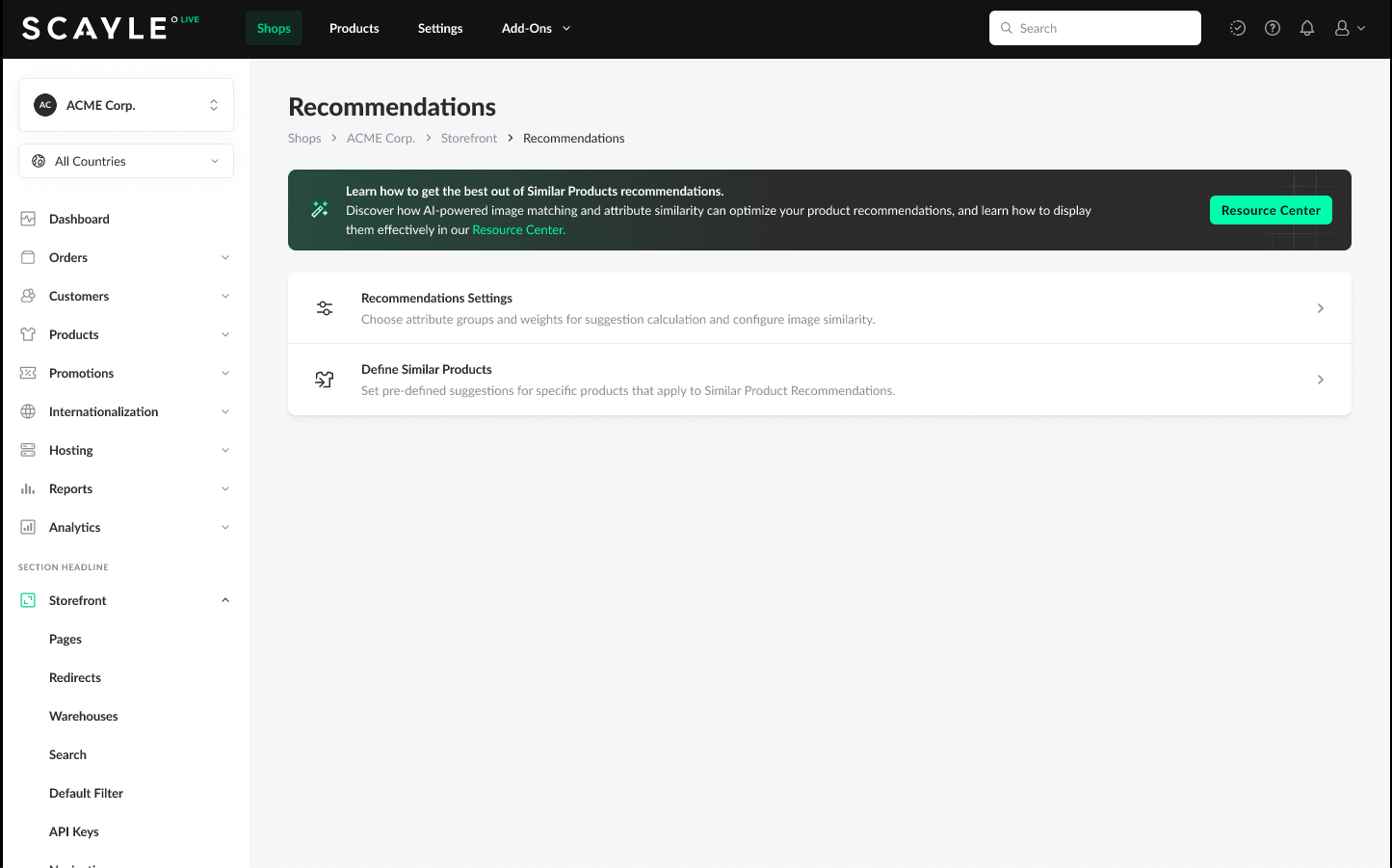
Defining Product Recommendation Settings
Required Permissions
To access and configure recommendation settings, permission shop__recommendations__list is required. To update any recommendation configuration under "Recommendation Settings" or "Define similar products," permission shop__recommendations__update is required. To define similar products, permission shop__recommendations__create is required and to delete a product for which similar products were defined, permission shop__recommendations__delete is required.
Define Similar Products
In this section, you can explicitly define products to be presented as recommended products. Click on “+ Product” to select a product for which you would like to define similar products. In the Preview displayed on the right, you can see which products will be shown to the end-user based on current settings (Image Similarity and/or Attribute-based Similarity). You can overwrite the order of these recommendations by using the “+” icon, thereby adding them as manual recommendations, or choose completely different products to be considered.
Preview Note: The recommendations calculated by the system in the preview only show products that are live, have a price and stock, and are included in the assortment of the currently selected application.
This configuration can be made at the global shop level (applying to all assigned countries) or at the individual country level.
Any updates you make are reflected immediately in the recommendation preview, allowing you to visualize changes before saving. Once saved, changes propagate to the Storefront API in near real-time.
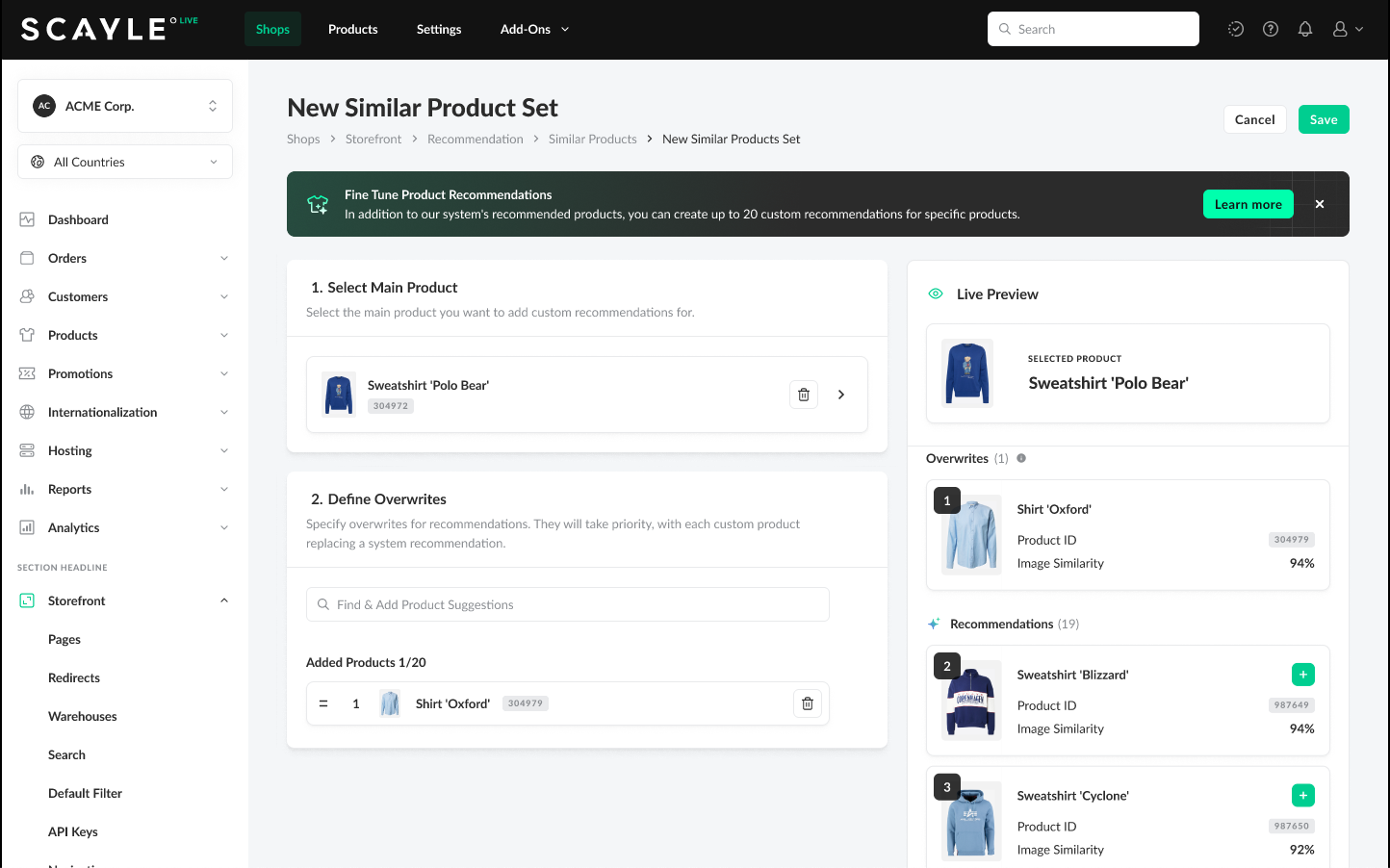
Define Similar Products
Configure Image Similarity
Configure the image similarity under the Recommendation Settings. These configurations are applied globally and therefore to all countries assigned to your currently selected shop.
Image Similarity determines recommendations based on the visual match of the first image assigned to products. Set a value for the similarity threshold between 0 and 10. "0" means that products will be presented as recommended even if their first image is not alike at all to the base product. "10" means that only products are considered as recommendations whose first image is very similar to the base product.
In the additional settings, you can further refine which products should be considered for the image similarity by using the configuration option Only consider tagged images for image similarity. Once this configuration option is enabled, recommendations calculated by the system only consider products with images that have the system attribute group suggestionsImage with the value true assigned to them.
If this configuration is enabled but no image is tagged, no image similarity will be calculated and the recommended products will be displayed based on predefined similar product suggestions and/or attribute matching. If the toggle remains disabled, the first product image will be chosen to define the image similarity of the image tagged with the system attribute group.
Changes made to the image settings for recommendations can take up to a day to go into effect as the Recommendations AI needs some time to recalculate image similarity. These changes will also not be reflected in the preview immediately.
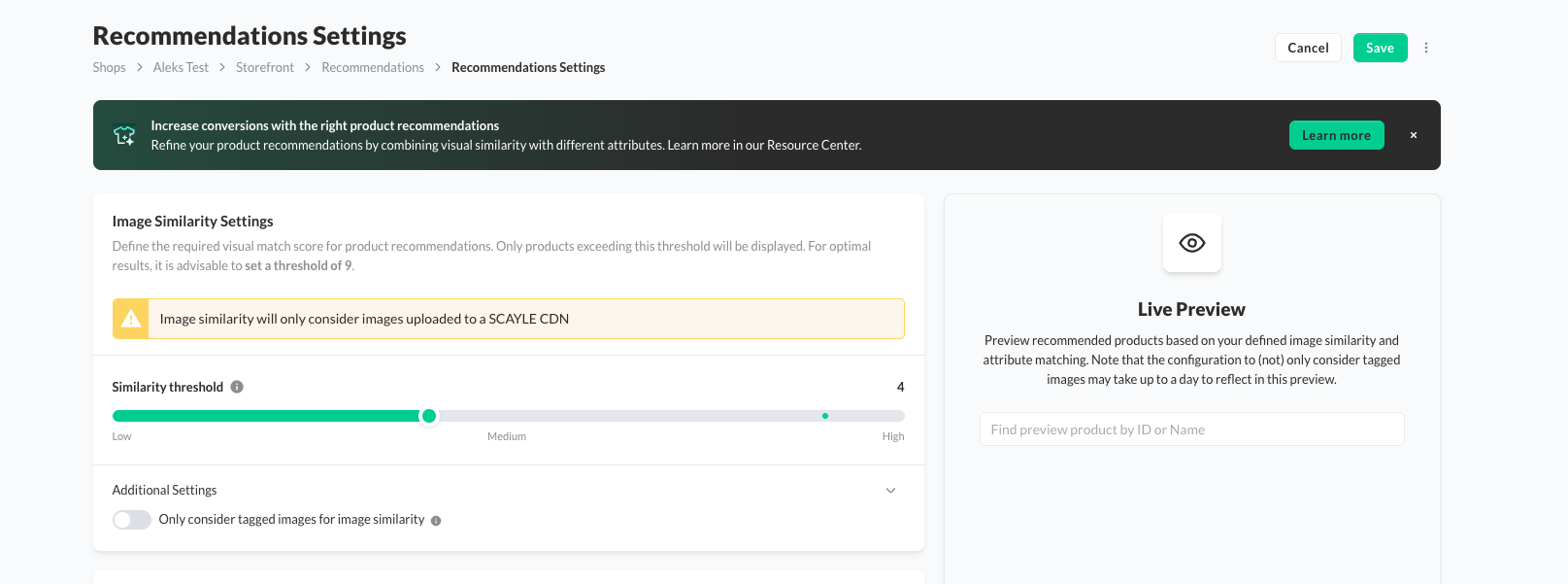
Define Image Similarity Settings
Define Attribute-based Similarity
To configure Attribute-based Similarity, choose any attribute groups on the product level as the basis for determining product similarity. Assign a weight to the individual groups to define their relevance for the calculation of recommended products.
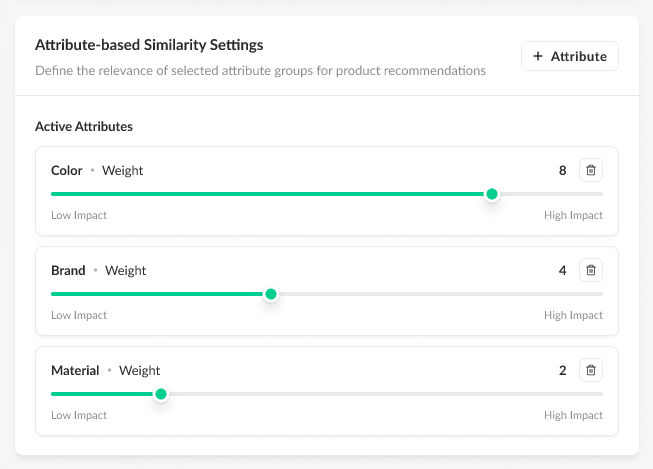
Define Attribute-based Similarity
You can utilize integrated AI to assist you in establishing meaningful attribute-based similarity settings. By clicking the “Most Used Set” button (available as long as no attribute groups are configured), the system leverages AI to analyze your shop's specific context. It identifies the five most relevant attribute groups and automatically assigns optimized weights for them, providing you with an intelligent, data-driven foundation for your recommendations.
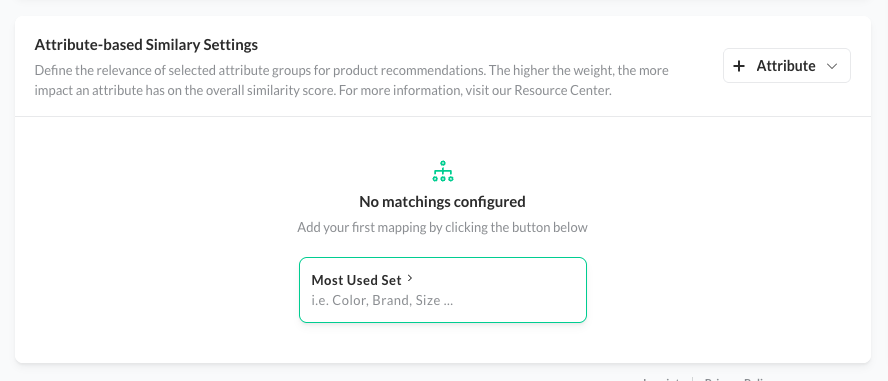
Use support off AI by calculating the "Most used" Attribute Groups
The Preview on the right of the recommendations settings page indicates how your current configurations affect the system-calculated recommendations based on a random product, or you can choose a specific product to test the results.
Any updates you make are reflected immediately in the recommendation preview, allowing you to visualize changes before saving. Once saved, changes propagate to the Storefront API in near real-time.
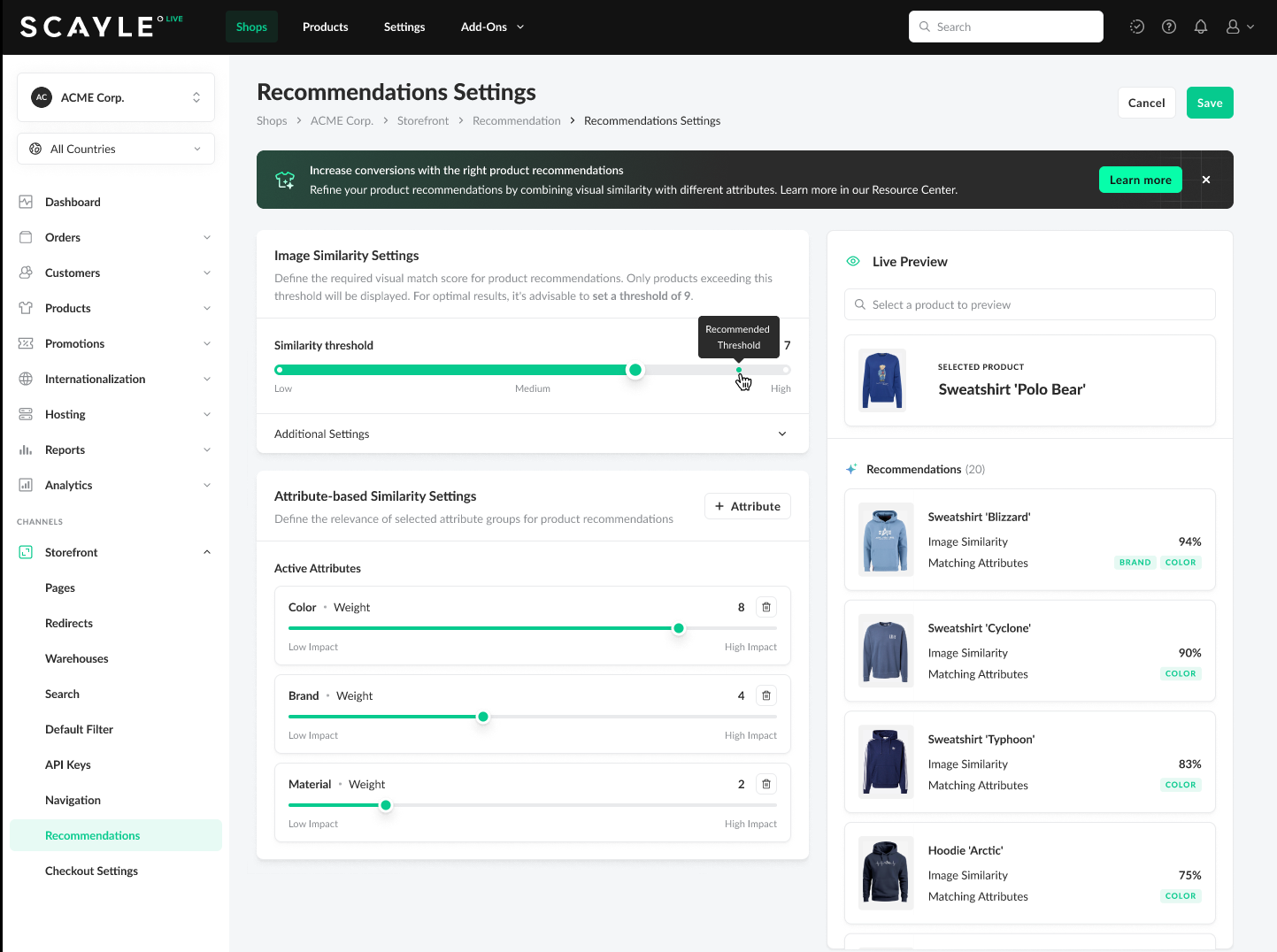
Preview of the Rcommendations Settings
Preview Note: The recommendations calculated by the system in the preview only show products that are live, have a price and stock, and are included in the assortment of the currently selected application.
Admin API
Update Custom Recommendations
You can define similarity by manually linking custom recommendations to a specific product. The Storefront API uses these links to generate recommendations based on the following rules:
- Ranking Logic: The order of the list determines the position in the response of
/v1/recommendations. Products placed higher in the list are returned first. - Configuration Scope: You can configure products at the shop level or the shop-country level. If a configuration exists for both, the shop-country level takes precedence over the general shop level.
To define custom recommendations, use the Admin API endpoint PATCH /products/{productIdentifier}/similar-products. For the full endpoint reference, see Similar Products.
Changes in the custom recommendations propagate to the Storefront API in near real-time.
| Parameter | Details |
|---|---|
shopKey | String |
countryCode | String |
productIds | Integer |
Storefront API
Output in /v1/recommendations/similar
When requesting products through the Storefront API endpoint, the response will generally include:
- A ranked list of similar products (maximum of 20, controlled by
limit)- Custom recommendations appear first, independent of their calculated similarity
- An image confidence score
imageConfidenceScore(0–100, or null if not available) - All product information requested through the
withparameter, nested within theproductobject - The response would be adjusted depending on filters applied through query parameters
You can find detailed request and response schemas in the Storefront API Specifications.
Get Product with all Attributes
For our product detail page, we want to get all related product attributes to show additional information. We can retrieve all attributes as follows:
Response
How to Interpret the imageConfidenceScore
The imageConfidenceScore indicates how visually similar two products appear based on the images you provide. It ranges from 0 to 100, where higher values suggest a closer visual match.
Because this score depends heavily on your own image setup, it should not be interpreted as an absolute measure of similarity. Instead, it reflects how our Recommendations AI perceives the visual similarity within the context of your catalog.
As an example: If all your images are images of the product shot in front of the same white background, the scores will likely be on the higher side, as the background alone will drive similarity. If your images are shot in front of different backgrounds, or your items are worn by different models, image similarity scores might be on the lower side.
What influences the score
- Consistent photography increases scores
If your images follow uniform guidelines (same background, same model, identical lighting, ...), the system will naturally find many products visually similar, even if the underlying products differ.
This often leads to generally higher image similarity scores across the catalog. - Diverse imagery leads to more nuanced scores
When product photos vary in background, pose, angle, or composition, the system can distinguish visual details more effectively.
This usually results in broader score variation and clearer separation between similar and dissimilar products. - The score reflects visual cues only
Material, fit, technical attributes, or product metadata do not influence theimageConfidenceScore.
Those aspects are handled separately via attribute similarity. - A low score does not mean a bad recommendation
A product might rank highly in the final recommendation list due to strong attribute similarity, even if its image similarity is low.
The score only represents visual similarity, not overall suitability. You can use custom recommendations to tweak recommendations to your liking.
How to Use It
- Treat the score as a relative indicator, not a strict rule.
- Expect higher scores in catalogs with highly standardized imagery.
- Try to keep the images consistent across products to have a reliable score
- Expect more varied scores in catalogs with creative or inconsistent product images.
- Fine-tune thresholds for your catalog.
You can use these instructions to configure the image similarity threshold according to your preferences, as described here.
Request Parameters
/v1/recommendations/similar supports filtering to refine the result set, as well as other request parameters to adjust the response according to your needs.
Below, you can find a list of the available parameters:
| Parameter | Example Use Case | Required |
|---|---|---|
filters[brand] | Similar products from {brand}. | ❌ |
filters:not[brand] | Similar products from other brands. | ❌ |
filters[category] | Similar products from the same category. | ❌ |
filters[sale] | Discount-focused audiences. | ❌ |
filters[sellableAt] | Only show products sellable at a given time. | ❌ |
with | Essential to get the data needed for frontend display. For example, to show different variants within the carousel of similar products. | ❌ |
campaignKey | Adjusts prices based on a specific campaign. | ❌ |
pricePromotionKey | Adjusts prices based on a specific promotion key. | ❌ |
limit | Adjust the number of products being returned in the recommendations. | ❌ |
shopId | Essential to get the corresponding data for the required shop. | ✅ |
Example API Requests
Recommendations from a Specific Brand
Showing "More like this from Gap" to keep the user within a specific brand ecosystem while browsing.
Request parameters:
| Parameter | Context |
|---|---|
filters[brand] | Restricts recommendations to a specific category ID. |
with | Includes attributes and advancedAttributes to verify brand matching and display product details. |
shopId | Mandatory to reference products in the correct shop. |
Response
Exclude Recommendations from a Specific Brand
"Products from other brands you might like" enables the discovery of other brands with similar articles in recommendations by explicitly filtering out the current brand.
Request parameters:
| Parameter | Context |
|---|---|
filters:not[brand] | Restricts recommendations to a specific category ID. |
shopId | Mandatory to reference products in the correct shop. |
Response
Recommendations from the Same Category and Sellable at the Given Time
"Shop similar styles available now" ensures that displayed recommendations are immediately purchasable (not future collections or expired items) and strictly relevant to the current category (e.g., showing only other "Summer Shirts").
Request parameters:
| Parameter | Context |
|---|---|
filters[category] | Restricts recommendations to a specific category ID. |
filters[sellableAt] | Includes attributes and variants (to show specific discounted prices). |
with | Set to variants to return details like stock and price for each recommendation. |
shopId | Mandatory to reference products in the correct shop. |
Response
Sale Items Only
"Sale items you may like" displays targeted recommendations for bargain hunters, showing discounted products similar to the current item with full details (size availability, brand info) to encourage quick conversion.
Request parameters:
| Parameter | Context |
|---|---|
filters[sale] | Set to true to restrict results to items that are currently discounted or part of a sale campaign |
with | Includes attributes and variants (to show specific discounted prices). |
shopId | Mandatory to reference products in the correct shop. |
Response
For more details on how to implement similar recommendations in your shop, please use our Implementation Step-by-Step Guide.
Other Recommendations Types
Besides Similar Products Recommendations, SCAYLE also utilizes the power of Smart Sorting and Storefront Application logic to provide you with more recommendation options for your Storefront Application. These include:
- Rule-Based Recommendations
- "Trending Products", "Bestseller Products", "New Arrival Products" etc.
- Recently-Viewed Products
- Personalized list of products the user has recently browsed in the Storefront Application.


