

Order Delegation
Overview
The Order Delegation process in SCAYLE orchestrates the handoff of confirmed customer orders from the SCAYLE Checkout system to merchants . This documentation outlines the end-to-end flow, technical touchpoints, payload structure, validation mechanisms, and recommendations for testing.
Delegation Lifecycle - Customer view
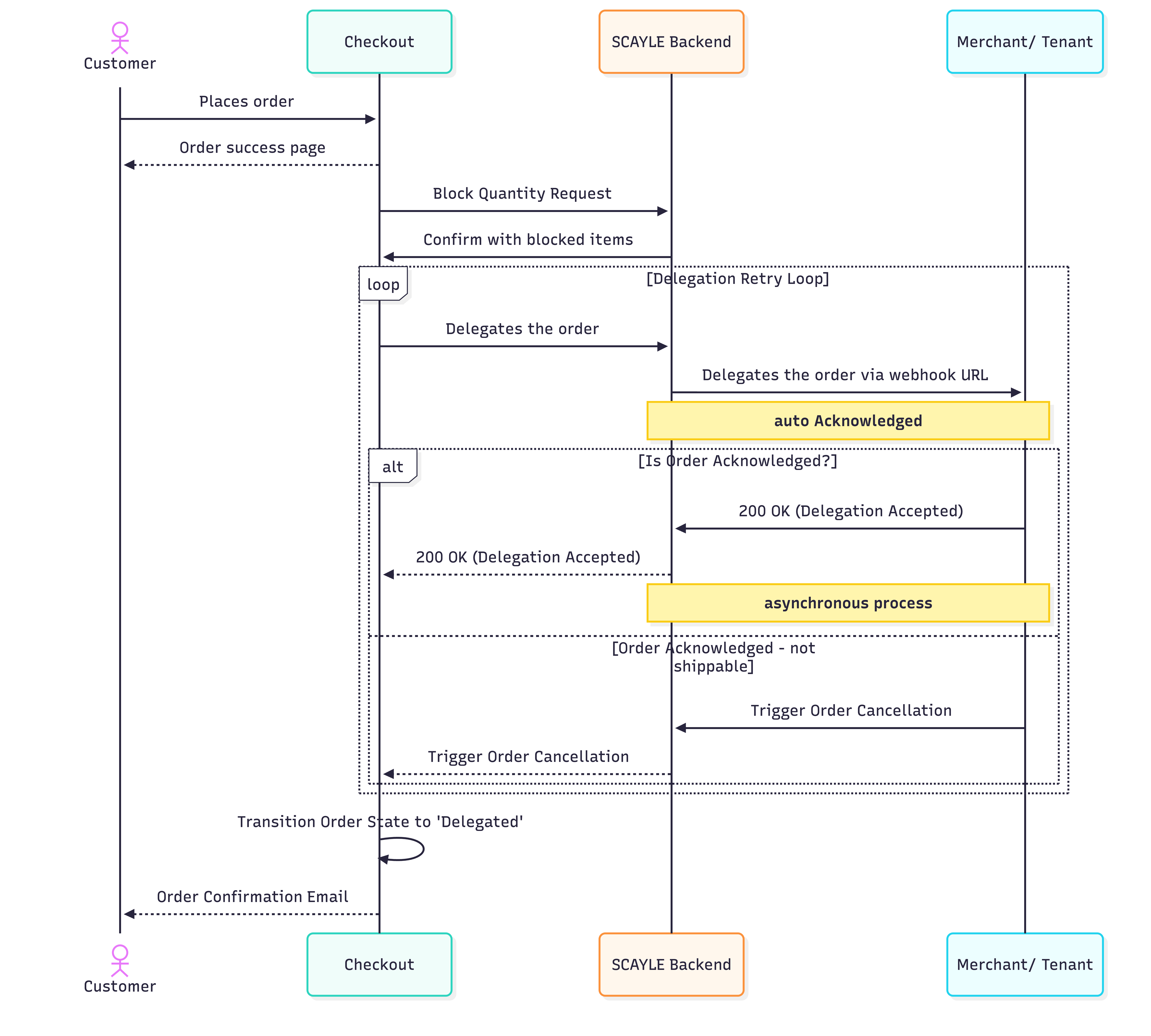
1. Order Confirmation & Stock Reservation
The process begins immediately after payment validation.
- Stock Reservation: SCAYLE reserves inventory based on specific merchant and warehouse configurations.
- State Change: The order state in SCAYLE transitions to
Confirmed.
2. Delegation Request & Transformation
Once confirmed, SCAYLE prepares the order for external fulfillment:
- Grouping: Order items are grouped by their respective
merchant_ID. - Transformation: The standard order payload is mapped into a merchant-specific JSON format.
- Forwarding: The request is sent via a Blocking Webhook. Unlike standard webhooks, the system halts further processing while awaiting a response.
3. Delegation Outcomes
SCAYLE reacts differently based on the merchant’s response:
| Scenario | Outcome | Webhooks Triggered |
|---|---|---|
| Complete Delegation | All items accepted by the merchant. Order state changes to | order-delegated |
| Partial Delegation | Some items accepted; some rejected. Order state changes to | order-delegated + item-out-of-stock |
| Rejected Delegation | All items are rejected by the merchant. Order state changes to | None |
| Failed Delegation | HTTP errors (e.g., 500). | See Retry Policy below |
4. Retry Policy & Failure Handling
Timeout / failure: If there is no valid HTTP 201 response within the webhook timeout
(~15 seconds), or the body is invalid, that Create Order attempt fails and order is not stored. SCAYLE enters an automated recovery lifecycle.
- Initial Retries:
- 1st Retry: 3 minutes after the initial failure.
- 2nd Retry: 5 minutes after the first retry.
- Long-term Backoff:
- The system retries every 2 hours for a total of 23 iterations.
- Total Duration: The retry window covers 44 hours and 8 minutes.
Final State: If all retries are exhausted, the order transitions from Aborted to Cancelled
5. Acknowledgement & Post-Processing
Merchants must acknowledge receipt of the delegation.
- Immediate (Synchronous): The merchant acknowledges via the direct response to the blocking webhook.
- Automatic: If no response is received within the timeout window, SCAYLE auto-acknowledges the request to prevent process stagnation.
Delegation Lifecycle - Admin View
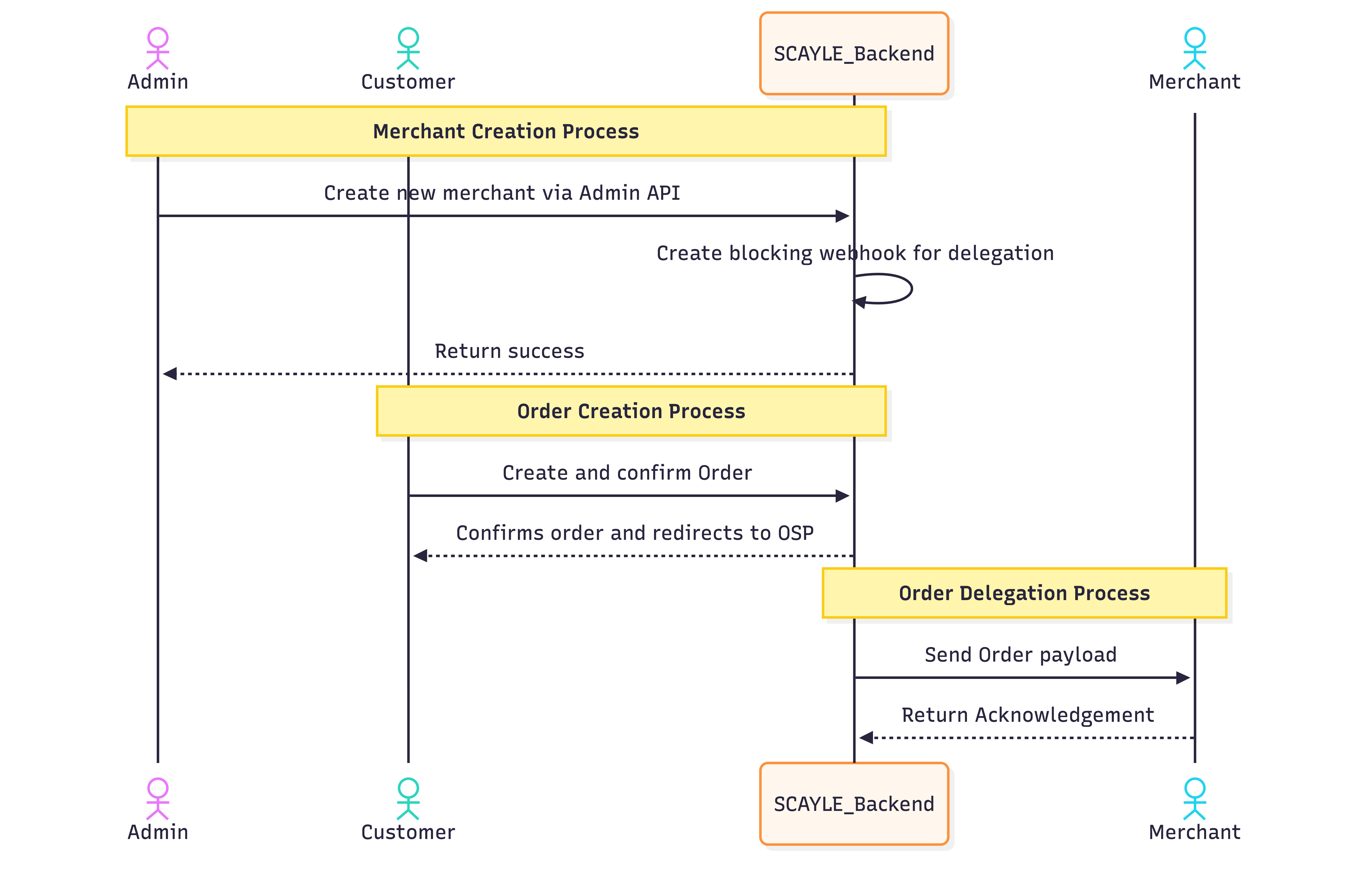
1. Merchant Configuration
To enable proper delegation:
- A Merchant must exist in SCAYLE and be configured with:
- orderDelegationUrl
- E.g., With basic Authentication
- https://***:***@{tenant}.middleware.aboutyou.cloud/api/public/orders
- E.g., Without basic authentication -
- public URL - https://<hostname>/sha-ig-prd-orsv-we/v1/delegate-order`
- Supported transport types:
- Webhook (CoreApiBlockingOrderWebhookTransform)
- Each merchant is linked to a warehouse and product variants.
2. Delegation Process
SCAYLE uses the Order Delegation URL configured during merchant creation to delegate orders. About one minute after order confirmation, SCAYLE sends a webhook with the following payload. The payload includes the order details required for the merchant to process and fulfil the order.
Request
Delegation Request Example - 2 items in the order
Response
Response Construction
If the endpoint returns a status other than 201, or an invalid response body, SCAYLE retries the delegation request at increasing intervals for up to two days. Each retry contains the same data. The webhook response must be idempotent.
The response must echo every order item that was sent in the request so that SCAYLE can match each one back.
The table below shows how to map values from the delegation request into the response.
| Response field | How to populate it |
|---|---|
orderDelegationResult | acknowledged - set this for all response back to SCAYLE. |
referenceKey | Return the request's order_id (the SCAYLE order key, for example xxxx-139-1234567). Do not confuse this with a product variant key such as merchant_product_variant_id. |
merchantReferenceKey | Key that identifies the order in the merchant's system. If the merchant does not maintain its own order key, return the request's order_id here as well. In most SCAYLE integrations referenceKey and merchantReferenceKey carry the same value. |
items[].referenceKey | Return the matching request item's order_item_id. SCAYLE uses this value to match each response item back to its request item. |
items[].merchantReferenceKey | Key that identifies the order item in the merchant's system. If the merchant does not maintain its own item key, return the request's order_item_id here as well. |
items[].deliverableQuantity | 1 to n - When full or part quantity can be fulfilled. 0 - when item is unavailable. Refer to mapping table below. |
Delegation Response Example — All items fulfilled
Delegation Response Example — Some items are fulfilled
Delegation Response Example — All items cannot be fulfilled
| orderDelegationResult | deliverableQuantity | SCAYLE Actions |
|---|---|---|
| acknowledged | all items quantity match the request |
|
| acknowledged | part items quantity match the request |
|
| acknowledged | all items are set to 0 | Order cancellation email is sent to customer |
Response Processing by SCAYLE
SCAYLE matches order items in the request and response using items[].referenceKey.
If deliverableQuantity is 0, SCAYLE marks the item as unavailable.
After SCAYLE receives responses from all merchants, it takes the following actions:
Undeliverable or cancelled items remain linked to the order. If the order was paid in advance, SCAYLE refunds the customer after invoicing(Subject to refund configuration in SCAYLE).
| Status code | Description |
| 200 | The request was successfully processed |
| 400 | Invalid item price — at least one item price is not an integer |
| 409 | Conflict — order already sent or warehouse mismatch |
| 412 | Invalid price for order items (the total price for all order items = 0). |
| 422 | Unprocessable — invalid/missing order JSON or address, invalid shop-country app prefix, or merchant webhook timeout |
| 424 | Failed dependency — merchant webhook failed with 400, 404, 412, 420, 422, 424, 500, 503. |
| 502 | Bad gateway — merchant webhook failed for any other reason (no/invalid response, connect error, schema validation failure) |
| 519 | Order already created or variant/warehouse resolve failures |
- Order transitions, webhooks, invoices, and emails depend on shop and payment-level configuration.
- Refunds are initiated exclusively only when the SCAYLE is configured to trigger refunds.


