

Step-by-Step Guide
Introduction
This guide outlines the required steps to migrate a Storefront v7-based project from Nuxt 2-to the new Nuxt 3-based Storefront Application.
This guide is intended as an overview, as we are not able to accommodate every scenario due to the complexity and variety of scopes and custom implementations per shop and tenant.
Before you start
Nuxt 3 is a complete rewrite of Nuxt 2, and also based on a new set of underlying technologies. This means there will be significant changes when migrating a Nuxt 2 app to Nuxt 3, thus an incremental migration of an existing project might not be feasible approach most of the time.
Some of these significant changes include:
- Moving from Vue 2 to Vue 3, including defaulting to the Composition API and script setup.
- Moving from Webpack 4 and Babel to Vite and Rollup.
- Moving from a runtime Nuxt dependency to a minimal, standalone server compiled with nitropack.
We recommend to check out the official Nuxt 3 Migration Guide before proceeding with this guide, to gain a better understanding of the tools and processes.
Limitations:
- No direct small “incremental” migration is possible: dependencies get exchanged piece by piece, due to large-scale architecture changes in Nuxt 3
- Complex migration due to the project complexity
- No “one-size-fits-all” migration solution
- How-to guide can only provide an overview and the order in which certain migration steps should be undertaken
- Every tenant migration should have a coordinated kickoff meeting with a review of the existing codebase and the creation of a dedicated migration concept
Migration Approaches
Incremental migration
Migrating an existing Nuxt 2-based project
Benefits
- Working in known codebase
- Avoiding potential downsides of a rewrite, e.g. missing context of historic implementation
Downsides
- Difficult to find ideal starting point for migration with existing Nuxt 2 codebase => Might leave developers with a daunting feeling
- Difficult to test as parts of the application might not be migrated and compatible with Nuxt 3
- Possibly unable to run shop application until a larger portion of the technical foundation has been migrated
- Debugging difficult => Not clear if error originate from outdated Nuxt 2 dependencies or functionality, or missing Nuxt 3-specific implementations, leading to increased debugging times and plain frustration
"Clean slate" migration
- using an empty Nuxt 3 or fresh Storefront Application project and using Storefront Application implementation as reference
- setting up technical foundation first (dependencies, configs, modules)
- moving custom implementations piece by piece (pages, components, composables)
Benefits
- Working version of shop application throughout the development process
- Rapid testing and validation of migrated elements
Downsides
- Feeling of building a whole new application & appears as if it might take more time than an incremental migration
- Storefront Application implementation might contain unused code that might need to be thrown out
As a rule of thumb, if your application has not diverged much from the cloned boilerplate it is likely easier to start fresh from the Nuxt 3 boilerplate and re-apply your changes. If your application has a long history and significant changes from the original boilerplate it might be easier to attempt an incremental migration.
Preparing a Nuxt 2-based project
Many of the changes in Nuxt 3 and storefront-nuxt have been backported to Nuxt 2 and storefront-nuxt2. You can minimize the scope of the migration by performing these tasks ahead of the migration.
- Update to Node.js >= 20.6
- Update to latest version of
@scayle/storefront-nuxt2 - Review and replace dependencies that are not Nuxt 3 compatible. Removing superfluous dependencies will lower the migration effort.
- Clean up any deprecated Vue features that do not work in Vue 3 (e.g. filters)
- Migrate to token-based authentication
- Migrate from legacy redirects to BAPI redirects
- Migrate from basic auth for BAPI to token auth
- Use
script setupfor components - Introduce tailored SCAYLE
eslintconfig ->@scayle/eslint-config-storefront - Introduce tailored SCAYLE
prettierconfig ->@scayle/prettier-config-storefront - Optional: Rewrite SCSS-based styling to CSS to reduce complexity and make use of modern native CSS features
- Optional: Remove storybook. The Nuxt 3 boilerplate does not include storybook, so especially if you are using the "clean slate" migration you might want to consider removing storybook and story files.
Overview Module support
The following list provides an overview of all formerly used Nuxt 2 modules of the DemoShop and their Nuxt 3 migration resolution. Should other 3rd-party modules be used in a project, it is required to investigate their Nuxt 3 support before the start of a respective Nuxt 3 project migration.
| Package / Module | Usage | Nuxt 3 compatible | Resolution |
|---|---|---|---|
@nuxt/typescript-runtime | Provides TypeScript integration for Nuxt 2 | ❌ | Module not required for Nuxt 3, native with Nuxt 3 |
@nuxtjs/composition-api | Provides Composition API support for Vue 2 | ❌ | Module not required for Nuxt 3, native with Vue 3 |
@nuxtjs/google-fonts | Provides Google Fonts integration | ✅ | Update to v3 of module |
@nuxtjs/gtm | Provides Google Tag Manager integration | ❌ | Use Nuxt 3 alternative @zadigetvoltaire/nuxt-gtm |
@nuxtjs/i18n | Provides internationalization capabilities | ✅ | Update to v8 of module |
@nuxt/image | Provides plug-and-play image optimization | ✅ | Update to v1.0 (RC) of module |
@nuxtjs/robots | Provides robots.txt support | ✅ | Update to v3 of module |
@nuxtjs/sentry | Provides Sentry.io monitoring and tracing integration | ❌ | Custom plugin implementation required |
@nuxtjs/storybook | Provides Storybook integration | ✅ | Update to v7 of module |
@nuxtjs/tailwindcss | Provides TailwindCSS integration | ✅ | Parallel support for Nuxt 2 and Nuxt 3 |
@nuxtjs/toast | Provides toast notification | ❌ | Custom implementation required (See SFAS reference implementation) |
@storyblok/nuxt-2 | Provides Storyblok CMS integration | ✅ | Use Nuxt 3 module @storyblok/nuxt |
nuxt-jsonld | Provides JSON-LD for SEO purposes | ✅ | Update to v2 of module |
nuxt-svg-loader | Provides handling of SVG files as Vue components | ❌ | Use Nuxt 3 alternative nuxt-svgo |
vueuse | Provides helper and utility functions as Vue composables | ✅ | Parallel support for Nuxt 2 and Nuxt 3 |
vue-fragment | Provides multi-root-node support for Vue components | ❌ | Module not required for Nuxt 3, native with Vue 3 |
vue-lazy-hydration | Provides delayed client-side hydration functionality | ❌ | Use Nuxt 3 alternative nuxt-lazy-hydrate |
vue-observe-visibility | Provides client-side visibility observer | ❌ | Use Intersect.vue from SFA or useIntersectionObserver from vueUse |
vue-slick-carousel | Provides carousel / slideshow integration | ❌ | Use Nuxt 3 alternative nuxt-swiper |
vue-slider-component | Provides a range slider Vue component | ✅ | Update to v4.0 (Beta) |
@vue/test-utils | Provides test utilities for Vue | ✅ | Update to v2 of package |
@vue/vue2-jest | Provides Vue component transformer for Jest | ❌ | Migrate from jest to vitest |
vue-the-mask | Provides string masking functionality | ❌ | Migrate to maska |
vuelidate | Provide input validation wit Vue v-model support | ✅ | Parallel support for Vue 2 and Vue 3 |
Setup
Based on the mentioned significant architectural differences, we recommend to have a look into the codebase of the new Nuxt 3-based SCAYLE Storefront Application beforehand. This allows you to get a feeling for the larger changes and structural differences.
Even with the knowledge from all Nuxt 3 Migration guides, the overall migration from Nuxt 2 to Nuxt 3 is a large undertaking. It should be expected that many implementations might break during the migration process and need to be adapted to Vue 3, Nuxt 3 and replacement libraries.
Migration steps
Dependencies
Dependency changes between Nuxt 2 and Nuxt 3
The first step to start the migration process should be to replace all necessary dependencies with suitable Nuxt 3 compatible versions and remove everything that will not be needed anymore. The following sections will shortly outline the differences in dependencies between a Nuxt 2-based DemoShop and a Nuxt 3-based SCAYLE Storefront Application.
devDependencies
Following a list of Nuxt 2-based DemoShop devDependencies and if they need to be migrated to Nuxt 3:
| Package / Module | Required for Nuxt 3 | Note |
|---|---|---|
@aboutyou/storyblok-generate-ts | ✅ | |
@babel/core | ❌ | Not required anymore for Nuxt 3 build setup |
@babel/plugin-proposal-nullish-coalescing-operator | ❌ | Not required anymore for Nuxt 3 build setup |
@babel/plugin-proposal-optional-chaining | ❌ | Not required anymore for Nuxt 3 build setup |
@babel/plugin-transform-class-properties | ❌ | Not required anymore for Nuxt 3 build setup |
@babel/plugin-transform-runtime | ❌ | Not required anymore for Nuxt 3 build setup |
@babel/preset-typescript | ❌ | Not required anymore for Nuxt 3 build setup |
@nuxt/image | ✅ | |
@nuxt/types | ✅ | |
@nuxtjs/eslint-config-typescript | ❌ | Included in @scayle/eslint-config-storefront |
@nuxtjs/storybook | 🤷 | Optional, depending on project requirement |
@nuxtjs/tailwindcss | ✅ | |
@scayle/eslint-config-storefront | ✅ | |
@scayle/prettier-config-storefront | ✅ | |
@types/color | ✅ | |
@types/express-session | ❌ | Replaced by @scayle/h3-session including types |
@types/tailwindcss | 🤷 | Optional, depending on project requirement |
@vue/test-utils | ✅ | |
@vue/vue2-jest | ❌ | jest should be replaced by vitest |
babel-jest | ❌ | Not required anymore for Nuxt 3 test setup with vitest |
cypress | ✅ | |
cypress-real-events | ✅ | |
env-cmd | ✅ | |
eslint | ✅ | |
eslint-plugin-cypress | ✅ | |
eslint-plugin-nuxt | ✅ | |
eslint-plugin-tailwindcss | ✅ | |
jest | ❌ | jest should be replaced by vitest |
postcss-html | ✅ | |
prettier | ✅ | |
prettier-plugin-tailwindcss | ✅ | |
sass | 🤷 | Optional, depending on project requirement |
sass-loader | ❌ | Not required, vite has built-in sass support |
schema-dts | ✅ | |
speed-measure-webpack-plugin | ❌ | vite is now used as Nuxt 3 build tool |
start-server-and-test | ✅ | |
storyblok | ✅ | |
storybook-addon-mock | 🤷 | Optional, depending on project requirement |
stylelint | ✅ | |
stylelint-config-prettier | ✅ | |
stylelint-config-standard | ✅ | |
stylelint-config-standard-scss | ✅ | |
stylelint-config-standard-vue | ✅ | |
stylelint-high-performance-animation | ✅ | |
tailwindcss | ✅ | |
ts-jest | ❌ | jest should be replaced by vitest |
ts-loader | ❌ | Nuxt 3 provides Out-of-the-box TypeScript support |
ts-node | ❌ | Nuxt 3 provides Out-of-the-box TypeScript support |
typescript | ✅ | |
vue-eslint-parser | ❌ | Included in @scayle/eslint-config-storefront |
vue-tsc | ✅ |
Add those devDependencies as part of the Nuxt 3 migration preparations:
@nuxt/devtools@zadigetvoltaire/nuxt-gtmautoprefixernuxt-svgonuxt-viewportofetchpostcss-custom-propertiesutility-types
Dependencies
Nuxt 2-based DemoShop dependencies needed for Nuxt 3:
| Package / Module | Required for Nuxt 3 | Note |
|---|---|---|
@crowdin/cli | 🤷 | Optional, depending on project requirement |
@nuxt/typescript-runtime | ❌ | Nuxt 3 provides Out-of-the-box TypeScript support |
@nuxtjs/composition-api | ❌ | Vue 3 provides Out-of-the-box Composition API support |
@nuxtjs/google-fonts | 🤷 | Optional, depending on project requirement |
@nuxtjs/gtm | ✅ | Use alternative package @zadigetvoltaire/nuxt-gtm |
@nuxtjs/i18n | ✅ | |
@nuxtjs/robots | ✅ | |
@nuxtjs/sentry | ❌ | Custom plugin implementation required |
@scayle/omnichannel-nuxt | ❌ | Not yet supported with Nuxt 3 Storefront Application |
@scayle/storefront-nuxt2 | ➡️ | Migrate to @scayle/storefront-nuxt |
@storyblok/nuxt-2 | ➡️ | Migrate to @storyblok/nuxt |
@tailwindcss/aspect-ratio | ✅ | |
@tailwindcss/forms | ✅ | |
@tailwindcss/typography | ✅ | |
@types/consola | 🤷 | Optional, depending on project requirement |
@vuelidate/core | ✅ | |
@vuelidate/validators | ✅ | |
@vueuse/core | ✅ | |
@vueuse/nuxt | ✅ | |
axios | 🤷 | We recommend to use ofetch, which is used by Nuxt 3 itself |
body-parser | ❌ | Express plugin that is not necessary with h3 |
check-password-strength | ✅ | |
color | ✅ | |
consola | 🤷 | Optional, depending on project requirement |
dotenv | ✅ | |
envalid | ❌ | No runtime env validation possible |
express | ❌ | express has ben replaced by nitropack and h3 within Nuxt 3, not required |
express-session | ➡️ | Migrate to @scayle/h3-session |
jws | 🤷 | Optional, depending on project requirement |
maska | ✅ | |
mobile-detect | ❌ | Replaced by nuxt-viewport |
nuxt | ✅ | |
nuxt-jsonld | ✅ | |
nuxt-svg-loader | ❌ | Replaced by nuxt-svgo |
portal-vue | ❌ | Native Vue 3 functionality |
postcss | ✅ | |
postcss-import | ✅ | |
radash | ➡️ | Migrate to radash-nuxt |
slugify | ❌ | |
storyblok-js-client | ✅ | |
ufo | ✅ | |
vue | 🤷 | Optional, depending on project requirement |
vue-lazy-hydration | ➡️ | Replaced by nuxt-lazy-hydrate |
vue-router | ❌ | |
vue-slick-carousel | ➡️ | Replaced by nuxt-swiper |
vue-slider-component | ✅ | |
vue-swipe-actions | ❌ | No replacement |
vue-text-highlight | ❌ |
Dependencies that should be added as part of the Nuxt 3 migration preparations:
nanoidradash-nuxtnuxt-lazy-hydratenuxt-swiperyn
Basic Configuration, Runtime Config & .env
Refer to Nuxt 3 Migration Guide / Configuration for Nuxt 3 specific migration steps.
The starting point for your Nuxt app remains your nuxt.config.ts file.
With the migration to Nuxt 3, one goal of the migration has been to make the application built as self-contained as possible ("build once, deploy anywhere"). This means moving most of the configuration options filled by environment variables to use the Nuxt 3 runtimeConfig.
As the nuxt.config.ts file is now pre-generated and serialized during build time, it is not able to execute dynamic functions, e.g. fetchStores during runtime anymore.
Replace the Dynamic functions within the nuxt.config.ts with the specified key-value objects. If the values have be injected dynamically, this should be done at runtime using the Nuxt 3 runtimeConfig.
For specific changes as part of the Storefront Application, check the SCAYLE Storefront Application Migration Guide.
Build Tooling
Refer to Nuxt 3 Migration Guide / Build Tooling for Nuxt 3 specific migration steps.
Per default the SCAYLE Storefront Application is using vite and Rollup, including PostCSS and esbuild as build tools.
Should the Nuxt 2-based rely on custom Webpack 4 configuration, the changes need to be adapted for usage with vite (Nuxt 3 Vite Config).
State Management
Storefront Application does not include VueX by default. The useStore composable has been introduced which is using the useState under the hood.
Should the requirement call for a more versatile state management solution, we recommend migration to pinia. Check the Pinia Documentation for more detailed information.
Plugins, Modules & Middleware
Refer to Nuxt 3 Migration Guide / Plugins and Middleware or Nuxt 3 Migration Guide / Modules for Nuxt 3 specific migration steps.
Please note that the format for plugins, modules and router middleware has changed and former Nuxt 2 modules will not be compatible!
Due to the nature of the open-source ecosystem, not every module that has been used as part of the Nuxt 2-based DemoShop, will be available as part of the Nuxt 3-based Storefront Application or will have a drop-in replacement.
Replaced modules
The following modules or custom implementations have been replaced:
| Module | Replaced by | Documentation |
|---|---|---|
nuxt-svg-loader | nuxt-svgo | SVG handling |
vue-slick-carousel | Swiper | Carousel Implementation |
@nuxtjs/gtm | @zadigetvoltaire/nuxt-gtm | Tracking |
| custom breakpoints implementation | nuxt-viewport module | Breakpoints handling |
For specific changes as part of the Storefront Application, check the SCAYLE Storefront Application Migration Guide.
Pages, Layouts & Storyblok
Refer to Nuxt 3 Migration Guide / Configuration for Nuxt 3 migration steps.
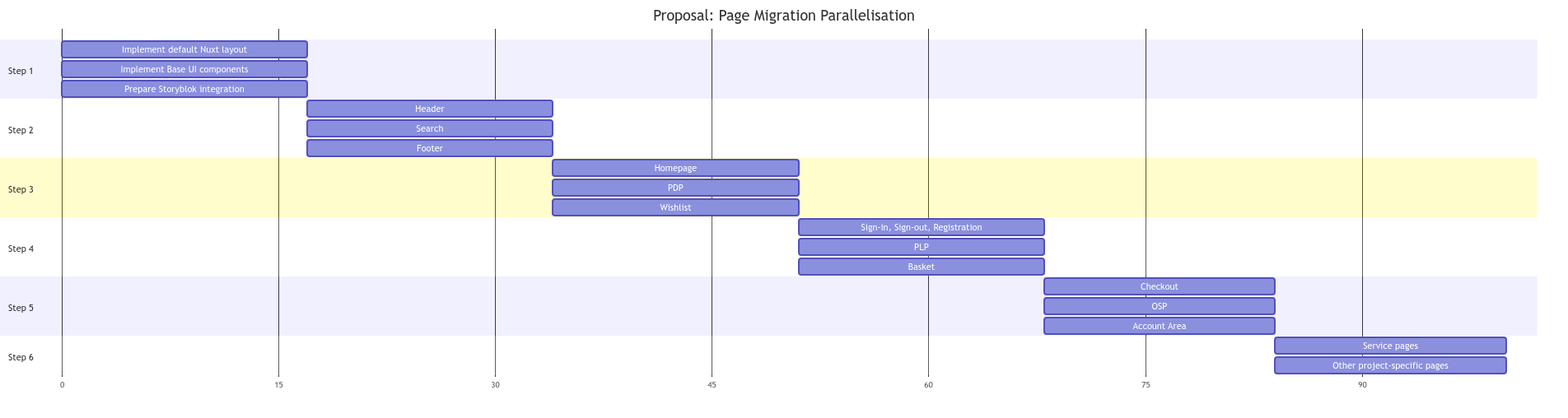
Once the Nuxt-3-based Storefront Application is up-and-running, you'll need to refactor all pages and related components. We recommend choosing a page-by-page approach, which can be parallelized to reduce time constraints and dependencies.
Based on initial feedback, a potential page migration order might look as follows:
Base UI components
The Storefront Application introduces some refactoring to improve long-term maintainability, usability and to reduce code redundancy.
One such case of decreased redundancy has been the introduction of shared base UI components within the Storefront Application reference implementation. This includes most commonly used UI components across the application (Buttons, Links, Inputs, Toast, layout related components, etc.) to be used during implementation of the bigger chunks of the application (pages, layouts etc).
Depending on the project size and complexity, this approach can reduce the overall migration efforts.
Component Options
Refer to Nuxt 3 Migration Guide / Component Options for Nuxt 3 specific migration steps.
Data fetching
Nuxt 3 provides new options for fetching data from an API. Nuxt 3 provides new composables for fetching data: useAsyncData and useFetch. They each have 'lazy' variants (useLazyAsyncData and useLazyFetch), which do not block client-side navigation.
To make your existing pages and components compatible with the new data fetching approach, the following steps are required:
- Replace the
asyncDatahook withuseAsyncDataoruseFetchin your page/component. - Replace the
fetchhook withuseAsyncDataoruseFetchin your component.
scrollToTop
This feature is not yet supported in Nuxt 3. If you want to overwrite the default scroll behavior of vue-router, you can do so in ~/app/router.options.ts (see Router options docs) for more info.
Meta Tags
Refer to Nuxt 3 Migration Guide / Meta for Nuxt 3 specific migration steps.
Nuxt 3 provides several different ways to manage your meta tags:
- via
nuxt.config.ts - via
useHeadcomposable - via global meta components
You can customize title, titleTemplate, base, script, noscript, style, meta, link, htmlAttrs and bodyAttrs.
Server & Deployment
Refer to Nuxt 3 Migration Guide / Configuration for Nuxt 3 specific migration steps.
In a built Nuxt 3 application, there is no runtime Nuxt dependency and no support from sourcing environment variables / runtimeConfig overrides from an .env file.
Should there be a need to source environment variables / runtimeConfig overrides from an .env file, we recommend using a Node.js version higher than 20.6, which includes native .env file support.
For more in-depth information regarding Nuxt 3 deployment options check the official Nuxt 3 Deployment Guide.
Troubleshooting
This section provides an overview of known migration issues and recommended solutions.
Dynamic / async component loading
| Problem | Solution |
|---|---|
The DefaultLink component is causing a full page reload | Rename all {component}.async.vue to {component}.vue |
| Button click-event handlers are not firing | Nuxt 3 Dynamic Imports |


