

Event Reference
This page lists every event emitted by the storefront-hosting producer, when each event fires, and the shape of the payload you receive.
Lifecycle at a glance
A deployment on Storefront Hosting is composed of two phases: Build and Rollout.
If Rollout fails, Rollback is kicked off automatically.
The typical paths are:
- Successful deployment:
deployment-started→build-started→build-succeeded→rollout-started→rollout-succeeded→deployment-succeeded - Build failure:
deployment-started→build-started→build-failed→deployment-failed - Rollout failure with automatic rollback:
deployment-started→build-started→build-succeeded→rollout-started→rollout-failed→deployment-failed→rollback-started→rollback-succeeded(orrollback-failed) - Cancellation during build:
deployment-started→build-started→deployment-cancelled
A few rules worth highlighting:
deployment-failedfires immediately after the first failing child event, which is eitherbuild-failedorrollout-failed.deployment-succeededonly fires afterrollout-succeeded. There is no partial success.- Rollback starts automatically only after
rollout-failed. Abuild-failednever triggers a rollback, because production was never touched. deployment-cancelledcan only occur during the Build phase, beforerollout-started. Once Rollout has started, cancellation is no longer possible, and no further events are emitted for that deployment afterdeployment-cancelled.
Delivery order is not guaranteed. The paths above show the order events are emitted. Webhook delivery may reorder them in transit, and deployment-failed shares its occurredAt with the failing child event. See Ordering event data on the Webhooks page for how to reorder events on your side.
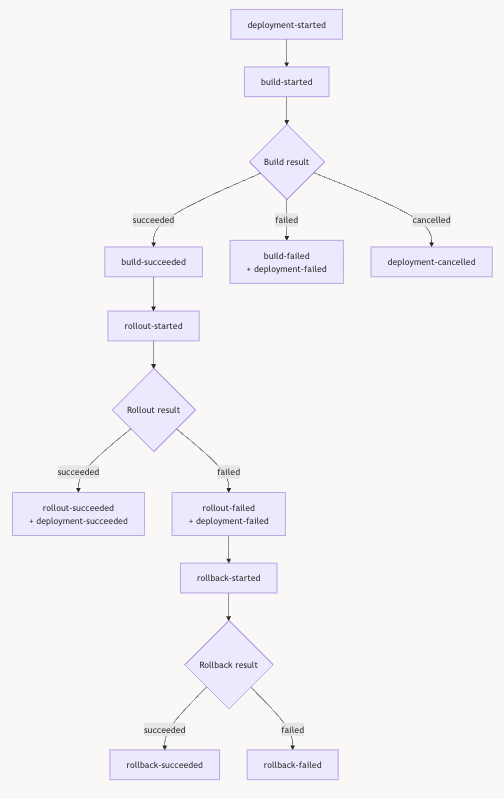
Deployment Events
Available events
| Event | Fires when |
|---|---|
deployment-started | A deployment is initiated, before Build begins. |
deployment-succeeded | The full deployment pipeline completes successfully. Only fires after rollout-succeeded. |
deployment-failed | The deployment fails. Fires immediately after the first failing child event, sharing the same occurredAt timestamp. |
deployment-cancelled | The deployment is cancelled during the Build phase, before rollout-started. No further events are emitted after this. |
build-started | The Build phase begins. |
build-succeeded | The Build phase completes successfully. Rollout starts next. |
build-failed | The Build phase fails. The git field is null when the failure happens before the git reference can be resolved; the following deployment-failed carries the same null. |
rollout-started | The Rollout phase begins. From this point onward the deployment cannot be cancelled. |
rollout-succeeded | The Rollout phase completes successfully. deployment-succeeded follows. |
rollout-failed | The Rollout phase fails. deployment-failed follows immediately, and Rollback starts automatically. |
rollback-started | Rollback is initiated automatically after rollout-failed. |
rollback-succeeded | Rollback completes successfully and the previous working version is restored. |
rollback-failed | Rollback fails. |
Payload
Every event uses the same top-level envelope. The payload shape is identical across all 13 event types.
Envelope
| Field | Type | Description |
|---|---|---|
type | string | The event name. |
occurredAt | string | RFC 3339 UTC timestamp with second precision (for example, 2026-10-14T12:37:42Z). |
payload | object | Event-specific data (see below). |
meta.shopKey | string | The shop key the deployment belongs to. Also the only supported target filter for subscriptions. |
Payload fields
| Field | Type | Description |
|---|---|---|
id | string | Unique identifier (UUID) of the deployment. |
link | string | Deep link to the deployment's page in the SCAYLE Panel. |
environment | object | The environment the deployment targeted. Contains key (for example, main) and name (for example, Development). |
git | object or null | The git reference being deployed. Contains ref, refType (branch or tag), resolvedCommitSha, and commitMessage. On rollback events, git describes the deployment being rolled back (the failed version), not the previous version being restored. null on build-failed and the following deployment-failed when the build fails before the reference can be resolved. |
Example (deployment-started):
Example (build-started):
Example (build-succeeded):
Example (rollout-started):
Example (rollout-succeeded):
Example (deployment-succeeded):
Example (deployment-cancelled):
Example (build-failed before the git reference could be resolved):
The git field is null when the Build phase fails before the reference can be resolved - for example, a syntax error in package.json or an unavailable Git reference.

