

Manage Media / Videos
General
You can manage product videos through the SCAYLE Admin API. The flow differs from images: Admin API creates a video entity and returns a signed upload package; you upload the file directly to the video storage provider (Admin API does not receive the file bytes). After upload, you attach the video to one or more products.
Typical flow:
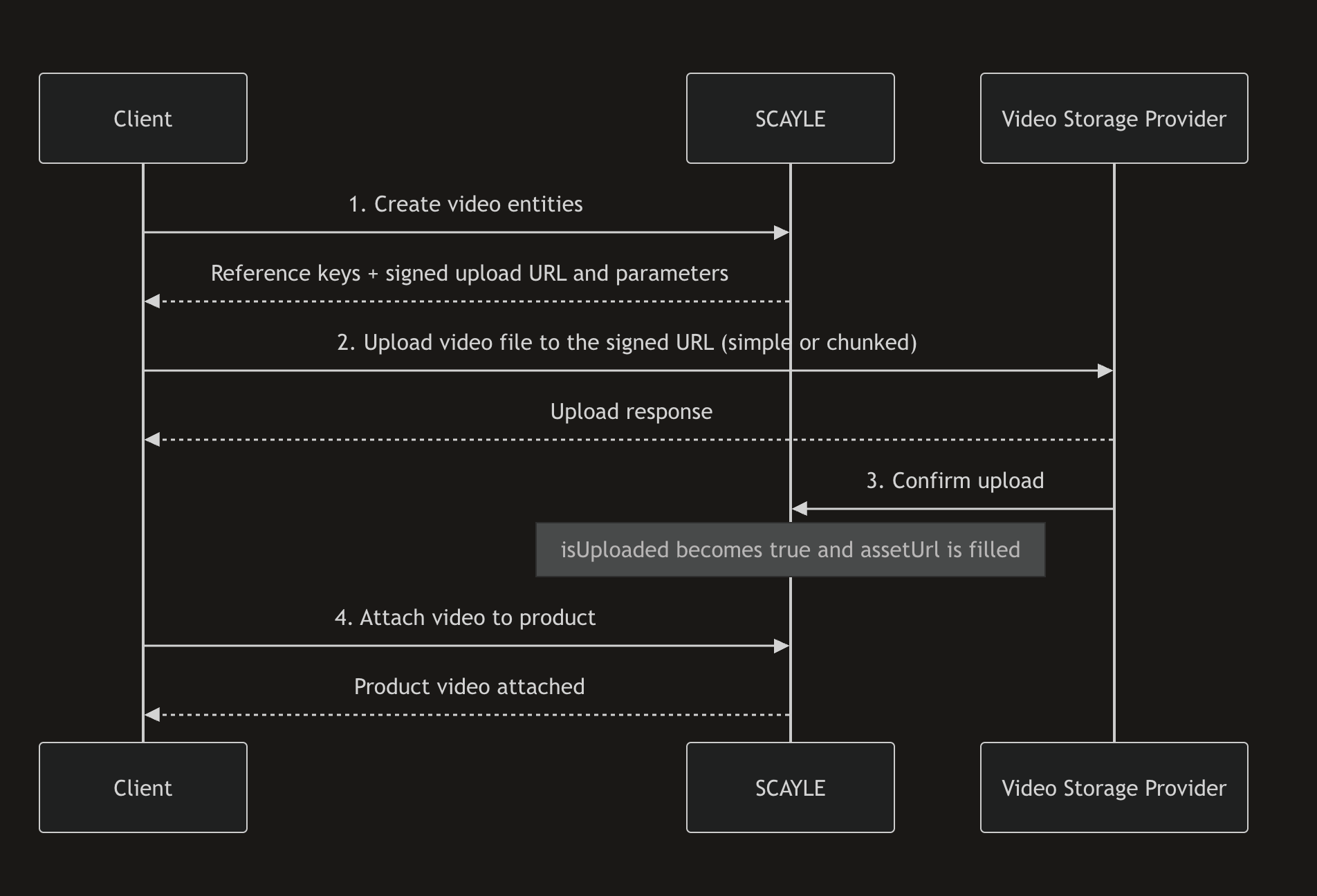
- Create a video entity (
POST /videos) and receiveurl+ signedparameters. - Upload the file to the returned storage
url(simple or chunked upload). - SCAYLE confirms the upload and sets
isUploadedandurl. - Attach the video to a product (product-video endpoints or the
videosfield on product create/update). - Optionally manage attributes and custom data.
Although attaching a video does not require waiting for upload confirmation, only videos with isUploaded set to true are shown in the shop.
Supported video formats
The Admin API supports the following format values:
mp4mkvavimovwebmwmvflv3gpmpgmpeg
Do not upload videos through asset or image upload endpoints. Create videos via the video endpoints and upload to the signed storage URL returned by Admin API.
Video entity
| Parameter | Details |
|---|---|
referenceKey | String. A key that uniquely identifies the video within the SCAYLE ecosystem. |
format | String. Video container format (see supported formats). Required on create/update. |
url | String READ-ONLY. Path of the uploaded video once available. |
isUploaded | Boolean READ-ONLY. Whether the video file has been uploaded and confirmed. |
Video entity endpoints identify a video by reference key with a key= prefix (for example key=my-video, URL-encode as key%3Dmy-video when required). Do not call /videos/my-video.
Admin API stores only the relative video path in url (for example videos/my-video.mp4). Storefront API later returns the full URL, including the CDN base.
Access your CDN by calling https://{{tenant-space}}.cdn.scayle.cloud.
For example, if your tenant is "acme" and the space is "live," the CDN URL would be: https://acme-live.cdn.scayle.cloud.
A full video URL then looks like https://acme-live.cdn.scayle.cloud/videos/my-video.mp4.
Video upload package (create/update response)
| Parameter | Details |
|---|---|
referenceKey | String. The video reference key. |
url | String. Upload URL of the video storage provider. |
parameters | Array of { name, value }. Signed form fields that must be sent exactly as returned on every upload request. |
Product video entity
| Parameter | Details |
|---|---|
id | Integer READ-ONLY. ID assigned by SCAYLE. |
referenceKey | String. Reference key of the attached video. |
format | String READ-ONLY. Video format. |
assetUrl | String READ-ONLY. Path of the video once uploaded. |
isUploaded | Boolean READ-ONLY. Whether the video file has been uploaded. |
attributes | Attribute[]. Attributes attached to the product video. |
customData | Object. Custom data for the product video. |
For product-video routes, {productVideoIdentifier} may be the numeric product-video id or key={referenceKey}. Video-entity routes under /videos/... accept only the key= form.
Admin API
An existing product is a precondition for attaching a product video. Creating the video entity itself does not require a product.
Create videos
This method creates one or more video entities (1–10 per request) and returns a signed upload package for each.
Send every returned parameters entry as a form field when uploading. Do not invent, rename, or omit signed fields.
Parameters
| Parameter | Type | Description |
|---|---|---|
referenceKey | string | Required. Unique video key in SCAYLE ecosystem. |
format | string | Required. Video container format. |
Response example:
Find more details on API reference pages:
Upload a video file
After creating a video, upload the file with a single POST to the returned url as multipart/form-data:
- All
parametersfrom the Admin API response (one form field pername/valuepair) - A
filefield containing the video file
This step calls the video storage provider directly. It is not an Admin API SDK method. Use simple upload for smaller files. For large files (or when a single request fails with entity-too-large), use Chunked upload for large files.
Parameter names and values always come from the Admin API response. The examples below are illustrative.
Chunked upload for large files
Use chunked upload when a single multipart request is not suitable (large files or entity-too-large responses).
For one file upload you must:
- Reuse the same Admin API
urlon every chunk request - Reuse the same Admin API
parameterson every chunk request - Send
X-Unique-Upload-Idwith one unique value per upload, identical for all chunks - Send
Content-Range: bytes {start}-{end}/{totalSize}for each chunk - Use chunk sizes greater than 5 MB for all chunks except the last
Intermediate chunk responses may include done: false. The final chunk completes server-side assembly and typically returns done: true.
Get a video
Use this method to get an existing video and check upload status. After a successful storage upload, SCAYLE sets isUploaded to true and fills assetUrl asynchronously — there may be a short delay.
Response example (upload complete):
Find more details on API reference pages:
Update a video
This method updates an existing video entity and returns a new signed upload package. Re-upload the file using the new url and parameters.
Find more details on API reference pages:
Delete a video
Deleting a video removes the video entity. This is different from detaching a product-video relation.
Find more details on API reference pages:
Attach a product video
This method attaches an existing video to a product by referenceKey. You may optionally set attributes and custom data in the same request.
format is read-only on product videos and must not be sent in the attach body.
Attach can succeed while isUploaded is still false. Storefront usefulness depends on upload completion.
You can also attach videos in product create/update payloads via a videos array:
Find more details on API reference pages:
List product videos
Request all videos attached to a product.
Find more details on API reference pages:
Detach a product video
Detaching removes the product-video relation. It does not delete the video entity (use Delete a video for that).
Find more details on API reference pages:
Create or update a product video attribute
Product-video attributes use the shared Admin API Attribute model (same pattern as image attributes).
Find more details on API reference pages:
- Update or create product video attribute
- List product video attributes
- Get product video attribute
- Delete product video attribute
- Unlock product video attribute group
Custom data
Product-video custom data follows the same custom-data model used across other Admin API entities.
Collection-level endpoints:
GET /products/{productIdentifier}/videos/{productVideoIdentifier}/custom-dataPUT /products/{productIdentifier}/videos/{productVideoIdentifier}/custom-dataDELETE /products/{productIdentifier}/videos/{productVideoIdentifier}/custom-data
Key-level endpoints:
GET /products/{productIdentifier}/videos/{productVideoIdentifier}/custom-data/{key}PUT /products/{productIdentifier}/videos/{productVideoIdentifier}/custom-data/{key}DELETE /products/{productIdentifier}/videos/{productVideoIdentifier}/custom-data/{key}
Find more details on API reference pages:
- Get product video custom data
- Create or update product video custom data
- Delete product video custom data
- Get product video custom data key
- Create or update product video custom data key
- Delete product video custom data key
Retrieve products with videos
Include videos on product reads with the with query parameter:
with=videoswith=videos.customData
videos.attributes is not a valid with value. Attributes are returned on product-video objects from attach/list flows and managed via the product-video attribute endpoints.
Find more details on API reference pages:
Data limits
Free tier accounts are limited to 5 uploaded videos per product. To upgrade to a paid plan with a higher limit, contact your SCAYLE Account Manager.
Platform lifecycle
SCAYLE applies lifecycle cleanup policies for video entities and uploaded assets. These policies are intentionally approximate and can change over time.
- Upload confirmation. After a successful upload to the video storage provider, SCAYLE is notified automatically,
isUploadedis set totrue, andassetUrlis populated. If the automatic confirmation is missed, SCAYLE retries by checking the storage provider every 2 hours for videos that are still not marked as uploaded and have not been updated for at least 1 day. - Never-uploaded cleanup. Video entities that are never uploaded may be removed after about 14 days.
- Uploaded-but-unattached cleanup. Videos that are uploaded but never attached to a product may be removed after about 14 days.
To avoid data loss, finish uploads promptly and attach videos to products when you intend to keep them. If a video is removed by lifecycle cleanup, create it again and re-upload the file.


