

Steps to enable the OTP flow
OTP login is enabled per shop country in the SCAYLE Panel. The configuration applies whether you integrate with the SCAYLE web component or build your own implementation.
Prerequisites
OTP codes are sent to customers as transactional emails. Before you enable the OTP flow, make sure that these emails can be delivered:
- Mailjet credentials: SCAYLE sends transactional emails through Mailjet. Contact your SCAYLE Account Manager to make sure that Mailjet credentials are set on your instance. Without them, no OTP emails are delivered.
- OTP email template: In the SCAYLE Panel, go to Settings ➜ Notifications & Templates and create an active template with the template key
customer-otp-verification-mailfor each shop and locale that uses OTP login. If no template is active, customers don't receive a code. For more information, see Transactional Mails.
Configure on the SCAYLE Panel
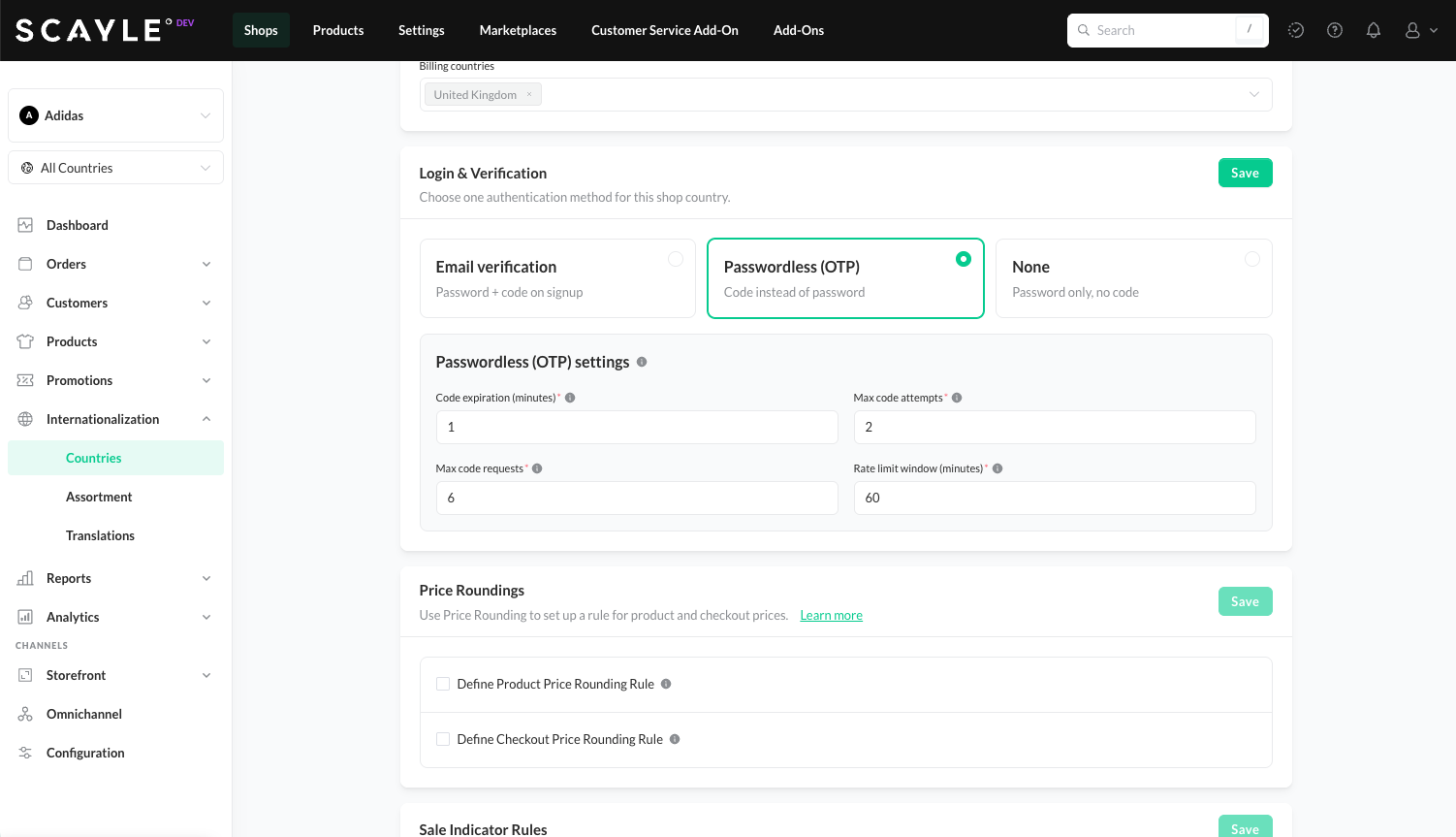
Passwordless (OTP) authentication settings
- In the SCAYLE Panel, navigate to your shop's authentication settings under Shops ➜ Internationalization ➜ Countries.
- Under Login & Verification, select
Passwordless (OTP). This automatically deselectsEmail verification— both options cannot be active at the same time. - Confirm the following configuration values before enabling this feature.
| Config value | Description |
|---|---|
Code expiration (minutes) | How long a code remains valid after it is sent. |
Max code attempts | How many incorrect entries are allowed before the code is invalidated. |
Max code requests | How many codes a customer can request within the rate limit window. |
Rate limit window (minutes) | The time window within which the max code requests limit applies. |
- Save the configuration. If you use the SCAYLE web component, the storefront routes customers through the OTP flow immediately. Custom integrations must first handle the changed responses described in Authentication API changes below. After applying the change, it may take up to a few minutes to fully propagate and be active.
To revert to standard email and password, select Email verification or None under Login & Verification and save.
Integration Options
| Option | Description |
|---|---|
| SCAYLE web component | Plug-and-play UI component that handles the entire OTP flow with no additional integration effort required. |
| Authentication API | Manage the OTP flow directly through the Authentication API if you're using a backend or require further customizations on the backend layer. E.g. you want to take ownership of the challenge_code to allow the same OTP for cross-device login |
Authentication API changes
Using Authentication API with the above settings will change the behavior of existing endpoints to a different status code, hence a follow-up is required.
Registration and Login flows
When the configuration is enabled, the registration endpoint returns a 202 instead of the existing 201, and the login endpoint returns a 202 instead of a 200. In both cases, a follow-up verification is required.
The response contains a customerId instead of the customer object or access tokens. You need this value for the follow-up steps.
Verification endpoint
A new verification endpoint lets you request a 6-digit code, the verification_code, to be sent to the customer's email. This confirms that the person completing the action is the account owner. It takes the customer identifier returned by the registration or login endpoint, and supports customization if you want to include a link that redirects the customer to a specific page.
The same endpoint also generates new codes, subject to the expiry and rate limits configured in the SCAYLE Panel.
For the full response schema, see the endpoint reference linked above.
Confirmation of the verification code
In addition to the new verification endpoint, we've also introduced a new endpoint to verify the combination of challenge_code and verification_code.
On success, the new access tokens are then generated and returned, ready to be used. The user has been successfully verified.
Special considerations
This new flow lets you restrict the origin of the login: only the client that requested the code receives the challenge_code in the verification response, while its counterpart, the verification_code, is sent by email. If you want to bypass this restriction, you can implement your own logic in your backend and use these endpoints as you see fit.
While using these endpoints, they can still behave normally if a password is present in the requests that are done to Authentication Api. This can be used as a fallback mechanism if you wish to do so.
Additionally, this configuration cannot run together with the email verification feature. The email verification feature is meant for account verification on registration and the same verification endpoints are used for both features to allow a more seamless and less confusing user and developer experience.

