

Initial Product Feed Generation
The Add-on automatically generates the first Product and sets the schedules for both full and delta feeds.
Product Feed Generation
Product Feed Setup
To generate the first Product Feed, the Tradebyte Add-on pulls all products available in the assortment by default all products ( in state "Live") on the SCAYLE instance from all newly created shop countries.
The default shop is set either to the required marketplace shop country and language or, if not required by the marketplace, to one of the newly created shop country and language combinations.
All translations from the selected SCAYLE shop countries are included in the feed, with the default language as described above.
Price Configuration and Channel Mapping
The Tradebyte Add-on automatically maps and activates newly created SCAYLE Shop Countries equivalent to Tradebyte Channels to the Tradebyte price type “Channel List Price” using default price import keys per channel.
Example, SCAYLE Shop Country Germany for Zalando DE is mapped to the Tradebyte channel list import key zade, SCAYLE Shop Country Germany for Zalando CH-DE is mapped to zacf, and so on.
Feed File Format and Delivery
The Product Feed file is generated as CSV with semicolon ; as the default separator.
The file is delivered via SFTP using the connection configured during the Marketplace Quick Setup.
Attribute Mapping to Tradebyte Properties
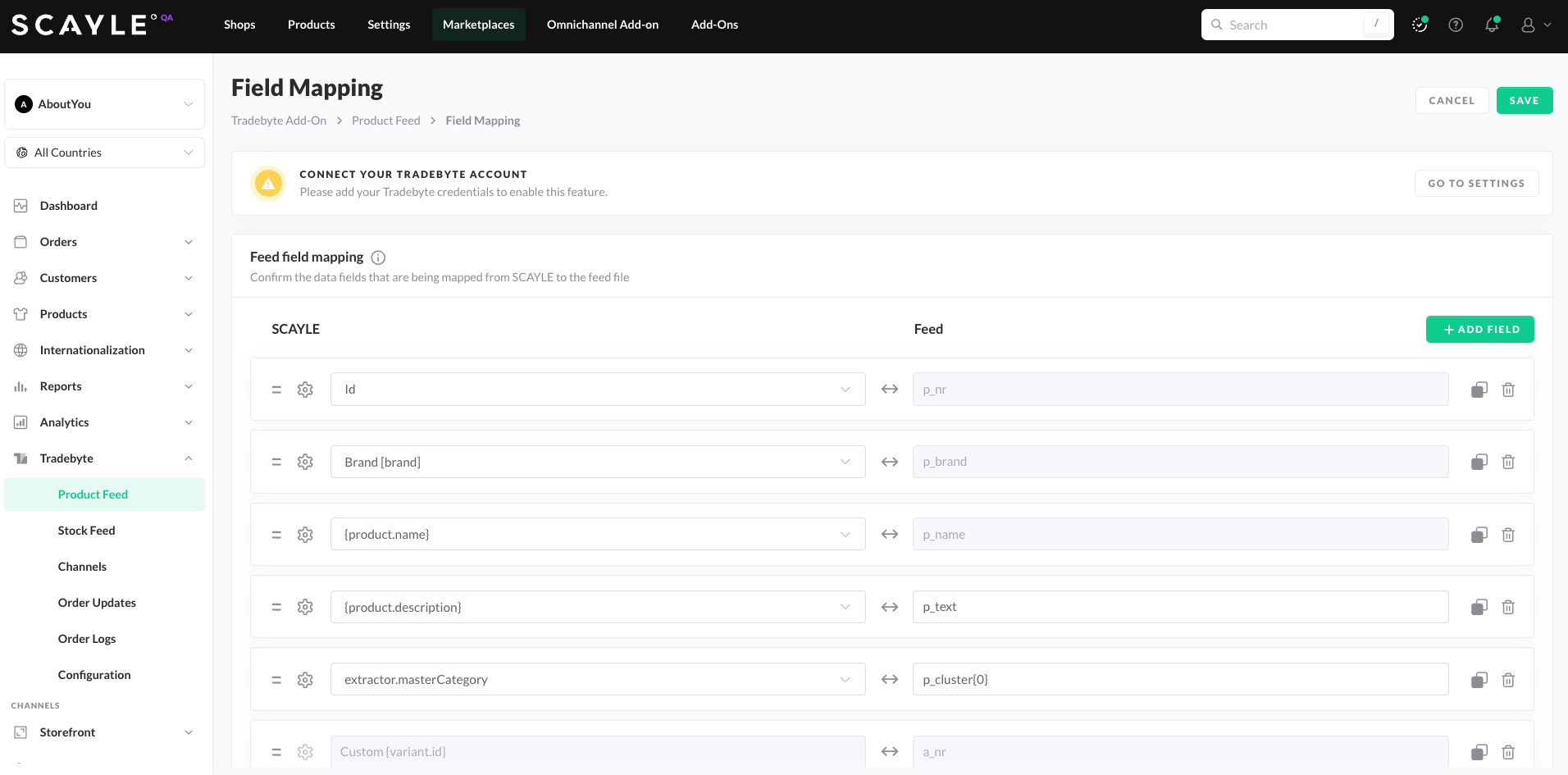
The Tradebyte Add-on automatically maps SCAYLE product variant attributes to the most important and mandatory Tradebyte article properties.
This includes required properties such as:p_nr, p_brand, p_name, p_text, a_nr, a_vk, a_vk_old, a_ean, as well as additional important fields like p_text, p_cluster{0}, a_uvp, a_mwst VAT rate defaulted to value 2 normal in Tradebyte, p_media[IMAGE]{0}, a_comp[color], a_comp[size].
It also sets activation flags to 1 for marketplace enablement globally and per channel, a_active and a_active[{channelSign}].
Default Product Feed Schedule
- Full feed, every day at 00:00 - midnight
- Delta feed, every 10 minutes
SCAYLE → Tradebyte Attribute Mapping
| SCAYLE | Tradebyte | Description |
|---|---|---|
product.id | p_nr | Product Identifier |
attribute.brand | p_brand | Product Brand |
attribute.name | p_name | Product Name |
attribute.description | p_text | Product Description |
attribute.category | p_cluster{0} | Product Master Categories |
variant.id | a_nr | Variant Id |
Price | a_vk | Variant Price |
OldPrice | a_vk_old | Variant Old Price |
variant.ean | a_ean | Variant EAN |
variant.price.recommendedRetailPrice | a_uvp | Recommended Retail Price |
tbVatRate (default: 2 = normal) | a_mwst | VAT Rate – defaulted to Tradebyte “normal” with value 2 |
tb_IsActive (default: 1) | a_active | Global Marketplace activation flag |
tb_IsActive_Channel (default: 1) |
| Marketplace Channel-specific activation flag (per marketplace country) |
product.image{0} | p_media[IMAGE]{0} | Product Image using SCAYLE CDN extractor |
attribute.color (1001) | a_comp[color] | Color Attribute |
attribute.size (1002) | a_comp[size] | Size Attribute |
All mappings can be adjusted in Expert Mode → Product Feed → Update Mappings at the bottom of the UI.
Important Notes
- The mapping between Tradebyte article properties and the target marketplace-specific properties (eg. Zalando, About You, etc) must be configured directly within the TB.One Platform.
This step ensures each marketplace receives the correct attribute set according to its individual requirements. - After SCAYLE Marketplace creation, the Product Feed automatically maps each SCAYLE shop country to every Tradebyte channel, meaning prices are sent from all SCAYLE shops to all Tradebyte channels. Currency is managed in Tradebyte per channel and is not included in the PANDA file.
If you assign a SCAYLE shop country to a generic price list (eg: sales price list) later in the Tradebyte Expert Mode → Product Feed → Price Configuration, that price list will be added to the PANDA file and automatically created in Tradebyte.
However, the price list is not assigned to any channels by default—this must be done manually in TB.One Platform. You can link the same price list to multiple channels, for example when they share the same currency.