

Architecture
You fork this application and deploy it as one Node process. That process answers every request: it renders pages with Vue 3 and Inertia.js on a Hono server, it serves the oRPC endpoints your buttons call, and it talks to the SCAYLE services on behalf of your shop. The SDK package @scayle/storefront ships the commerce domains as base classes inside that process, so the code you write extends SCAYLE's code instead of replacing it.
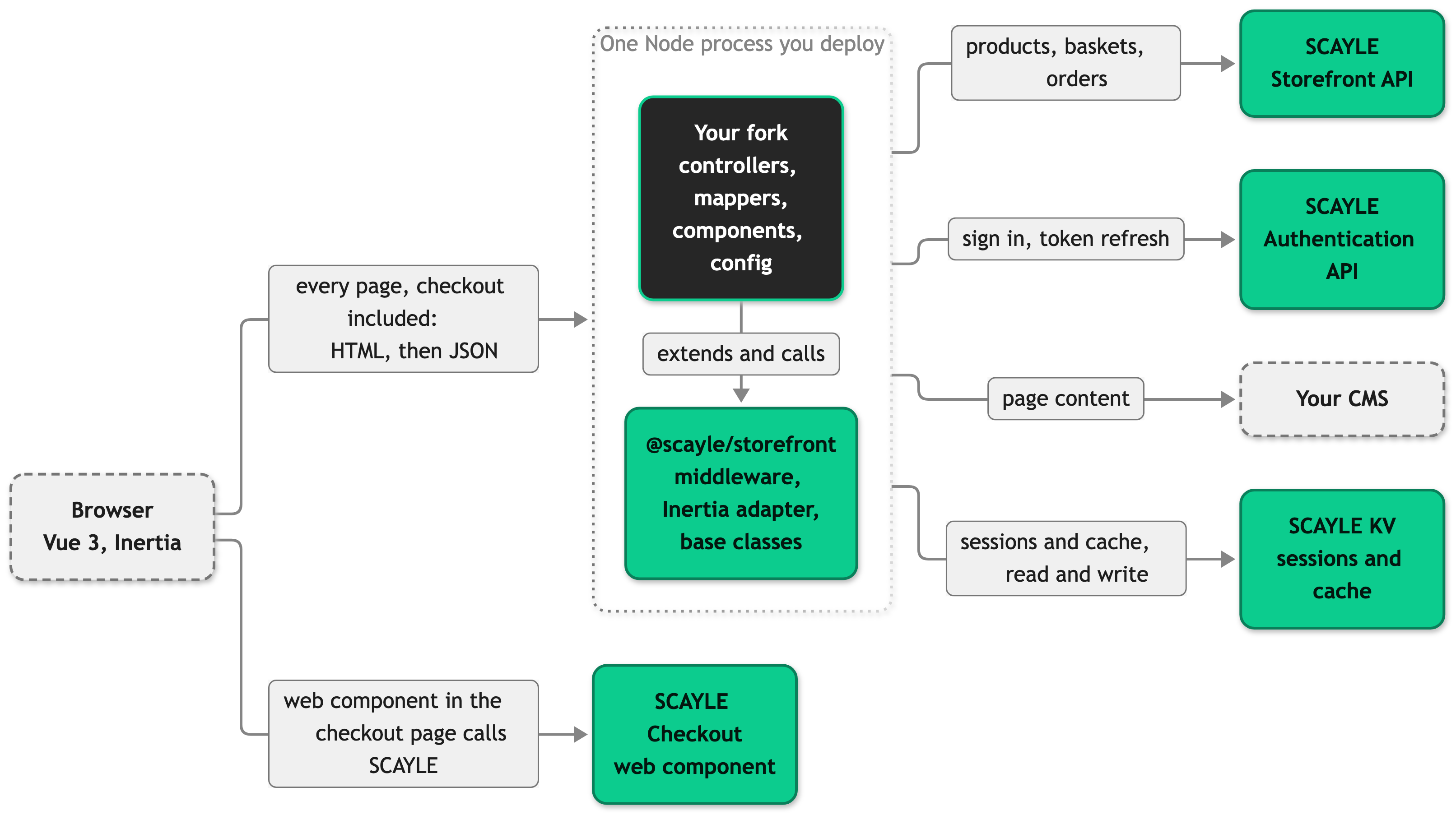
One process covers both halves of a visit. The first request returns server-rendered HTML, and every navigation after that returns the next page's props as JSON, which Inertia swaps into the running Vue app.
Checkout is where that pattern stops. Your server still renders the checkout page, but it signs a JWT for the current basket and hands it to the browser, and the SCAYLE Checkout web component takes over from there and talks to SCAYLE directly. Payment data goes straight from the browser to SCAYLE and never reaches your server.
The other SCAYLE packages and their roles are on Tech Stack.
What you own and what SCAYLE owns
You own the fork. Every file under src/ is yours to edit, and no SDK release rewrites one of them. SCAYLE owns the packages in node_modules, which arrive through version bumps and carry fixes and new domains with them. A change you can express as an override keeps receiving SDK upgrades.
The SCAYLE Commerce Engine owns the commerce facts themselves. Prices, stock, promotion rules, and order state are decided by the Storefront API and the SCAYLE Panel, not by your storefront. Your application reads those values and presents them, so a pricing rule is a Panel change, not a code change.
Your CMS runs on a vendor you choose. SCAYLE KV holds sessions and cached data for every instance of your process, which is what lets you run more than one.
What you can change
The customization ladder tells you where to touch the code:
- Configure by setting
storefront.config.tsvalues for country lists, caching rules, and shop settings. Build time and runtime says which change needs a rebuild and which needs a restart. - Theme your page look and feel through CSS and component markup. You own
src/client/components/andsrc/client/layout/. The SDK never touches them. - Extend what a page shows or how a user action works by subclassing an SDK base class. A mapper or service subclass goes on its registry slot in
src/server/registries.ts, and a controller subclass is mounted on a route insrc/server/ssr-routes.ts. For mappers, start fromsuper.mapX(...)and add your shop-specific fields, as Start every override fromsuperexplains.getViewPropsis different: it is abstract on every page controller, so you write the whole props object yourself rather than building on a base result. - Replace a built-in system with a different one. Choosing your CMS vendor is the case you will meet, because
CMS_PROVIDERselects the provider package at build time and your server talks to that vendor instead of any SCAYLE default. A page shape the SDK has no base controller for is the other: you add the route and write the controller yourself.
Where each task starts
The first four rows give you the mental model. Read Extending the SDK before your first real change, because most of what you build is an override.
| You want to | Start at |
|---|---|
| Learn the runtime and the tools | Tech Stack, for the runtime, the build, and the test tools |
| Learn where code goes | Project Structure, for the folders and the import boundaries ESLint enforces |
| Follow one request through the server | Request Lifecycle, for the middleware in src/server/index.ts |
| Learn what each layer is responsible for | Layers and Data Flow, for what a service, a mapper, and a controller each do |
| Add a page | Pages and Controllers, for the controller, its hooks, and the Vue page it renders |
| Add a button that changes data | RPC API, for an oRPC procedure and the client call |
| Add a field to a product, basket, or order | Extending the SDK, for the type declaration and the mapper that fills it |
| Add a country or change the URL scheme | Routing and Countries, for the country selector and the route builders |
| Change what is cached and for how long | Caching, for the response cache, the data cache, and cacheableRoutes |
| Keep something per user | Session and Authentication, for session data, sign-in, and protected pages |
| Add a setting or an environment variable | Configuration, for the config file, validation, and what reaches the browser, and Environment Variables, for every variable and what a change needs |
| See what a page received and sent | Storefront DevTools, for the Inertia.js visits, the oRPC calls, and the shop, country, and locale of the current page |
| Find out why a request failed | Errors and Logging, for the error page, oRPC errors, and the logger |


