

Storyblok
Your editors compose the homepage, content pages, and category page content in Storyblok, and the Storefront Application V3 renders them as Vue blocks. Editors preview unpublished changes live in Storyblok's Visual Editor before they publish.
Why it matters
The block library covers the common editorial patterns, such as text, images, sliders, and product sliders, so your developers only build what is specific to your shop. What every CMS provider shares is on the CMS page.
Try it
- Open the demo homepage: a homepage composed from Storyblok blocks.
What's included
- Storyblok provider: The
@scayle/storefront-cms-storyblokpackage fetches stories from the Storyblok Content Delivery API and caches published content.src/server/cms/providers/storyblok/service.tsbinds it to your generated content types. - Block library: A block is one Storyblok component that an editor places on a page. Each block is a Vue component in
src/client/cms/providers/storyblok/components/, andStoryblokBlockDispatch.vuepicks the component for each block. - Content model and type sync:
pnpm cms:syncpulls your component definitions from Storyblok and generates TypeScript types for them. The Storefront CLI can import the bundled content model into an empty space. - Visual Editor support: The server detects Visual Editor requests, allows Storyblok to frame your shop, and shares editor data with the page. The browser then starts Storyblok's bridge script, which updates the page while an editor types, and the
v-editabledirective tags blocks so the editor can select them. - Category page content: Product listing pages fetch the story of their category and render its teaser blocks above the product grid and its SEO blocks on the first page.
- SEO metadata: The homepage and content pages take the title, description, robots rule, and social share image from the story. Their hreflang links, which tell search engines which URL serves which country, come from the story's translated versions. A category page takes only the social share image from its story.
Blocks the Storyblok dispatcher renders (complete list)
PageComponent and ProductListingPageComponent are the root content types of a story, not blocks. The dispatcher renders exactly the blocks in this table.
| Block | What it renders |
|---|---|
TextComponent | A heading from h1 to h4 or a paragraph, chosen by the textType field. |
RichTextComponent | Formatted prose from Storyblok's rich text field. It localizes internal links and sanitizes the HTML. |
ImageComponent | A responsive image with separate desktop and mobile files, an optional aspect ratio, and an isPriorityImage toggle. |
VideoComponent | A video with a preview image and toggles for autoplay, mute, loop, and controls. With autoplay off, it shows the preview image and a play button. |
LinkComponent | A link around nested blocks. |
ButtonComponent | A link styled as a button in one of four styles: primary, secondary, accent, or plain. |
AccordionComponent | A group of accordion items with an optional title. |
AccordionItemComponent | One accordion pane with a title and nested blocks. |
CountdownTimerComponent | A countdown to endDate in a small or large size. The live countdown starts in the browser, and the server renders a placeholder until then. |
SectionComponent | A container with a background color or image, padding, minimum height, and content alignment. |
GridComponent | A grid with separate column counts and gaps for desktop and mobile, and one alignment setting for each direction. |
DividerComponent | Vertical spacing in three heights with an optional line. |
SliderComponent | A carousel of nested blocks with optional arrows and pagination indicators. |
ProductSliderComponent | A slider of the products an editor picks in Storyblok. |
SmartSortingProductsSliderComponent | A slider of products ranked by a smart sorting key, with optional brand, category, and limit filters. |
RecentlyViewedProductsComponent | A slider of the products the user viewed before, read from the browser. |
SingleProductComponent | A spotlight card for one product with an optional badge, urgency flag, countdown, and colors. |
What you can change
Configure
- The Storyblok access token and the draft content switch, with environment variables. See Configuration.
Theme
- The markup and styling of any block, by editing its Vue component in
src/client/cms/providers/storyblok/components/.
Extend
- Add a custom block: a new Storyblok component with its own Vue component.
- Map language codes to your Storyblok folder names with
folderMappingincreateCMSService. See Folder mapping. - Read different story fields for SEO metadata by editing
getPageMetainsrc/server/cms/providers/storyblok/service.ts. - Change the Content Delivery API query by overriding
buildStoryQuery, or keep more of the API response by overridingtransformStoryResponse. - Change the Content-Security-Policy directives that Visual Editor requests add, by setting
cspConfigon your subclass ofStoryblokCMSService. The server removesX-Frame-Optionsonly while yourcspConfigcontainsframe-ancestors, so dropping that directive keeps an existingX-Frame-Optionsheader, which blocks the editor frame.
Replace
- Storyblok for another CMS provider, which you select with
CMS_PROVIDERas the CMS page describes. Content models, blocks, and generated types belong to one provider, so nothing from Storyblok carries over.
Constraints and limits
Permanent
- Your deployment reads one Storyblok space with one token. The server creates one Storyblok client on first use and shares it across all requests, and the token comes from the environment when the server starts. To switch spaces, change
STORYBLOK_CMS_ACCESS_TOKENand restart. - Draft content also needs a Preview token in
STORYBLOK_CMS_ACCESS_TOKEN, because Storyblok serves drafts only to a Preview token. The request needs a non-empty_storyblokquery parameter andSTOREFRONT_CMS_ALLOW_DRAFTS=trueon the server, as the CMS page describes. Without either, the server serves published content. The CMS page explains why the flag stays off on production. - The server refuses to start without
STORYBLOK_CMS_ACCESS_TOKEN. The error is theInvalid Storyblok CMS environmentmessage that the CMS page describes. - A request outside an editor session finds a story only when the story is published and sits inside the folder of the shop's language. A shop with the locale
de-DEreadsde/content/about, and a story atcontent/aboutoutside that folder gives the not-found page. A slug with a character other than a letter, a digit, an underscore, a dot, or a hyphen is rejected without a call to Storyblok. An editor session with drafts enabled also finds unpublished stories, as the bullet above describes. - Published content is cached per story and locale, and every user shares that cache. Visual Editor requests that serve drafts skip the cache. The CMS page says how long a change takes to show.
Known limitations
- The page-fetching client sets no Storyblok region, so it calls the default (EU) Content Delivery API host.
STORYBLOK_CMS_REGIONonly affectspnpm cms:syncand the Storefront CLI. A space outside the EU needs a change to the package, because the client is created inside it. - A story that lists an unpublished translation still gets an hreflang link to it. The package builds the links from every alternate of the story and does not check whether the alternate is published, so the link points to a URL that answers with the not-found page. This also affects the hreflang links of the SEO metadata described under What's included.
- The generated types are a snapshot. When an editor changes a component in Storyblok, your types stay as they are until you run
pnpm cms:sync, and a Vue block can read a field that no longer exists. Fields then arrive asundefinedat runtime. - The bundled content model also defines
ImageTextSliderComponentandImageTextSlideComponent. No field accepts the slider, only the slider accepts the slide, and the dispatcher has no entry for either, so they render nothing. ProductSliderComponentuses thescayle-storyblokcustom field type for its products. The content model import fails for that component until your space has the SCAYLE Field Type Plugin, and a re-run after you add it creates only what is missing.SingleProductComponentstores a plain product ID in a number field, so an editor types the ID.- The content model import only creates what your space is missing. It skips components that exist, so a change to an existing component in
components.jsondoes not reach your space. Apply it in Storyblok. The import creates components and component groups and no stories. getPageMetareturns metadata only for stories whose root block isPageComponentorProductListingPageComponent. For any other root block, the page title falls back to the shop name and the page has no description or robots rule.- Storyblok rate limits fail the request at once, because the client does not retry a 429. On a cache miss, a CMS page then shows a server error. A category page renders without its CMS content.
- The page-fetching client sets no request timeout, and the server's outbound dispatcher fails a Storyblok call after 3 seconds without a response, see Outgoing calls.
RichTextComponenthas custom renderers for headings, lists, paragraphs, and links only. Heading levels 4 to 6, quotes, and images render as plain tags without the storefront typography classes. A block embedded inside a rich text field renders nothing.- Live preview updates the blocks of the story and nothing around them. The title, description, robots rule, social share image, and hreflang links come from the server, so a change to them shows after a reload. The bridge helper reloads the page on the Visual Editor's
changeandpublishedevents and ignores link clicks in the editor frame.
How it works
A story arrives in your page as the CMSPageData shape, with the block tree under story.content:
A route chooses the story, and the Storyblok provider service fetches it:
- The route sets the slug, one of the slugs the CMS page lists.
- The provider service puts the language folder in front of the slug, requests
cdn/stories/<folder>/<slug>from the Content Delivery API, and returns{ story }. It reads the language from the locale of the active country. A published response is cached. A missing story follows the not-found rules of the CMS page. - For the homepage and content pages, the server derives SEO metadata with
getPageMetaand builds hreflang links. When the story has translated versions, each country with a translated version links to that story's path. All other countries link to the path of the current page. A category page reads only the social share image throughgetPageMeta, and takes its other SEO data and its hreflang links from the category. - The homepage and content pages receive the story as
pageData.PageComponentrenders each entry ofcontentthroughStoryblokBlockDispatch, which picks the Vue component by the block'scomponentname. Blocks that nest other blocks use the same dispatcher. A category page receives the story as thecmsContentprop.
Draft content and the Visual Editor
Storyblok loads your shop in an iframe and adds _storyblok to the URL. That parameter marks an editor session. The provider service then decides which version to fetch:
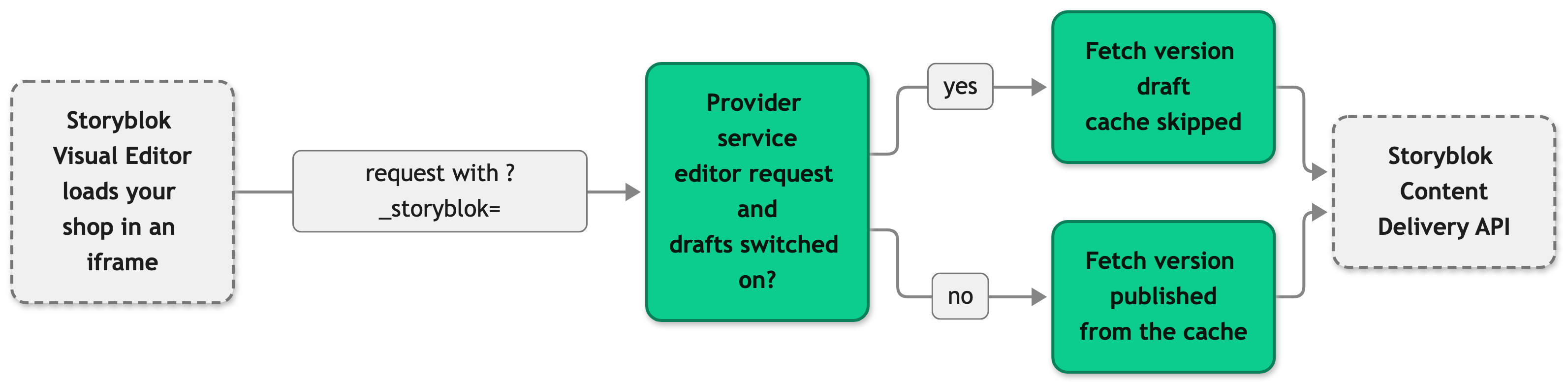
A request without _storyblok takes the no branch, and so does an editor request when STOREFRONT_CMS_ALLOW_DRAFTS is not true.
Every full page request with _storyblok, whatever the switch says, also gets these three things:
- The server merges Storyblok's origins into the Content-Security-Policy, so the iframe can load. The CMS page describes the merge rules.
frame-ancestorsbecomes'self' https://app.storyblok.com, andscript-srcandconnect-srcgain Storyblok's origins.script-srcalso gains'unsafe-inline', because Inertia injects inline scripts for the page data. - The server shares
cmsEditorDatawith the page. Its presence is the signal that the request is an editor session. - The browser loads Storyblok's bridge script after the page mounts and the bridge replaces the story on screen whenever the editor changes a block.
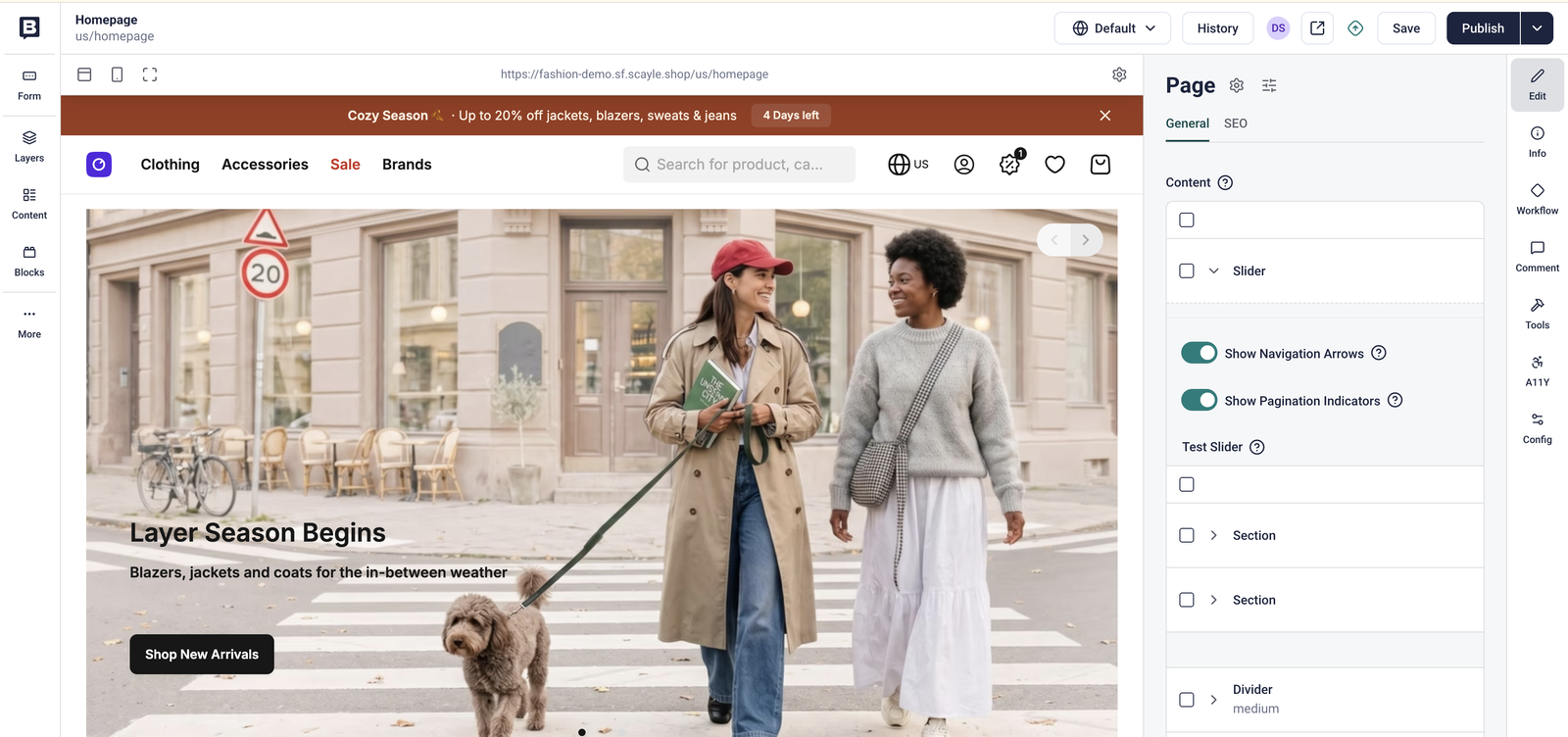
Visual editor
The v-editable directive tags a block with the attributes Storyblok needs to select it. Storyblok includes the _editable field that the directive reads only in draft responses, so on a block without it the directive returns at once. The directive imports @storyblok/js lazily, so the attributes appear a moment after the block mounts.
Setup
Prerequisites
- A Storyblok space. In Settings > Access Tokens, you find a Public token for published content and a Preview token for draft content. Use the Public token on production and the Preview token on every environment where editors preview.
- A Personal Access Token from your Storyblok account settings under Personal access tokens. The content model import and
pnpm cms:syncuse it, and the running shop does not. - A project set up for the Storefront Application V3 with a
.envfile in its root.
Set up with the Storefront CLI
You end with the Storyblok variables in .env and, optionally, the bundled content model in your space. The Storefront CLI page covers the command in general.
- Run the command from the root of your project:
Without flags, the command prompts for each value.--import-content-modelis always required, and the Personal Access Token is required only when it istrue. Add--non-interactivein CI, so a missing value fails the run. - Check
.env. The variables the command writes are listed on the Storefront CLI page. - Set
STOREFRONT_CMS_ALLOW_DRAFTS=truein.envon every environment where editors preview. - In Storyblok, create a folder for each language of your shop and a story named
homepageinside it. Name the folder after the language code of the shop's locale, such asdeforde-DE, or after the value you set in Folder mapping. Publish the stories. - Rebuild with
pnpm build, because the build readsCMS_PROVIDER.
When it worked, the homepage of your shop renders the blocks of the homepage story. A language without that story shows the not-found page.
Set up manually
Use this path in CI or when you want to see what the command writes. It does not import the content model, so use the Storefront CLI for that.
- Set the variables in
.envor in your deployment environment: - Create the language folders and
homepagestories as in step 4 of the CLI setup. - Rebuild with
pnpm build.
Sync your content model and types
You end with up-to-date TypeScript types for your Storyblok components. The sync only reads from your space and never changes it. Run it after an editor or developer changes a component in Storyblok.
- Set
CMS_PROVIDERandSTORYBLOK_CMS_SPACEin.env. SetSTORYBLOK_CMS_PERSONAL_TOKENtoo, or sign in to the Storyblok CLI beforehand. - Run
pnpm cms:sync. - Commit the changed files.
The script signs in to the Storyblok CLI when a Personal Access Token is set, using STORYBLOK_CMS_REGION or eu. It pulls your components, saves components.json and groups.json to .scayle/cms/contentModel/storyblok/, and generates types into src/shared/types/cms/storyblok/gen/.
When it worked, git status shows the changed type files, or nothing if your components did not change.
Connect the Visual Editor
You end with Storyblok showing your shop in the Visual Editor.
- Run an environment over HTTPS with
STOREFRONT_CMS_ALLOW_DRAFTS=trueand a Preview token inSTORYBLOK_CMS_ACCESS_TOKEN. Storyblok requires HTTPS for the preview, locally as well. The development server serves HTTPS and needs the certificates from the project README. - In Storyblok, open Settings > Visual Editor and set the Preview URL to the origin of that environment, such as
https://localhost:3000. - Open a story in the Visual Editor.
When it worked, your shop loads in the editor frame and blocks you select in the editor update as you type.
Configuration
Environment variables
CMS_PROVIDER and STOREFRONT_CMS_ALLOW_DRAFTS work the same for every provider. Set CMS_PROVIDER to storyblok. The CMS page describes both.
| Variable | Read by | Default | A change needs | Purpose |
|---|---|---|---|---|
STORYBLOK_CMS_ACCESS_TOKEN | The server | None, required | A server restart | The Public or Preview token for the Content Delivery API. Drafts need a Preview token. |
STORYBLOK_CMS_SPACE | pnpm cms:sync | None, required for the sync | The next sync run | The Space ID. |
STORYBLOK_CMS_PERSONAL_TOKEN | pnpm cms:sync | None | The next sync run | The Personal Access Token. Without it, the sync uses an existing Storyblok CLI session. |
STORYBLOK_CMS_REGION | pnpm cms:sync | eu | The next sync run | The region the sync signs in to, such as eu or us. The running server does not read it. |
Folder mapping
createCMSService in src/server/cms/providers/storyblok/service.ts passes the settings below to the provider service. The service looks up the folder for a request in folderMapping, first by the full locale such as de-AT and then by the language code such as de. Without a match, it uses the language code as the folder name.
| Field | Default in the Storefront Application V3 | Purpose |
|---|---|---|
accessToken | STORYBLOK_CMS_ACCESS_TOKEN | The token for the Content Delivery API. |
draftContentEnabled | true when STOREFRONT_CMS_ALLOW_DRAFTS is true | Allows draft content in Visual Editor requests. |
folderMapping | { de: 'de', en: 'en' } | Maps a locale or language code to a Storyblok folder name. |
To use other folder names, change the mapping:
The story paths the service requests, for a shop with the locale de-DE and the default mapping:
| Request | Story path |
|---|---|
/ or /homepage | de/homepage |
/content/about | de/content/about |
| Category page of category 42 | de/c/c-42 |
Customization guides
Add a custom block
You end with a block that editors can place on a page and your shop renders.
- Define the block in your Storyblok space. Its technical name has to match the name you use in the dispatcher.
- Allow the block where editors place it. Every blocks field of the bundled content model lists the blocks it accepts, so add yours to the fields it belongs in. Add it to the
contentfield ofPageComponentas well, because theStoryblokBlocktype is built from that field. - Run
pnpm cms:syncto generate the type for the block. It is then available from@shared/types/cms/storyblok. - Create the Vue component next to the others in
src/client/cms/providers/storyblok/components/. Copy a small existing block,DividerComponent.vue, rename it, and swap the type and the template. Keepv-editable="contentElement"on the root element, because that is what lets editors select the block. - Register the block in
StoryblokBlockDispatch.vue. Add its import and an entry to theBLOCKSmap. Setsuspense: truewhen the component awaits insetupor is wrapped indefineAsyncComponent, andfalseotherwise. The dispatcher forwards the fallthrough attributes thatSectionComponentrelies on for the spacing between nested blocks, so the entry needs nothing else.BLOCKShas a key for every block type in the generatedStoryblokBlocktype, sopnpm typecheckfails until your block has an entry, and it also fails when the component cannot accept the payload of its block type. - Compose a page with the block in Storyblok and open it.
When it worked, the page renders your block. A development build shows Storyblok block "<name>" is not implemented. when the dispatcher has no entry for the name, and a production build shows nothing. Step 1 sets the exact component string and the dispatcher looks it up as written, so the case has to match.
Read your own SEO fields
You end with page metadata that reads the fields of your own story model. The CMS page controller calls getPageMeta and builds the title, description, robots rule, and share image from the result. Change the field names in getPageMeta in src/server/cms/providers/storyblok/service.ts:
CMS explains how the title, description, and robots rule apply to CMS pages and category pages.
When it worked, the page title and description of a story come from the fields you read.
Change the Content Delivery API query
You end with a provider service that sends the query parameters your shop needs. StoryblokCMSService has two protected hooks. Subclass it in src/server/cms/providers/storyblok/service.ts and return your subclass from createCMSService.
buildStoryQuery(useDraftContent: boolean, request: IncomingRequest): Record<string, unknown>returns the query for the story request. The base class setsversion,cv,language, andresolve_links. Override it to change those or to add parameters such asresolve_relations.transformStoryResponse(response: { data: { story: unknown } }): TPageData | undefinedturns the API response into the page payload. The base class returns{ story }. Override it to keep more fields of the response, and add those fields toCMSPageData. Returningundefinedrenders the not-found page.
Spread super.buildStoryQuery(...) as the first entry. Without it, the query loses version, so drafts silently stop appearing, and it loses language and resolve_links. TypeScript does not report this, because the return type is Record<string, unknown>.
The Visual Editor bridge accepts a resolveRelations list, and the call in src/client/cms/providers/storyblok/composables/useStoryblokEditor.ts sets only resolveLinks and preventClicks. After you add resolve_relations to the query, set the same list in that call, so the bridge and the server agree on which relations to resolve.
When it worked, the request for a story carries your parameter.
Best practices
Check the block library before you add a block
Images, sliders, grids, sections, and accordions cover most layouts. A block you add is code that you test and keep in step with the content model.
Load the Storyblok SDK lazily in code that every customer and user runs
vite.config.ts groups @storyblok/js and its dependencies into the cms-storyblok chunk. The v-editable directive and the Visual Editor bridge import the SDK dynamically, and the dispatcher loads RichTextComponent as an async component. So the chunk loads for editor sessions and for pages that render rich text. A static import of a runtime value from @storyblok/js in a component that every page loads moves the chunk into the initial load. In your own blocks, use a dynamic import() or an async component, as StoryblokBlockDispatch.vue does for RichTextComponent. Type imports are removed at build time and are safe.
Leave the priority image toggle off unless the automatic choice is wrong
Editors turn on isPriorityImage for at most one image or section background per page. Image priority explains when that is worth it.
Test the Visual Editor on staging before you hand it to editors
Open a few stories in the editor, with drafts switched on, a Preview token, and the Preview URL pointing at staging. Check that a change shows up while you type.
Troubleshooting
Pages fail with a server error and the log says "Storyblok API request failed"
Issue: A CMS page returns a server error. The server log holds Storyblok API request failed with the slug, the locale, and a status.
Possible causes:
- The status is 401, and Storyblok rejects the token.
- The status is 429, which is the Storyblok rate limit described under Constraints and limits.
- Storyblok has an outage or the request cannot reach it.
Solution:
- Read the
statusin the log message. - For a 401, request a story directly with a token that can read it, for example
curl "https://api.storyblok.com/v2/cdn/stories/de/content/about?token=<access-token>&version=published", and replace the token inSTORYBLOK_CMS_ACCESS_TOKENif it fails. A 404 means the path is wrong or the story is unpublished. - For a 429, wait for the limit to reset and check how many uncached requests reach Storyblok.
Prevention: Serve the cacheable routes behind a CDN, so fewer requests reach the server and, on a cache miss, Storyblok.
The Visual Editor shows no live updates
Issue: An editor changes a block in the Visual Editor and the page does not update. First confirm the draft content settings under Constraints and limits.
Possible causes:
- The request reaches the server without
_storyblok, for example because a proxy strips the query string. The server then does not treat it as an editor session and does not start the bridge. - A proxy or CDN in front of your shop sets its own
Content-Security-PolicyorX-Frame-Optionsheader, and the editor frame stays blank. - The browser blocks the bridge script.
Solution:
- In the browser developer tools, check that the document request of the editor frame carries
_storyblok. - Check that the response header
Content-Security-Policyholdsframe-ancestors 'self' https://app.storyblok.com, and that noX-Frame-Optionsheader remains. - Look in the console for an entry labeled
storefront:cmswith the messageFailed to initialize Storyblok Visual Editor bridge, and read the error it carries.
Prevention: Test the editor on staging with the same proxy and CDN setup as production.
Blocks render but the Visual Editor does not outline them
Issue: The blocks show on the page and the editor cannot select them.
Possible causes:
- The block data holds no
_editablefield because the response was not a draft. - You looked before the attributes landed, which happens a moment after mount.
Solution:
- Inspect the root element of the block and wait a moment. It carries
data-blok-canddata-blok-uidwhen the directive applied. - If the attributes are missing on a custom block, check that its root element carries
v-editable="contentElement", as in Add a custom block. - If they are missing on every block, check that the request served draft content, as described under Constraints and limits.
Prevention: Start a custom block from an existing block, such as DividerComponent.vue, so the directive is already there.
Reference
Storyblok
- Storyblok access tokens
- Storyblok Content Delivery API
- Storyblok Management API
- Storyblok Visual Editor
- Storyblok CLI

