

Routing and Countries
The Storefront Application V3 serves every country from one deployment. Before a controller runs, the SDK matches each request to one of the countries in storefront.config.ts. The countrySelector setting decides how a country shows up in a URL: as its own host, or as a path prefix on a shared host.
Each entry in countries is one SCAYLE shop country: a country in one language, with its own shopCountryId, locale, and URL. Two entries can share a countryCode, such as de-CH and fr-CH, and the shop switcher groups them by it. Configuration lists every country field, and the locale also decides the translations, currency, and date formats, see Internationalization.
For how a matched route renders a page, see Pages and Controllers.
How a request gets its country
The SDK resolves the country in its context middleware, from the URL. The selector decides which part of the URL to match: the host for domain, or the first path segment for path and path_except_default. A request that carries an x-shop-country-id header skips the URL, see The x-shop-country-id header.
Once a country resolves, the middleware builds the StorefrontContext with a SCAYLE Storefront API client scoped to that country's countryCode and locale. Controllers read the result as this.storefront.country and never parse the URL themselves. Under the domain selector, a host that matches no country's domain leaves the request without a country. The request then continues without a storefront context, and the page controller throws Storefront context is missing. Ensure createStorefrontRuntime() middleware runs before SSR controllers., which answers a 500. The message points at the middleware, but the cause is the host. The Storefront context panel of Storefront DevTools shows the shop, country, and locale that the current page resolved.
The x-shop-country-id header
When a request carries x-shop-country-id, the SDK matches its value against the shopCountryId of each configured country and ignores the host and the path. A value that matches no country resolves no country, and the request does not fall back to the URL. The browser sends the header on API calls, and any other client can send it too. Nothing checks where the value came from, so a client can select a shop that its host or path would not. It is a different header from CF-IPCountry, which only feeds the country suggestion.
Don't strip the header at your edge in the path and path_except_default modes. API routes carry no country prefix, so the calls of the application's own browser client need it to reach the right shop. Without it, a call under path fails with a 400, and under path_except_default it runs against the default shop. In domain mode the host selects the country, and stripping the header is safe there.
Choosing a country selector
| Selector | Country comes from | Example URLs | Default country |
|---|---|---|---|
path | First path segment | example.com/de/basket, example.com/en/basket | Has a prefix like every other country. / redirects to it. |
path_except_default | First path segment, falling back to the default | example.com/basket, example.com/at/basket | Served at the root, without a prefix. |
domain | Request host | example.de/basket, example.us/basket | No special URL. |
The config schema is a discriminated union on countrySelector, so the selector decides which country fields TypeScript and the boot-time validation accept. The two path selectors require path on every country, and domain requires domain on every country.
The Storefront Application reads the selector from the STOREFRONT_COUNTRY_SELECTOR environment variable and falls back to path. Its example countries carry path, so the variable only switches between path and path_except_default. Setting it to domain fails validation when the server starts. See Switch the country selector.
path
Every country, the default one included, lives under its own prefix. One host serves all of them, and the Storefront Application uses this selector by default.
What to set:
pathon every country, as a single path segment such asdeoren. The segment is any value you choose, which is why the Storefront Application gives the United Statesen. The server doesn't check that the values are unique or free of slashes, so keep them that way yourself.isDefault: trueon the country that unprefixed requests redirect to. It's optional: without it, the first country in the list takes that role.domainat the top level is optional. See Public origin.
A request whose first path segment isn't a configured country path gets a 302 to the same path under the default country: / goes to /de, and /basket?step=1 goes to /de/basket?step=1. createStorefrontRuntime sends this redirect before the session starts, and lets /api requests through.
path_except_default
The default country lives at the root, and every other country gets a prefix. Pick it when a shop that served a single country adds more and its existing URLs have to keep working.
What to set:
isDefault: trueon exactly one country. The server refuses to boot without one.pathon every country. The default country needs one to pass validation, but itspathnever appears in a URL.domainat the top level is optional. See Public origin.
Nothing redirects. A path without a non-default country prefix is matched against the routes of the default country, so with Germany as the default, /de/basket matches no route and returns a 404 instead of redirecting to /basket. localizeLink and SFLink never add the default country's prefix, so watch for it in hand-written URLs, CMS content, and marketing links.
domain
Each country has its own host, such as a subdomain or a country domain, and paths carry no country prefix. It takes a code change in storefront.config.ts, plus DNS and a TLS certificate for every host.
What to set:
domainon every country, as a lowercase bare host with an optional port, such asexample.deorde.localhost:3000. The server refuses to boot on a value with a scheme, a path, or a trailing slash, such ashttps://example.de.- No
pathon the countries and no top-leveldomain. The public origin always comes from the active country'sdomain. isDefaultis optional.
The request host has to equal a country's domain exactly, port included. A host that matches no country, such as www.example.de when only example.de is configured, resolves no country and fails as described in How a request gets its country, so redirect such hosts before they reach the application. A proxy in front of the application has to forward the public host.
Rules for every selector
- At most one country sets
isDefault: true. - No two countries share a
shopCountryId. - The server checks both rules at boot and refuses to start when either fails.
isDefaultmarks the country whose URL becomes thex-defaulthreflang alternate. Without it, nox-defaultalternate is emitted.- Trailing slashes are redirected away before the country redirect and routing:
/de/basket/goes to/de/basketwith a301forGETandHEADrequests, and a308for other methods.
Public origin
Canonical links, hreflang alternates, and shop switcher URLs are absolute, so the server resolves one public origin per request. Middleware reads it as ctx.var.request.origin, and the client receives it as page.props.storefront.origin.
domain: the active country'sdomain.pathandpath_except_default: the top-leveldomainwhen it's set, and the request host otherwise.
Every absolute URL your server emits, from a canonical link to a JSON-LD base, comes from request.url or request.origin, never from a scheme literal glued to a config value. ctx.req.url is for path matching only, because behind a proxy it can carry the host the request arrived on instead of the public one, for example when the proxy sends no x-forwarded-host.
@scayle/storefront-build rewrites the request host from x-forwarded-host when a proxy sends that header. The scheme comes from x-forwarded-proto and falls back to the protocol of the request.
The application applies the forwarded host as it is, so it trusts the proxy to send a sanitized one. When a proxy passes a client-sent x-forwarded-host through untouched, a forged value reaches every absolute URL on a cacheable page, and your CDN keeps that page for other visitors. Set the top-level domain in that setup. It pins the public origin for the path and path_except_default selectors. The domain selector is not affected, because a forged host matches no country.
Set the top-level domain when customers reach the Storefront Application through a host it never sees, for example when your own WAF or CDN sits in front of Storefront Hosting:

Customers visit www.example.com, but requests reach the application as storefront.example.com, so every absolute URL would point there. With domain: 'www.example.com', canonical links, hreflang alternates, and shop switcher URLs use the public host again. The Storefront Application reads the value from STOREFRONT_DOMAIN, as a bare host without a scheme. Leave it unset when the application already sees the public host, as in local development, or on Storefront Hosting with no proxy of your own in front.
How links get their country
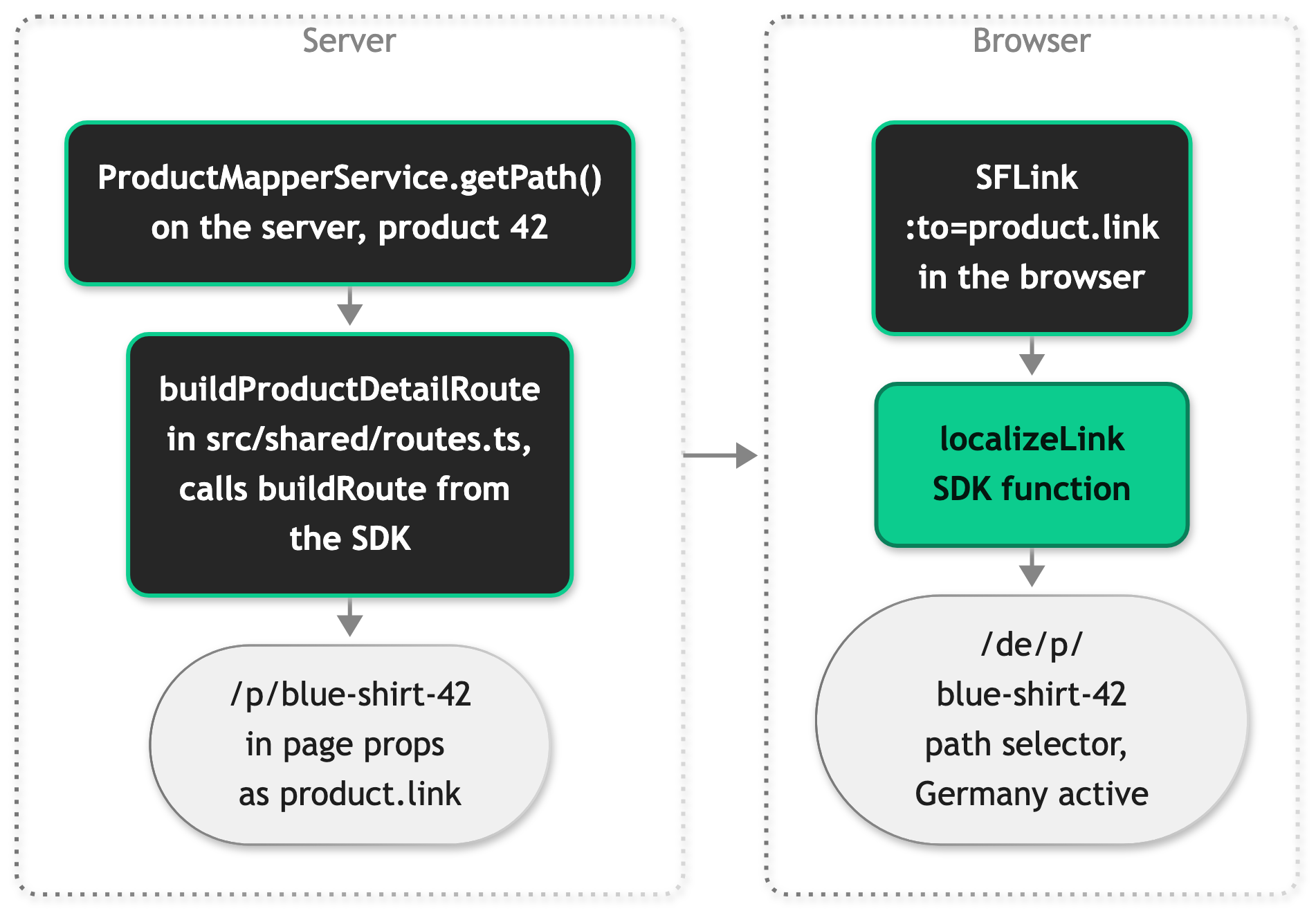
Route patterns and the paths built from them never carry a country. The country is added at the last moment, when a link renders or a redirect is sent, so the same path works under every selector and for every country:
Route patterns and builders
src/shared/routes.ts holds every URL pattern of the application in one routes object, next to builder functions that fill in the parameters:
The application ships these builders:
| Builder | Returns |
|---|---|
buildProductDetailRoute(id, name) | /p/blue-shirt-42 |
buildProductListingRoute(id, path) | /c/women/shoes-42, keeping the slashes of the category path |
buildSearchRoute(term) | /search?filters[term]=<term>, with the term URL-encoded |
buildOrderDetailRoute(id) | /account/orders/<id> |
getSignInRoute(redirectUrl?, register?) | /signin, with a sanitized redirectUrl and an optional register query |
Mappers call the builders on the server, for example getPath in src/server/services/mappers/product-mapper.ts, and the unprefixed path reaches the client in page props such as product.link. The server mounts each pattern in src/server/ssr-routes.ts, and Pattern syntax covers how to write one.
The builders rest on two helpers from @scayle/storefront/shared, which run on the server and in the browser:
buildRoute(pattern, params, query?, options?): substitutesparamsinto a Hono pattern, drops the{…}constraints, URL-encodes the values, and appendsquery.paramsis typed from the pattern, and a missing value throws. List a param inoptions.rawParamsto keep its slashes.slugify(text): turns text into a lowercase ASCII slug with diacritics stripped, soCrème Brûléebecomescreme-brulee.
Pattern syntax
The examples show patterns as written in a TypeScript string, where a backslash is doubled.
| Syntax | Example | Matches |
|---|---|---|
| A static path | /basket | /basket only |
:name | /content/:slug | One path segment, read with this.ctx.req.param('slug') |
:name{regex} | /account/orders/:id{\\d+} | A segment the expression matches, such as /account/orders/42 |
A regex that allows / | /c/:identifier{(?<slug>[a-z0-9]+(?:[-/][a-z0-9]+)*)-(?<id>\\d+)} | Several segments, such as /c/women/shoes-42 |
* | /account/* | /account and every path below it, used to register middleware |
- A pattern never carries a country prefix. With a selector that uses a prefix, the router is mounted under it.
- Hono wraps the expression in
^and$by joining strings, so group an alternation, as in:size{(s|m|l)}. An ungroupeds|m|lcan match a prefix or a suffix, depending on which Hono router handles the route. - The first mounted pattern that matches handles the request, so mount a specific pattern before a broader one.
buildRoute()drops the{…}part when it builds a link, so one pattern serves the mount and the builder.- The named groups in the product and category patterns document their shape. The base classes read the whole
identifierand take the number after its last hyphen as the ID.
For the helpers that build canonical links and hreflang alternates, see SEO.
localizeLink
localizeLink(context, to) from @scayle/storefront/shared adds the active country's prefix to a site-relative path. It accepts the server StorefrontContext (this.storefront in a controller) or the client page.props.storefront. A path that already starts with the active country's prefix comes back unchanged, so passing /de/basket under the path selector with Germany active returns it as is. Pass only site-relative paths, because an absolute URL gets a prefix too.
| Selector | Active country | localizeLink(context, '/basket') | localizeLink(context, '/') |
|---|---|---|---|
path | Germany (de) | /de/basket | /de |
path_except_default | The default | /basket | / |
path_except_default | Austria (at) | /at/basket | /at |
domain | Any | /basket | / |
Most code never calls it directly: SFLink, useRoute().navigate, and inertia.navigate on the server call it for you.
SFLink and SFButton
src/client/components/ui/links/SFLink.vue is the link component the whole application uses. Give it a site-relative path in to, and it adds the country prefix through localizeLink, so no component builds a prefix itself:
Never build the prefix yourself, as in :to="`/${country.path}/basket`". It only works under path: the default country has no prefix under path_except_default, and the countries have no path under domain.
SFLink renders site-relative links as an Inertia <Link>, which navigates client-side. It passes absolute and external URLs through unchanged and renders them as a plain <a>, which triggers a full page load. Links to another country rely on that, as described in Shop switcher and country detection.
SFButton renders an SFLink when you set its to prop, so buttons that navigate are localized the same way.
useRoute and useStorefrontConfig
useRoute() in src/client/composables/useRoute.ts parses the current page URL into path, query, and hash, plus baseUrl and the absolute fullPath. Its navigate(to, options) localizes a site-relative path before it calls Inertia's router.visit:
useStorefrontConfig() returns the shared storefront prop as config, which is what localizeLink expects on the client, and the active country as country. Pass config.value to localizeLink when you need a localized path outside of a link. The path from useRoute includes the country prefix, so compare it against a localized path. isActivePath from src/shared/utils/routing.ts does that comparison on path segment boundaries:
Shop switcher and country detection
Links to another country work differently from every other link: they're absolute, and they point at the root of the target country. The server builds them, because only the server knows the public origin and every country's URL shape. Since SFLink renders an absolute URL as a plain <a>, switching countries triggers a full page load, and the new country starts with a fresh app with its own locale and shared props.
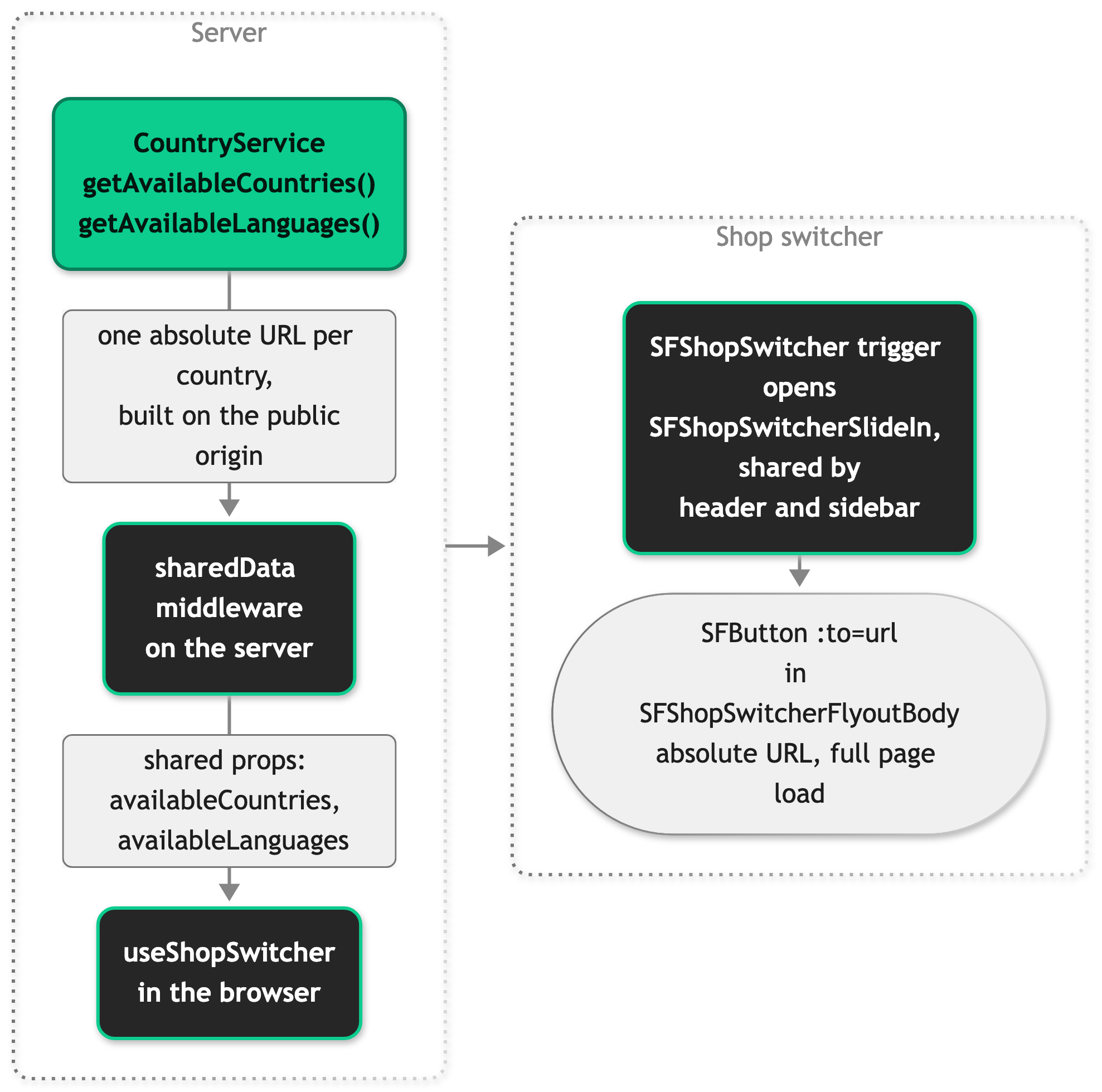
src/server/middleware/sharedData.ts shares both lists from services.country, the request's CountryService from @scayle/storefront/services. Read it as this.services.country in a controller or ctx.get('services').country in middleware. Each url has this shape:
| Selector | Shop switcher url for Germany (de) |
|---|---|
path | https://example.com/de |
path_except_default | https://example.com/ when Germany is the default, https://example.com/de otherwise |
domain | https://example.de/, keeping the scheme of the request origin |
SFShopSwitcher in src/client/components/shopSwitcher/ is the globe button in the header (placement="header") and in the mobile sidebar (placement="sidebar"). It renders only when you configure more than one country, and it opens SFShopSwitcherFlyoutBody in a slide-in with two lists:
- Languages: the countries that share the active
countryCode, such as German and French for Switzerland. The list only shows when there's more than one. - Countries: one entry per
countryCode, linking to the first configured country with that code.
Picking an entry takes the customer to the home page of that country, not to the same page there. The click also records the switch in session storage, which keeps the country detection modal from opening for the rest of the session.
The country detection prompt, a modal that suggests the shops of the visitor's country, uses the same url values as the shop switcher for its buttons. Country Detection covers where the suggestion comes from and who sees it.
To change what CountryService returns, extend it and register your class, as described in Extending the SDK.
Common tasks
Add a country
- Create the shop country in the SCAYLE Panel and note its shop country ID.
- Add an entry to
countriesinstorefront.config.ts. The quickest way is to copy an existing entry, such as Austria, and change its name, locale, codes, environment variable names, and the field your selector needs (pathordomain): - Set the new
STOREFRONT_COUNTRIES_ES_*variables in your.envfile and in every deployment, and make sure each one has a value. The server refuses to boot without a valid shop country ID, but it doesn't check that the checkout values are filled. - Check that
src/i18n/locales/has a messages file for the locale, named after it with an underscore. Spanish already ships ases_ES.json. For a locale without a file, such aspt-BR, addpt_BR.json. Without one, the country renders thede-DEmessages and the server logs a warning. - Under
domain, point the new host at your deployment.
Routing needs no other change.
To add a language to a country you already serve, such as French for Switzerland, follow the same steps with the same countryCode and a new locale, shopCountryId, and path or domain. The shop switcher then lists both under Languages.
Switch the country selector
In the Storefront Application, storefront.config.ts reads STOREFRONT_COUNTRY_SELECTOR when the server starts. Switching between path and path_except_default therefore takes a new value and a restart, not a rebuild. path_except_default also needs isDefault: true on one country, which the Storefront Application sets on Germany.
Switching to domain is a code change. Replace path with domain on every country, and replace the narrowed countrySelector line with countrySelector: 'domain'. Also delete the top-level domain line, because the domain selector doesn't accept it. STOREFRONT_COUNTRY_SELECTOR no longer applies after that. These are the two lines to replace:
Every switch changes your URLs. Moving from path_except_default to path is covered by the redirect for unprefixed paths, but that redirect is a temporary 302. If search engines should treat the move as permanent, add 301 redirects in front of the application, such as at your CDN. Moving from path to path_except_default turns every default-country URL such as /de/basket into a 404. Redirects rules apply to exactly those requests, and a rule's source can be a regular expression, so you don't need one rule per URL.
Redirect to a localized path
On the server, pass the unprefixed target to inertia.navigate(target, status): this.inertia in a controller, or ctx.get('inertia') in a route handler or middleware. It localizes a site-relative path for the active country and sends an absolute URL as a full page load. The sign-in controller sends an already signed-in customer on this way:
getSiteRelativePath from @scayle/storefront/shared returns the site-relative part of redirectUrl, or undefined when the target would leave your origin, which guards the parameter against open redirects.
On the client, call navigate from useRoute, which localizes for you.
Run the domain selector locally
First switch to domain as described in Switch the country selector. Then point the country domains at loopback subdomains such as de.localhost:3000 and us.localhost:3000. Chrome and Firefox resolve subdomains of localhost to the loopback address without a hosts-file entry. In a browser that doesn't, add one line per domain to /etc/hosts. Local development runs over TLS, so extend the mkcert command from the Storefront Application README to cover every country domain:


