

Analytics & Tracking
The Storefront Application V3 reports what users do in your shop to two places. Tracking pushes Google Analytics 4 (GA4) shaped events to window.dataLayer, and your Google Tag Manager (GTM) container forwards them to the analytics and marketing tools you already use. SCAYLE Analytics sends a fixed set of events to SCAYLE through the Storefront API. Both are included in every new project, and the same event-family composables fire both, so you instrument an interaction once.
An event-family composable is a composable in src/client/composables/tracking/ that owns the events of one domain, such as useBasketEvents() for the basket or useSearchEvents() for search.
On these pages, Tracking is the GTM pipeline and SCAYLE Analytics is the pipeline to SCAYLE. Google Tag Manager and SCAYLE Analytics cover each pipeline in depth.
Why it matters
Two audiences read behavior data, and they need different things. Your marketing and merchandising teams need standard e-commerce events in the tools they already work in, with destinations they can change in GTM without a storefront release. SCAYLE needs events in a fixed shape with more detail, for example a product's position across the whole list and the filters a user applies.
Try it
Try it: open the demo shop and watch both pipelines
Open the browser DevTools console and inspect window.dataLayer to see the Tracking events as you browse and add products to the basket. Filter the Network panel to analytics/events to see one SCAYLE Analytics request per event.
What's included
- Tracking pipeline: A client plugin that stamps a shared
contexton every event and pushes it towindow.dataLayer, and the GTM container loader inSFAnalyticsHead.vue. See Google Tag Manager. - SCAYLE Analytics pipeline: A client dispatcher with a consent gate, a same-origin ingest route on your server, and a forwarding service to the Storefront API. See SCAYLE Analytics.
- Event-family composables: One per domain in
src/client/composables/tracking/. A function in them callsuseTracking().push()for Tracking,useAnalytics().track()for SCAYLE Analytics, or both. - Shared classification:
resolveTrackingPageType,resolveTrackingDeviceType, andtoTrackedPathinsrc/shared/utils/tracking.tsclassify the page, the device, and the reportedpage_pathfor both pipelines, so a change there affects both. - One browser session: The SCAYLE Analytics dispatcher starts the browser session, and the tracking plugin reads the same session, so both pipelines report the same
session_id. - Separate consent handling: SCAYLE Analytics has its own consent vendor and gate, and Tracking has no consent check in the Storefront Application, except that
purchasewaits for the consent report and usesgoogle-analyticsconsent to avoid sending an order twice. See Consent Management.
What you can change
Configure
- The GTM container the Storefront Application loads, through the
STOREFRONT_GTM_IDenvironment variable. - The tags, triggers, destinations, and consent rules in your GTM container.
- The SCAYLE Analytics service in your consent management platform.
- Which consent vendor SCAYLE Analytics uses and which countries require consent management.
Extend
- Instrument an interaction in both pipelines from the event-family composable of its domain.
- Stop an event family for your shop by removing or conditioning the
push()andtrack()calls in its composable. - Forward another attribution parameter to Tracking.
Constraints and limits
Permanent
- No code links the two pipelines. An event-family composable calls
push()andtrack()explicitly, so an interaction you instrument with only one of them leaves the other pipeline without the event, and nothing warns you. - The SCAYLE Analytics event set is closed. The contract in
@scayle/storefront-apidefines it, and it has no sign-in, sign-up, checkout, or purchase event. The Storefront Application sends those to Tracking only. The checkout web component sends its own checkout events to SCAYLE Analytics, see Checkout web components.
Known limitations
- Neither pipeline has a configuration flag that stops capture or skips one event family. To stop an event family, change its composable. Leaving
STOREFRONT_GTM_IDempty only stops the GTM container from loading, see Pitfalls on the Google Tag Manager page. trackSearchOutcomefires bothsearchevents from one payload. A separatepush()of thesearchevent next to it counts the Trackingsearchtwice.
How it works
An interaction calls one function in an event-family composable. That function builds each payload and hands it to the two pipelines:
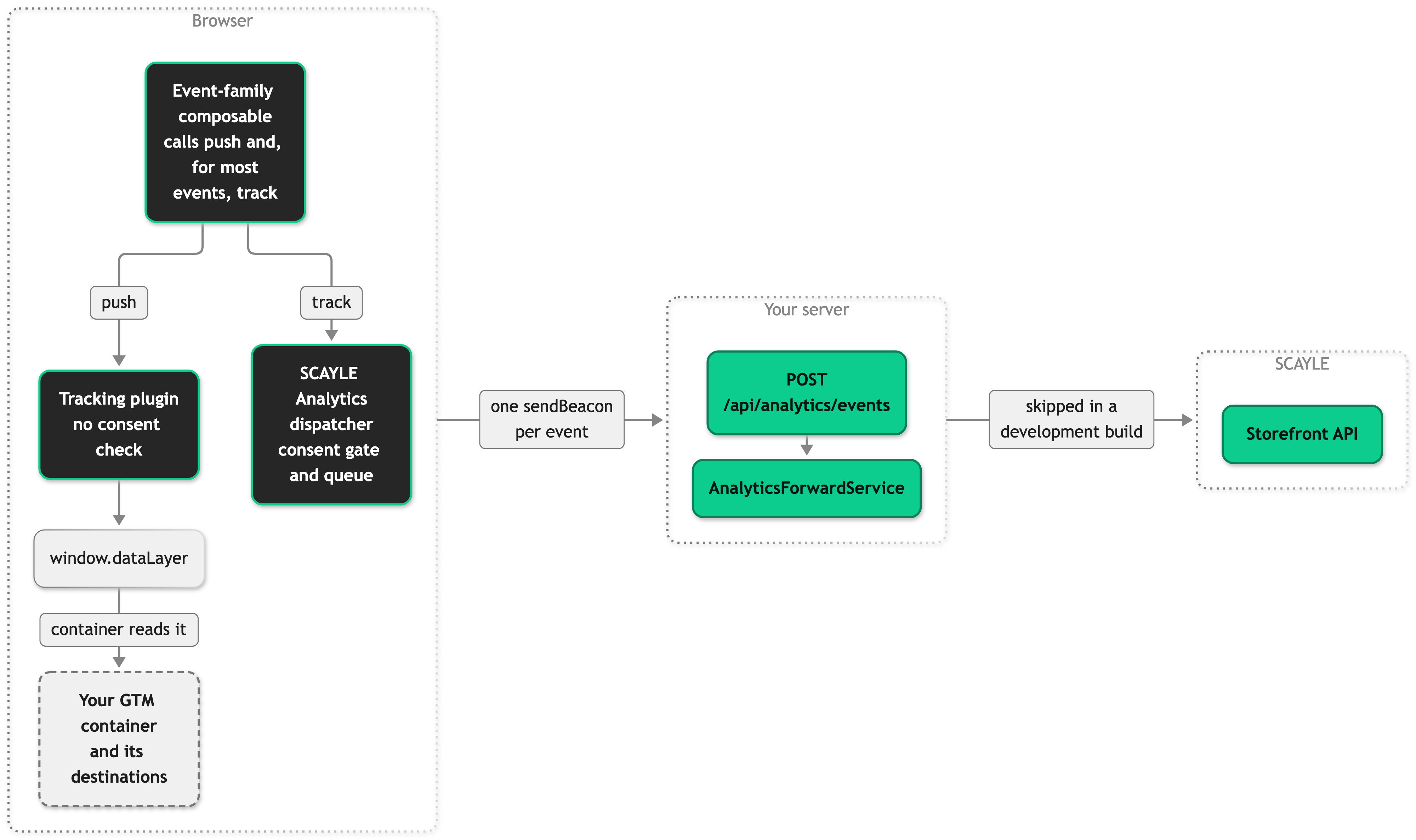
Running both
Most interactions fire both pipelines, and each pipeline has events the other has no counterpart for.
- A basket view, a basket add or removal, a wishlist add, a promotion or campaign view and click, a product detail view, a product click, a product list impression, and a search outcome each produce one Tracking event and one SCAYLE Analytics event. A list impression is the Tracking
view_item_listand the SCAYLE Analyticsview_product_list. - Each pipeline has its own page view: the Tracking
page_viewand the SCAYLE Analyticsview_page. - SCAYLE Analytics alone receives
view_product_tilefor each visible tile,apply_filter,view_search_suggestion, andselect_search_suggestion. - Of the events the Storefront Application fires, Tracking alone receives
begin_checkout,login,sign_up, and thepurchasethe order confirmation page fires, plus theadd_to_cartandremove_from_cartevents the checkout web component posts. The checkout web component sends its own events to SCAYLE Analytics.
Tracking Events and SCAYLE Analytics events list when each event fires and what it carries. Adding an event shows how to instrument an interaction in both pipelines.


