

Similar Products
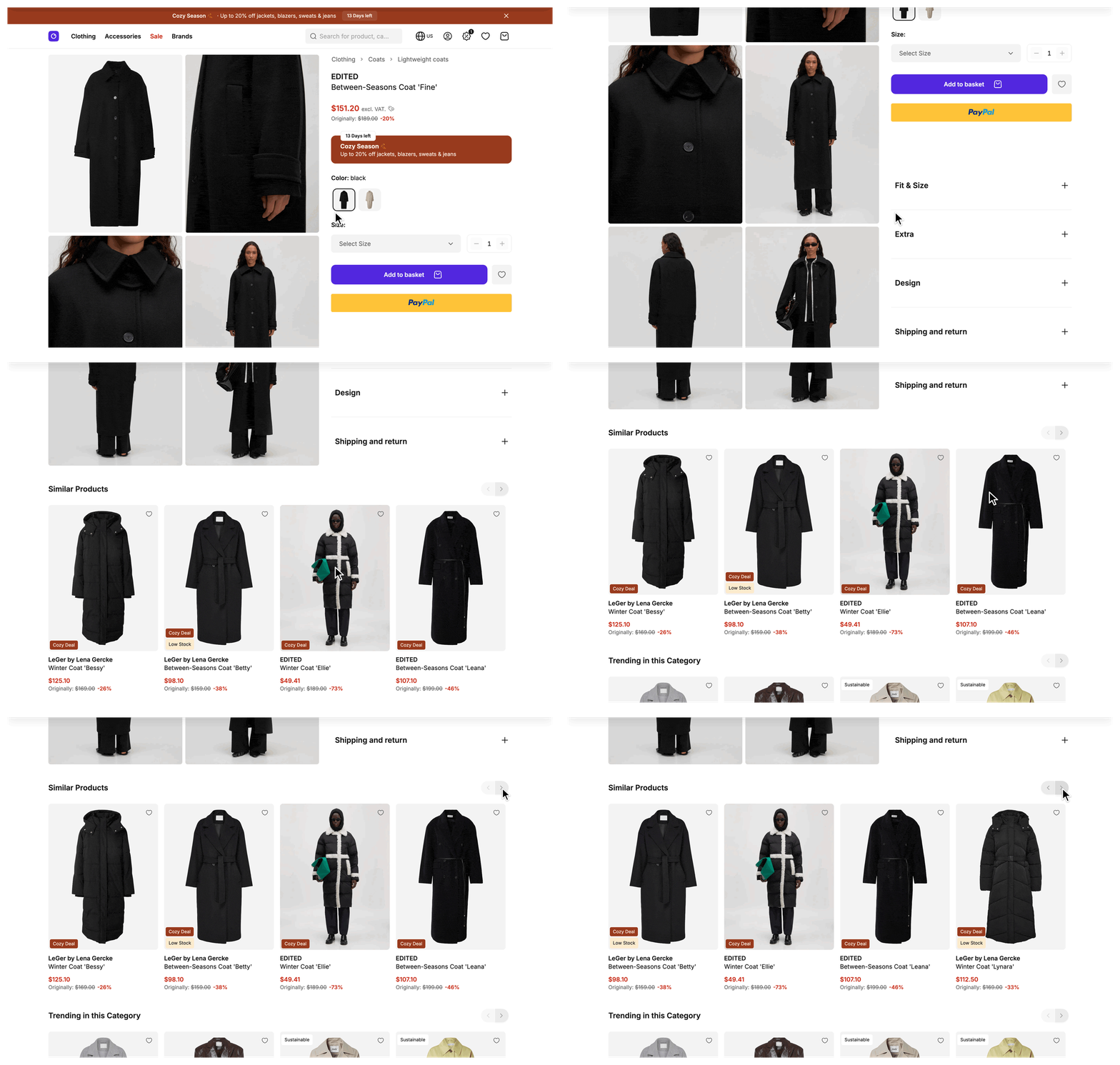
Users who look at a product see alternatives to it in a slider below the product details. The Storefront Application V3 loads them from the Storefront API after the page renders, caches the result on the server, and leaves the slider out when there is nothing to show.
Why it matters
A user who is already looking at one product is ready to compare. A different color, a similar cut, or a comparable item when the current one is sold out is one swipe away, so the customer keeps browsing instead of leaving or starting a new search.
Try it
Try it: Similar products slider
What's included
- Similar products slider: A horizontal slider under the product details with one product card per product. Its heading comes from the
product_detail_page.similar_productstranslation. The slider is not rendered when the list is empty. - Server-side caching: The server caches each result, so repeat views of a product skip the Storefront API call. See Constraints and limits for the lifetime and Turn caching off for debugging to switch it off.
- Sellable products only: The request carries a sellable-at timestamp. A product that is not sellable yet is not recommended, and a product that becomes sellable appears after the cached result expires.
- Campaign awareness: The request carries the active campaign key when a campaign is running, and each campaign gets its own cached result.
- Deferred loading: The similar products are a deferred prop, a page prop the server leaves out of the first response and sends in a follow-up request. The page shows a skeleton slider until the follow-up request returns.
- Failure fallback: When fetching fails, the controller logs the error and returns an empty list, so a recommendations problem never breaks the product detail page.
- Tracking: The slider reports a list view when it scrolls into view, a tile view for each card that scrolls into view, and a product select on click. All three carry the list id
similar_products.
What you can change
Configure
- Which products count as similar, in the SCAYLE Panel.
- Change the number of products in
src/server/controllers/product-detail.ts, see Configuration.
Theme
- Change the slider layout and arrows in
src/client/components/product/slider/SFProductSlider.vue, and the card of each product insrc/client/components/product/SFProductCard.vue. The card is shared with other product lists, so a card change shows up there too. - Change the loading skeleton in
src/client/components/product/slider/SFProductSkeletonSlider.vue. - Change the heading in the
product_detail_page.similar_productsentry of each file insrc/i18n/locales/. - Move the slider to another place on the page in
src/client/pages/ProductDetail.vue.
Extend
- Add a custom field to every similar product by extending the product mapper, the class that turns a Storefront API product into the shape your pages render.
- Filter or reorder similar products by overriding
fetchSimilarProductson the service. The method returns a list of listing products from any source, so the same override can serve products from a different recommendations provider. - Remove the slider: delete the
similarProductsentry ingetViewPropsofsrc/server/controllers/product-detail.ts, the slider insrc/client/pages/ProductDetail.vue, and'similarProducts'in the<Deferred :data>list next to it.
Constraints and limits
Permanent
- The Storefront Application V3 does not rank products itself. The SCAYLE Recommendation Engine returns them in ranked order, and the service keeps that order. You influence the ranking through the Panel settings.
Known limitations
- An empty list and a failed fetch look the same on the page: no slider. Only the server log tells them apart, see Troubleshooting.
- The server caches each result for up to 15 minutes. A change to the recommendation settings in the Panel, a product that becomes sellable, or a product that sells out shows in the slider only after the cached entry expires. Changes to image similarity can take up to a day to take effect on the SCAYLE side. Data cache TTLs explains how to use another lifetime.
- There is no hook for the cache key, so changing it means overriding
fetchSimilarProductson the service as a whole. Each distinct limit creates its own entry, so asking for different limits on different pages multiplies the entries. - Image similarity compares only images uploaded to the SCAYLE CDN. Without such images, similarity is based on attribute matching alone.
- Similar products and trending products load in one follow-up request, because both use the
recommendationsgroup. A group is a name set on a deferred prop, and the props that share it load together. The slower fetch delays both sliders. - Deleting only the slider from
ProductDetail.vuedoes not stop the server from fetching similar products. Remove thesimilarProductsentry ingetViewPropstoo.
How it works
When a user opens a product detail page, the first response leaves similarProducts out, see Defer slow data. The browser then sends a follow-up request for the recommendations group, which asks the controller for the similar products and the trending products together.
The controller and the service each define a method named fetchSimilarProducts. The one on the controller takes the limit and catches errors. The one on RecommendationsService fetches and caches the products. The controller calls the service method, and the service is part of the @scayle/storefront package.
The service looks up the cache first. On a cache miss, it asks the Storefront API for similar products, requesting the product fields that the Includes getter of the product mapper lists. It maps every product with mapProduct of the product mapper and stores the mapped list in the cache.
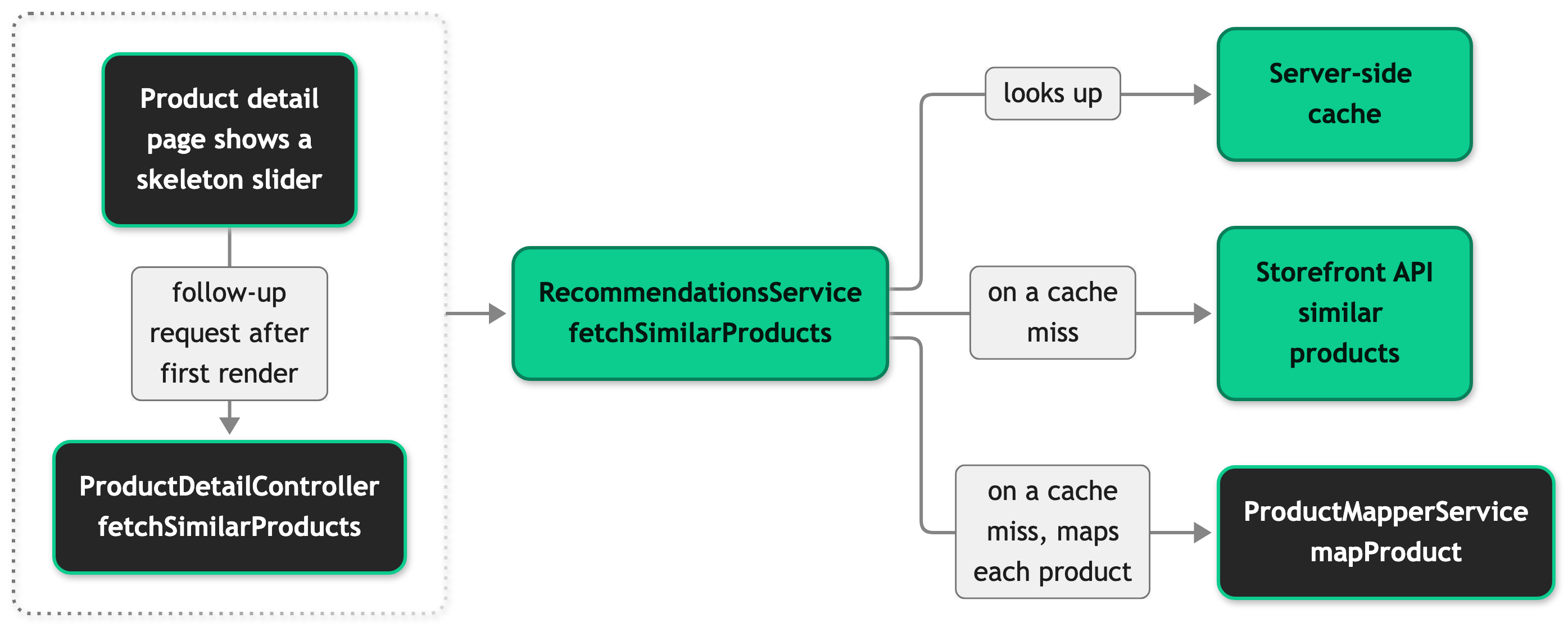
The controller catches any error from the service, logs Failed to fetch similar products, and returns an empty list. When the list has at least one product, the page renders it in SFProductSlider with the list id similar_products. The slider uses that id for the tracking events.
Setup
Similar products are already part of the product detail page, so there is nothing to install or register. The products in the slider depend on the recommendation settings of your shop in the SCAYLE Panel, see Configuration.
Configuration
SCAYLE Panel
You set what counts as similar in the Panel under Storefront ➜ Recommendations. You can combine these levers:
- Attribute-based similarity, which weights product attribute groups.
- Image similarity, which matches the first image of each product against a threshold.
- Manually defined similar products.
The image similarity settings apply to every country of the shop. You can define similar products manually for the whole shop or for a single country. The Recommendations documentation lists the thresholds and the permissions you need.
In your application code
RECOMMENDATION_LIMIT in src/server/controllers/product-detail.ts sets how many products the similar and the trending slider show. It defaults to 10. The limit argument of fetchSimilarProducts in the same file defaults to RECOMMENDATION_LIMIT. To change the limit for the similar products slider only, pass a value in getViewProps:
Customization guides
Add a custom field to similar products
You end up with an extra field on every similar product, ready to render in a card. The guide uses the design attribute, which the Storefront Application V3 already has a key for.
The hook is mapProduct of ProductMapperService, which RecommendationsService calls through the product mapper slot. The same mapper maps products for other lists, so the field appears there too, and the extra attribute is requested from the Storefront API for each of those lists, not only for similar products.
Before you start, make sure the attribute exists in your shop in the SCAYLE Panel.
- Request the attribute from the Storefront API by adding its key to the includes of the product mapper.
- Map the attribute in
mapProduct. - Declare the field on the listing product type.
- Read
product.designinsrc/client/components/product/SFProductCard.vue.
Reload a product detail page. Each product in similarProducts now carries design, and your card renders it.
Leaving the key out of the includes compiles without an error and returns undefined for the field on every product. Leaving ...base out of the returned object fails type-checking, because the listing product requires the base fields.
Filter sold-out products from the slider
You end up with a slider that lists only products that are not sold out. The same pattern works for any other filter or order.
The hook is fetchSimilarProducts on RecommendationsService. Its signature is fetchSimilarProducts(productId: number, options?: FetchSimilarProductsOptions): Promise<ListingProduct[]>. You subclass the service in src/server/services/ and register the subclass in src/server/registries.ts.
- Create the subclass. It asks the parent for more products than the slider needs, filters them, and cuts the list to the limit.
- Register the subclass in the
recommendationsslot of the service registry. - Remove
RecommendationsServicefrom the existing@scayle/storefront/servicesimport insrc/server/registries.ts, because nothing else in that file uses it.
Reload a product detail page. The similar products slider no longer lists sold-out products, and the trending slider is unchanged, because the subclass overrides only fetchSimilarProducts.
The sold-out state comes from the cached list, so it can lag until the cached entry expires. If you call super with the original limit and filter afterwards, the slider shows fewer products than the limit whenever the filter removes any. If you skip super and call the Storefront API yourself, see Cache every override that calls the Storefront API.
Best practices
Leave similar products deferred
Keep similarProducts in Inertia.defer when you change the controller. An eager prop makes the whole product detail page wait for the recommendations call, and the product is the part the customer came for.
Cache every override that calls the Storefront API
An override that skips super runs on every product detail page view. Wrap its call in this.context.cache.getOrSet and put the product ID, the limit, the active campaign key, and any value your filter depends on into the key. A key that leaves one of them out serves one customer's result to another.
Troubleshooting
The similar products slider is missing for a product
Issue: A product detail page shows no similar products slider.
Possible causes: The Storefront API call failed, your override of fetchSimilarProducts threw, or the cache storage failed to read or write. In each case the server log contains Failed to fetch similar products. If the log has no such message, the Storefront API returned an empty list, for example because the Panel settings match no sellable product for that product.
Solution:
- Search the server log for
Failed to fetch similar productsand read itserrfield. - If the error comes from the Storefront API, check its status and reload after it recovers. A failed call is not cached, so the next request fetches again.
- If the error comes from your override, fix the override. If it comes from the cache storage, check the storage the server cache runs on.
- If there is no error, call the similar products endpoint for the product ID and compare. An empty response there means the Panel settings or the product data produce no match.
Prevention: Alert on this log message, so an outage shows up before a customer reports a missing slider.


