

Accessibility Testing
Find accessibility problems in your storefront automatically with axe, an open-source accessibility testing engine. The checks find mechanical problems such as missing alternative text or low contrast. They cannot judge whether a page makes sense with a screen reader, so they support but do not replace testing with a keyboard and a screen reader. See Best practices on the Accessibility page.
The Playwright suite of the Storefront Application V3 ships an opt-in axe integration. It scans your pages in a real browser and groups the findings by rule, impact and page type. A page type is the group of pages that use the same template, so all product pages count as one. You turn it on with A11Y=1. The checks only report. A finding never fails a test.
A scan starts in one of three ways. The crawl is a test that opens your shop's pages by following links, without any test code. The replay scans the pages that your own tests visit, after each test has finished. A checkA11y call scans a state that you bring the page into yourself, such as an open dialog.
Constraints and limits
Permanent
- The checks find mechanical problems. They cannot tell whether a page makes sense with a screen reader, whether the focus order is logical, or whether the text is clear. Test those with a keyboard and a screen reader.
- The checks only report. A finding never fails a test, but the crawl fails when it cannot open any page of your shop or runs into its timeout.
Known limitations
- The scan uses the list of axe rules in
AXE_TAGSintesting/playwright/support/a11y.ts, which leaves out WCAG 2.2 rules such astarget-size. Check WCAG 2.2 criteria separately. - The replay scans a page as your session leaves it, after the test and its
afterEachhooks. A hook that empties the basket or signs out changes what it sees. A dialog, a half-filled form and a request that your test stubs withpage.routeare not there, so usecheckA11yfor those. - The replay scans each page type once for each project and worker. It skips a page whose revisit lands on a different page type, for example the sign-in page after a sign-out, and an order confirmation link with a
cbdtoken. It also skips a page that answers with a status of 400 or higher, a test that timed out, and the sign-in setup projects, and it stops after 15 seconds for each test. A page it did not reach is scanned in a later test that visits it. - A scan is dropped when the page changes while axe reads it, because the results would mix two page states.
checkA11ydoes not scan content inside cross-origin frames.
How the checks work
The crawl, the replay and a checkA11y call all end in the same place. Every finished scan writes one result file, and pnpm a11y:summary turns the files of a run into one summary.
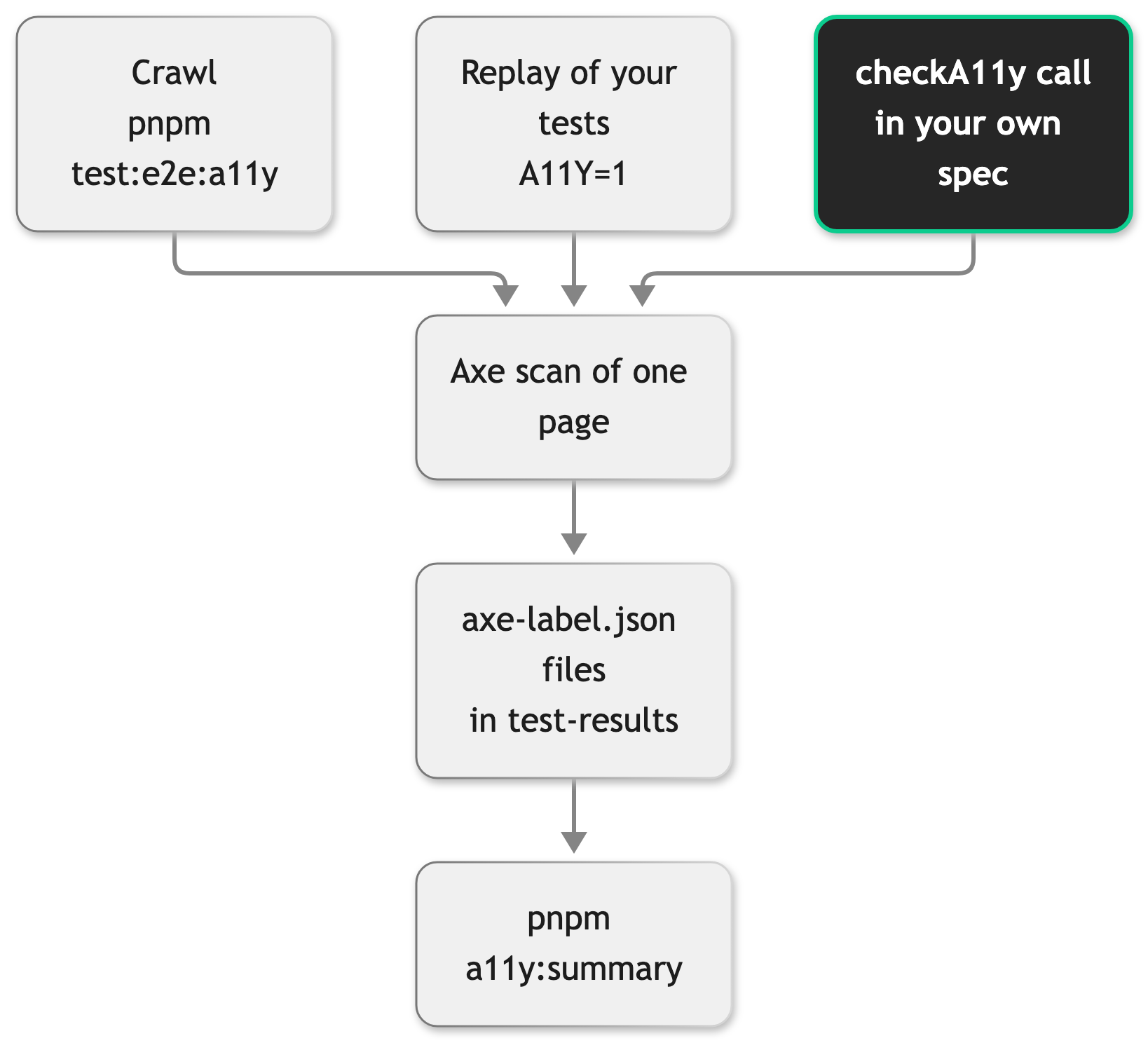
The scan uses the axe rules for WCAG 2.0 and 2.1 at levels A and AA, plus axe's best practices. Before it scans, it waits for the page to load and for the Vue application to mount. If the application does not mount within 5 seconds, it scans the page as it is. The crawl and the replay also wait until the page stops changing, up to 5 seconds. A checkA11y call does not wait for that, so bring the page into its final state before you call it.
Each result file holds the label of the scan, the page URL without query string or hash, the project name, the full title path of the test, and two lists from axe. violations holds the problems that axe confirmed. incomplete holds the items that axe could not decide, such as text over a photo, which a person has to check. A scan that throws while the page is still open writes an axe-failed-<label>.txt file instead and never fails the test.
The results group pages by page type. A path segment that is a number, or ends in a dash and a number, stands for an id. So /p/jacket-342691 and /p/shoe-100200 are one page type. Category pages under /c/ that end in an id, such as /c/women/shoes-12, are one page type whatever their depth.
Run the checks
You end with result files in test-results/ and a summary of the findings. The checks need the suite installed, which means the steps of Set up the suite up to installing the browsers, a running storefront, and a BASE_URL (see Environment variables) that is the homepage of one country, with its prefix if your shop uses one, for example https://localhost:3000/de/.
Crawl your shop
The crawl needs no test customers, no Storefront API credentials, no catalog data and no page objects. It opens the homepage, follows the links inside your country, and scans each page type once. It only opens pages. It never clicks a button, fills a form, signs in or changes the basket.
- From
testing/playwright/, run the crawl:
The script setsA11Y=1and runs thea11y-crawlproject in desktop Chrome and thea11y-crawl-mobileproject in mobile Chrome. The script uses POSIX shell syntax. In another shell, setA11Y=1yourself and runpnpm exec playwright test --project=a11y-crawl --project=a11y-crawl-mobile. - Print the summary:
The crawl has its own projects, which exist only when A11Y=1 is set. They have no sign-in setup, so you do not pass --no-deps. The a11y-crawl annotation of the test lists the pages the crawl visited, and an a11y-crawl-skipped annotation lists the pages it could not open.
Scan the pages your tests visit
With A11Y=1, every test records the pages it visits. After the test body ends, the suite opens a fresh page in the same browser context, which keeps the session. It visits each recorded page type and scans it. Nothing is scanned while the test runs, so a test cannot notice it. Your specs do not change, as long as they import test from fixtures/fixtures. The replay runs in the browser projects of your tests, which run the sign-in setup first. Unlike the crawl, tests that restore a saved session need the test customers.
Without --project, A11Y=1 also runs the crawl in its own projects. The replay reaches pages the crawl cannot, such as the account area, because the tests that restore a saved session scan it signed in. A test that visits a new page type lists what it scanned and skipped in its a11y-replay annotation. A spec can opt out with test.use({ a11yEnabled: false }), which also turns off checkA11y in that spec.
Scan a state the crawl cannot reach
Ask for the a11y fixture and call a11y.checkA11y('label') at the point where the page is in the state you want to check, for example with a dialog open or a form half filled:
checkA11y does nothing unless A11Y=1 is set or the spec turns it on with test.use({ a11yEnabled: true }), so it is safe to leave in a spec. test.use({ a11yEnabled: false }) silences it too. test.use({ a11yEnabled: true }) also turns on the replay for that spec. Give every scan its own label. Two scans with the same label in one test overwrite each other's file. A label that matches a page type name, such as basket or home, also overwrites that page's file, because the replay uses page type names as its labels.
Read the results
You end with a list of rules to fix, in the order that matters. The suite writes no browsable report. Each scan writes an axe-<label>.json file into the folder of its test under test-results/. A label with characters other than ASCII letters, numbers, underscores and dashes gets a short hash added to the file name. pnpm a11y:summary reads all of these files and prints one Markdown summary. Pass a folder to read another one, for example pnpm a11y:summary path/to/results. Playwright empties test-results/ at the start of every run, so the summary covers the last run only. To scan the pages of both browser projects in one summary, run both projects in one command, and collect the results of a crawl run before you start a replay run.
The summary starts with the page types and projects it covers. If scans failed, a line tells you how many, and the details are in the axe-failed-<label>.txt files. Then come two sections, Violations and Needs review (incomplete). Each is a table with the columns Rule, Impact, Elements, Pages and Viewports, or the word None. when it has no rules:
- Violations are problems that axe confirmed.
- Needs review lists the items that axe could not decide. A person has to look at these.
- Impact is the severity that axe assigns to a rule, from
criticalthroughseriousandmoderatetominor. The tables list the most severe rules first. A rule without an impact rating shows asunknownand comes before the others. - Elements counts each combination of page, viewport and selector once, even when several tests visit the same page.
- Pages are the labels of the scans: page types for the crawl and the replay, and your own label for a
checkA11ycall. Viewports are the browser projects that scanned them.
The summary lists only what was scanned. A page type that no scan reached does not appear in it, so a clean summary does not show that those pages are clean.
Decide who fixes a finding
The summary does not print selectors, so open the axe-<label>.json file of the finding. The file sits in the folder of its test under test-results/, for example test-results/<test folder>/axe-p-id.json. Playwright names <test folder> after the spec, the test and the project, and p-id is the label of the scan, here the page type of the product pages. The shortened example below uses a made-up selector. Each finding in the violations list has nodes, and each node holds the selector in target and the HTML snippet of the element in html:
The selector in target tells you who owns the element. A selector that starts with the name of a SCAYLE web component points into markup that the component renders, and you report it to SCAYLE. On the sign-in page, for example, a finding has the target value [["scayle-auth", ".auth-title"]]. Every other finding is in your own code. The html snippet of the node helps you find the element.
Adapt the crawl to your shop
You end with a crawl that follows your shop's structure and skips the paths you do not want scanned. The crawl limits and the excluded paths are constants at the top of tests/e2e/a11y-crawl.e2e.spec.ts. Edit them there.
| Constant | Default | What it does |
|---|---|---|
MAX_PAGES | 20 | The most page types the crawl scans. The crawl test allows 45 seconds for each of them, so its timeout is MAX_PAGES times 45 seconds, which is 15 minutes at the default. Raising MAX_PAGES raises the timeout with it. |
MAX_DEPTH | 2 | How many link hops from the homepage the crawl follows. |
MAX_PER_SECTION | 3 | The most pages the crawl scans under one first path segment, so that no section uses up the whole budget. |
EXCLUDE_PATHS | a regex | The paths the crawl skips: sign-out links, API paths and file downloads. It finds sign-out links by the words in the path. |
The crawl cannot tell your default country from the others when BASE_URL has no country prefix, and it follows links such as /en/.... It also counts each distinct category path as its own page type when it does not know the first path segment of your category pages.
- Keep the country prefix in
BASE_URL. If your shop has no country prefix, add the other countries toEXCLUDE_PATHS, for example|^\/(en|at)(\/|$). The constant is a regex literal, so the slashes need escaping. - If your sign-out path uses other words, add them to the pattern in
EXCLUDE_PATHSso the crawl does not open it. - If your shop serves categories under a first path segment other than
/c/, add that segment toNESTED_SLUG_SECTIONSat the top ofsupport/a11y.ts. The crawl groups a category path only when it ends in an id, such as/c/women/shoes-12.
The crawl and the replay mark the country switch suggestion as dismissed by setting hasPromptedCountrySwitch in the browser's sessionStorage. The dialog would otherwise hide the page from axe. checkA11y does not set it, so close the suggestion with the countryDetector page object before you call checkA11y.
Run the checks in a pipeline
You end with a pipeline job that produces the summary and keeps the result files. The test-results/ folder holds page text and HTML snippets of the scanned elements, and it can hold page snapshots with typed passwords, see the warning under Run the suite in a pipeline.
- Pass
BASE_URLand the other variables through the environment of the job.CIis set in a pipeline, so the suite reads no.envfile, see Environment variables. - Run
pnpm test:e2e:a11y, which setsA11Y=1itself, or setA11Y=1in the job and run your own specs. - Run
pnpm a11y:summaryafter the tests and keep its output as a job log or a build artifact. - Keep
test-results/as a build artifact. - Restrict who can download the artifact.
Findings fail neither a test nor the summary script. If you want a gate, check the summary in your own pipeline step.
Troubleshooting
The summary says "No results folder"
Issue: pnpm a11y:summary stops with No results folder at test-results. Run the checks first, for example with pnpm test:e2e:a11y.
Possible causes: You have not run the checks yet, or the results are in another folder. The script reads test-results, and any folder you pass, relative to the folder it runs in. pnpm a11y:summary runs it in testing/playwright/.
Solution:
- Run the checks, for example with
pnpm test:e2e:a11y. - Run
pnpm a11y:summaryagain, or pass the folder that holds the results.
Prevention: Keep the checks and the summary in the same job or script.
The summary shows 0 page types
Issue: The summary shows no page types and both tables say None.
Possible causes: A11Y=1 was not set, so no scan ran. Or the run left no result files, for example because every scan was dropped.
Solution: Set A11Y=1 and run the checks again. With A11Y set to anything but 1, the crawl projects do not exist, and playwright test --project=a11y-crawl stops with an error about an unknown project.
Prevention: Use pnpm test:e2e:a11y for the crawl. It sets the variable for you.
The crawl visited no page
Issue: The crawl test fails with The crawl visited no page. Check that BASE_URL (...) opens the shop., or with a timeout.
Possible causes: The storefront does not run at BASE_URL, or the homepage answers with an error status, or it redirects to another origin. A timeout means the crawl ran longer than the test allows. That is 45 seconds for each page up to MAX_PAGES, so the timeout grows when you raise MAX_PAGES, see Adapt the crawl to your shop.
Solution: Open BASE_URL in a browser, start the storefront if needed, and run the crawl again. The a11y-crawl-skipped annotation lists the pages the crawl could not open and their status.
Prevention: Start the storefront before the run, and set BASE_URL to the homepage of one country.
A page is missing from the axe summary
Issue: pnpm a11y:summary does not list a page you expected.
Possible causes: The crawl stops at the limits listed under Adapt the crawl to your shop. It skips paths in EXCLUDE_PATHS, a page that fails to load, a page that answers with status 400 or higher, and a page that redirects to another origin. A redirect inside the same origin is followed and scanned under its final path. Pages behind a sign-in stay out of reach, because the crawl never signs in.
Solution:
- Check the run output and
test-results/results.xmlfor thea11y-crawlannotation, which lists the visited pages, and thea11y-crawl-skippedannotation, which lists pages that failed to load, answered with status 400 or higher, or redirected off your origin. A page dropped by a limit or byEXCLUDE_PATHSappears in neither. The summary lists none of them. - Raise the limits in the crawl spec or fix
BASE_URL, see Adapt the crawl to your shop. - For a page behind a sign-in or a state the crawl cannot reach, run your own specs with
A11Y=1, or calla11y.checkA11y('label')in a spec at that point.
Prevention: Treat the summary as a list of the pages the crawl reached, not of every page in your shop.
The summary reports failed scans
Issue: The summary says that scans failed and are not in it.
Possible causes: The axe scan threw while it read the page. The error text is in the failed scan's file.
Solution: Look for the axe-failed-<label>.txt files in the folders under test-results/. Each one names the page and the error. Run the checks again for the pages involved.
Prevention: Bring the page into its final state before you call checkA11y. That reduces failed scans but does not rule them out.
The crawl scans pages of other countries
Issue: The summary lists page types from countries you did not intend to scan.
Possible causes: BASE_URL has no country prefix, so the crawl treats every link on your origin as part of the shop.
Solution: Follow step 1 under Adapt the crawl to your shop.
Prevention: Set BASE_URL to the homepage of one country.


