

Account
Your customers check orders, manage subscriptions, and edit their personal details in one protected area under /account/*. One sign-in guard covers every page under that prefix, and one shared navigation wraps the account pages. A page you add inherits the guard when you mount it below the guard, and joins the navigation once you add its menu entry and wrap it in SFAccountLayout.
Why it matters
The account area is where you add the pages that keep customers coming back, such as loyalty points or saved preferences. A new page needs a route, a page component, a controller, and a menu entry, and no authentication code of its own.
Try it
Try it: open your account page (requires signing in)
What's included
- Sign-in guard on
/account/*: Every page under the prefix needs a customer in the session. A user without one goes to/signinand returns to the page they asked for after signing in. See Pages:createAuthGuardMiddleware. - Orders and order detail:
/account/orderslists past orders and/account/orders/:idshows one order. Order History and Order details cover both pages. - Subscriptions page:
/account/subscriptionshosts the subscription management web component. The page and its navigation item exist only in countries wheresubscriptionEnabledistrue. In any other country the page answers 404 and the navigation item is not rendered. - Profile page:
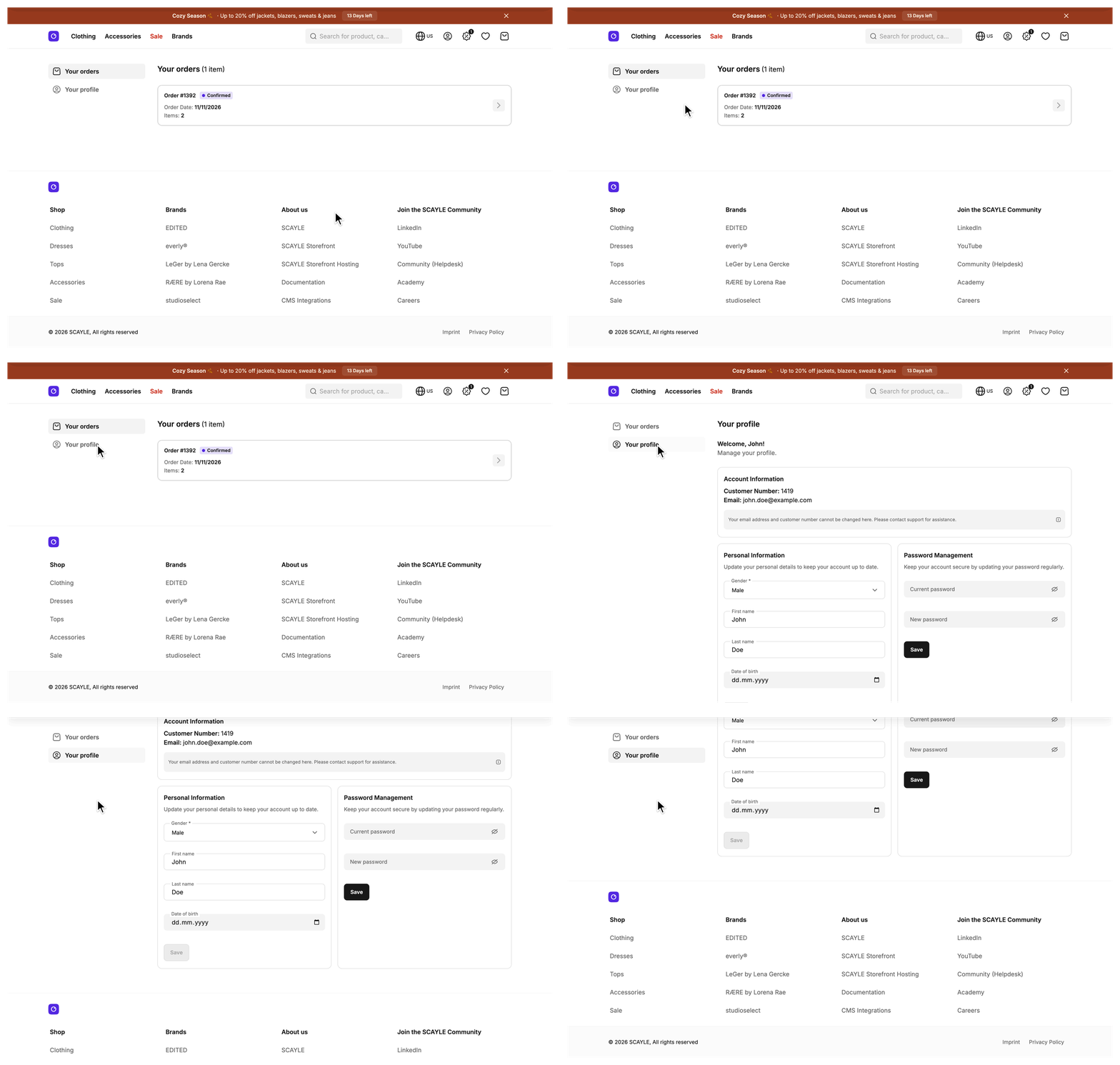
/account/profileshows the customer number and email as read-only text, a personal information form (gender, first name, last name, birth date), and a password form. The form requires a gender. It requires a birth date once the customer has saved one, because the Customer Account API cannot remove it. - Personal information update: Saving the form updates the customer in the Customer Account API, stores the result in the session, and reloads the
customerprop. The new name shows up everywhere without a new sign-in. - Password change: The password form appears only when the customer's
authentication.typeis exactlypassword. A customer who signs in through an identity provider has no password to change and sees a short note instead of the form. - Shared account navigation: A side menu on large screens and a scrollable tab row on small screens render the same
useAccountMenulist. Routes, labels, order, and active state stay in sync in both. The header account popover reads the same list, so a new entry also appears there. - Customer prop on every account page: Account routes are not cacheable, so on a full page request the
customershared prop arrives with the initial render. Only a cacheable page defers it.
What you can change
Configure
- Turn the Subscriptions page and its navigation item on or off per country with an environment variable. A country you add to
storefront.config.tsneeds the samesubscriptionEnabledline in itspublicFieldsfirst. See Configuration. - Set the password rules for the checkout's login and registration fields in the SCAYLE Panel. See the Configuration table.
Extend
- Add an account page with your own route, controller, and navigation entry.
- Enforce your own password rules before the request reaches the Customer Account API.
- Add a field to the personal information form.
- Reorder or remove navigation entries by editing the list in
useAccountMenu. The side menu, the tab row, and the header account popover all read it. - Change the gender labels in the
account.form_fields.gender_optionskeys of your locale files.
Replace
- Serve the account area from a different system. In
src/server/ssr-routes.ts, remove the four accountmountControllercalls and change theroutes.accounthandler to send customers to the external dashboard's absolute URL.inertia.navigateanswers an absolute URL with a full page load. The/account/*guard also matches/account, so it still sends a signed-out user to sign-in before the redirect. Remove the guard as well if the external system handles sign-in itself.
Constraints and limits
Permanent
- For a signed-in customer, visiting
/accountredirects with a 302 to/account/orders. The bare URL has no page of its own. A signed-out user goes to sign-in first, because the guard matches/accounttoo. - A page you mount outside
/account/*is public until you add a guard to it, see Pages:createAuthGuardMiddleware. - Sign-out is not part of the account area. It lives in the header account link and the mobile sidebar, so it is reachable from every page that uses the full layout.
Known limitations
- The profile page shows email and customer number read-only. Its notice tells the customer to contact support. The SDK's
CustomerServicehas anupdateContactInfomethod for email and phone, but no RPC exposes it. - The password form checks the rules in
src/shared/constants/password.ts: 8 to 70 characters, no spaces, and at least one uppercase letter, one lowercase letter, one digit, and one special character. - These rules only give the customer fast feedback. The Customer Account API has the final say. If the API rejects a password the form accepted, the customer sees the generic "Your request could not be processed" message. If the form is stricter, it blocks passwords the API would accept. Keep the constants in line with the rules your shop uses.
- The password rules of the checkout's own login and registration fields are set in the SCAYLE Panel. See the Configuration table.
How it works
A request to an account page passes the guard, reaches a controller, and renders an Inertia page. The profile page fetches no domain data. AccountProfileController extends BaseController and overrides getTemplate and getViewProps. It returns only the page meta. The page reads the customer from the customer shared prop through useCustomer(). The orders and order detail controllers extend base controllers from @scayle/storefront/controllers that fetch the orders before the page renders.
The profile forms send their changes to the profile RPCs. These RPCs ship in @scayle/storefront. src/server/api/index.ts assigns them with profile: createProfileRouter(base), so they run on your application's base builder and pick up the middleware and error codes you add there. Both RPCs sit behind the access token check. A user, or a customer whose access token has expired, gets UNAUTHORIZED before the handler runs.
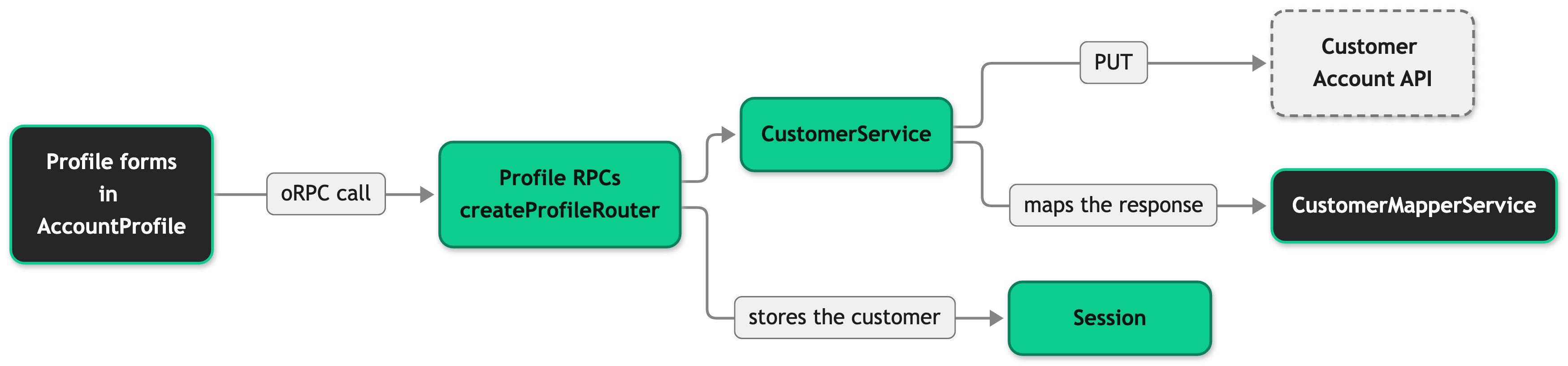
The personal information RPC (profile.updatePersonalInfo) accepts a first name and last name, plus an optional gender (m, f, d, or n) and an optional birth date. A birth date must be a YYYY-MM-DD date from 1900 to 2099, or the RPC answers 400. The form leaves the field out to keep the stored value. After the update it writes the returned customer to the session. It keeps the segments the session customer already had, because the update response carries none. The form then reloads the customer prop and shows a toast.
The password RPC (profile.updatePassword) checks only that both passwords are strings and that the current password is not empty. It sets no length or character rules. An upstream 403 from the Customer Account API becomes FORBIDDEN, which means the current password is wrong. An upstream 400 becomes BAD_REQUEST, which means the API rejected the new password under the shop's policy. The form gives FORBIDDEN its own message. BAD_REQUEST and every other failure show the same "Your request could not be processed" message.
Setup
The account area ships in the Storefront Application V3 with its routes, guard, and navigation in place. You install nothing. To show subscriptions, enable them for each country as described in Configuration and see Subscriptions.
Configuration
| Setting | Where | Effect |
|---|---|---|
STOREFRONT_COUNTRIES_<COUNTRY_CODE>_SUBSCRIPTION_ENABLED | Environment variable, one per country that reads it in storefront.config.ts, for example STOREFRONT_COUNTRIES_US_SUBSCRIPTION_ENABLED | true (any letter case) sets subscriptionEnabled in that country's publicFields. It shows the Subscriptions navigation item and serves the page. Any other value, or no value, hides the item and answers the page with 404. |
| Password rules | SCAYLE Panel: Settings ➜ Checkout ➜ Customization ➜ Sign In Step ➜ Email and Password Settings | Sets the rules for the checkout's login and registration fields, see Checkout Settings Reference. See Constraints and limits for the form's own rules. |
The password form needs no setup for identity providers. To set up single sign-on, see Setting up Single Sign-On (SSO).
Customization guides
Add an account page
You end up with a page at /account/<your-page> that sits behind the sign-in guard and appears in the side menu, the tab row, and the header account popover. The example uses a loyalty page. Use your own names.
Before you start, copy src/server/controllers/account-profile.ts and src/client/pages/AccountProfile.vue as your starting points.
- Add the route to
routesinsrc/shared/routes.ts. - Create the page component in
src/client/pages/. The file name is the Inertia template name, soAccountLoyalty.vueresolves to the templateAccountLoyalty. Wrap the content inSFAccountLayoutso the navigation renders around it. - Register the page props in the
Componentsregistry insrc/shared/types/global.d.ts. The controller's template name is typed from this registry. - Create the controller in
src/server/controllers/account-loyalty.ts. ExtendBaseController<'AccountLoyalty'>from@scayle/storefront/controllers, return'AccountLoyalty'fromgetTemplate, and return your page props fromgetViewProps. Addrobots: 'noindex, nofollow'to the page meta, asAccountProfileControllerdoes. - Mount the controller in
src/server/ssr-routes.ts, below thessrRouter.use('/account/*', ...)guard so it inherits the guard. Hono runs middleware in registration order, so a mount above the guard skips it. - Add the navigation entry in
src/client/composables/useAccountMenu.ts. Add your page name to theidunion ofAccountMenuItemfirst. Theidfield is required and the union is closed, so a new item without it fails to type check. - Add the
account.tabs.loyaltyandaccount.tabs.short.loyaltykeys tosrc/i18n/locales/en_GB.jsonand to every other locale file. The lint rule for missing locale keys fails otherwise.
When it works, a signed-out visit to /account/loyalty redirects to /signin and returns there after sign-in. A signed-in visit renders your page, and the side menu, the tab row, and the header account popover list it. If you skip step 6, the page loads by direct link but no navigation entry leads to it.
Enforce your own password rules
You end up with a password RPC that rejects a weak password before the Customer Account API call. The API's own policy still applies on top.
- Rebuild
profile.updatePasswordinsrc/server/api/index.tson theauthedbuilder from./base. SpreadupdatePasswordDefinition, extend itsinput, and pass the result tobuildRpc. - Change the matching rules in
src/shared/constants/password.tsand the Panel password rules together. The form and the RPC then agree on what a valid password is.
Build the override on authed, not on base. createProfileRouter puts both profile RPCs behind the access token check, and a rebuild on base drops that check. src/server/api/base.ts exports authed for this.
Add a field to the personal information form
You end up with an extra field that the form sends, the RPC forwards, and the session stores. The example adds the optional title (such as Dr.). The SDK's PersonalData type already includes title, and the Customer type already carries it, so no mapper change is needed for it.
- Rebuild
profile.updatePersonalInfoinsrc/server/api/index.tsonauthed, the same way as in the password guide. - Add the field to
src/client/components/account/profile/SFProfilePersonalInformation.vue. Add it toinitPayload, to theeditableFieldslist, to the validation rules, to the template, and to the object passed torpcClient.profile.updatePersonalInfo.
A field that Customer does not carry yet also needs a CustomerMapperService.mapCustomer override that calls super.mapCustomer(...) first, plus a declare module '@scayle/storefront/types' entry in src/shared/types/Customer.ts. Forgetting the super call still type checks and drops every base field. The Customer Account API also has to accept the field on its personal data endpoint.
Best practices
Read the customer through useCustomer()
The composable returns the customer shared prop and a reloadCustomer function. After a change that alters the customer, call reloadCustomer() so every component that reads the prop updates. SFProfilePersonalInformation does this after a save.
Send noindex meta from every new account page
Account pages are specific to one customer. Return robots: 'noindex, nofollow' from the controller's meta, as step 4 of Add an account page does.
Troubleshooting
Saving the personal information shows an error toast
Issue: A customer saves the personal information form and sees the error toast instead of the success toast.
Possible causes:
- The customer's access token has expired. The profile RPCs answer
UNAUTHORIZEDbefore the handler runs, and the form shows the same generic toast for every failure. - The Customer Account API rejected the update or did not answer.
Solution:
- Open the browser's network panel and find the failed
PUTrequest to the profile RPC. AnUNAUTHORIZEDcode points to an expired access token. - For an expired token, ask the customer to sign in again.
- For any other code, check the Storefront Application V3 server log for the Customer Account API error.
Prevention: The form cannot tell the causes apart. If you need distinct messages, handle the error codes in SFProfilePersonalInformation.vue the way SFProfilePasswordManagement.vue maps FORBIDDEN and BAD_REQUEST.


