

SEO
The Storefront Application V3 tells search engines and social networks what each page is, so the right URL shows up in results. Each page gets a title and Open Graph title and type tags in the server-rendered HTML, plus a robots directive, a description, and a canonical link where the page type has them. Crawlers therefore read the same head a browser receives. Product, category, and content pages add hreflang links, and product, category, search, and homepage pages add structured data. Each page controller builds this metadata on the server, and one shared component, PageMetaHead, renders it as tags.
Why it matters
A search engine decides how to index and show a page mostly from its head: the canonical link, the robots directive, and the structured data. Without them, a sorted or filtered category URL can count as a duplicate of the plain one, a basket or checkout page can appear in results, and a missing hreflang link can send a visitor to the wrong country's page.
Try it
Open a page on the demo shop, view its page source, and search for canonical and robots in the head.
Try it: product detail page head
Try it: category listing served as indexable
Try it: the same listing's second page, served with noindex
Users never see this output. It lives in the page head and in how your shop appears in search results. On the demo shop, the first listing page answers index, follow with a canonical link. The second page answers noindex, follow and carries no canonical link, so only the first page competes in search results. Product detail and listing pages list one hreflang link per country, and both add JSON-LD, the structured data format search engines read for rich results.
What's included
- Page metadata: Each page controller returns a
SEOMetaobject with a title, description, canonical link, robots directive, and Open Graph image.PageMetaHeadrenders it as the<title>, description, robots, canonical, and Open Graph tags. Open Graph tags are the tags social networks read for link previews. The description, canonical link, robots, and image tags render only when the controller sets them. - Localized titles and descriptions: Titles and descriptions come from locale strings such as
product_detail_page.meta.titleinsrc/i18n/locales/. Product detail, listing, and sign-in titles add the shop name from your shop configuration. When the shop configuration cannot be read, the title drops the shop name and the product detail and listing descriptions are left out. - Canonical links:
buildCanonicalUrl()keeps only thepagequery parameter and sorts what remains, so a product detail URL with?variantId=canonicalizes to the plain product URL. A listing variant that is not indexable gets no canonical link. CMS pages keep no query parameters. - Robots directives: Product detail pages send
index, follow. A listing sendsindex, followfor the first page with the default sort and no filters, andnoindex, followfor every other variant. Search, basket, checkout, wishlist, order, and account pages sendnoindex, nofollow, and the sign-in page sendsnoindex,follow. The homepage and CMS content pages send the robots value of their CMS entry, and no robots tag when the entry has none. The placeholderscayleCMS provider, which stays active until you setCMS_PROVIDER, sendsnoindex, nofollowon those pages. A shop without a real CMS provider therefore keeps its homepage out of search results. - Hreflang links: Product detail, listing, and CMS pages list one hreflang link per configured country, the link tags that tell search engines which URL serves which country and language. The country flagged
isDefaultalso gets anx-defaultentry. - Structured data: Product detail pages send a ProductGroup and a BreadcrumbList, listing pages an ItemList and a BreadcrumbList, search pages an ItemList, and the homepage an OnlineStore. The payload is one JSON-LD script in the head.
- URL normalization: Product detail and listing controllers answer a request whose path differs from the current product or category link, for example an outdated slug, with a 301 to the current path and keep the query string. See Rules for every selector and
pathfor the trailing slash and country prefix redirects. - Redirect rules: Redirect rules you manage in the SCAYLE Panel apply before the page renders. See Redirects.
- Sitemap Add-on files: When you set
sitemapsinstorefront.config.ts, the Storefront Application V3 serves/robots.txt,/sitemap_index.xml, and the child sitemaps from the S3 bucket of the SCAYLE Sitemap Add-on. The Add-on generates and hosts the files. Off by default.
What you can change
Configure
- Change the wording of titles and descriptions in the locale strings under
src/i18n/locales/. - The Sitemap Add-on's inclusion rules and robots.txt settings in the SCAYLE Panel.
- The shop name that titles and descriptions use, in your shop configuration in the SCAYLE Panel. The Storefront Application V3 caches the shop configuration, so a renamed shop reaches titles after that cache expires.
sitemaps.bucketandsitemaps.regioninstorefront.config.ts, which turn the Add-on files on.domaininstorefront.config.ts, which pins the host of every absolute URL the page emits, such as canonical links and hreflang links, with thepathandpath_except_defaultselectors.
Extend
- Override
getMetain a page controller undersrc/server/controllers/to change a page's title, description, robots value, canonical link, or Open Graph image. Index paginated listing pages shows one such change. - Pass a different query parameter list as the second argument of
buildCanonicalUrl()insidegetMeta. See Keep a query parameter in the canonical link. - Add hreflang links to your own page type with
buildCmsHreflangs()fromsrc/server/utils/seo.ts. See Add hreflang links to your own page type. - Give a CMS page a different path per country by implementing the optional
getAlternatePathsmethod on your CMS provider service. Amplience describes how to implement it for that provider. - Add structured data to a page type, or change what a page type sends, by extending
PageJsonLdand returning ajsonLdprop from the controller. See Add structured data to CMS content pages. - Change the logo path in the homepage structured data by editing
DEFAULT_LOGO_PATHinsrc/server/cms/constants.ts. The path is added to the shop's own origin, so serve the file from there. The default file ispublic/logo.svg.
Replace
- Serve your own
robots.txtand sitemaps instead of the Add-on's. Leavesitemapsunset and put your own files inpublic/, which the Storefront Application V3 serves at the root path ahead of its country redirect.
Constraints and limits
Permanent
- Hreflang links and structured data exist only in the server-rendered HTML. The controllers send both as server-only props, which are resolved while the server renders the page and left out of the data an Inertia visit returns. After a client-side navigation the live page has no JSON-LD or hreflang links. Crawlers request each URL fresh, so they receive both.
PageMetaHeadalso renders JSON-LD only while the page is still on the URL it was first rendered for, so a partial reload such as listing pagination never keeps the structured data of the page it started on. - The title has to stay a prop on
<Head>inPageMetaHead, never a<title>child. Inertia escapes the prop on the server but writes a child into the HTML as is, so a search term or product name containing markup would run as script. Inertia also drops the prop as soon as any<title>child exists. PageMetaHeadescapes every<in the JSON-LD payload as\u003C. Fields that editors control, such as a product name, could otherwise close the script tag and break out of it. Keep the escaping if you change how the JSON-LD is rendered.- The Storefront Application V3 does not generate sitemap or robots.txt files. The Add-on generates and hosts them, and the application reads them from the bucket over public HTTPS. The bucket must be publicly readable, because the application treats a 403 from the bucket like a 404.
- Sitemap files carry the bucket's
ETagandLast-Modifiedheaders. The sitemap index and the child sitemaps answer a request withIf-None-Matchwith a 304 when the file is unchanged.robots.txtnever answers a 304 and setsCache-Control: public, max-age=3600. The routes run before the session is read, so these responses set no session cookie. - The URL of a child sitemap depends on the country selector, the setting that decides how a URL names its country.
/robots.txtand/sitemap_index.xmlmatch in every mode. With thepathorpath_except_defaultselector, a child sitemap is/{locale}/sitemap-{name}.xml, where{locale}is the configured locale in lowercase, for example/de-de/sitemap-products.xml. It is not the country path such as/de, and a locale that no configured country uses answers 404. With thedomainselector, a child sitemap is a bare/sitemap-{name}.xmlfor the host's country. A host that matches no country answers 404 forrobots.txt, the sitemap index, and every child sitemap. sitemaps.regionaccepts only the AWS regions the config schema lists. Any other value fails config validation.- A page without a robots value sends no robots tag, and crawlers then apply their own default. CMS pages work this way on purpose, so a draft or preview page is not flagged
index, followby accident.
Known limitations
- The Storefront Application V3 caches the hreflang paths of a product or category for 12 hours, and no setting changes that. A changed slug in another country, or a newly added country, reaches the hreflang links after the cache expires. A country whose lookup fails is left out of the cached list until it expires too.
- A CMS page links the same page path for every country unless its CMS provider implements
getAlternatePaths. Of the providers in the Storefront Application V3, only Storyblok does.
How it works
From request to head tags
A request passes through the runtime, then the page controller, then PageMetaHead. Sitemap and redirect handling run first and can answer before any controller runs.
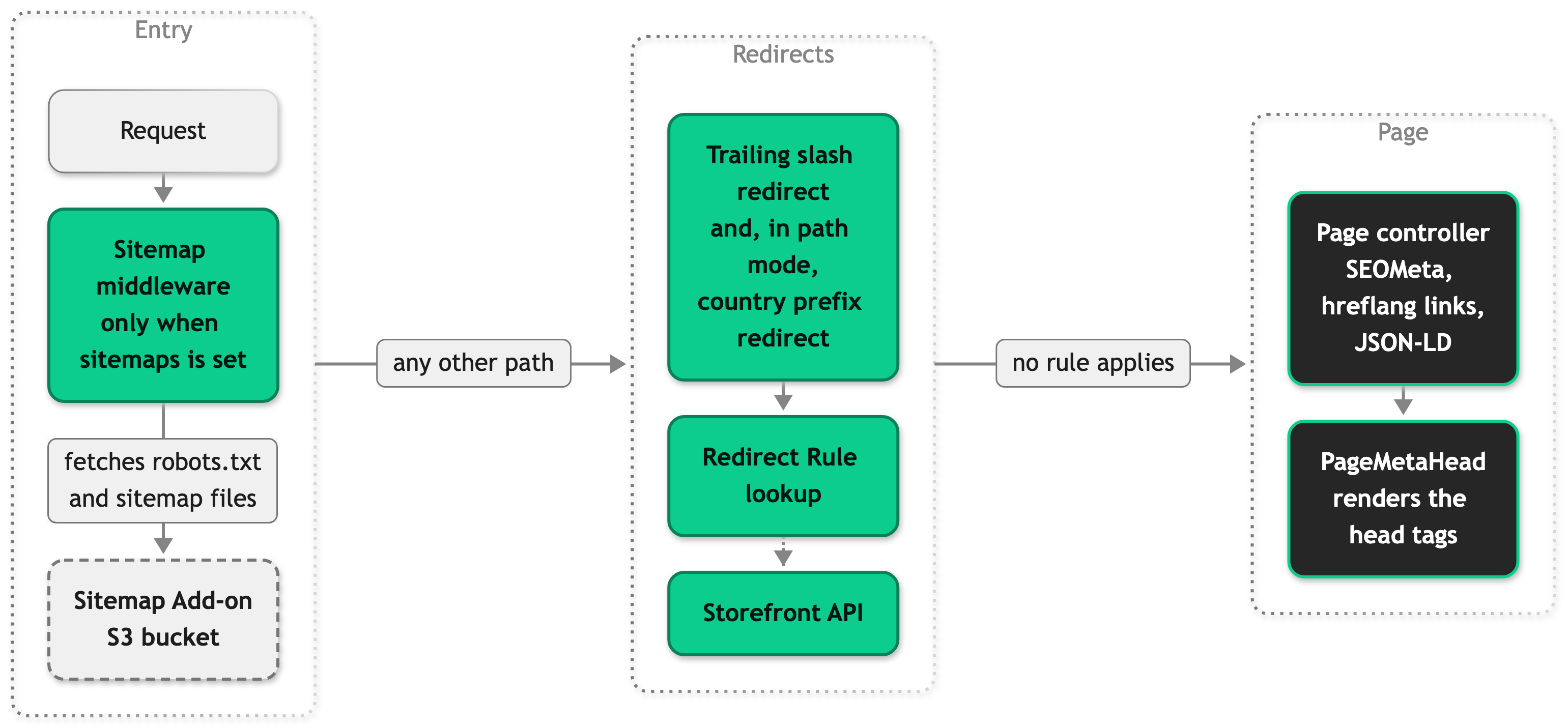
The sitemap middleware sits ahead of the country redirect, so /robots.txt is never rewritten onto a country prefix.
What a controller sends
A page controller sends a meta prop to the page component, which holds a SEOMeta object. Where its page type has them, it also sends two optional, server-only props: hreflangs and jsonLd. Structured data is not part of SEOMeta, it travels in its own prop.
The product detail controller sends all three props side by side.
How PageMetaHead renders it
PageMetaHead takes meta, hreflangs, and jsonLd as props, and a page component passes along the ones its controller sends. The product detail page, for example, renders <PageMetaHead :meta="meta" :hreflangs="hreflangs" :json-ld="jsonLd" />. The component renders a tag only when its field has a value. Open Graph title and type always render. The Open Graph URL comes from the canonical link, so a page without a canonical link has no Open Graph URL. The Open Graph viewer in Storefront DevTools shows the meta tags of the page you have open and a preview of how a shared link looks.
Setup
The metadata, canonical links, hreflang links, and structured data are on by default. The Sitemap Add-on files are optional and off until you set sitemaps.
To serve the Add-on's files, you need the SCAYLE Sitemap Add-on active for your shop and its first run finished, so its bucket holds the files.
- Open
storefront.config.ts. - Add
sitemapswith the bucket name and region of the Add-on's hosted files. The Storefront Application V3 reads the files fromhttps://{bucket}.s3.{region}.amazonaws.com/, so both values must match the public link the Add-on shows for them.
- Restart the server. The runtime registers the sitemap middleware when it starts, so a config change needs a restart.
- Request
/robots.txtand/sitemap_index.xmlon your shop's domain.
Once the Add-on has generated its files, the two requests answer 200 with their content. You do not need a reverse proxy, a redirect rule, or any other server configuration in front of the Storefront Application V3 for these paths.
Configuration
Set these values in storefront.config.ts.
| Field | Type | Default | Description |
|---|---|---|---|
sitemaps | object | unset | Turns on the Sitemap Add-on routes. Leave it unset to turn them off. |
sitemaps.bucket | string | none | Name of the S3 bucket that holds the Add-on's files. An empty value logs a warning, and the request continues to the normal routing. |
sitemaps.region | AWS region | none | AWS region of that bucket. Must be one of the regions the config schema lists. |
See Public origin for domain and Rules for every selector for isDefault.
buildCanonicalUrl(url, whitelistParams) is the helper that builds canonical links. It comes from @scayle/storefront/shared. whitelistParams is the list of query parameter keys to keep, and it defaults to ['page']. A list you pass replaces the default, it does not add to it.
Customization guides
Index paginated listing pages
By default, only the first listing page with the default sort and no filters is indexable. These steps make every page of the default sort indexable, each with its own canonical link.
- Open
src/server/controllers/product-listing.ts. - In
getMeta, removepage === 1 &&fromisIndexableListingPage.
The page source of ?page=2 now shows index, follow and a canonical link that ends in ?page=2. Sorted and filtered variants stay noindex, follow.
Keep a query parameter in the canonical link
The product detail page picks a variant from the variantId query parameter. By default, the canonical link drops it, so every variant URL canonicalizes to the product URL. These steps make each variant canonicalize to itself.
- Open
src/server/controllers/product-detail.ts. - In
getMeta, pass the parameters to keep as the second argument ofbuildCanonicalUrl().
The page source of a product detail URL with ?variantId= now carries a canonical link with that parameter.
Add hreflang links to your own page type
A page type gets hreflang links when its controller sends an hreflangs prop and its page component passes the prop to PageMetaHead. Use buildCmsHreflangs() from src/server/utils/seo.ts to build the links, whatever the page type. It takes the page path, the storefront context, the request origin, and optionally a path per locale. It needs origin, which you read from this.request.origin, so that every absolute URL uses the host the request arrived on. Send the prop through Inertia.serverOnly(). Without it, the prop is also resolved and sent on every Inertia visit, although only the server-rendered head uses it.
- In your controller's
getViewProps, add thehreflangsprop. The CMS page controller does it like this, withbuildCmsHreflangsimported from@server/utils/seo.
- In your page component, declare
hreflangs?: Hreflang[]as a prop and pass it toPageMetaHeadas:hreflangs="hreflangs".
The page source of that page type now lists one alternate link per configured country.
Add structured data to CMS content pages
The homepage sends OnlineStore structured data, and /content/:slug pages send none. These steps add an Article to the content pages. The same four changes work for any page type: a type, a generator, a jsonLd prop, and a page component that accepts it.
- Add the type and extend
PageJsonLdinsrc/shared/types/SEO.ts.
- Add a generator to
src/server/utils/seo.ts. AddArticleto itsschema-dtsimport andArticleJsonLdto its@shared/types/SEOimport.
- In
src/server/cms/controllers/cms-page.ts, overridegetViewPropsonCmsContentControllerand send the generator's result as a server-onlyjsonLdprop. AddgenerateArticleSchemato the existing@server/utils/seoimport.
- In
src/client/pages/CmsPage.vue, widen thejsonLdprop. The template already passes it toPageMetaHead.
The page source of a /content/<slug> page now has a JSON-LD script with "@type":"Article". If PageJsonLd does not include your new type, PageMetaHead rejects the prop at type-check time.
Best practices
Build canonical and hreflang links with the helpers
buildCanonicalUrl(), buildCmsHreflangs(), and composeHreflangs() already handle query stripping, parameter sorting, and the country selector. A hand-built string is an easy place to miss one of them.
Build absolute URLs from the request origin
Read the host from this.request.origin, and build a page's own URL from this.request.url. See Public origin.
Give every new page type a robots value
Decide the robots value deliberately for each page type, and use noindex, nofollow for anything personal or transactional.
Troubleshooting
A filtered or paginated listing page shows up in search results
Issue: A filtered, sorted, or paginated listing page still appears in search results.
Possible causes: The search engine indexed the page before it carried noindex, follow, and it has not crawled the page again. Search engines drop a page on their own schedule, which can take days or weeks.
Solution:
- Open the page source of the listing URL.
- Confirm that the head contains
<meta name="robots" content="noindex, follow">and no canonical link. - If both are present, wait for the search engine to crawl the page again. Nothing in the Storefront Application V3 needs to change.
Prevention: Only the first page with the default sort and no filters is meant to be indexed. A page you set to index, follow is also subject to the search engine's crawl schedule, so it does not appear in results at once.
Sitemap or robots.txt requests return a 404 or 502
Issue: /robots.txt, /sitemap_index.xml, or a child sitemap answers 404 or 502.
Possible causes:
- The Add-on has not generated or published the files yet.
sitemaps.bucketorsitemaps.regiondoes not match the bucket that holds the Add-on's files.- The request to the bucket failed, or the bucket answered with another error status. The application answers 502 and logs "Sitemap upstream request failed".
Solution:
- Request
/robots.txtand/sitemap_index.xmland note the status codes. - For a 404, check the Sitemap Add-on's configuration in the SCAYLE Panel to confirm that it generated the files, and compare
sitemaps.bucketandsitemaps.regionwith the Add-on's bucket. - For a 502, search the server log for "Sitemap upstream request failed" and read the
statusit records.
Prevention: The Add-on owns file generation and hosting. If files are missing in the bucket, the cause lies in the Add-on's rules, not in the Storefront Application V3.
Structured data fails a rich results check
Issue: A rich results test rejects or warns about the JSON-LD of a page.
Possible causes: A search engine's rich result rules can be narrower than the general schema.org shape. For example, the product detail page leaves out uploadDate on videos until a product video exposes a reliable publication date, so Google does not treat those videos as eligible for video rich results.
Solution: Compare the JSON-LD in the page source with the search engine's current requirements for that rich result type, not only with the schema.org definition. Then add the missing property in the generator in src/server/utils/seo.ts.
Prevention: Run the test against the URL itself, so it reads the server-rendered HTML.


