

Contentful
Contentful lets your editors compose pages from reusable content blocks, and the Storefront Application V3 renders them as Vue components with live preview. For behavior shared by every CMS provider, see CMS.
Why it matters
Editors see an edit in the page while they type it. You get typed content, because the types for every content type are generated from your space.
What's included
- Pre-built content block components: Text, images, video, rich text, accordion, buttons, countdown timer, links, page layout, grids, dividers, carousels, product components, and more.
- Published and draft clients: One client for the Contentful Delivery API (published entries) and one for the Preview API (drafts). Each is created on first use and shared by every request in the server process.
- Published content caching: The server caches published entries per slug and locale. Draft requests skip the cache. The CMS page says how long a change takes to show.
- Locale fallback: When Contentful reports that your shop locale does not exist in the space, the server retries without a locale and renders the space's default locale.
- Live preview: With
STOREFRONT_CMS_ALLOW_DRAFTSset totrue, editors see edits in the page as they make them. Inspector mode works as well. It lets editors jump from an element that carriesdata-contentful-entry-idanddata-contentful-field-idattributes to its field in the Contentful editor. - Editor security headers: For an editor session, which is a request that carries the
_editorModequery parameter Contentful adds to the preview URL, the server adds the Contentful origins to the Content-Security-Policy headers so the Contentful editor can embed your shop. - Generated types:
pnpm cms:syncexports your content model and generates TypeScript types for every content type, each with a type guard, a function that narrows a value to that content type.
What you can change
Configure
- Which Contentful space and access tokens your shop reads from, with environment variables.
- Whether editor sessions receive draft content, with
STOREFRONT_CMS_ALLOW_DRAFTS.
Theme
- The look of each block by editing its Vue component in
src/client/cms/providers/contentful/components/. The components are files of your project, so their Tailwind classes and the design tokens are yours to change.
Extend
- Add a custom content block by creating the content type in Contentful, syncing the types, and adding the Vue component to
ContentfulBlockDispatch.vue. - Change how a page is queried by overriding
buildPageQuery,buildListingQuery, ortransformPageResponseon a subclass ofContentfulCMSService. - Change which fields feed the page head by editing
getPageMetainsrc/server/cms/providers/contentful/service.ts.
Replace
- Swap Contentful for another supported CMS provider, which you select with
CMS_PROVIDERas the CMS page describes. Your Contentful content and generated types do not carry over.
Constraints and limits
Permanent
- A running server reads one Contentful space and always its
masterenvironment. The clients are created once per process, and the Contentful client has no environment setting. Changing the space ID or a token needs a restart. - The server needs the space ID, the Delivery token, and the Preview token to start, even when you never preview. A missing or empty value stops the boot with the
Invalid Contentful CMS environmentmessage that the CMS page describes. - The homepage entry has the slug
homepageand answers on/and/homepage. A content page on/content/aboutneeds aPageComponententry whose Slug field iscontent/about. The match is exact and case-sensitive, so/content/Aboutdoes not find it. A listing page for a category needs aproductListingPageComponententry whose Slug field isc/c-<categoryId>. - An editor session sees draft content from the Preview API only when
STOREFRONT_CMS_ALLOW_DRAFTSistrue, as the CMS page describes. Inspector mode needs drafts too, because the editor bridge starts only for a page that carriespreviewSource. The CMS page covers who can send the_editorModeparameter and what the response cache does with it.
Known limitations
- Your shop locale (for example
de-DE) must match a locale code in your space exactly. When it does not, Contentful answersUnknown locale, the server falls back to the default locale of the space, and customers and users see default-locale content instead of a 404. Live preview subscribes with the shop locale, so field updates never arrive while inspector mode still works. Align the codes in the country configuration or in the space. - Live preview resolves each update against the linked entries that were included when the page loaded. A reference to an entry added after that load is skipped, and the browser console logs
Contentful live update could not be resolved against the frozen includes snapshot. Reload the page in the preview panel to fetch a fresh set. - Live preview updates the blocks of the page and nothing else. The page title, description, and social image come from
getPageMetaduring the page request, so an edit to those fields shows only after a reload. - The default page and listing queries ask Contentful to include linked entries up to 10 levels deep. Entries nested deeper are not resolved. Override
buildPageQueryandbuildListingQueryto change the depth. - The rich text block renders what the bundled content model allows: bold, italic, and underline marks, headings 1 to 3, ordered and unordered lists, and links to a URL, an entry, or an asset.
RichTextComponent.vuehas no renderer for other node types. When you enable one in your content model, the default renderer of@contentful/rich-text-html-rendererapplies. It renders plain tags without your typography classes, an embedded block entry as an emptydiv, and an inline embedded entry as the visible texttype: embedded-entry-inline id: <id>. Add arenderNodeentry for every node type you enable. - A link to an entry in rich text points to
/content/plus the Slug of the linked entry. A page entry with the Slugcontent/abouttherefore links to/content/content/about, which no route serves. Link to such a page with a URL link to/content/about. - The setup command's content model import (
--import-content-model=true) overwrites the definitions of content types that already exist in your space. It leaves entries and assets alone. Run it against a new space. - A listing entry supplies no SEO metadata.
getPageMetareturns metadata forPageComponententries only, and the listing page takes only a social image from the CMS, so the Social Share Image of a listing entry is not used. - The sync script runs
sed -i ''in its post-processing steps, which is BSD sed syntax as on macOS. GNU sed on Linux does not accept that form, so the step fails. On Linux, change-i ''to-iinscripts/sync-cms.sh. - Contentful does not provide per-locale page paths. Every country gets the same path in the hreflang alternate links of a CMS page.
How it works
Server: fetching and caching
The controller for a CMS page calls fetchPageData(slug, request) on the Contentful service. The service takes the locale from the shop's country configuration. The result reaches the Vue page as an object with this shape:
entry is the page with its linked blocks resolved. previewSource exists only for draft fetches. The two fetch paths differ in the client, the cache, and who resolves links:
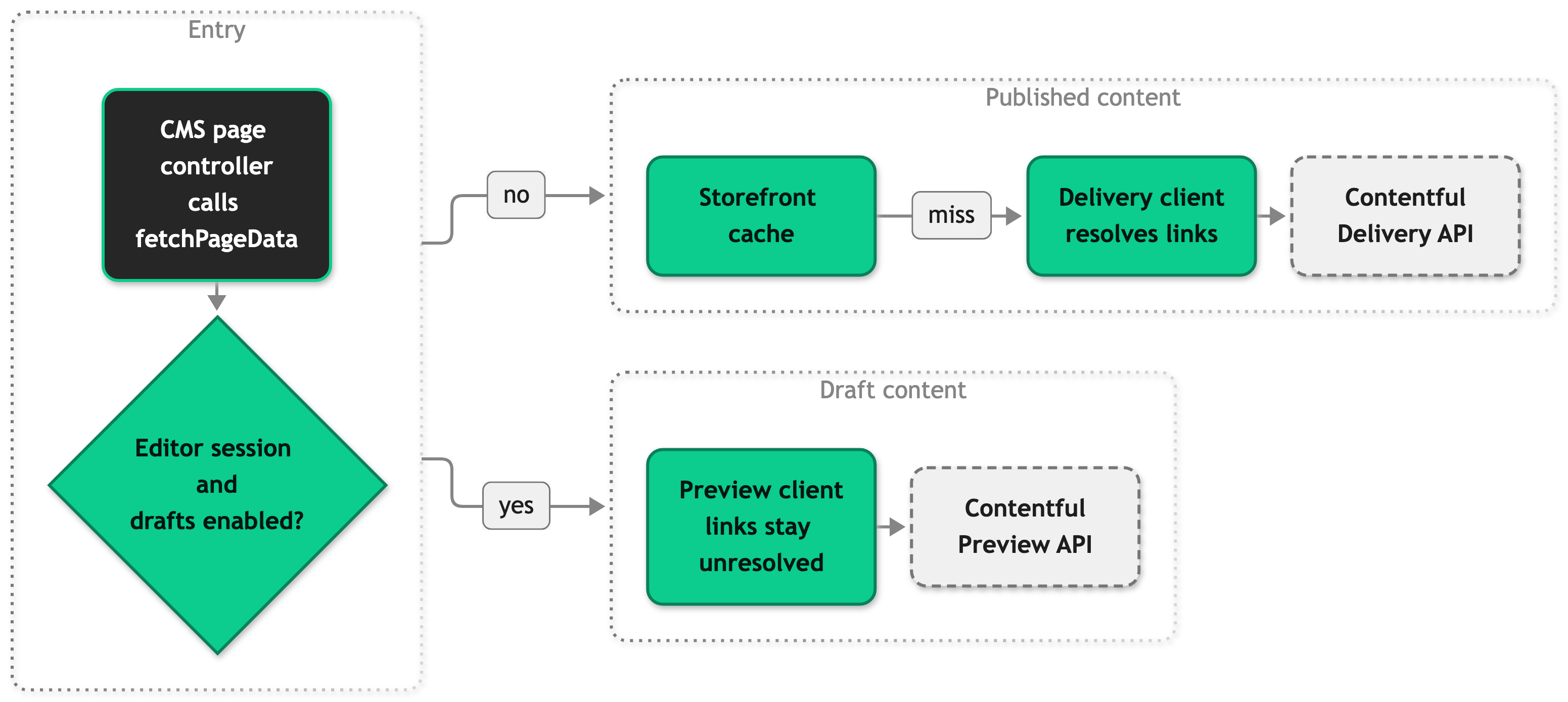
For a content page the query asks for one PageComponent entry whose slug matches, with linked entries included. For a listing page it asks for one productListingPageComponent entry with the slug c/c-<categoryId>. Both queries match the slug exactly.
The published path uses the Delivery client. The client resolves the links in the response, and the server caches the entry per slug and locale for a page, or per category and locale for a listing.
The draft path uses the Preview client and skips the cache. It asks Contentful for unresolved links, resolves them in the server with contentful-resolve-response, and keeps the untransformed entry and its linked entries as previewSource. The browser subscribes with the resolved entry and uses the includes of previewSource to resolve the links in each update.
The cache stores only entries that exist. A slug without a matching entry and a category without listing content are not stored, so every request for one asks Contentful again, and a page that had no entry before appears at once.
When Contentful reports an unknown locale, the server retries without a locale. A missing entry and every other failure follow the rules under Constraints and limits on the CMS page.
The service sets no timeout and no retry policy, so the defaults of the contentful package apply to both clients. The package retries connection errors, server errors, and rate limit answers with growing waits, and a request that times out after 30 seconds counts as a connection error. A slow or failing Contentful therefore holds the page request for the whole retry time before the error page appears. The service has no fallback to an expired cache entry, so a page whose entry expired during an outage renders the error page too.
The page head comes from getPageMeta in src/server/cms/providers/contentful/service.ts, which the controller calls on the fetched entry. For a PageComponent it reads the fields metaTitle, metaDescription, robots, and socialShareImage.
Client: rendering blocks
PageComponent.vue renders the entries in the content field of the page through ContentfulBlockDispatch.vue. The dispatcher picks a Vue component for each block with the generated type guards, such as isTypeImageComponent(). Blocks nest, so a section can hold a grid, and the grid can hold images and text. The rich text block and the four product blocks load on demand, so their code reaches the browser only on pages that use them.
On a category listing page, ProductListingPageComponent.vue renders teaserContent above the product grid. It renders seoContent below the grid on the first page only.
Live preview
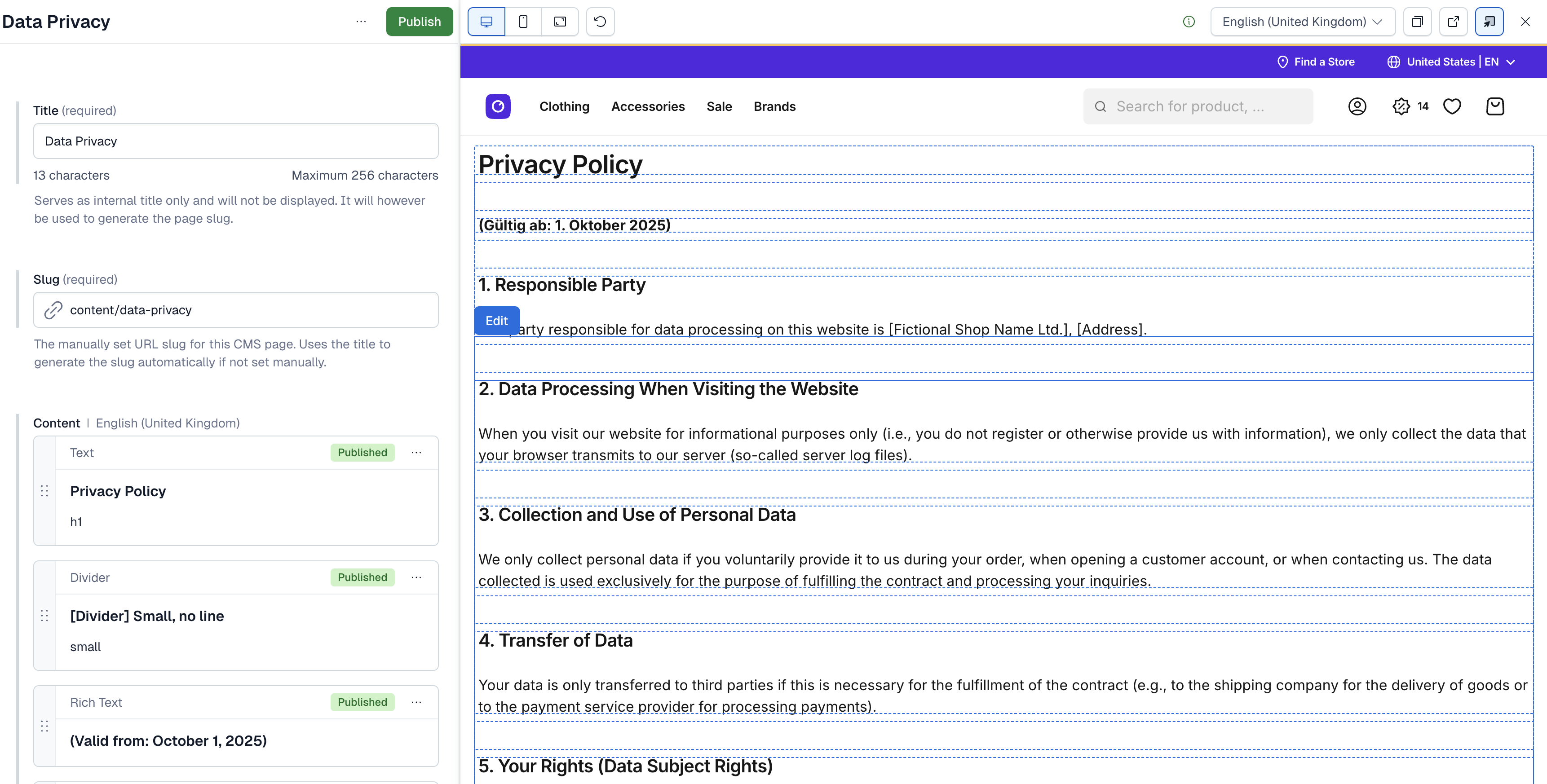
An editor opens the preview URL from Contentful, and Contentful adds _editorMode to the URL. On that full page request, the server adds cmsEditorData to the page props. With drafts enabled, the page payload also carries previewSource. The useContentfulEditor composable loads @contentful/live-preview in the browser after the page mounts, starts it with the shop locale, and subscribes with the resolved entry. Each update is resolved against the included entries of previewSource in the browser, and Vue renders the merged page. The subscription ends when the page unmounts.
Live preview
In an editor session the server merges the Contentful origins into the Content-Security-Policy, as the CMS page describes. frame-ancestors becomes 'self' https://app.contentful.com, and script-src, worker-src, and connect-src gain Contentful sources. The script-src sources include 'unsafe-inline', so a policy that blocked inline scripts allows them during an editor session. The Live Preview SDK starts a web worker from a blob URL, which is why worker-src includes blob:.
Setup
Run the setup command
The setup command writes the Contentful variables into .env and can import the bundled content model into your space. Run it in your project:
The command asks for the Space ID, the Delivery token, the Preview token, and whether to import the content model. It asks for the Management token only when you import. Pass the answers as flags to skip the prompts. The setup cms flags list them.
The command sets CMS_PROVIDER=contentful and the variables from Configuration. Set STOREFRONT_CMS_ALLOW_DRAFTS yourself where editors need drafts. Rebuild afterward, because CMS_PROVIDER is read at build time:
Set the variables by hand
Add the variables to your .env file and rebuild:
Sync your content model types
Your project contains generated types for the bundled content model. Run pnpm cms:sync whenever you change the content model in Contentful, and commit the files it changes. The script needs CMS_PROVIDER=contentful, CONTENTFUL_CMS_SPACE, and CONTENTFUL_CMS_MANAGEMENT_TOKEN:
The script exports the content model without content, roles, or webhooks into .scayle/cms/contentModel/contentful/contentful.json. It then generates the types and a type guard for every content type, such as isTypePageComponent(), into src/shared/types/cms/contentful/gen/. The script only reads from Contentful.
Set up live preview in Contentful
Enable drafts with STOREFRONT_CMS_ALLOW_DRAFTS=true in the environment that editors open. Then configure a preview URL in Contentful. In Contentful, open Content model, select the content type you want to preview (for example PageComponent), and find the Preview URL field under Settings. Enter the address where your shop serves that content type. The slug of a content page includes the content/ prefix, so for a shop that uses a country path prefix the pattern looks like this:
To start a preview session, open an entry in Contentful and click Preview in the top menu. The preview opens in a side panel. Edits in Contentful show up in the page without a reload.
Configuration
Find the Delivery and Preview tokens in Contentful under Space settings > API keys. Create the Management token under Space settings > Content management tokens.
CMS_PROVIDER and STOREFRONT_CMS_ALLOW_DRAFTS work the same for every provider. Set CMS_PROVIDER to contentful. The CMS page describes both.
| Variable | Required | Default | A change needs | Description |
|---|---|---|---|---|
CONTENTFUL_CMS_SPACE | Yes | None | A server restart, and the next sync run for the sync | The ID of your Contentful space. |
CONTENTFUL_CMS_ACCESS_TOKEN | Yes | None | A server restart | The Content Delivery API token. It fetches published entries. |
CONTENTFUL_CMS_PREVIEW_ACCESS_TOKEN | Yes | None | A server restart | The Content Preview API token. It fetches drafts in editor sessions. |
CONTENTFUL_CMS_MANAGEMENT_TOKEN | Only for pnpm cms:sync and the Storefront CLI content model import | None | The next sync or import run | The Content Management API token. The running server never reads it. |
Customization guides
Add a custom content block
You add a block in four places. Contentful holds the content type, the generated types hold its shape, a Vue component renders it, and the dispatcher connects the two.
- In Contentful, create the content type and add it to the block field of the container that should hold it, such as the
contentfield ofPageComponent. The generated type of that field lists the allowed block types. - Run
pnpm cms:syncand commit the newType<ContentTypeId>.tsfile and the updatedindex.tsinsrc/shared/types/cms/contentful/gen/. The type guard is namedisTypefollowed by the content type ID. - Create the Vue component next to the existing blocks in
src/client/cms/providers/contentful/components/. TakeDividerComponent.vueas the smallest model. It takes acontentElementprop typed with the generatedType<ContentTypeId>WithoutUnresolvableLinksResponse, and it sets thedata-contentful-entry-idanddata-contentful-field-idattributes on its root element, which the text and divider blocks do as well. - Import your component and its type guard in
ContentfulBlockDispatch.vue, and add an entry to theBLOCKSlist. Setsuspense: truewhen the component awaits insetupor is wrapped indefineAsyncComponent, andfalseotherwise.toBlockEntryfailspnpm typecheckwhen the component cannot accept the type its guard narrows to. This is the entry for the divider:
If you skip step 4, the block renders nothing in production. In development it shows Contentful block "<id>" is not implemented.
Change how a page is queried
ContentfulCMSService builds its Contentful queries in three protected methods that you can override in a subclass:
buildPageQuery(slug: string, locale: string | undefined): Record<string, unknown>builds the query for a content page.buildListingQuery(slug: string, locale: string | undefined): Record<string, unknown>builds the query for a listing entry.transformPageResponse(response, useDraftContent)turns the Contentful response into the page payload.
Override one when your space does not match the defaults. Say a page that nests many linked entries is slow to fetch, and you want the query to include fewer levels of them. Subclass the service in the file that creates it, and return your subclass from createCMSService:
Start from super.buildPageQuery(...) so the content type, include, limit, and locale keep their defaults. The generated type guards, getPageMeta, and PageComponent.vue all expect the content type ID PageComponent, so a query for another content type needs changes in those places as well. A query that Contentful rejects throws, and the customer or user sees the error page. A query that matches nothing renders the 404 page.
Best practices
Narrow a block with its type guard
Read a block's fields after isType<ContentTypeId>() has narrowed it, as the dispatcher does. A cast hides a mismatch between the content model and your component until a customer or user loads the page.
Turn on the priority image field for one image per page
The Priority image (LCP) field adds to the automatic choice, so turn it on for at most one image per page. Image priority explains how the two work together.
Troubleshooting
A page you created in Contentful returns 404
Issue: A page that exists in the Contentful web app renders the 404 page.
Possible causes:
- The entry is not published. The Delivery API returns published entries only.
CONTENTFUL_CMS_SPACEor the Delivery token belongs to a different space than the one you edit.
Solution:
- In Contentful, check that the entry has the status Published and that its changes are published.
- Check that
CONTENTFUL_CMS_SPACEandCONTENTFUL_CMS_ACCESS_TOKENbelong to the space that holds the entry. - Check the slug convention in Constraints and limits. A change to an entry that is already cached shows after the cache time, which What's included names.
Prevention: Publish an entry before you share its link.
The Contentful editor shows a blank preview frame
Issue: The preview panel in Contentful stays empty, or the browser reports that the page refuses to be framed.
Possible causes:
- The request never reaches the Storefront Application V3, because the preview URL points at another host.
- A reverse proxy or CDN in front of your shop sets its own
X-Frame-Optionsorframe-ancestorsheader on the response. securityHeadersMiddlewareis registered beforecmsCspMiddlewareinsrc/server/index.ts. The security headers are written after the request handlers return, in reverse registration order, so that order overwrites the editor adjustments.
Solution:
- Open the preview URL in a browser tab and add
_editorMode=trueto the address. - Read the response headers.
Content-Security-Policyshould containframe-ancestors 'self' https://app.contentful.com, andX-Frame-Optionsshould be absent. - If the headers differ, change the proxy or CDN configuration so it leaves framing to the application for editor requests. Check that
cmsCspMiddlewareis registered beforesecurityHeadersMiddlewareinsrc/server/index.ts.
Prevention: Test the preview URL against the environment that editors use before you hand it over.
`pnpm cms:sync` fails or the generated types have no type guards
Issue: The script exits with an error, or the files in src/shared/types/cms/contentful/gen/ have no isType* functions.
Possible causes:
- The Management token or the space ID is wrong. The export step fails before type generation runs.
- Your copy of
scripts/sync-cms.shno longer passes--typeguardtocf-content-types-generator.
Solution:
- Check that
CONTENTFUL_CMS_SPACEandCONTENTFUL_CMS_MANAGEMENT_TOKENbelong to the space whose model you export. - Run
pnpm cms:syncagain. - If the type guards are still missing, check that
scripts/sync-cms.shpasses--typeguard.
Prevention: Keep scripts/sync-cms.sh close to the shipped version and regenerate the types, so you never edit the generated files by hand.


