

Recently Viewed Products
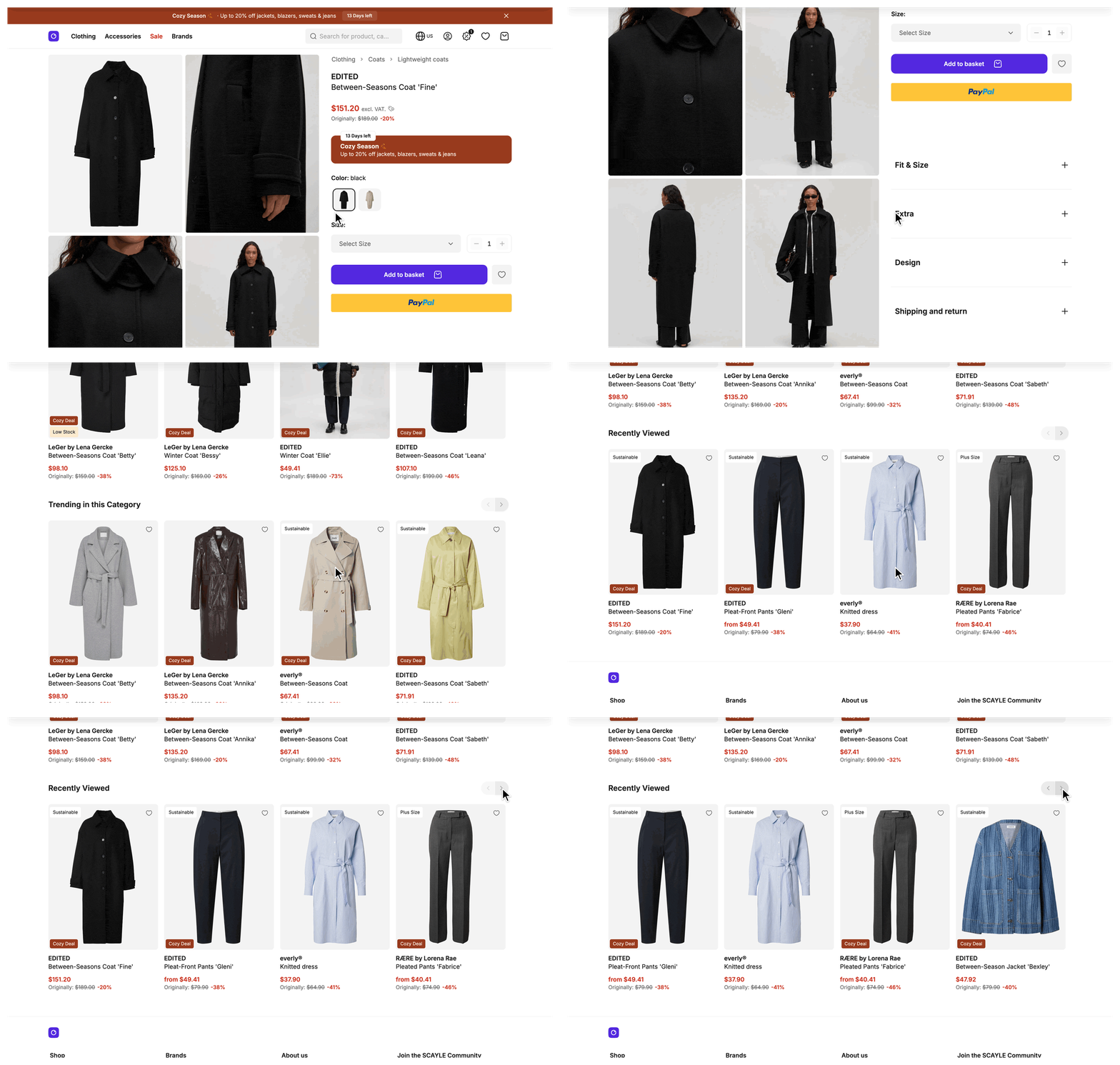
Recently viewed products show users the items they already looked at, so they can find their way back to a product they liked. The Storefront Application V3 keeps the list in the user's browser, needs no sign-in, and renders it in a slider on the product detail page and as a CMS block.
Why it matters
A user who comes back to a product they viewed earlier is close to a purchase decision. The slider gives them a one-click path back, without a new search or a trip through the category pages.
Try it
Try it: see the recently viewed slider on the product detail page
Open a few product detail pages, then open another one. The slider lists the products you viewed, newest first.
What's included
useRecentlyViewedProductscomposable: Keeps the list of product ids in local storage and resolves the ids into products. It returnsproducts,loading,error,status,addProductId, andloadMissingProducts.SFRecentlyViewedProductSlidercomponent: Renders the list throughSFProductSliderand renders nothing while the list is empty. The slider title comes from therecentlyViewedProductsSlider.titlelocale key. The slider reports each product tile that comes into view and each selection to tracking with the list idrecently_viewed.- Product detail page integration: The product detail page renders the slider below the recommendations and records the product it shows.
- CMS block: The Amplience, Contentful, Contentstack, and Storyblok providers each ship a recently viewed products block. Editors set its padding to none, small, medium, or large.
getProductsByIdsRPC: Resolves up to 100 product ids into listing products for CMS components.
What you can change
Configure
- In your CMS, add the recently viewed products block to a page and set its padding to none, small, medium, or large. Any other value renders without padding.
- Change how many products the list keeps. See Maximum number of products.
Theme
- Place
SFRecentlyViewedProductSlideron any page and pass spacing classes throughclass. See Show recently viewed products on another page. - Change the slider heading with the
recentlyViewedProductsSlider.titlekey insrc/i18n/locales/.
Extend
- Record views on other pages with
addProductId. See Record views on another page. - Price the products for a price promotion with the
pricePromotionKeyoption. See Resolve prices for a price promotion. - Build your own slider on the
products,loading,error, andstatusvalues the composable returns. - Override
mapProductinProductMapperServiceto change how the resolved products are shaped. ThegetProductsByIdsRPC maps products with the sameproductmapper as the rest of the application, so the override changes every place that maps listing products, not only this slider. To add data the Storefront API does not return yet, extend theIncludesgetter ofProductMapperService. The RPC reads it for every request, so the change reaches this slider.
Constraints and limits
Permanent
- The list lives in the browser's local storage, so it belongs to one origin in one browser on one device. It does not follow a customer to another device, even when the customer is signed in. Your server never stores it. The browser only sends the ids to the
getProductsByIdsRPC to resolve them into products. - The list is kept per shop country. The storage key starts with the shop country id, so a user who switches country sees the list of that country.
- The list holds product ids only. Each time a slider mounts, the composable asks the
getProductsByIdsRPC for the products behind those ids. - The slider renders only products the Storefront API returns. An id that does not resolve, for example because the product was deleted, is skipped and stays in local storage until newer views push it out.
- A failed request leaves the slider empty. The composable sets
errorandstatusand logs a warning.
Known limitations
addProductIdandloadMissingProductsthrow an error when they run during server-side rendering, because local storage does not exist on the server. The error message starts with "useRecentlyViewedProducts uses local storage". Call both only fromonMounted, asProductDetail.vueandSFRecentlyViewedProductSlider.vuedo.- Two sliders that mount while a request for the same missing ids is still running share one request. Only the slider that started it receives the products, and the other renders nothing. Mount one slider per page.
- A limit above 100 breaks the slider. The
getProductsByIdsRPC accepts at most 100 ids, so a longer list makes the request fail validation and the slider renders nothing. - A stored list that is longer than the current limit does not shrink when users view products. The slider still shows only the newest products up to the limit.
- The composable has no function to remove one product or clear the list. To clear it, remove the local storage key yourself, for example with
localStorage.removeItem. - The server caches the mapped products of
getProductsByIdsfor up to 5 minutes, see Data cache TTLs. A change toProductMapperService, a price change, or a product that sells out appears in the slider after the cached entries expire.
How it works
Two independent steps share one list in local storage. A page records a view, and a slider reads the list. A page that only shows the slider never calls addProductId.
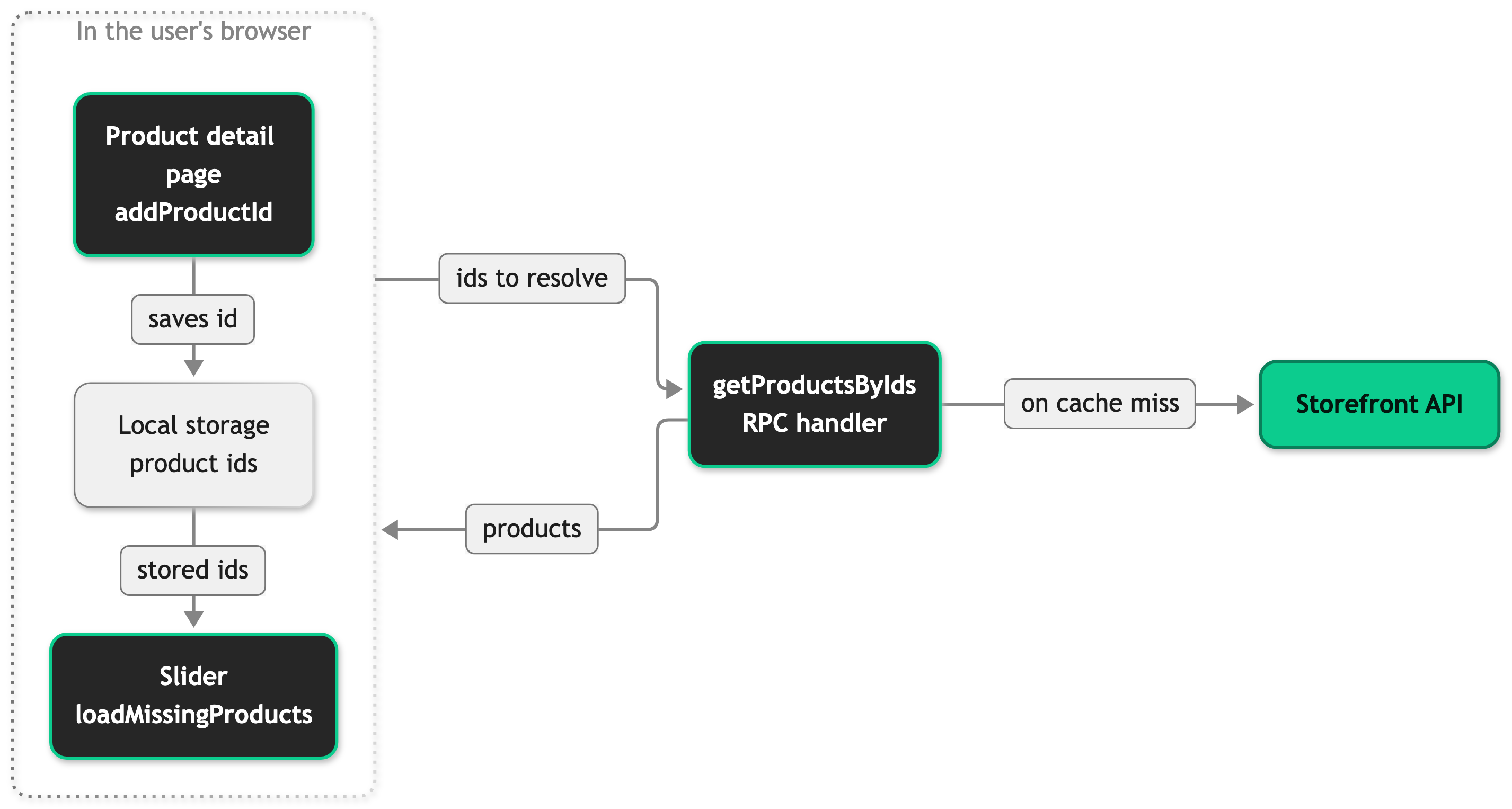
When a user opens a product detail page, the page calls addProductId(productId) from useRecentlyViewedProducts. The function moves the id to the front of the list. If the list is then longer than MAX_RECENTLY_VIEWED_PRODUCTS, it drops the oldest id.
When a slider mounts, it calls loadMissingProducts(). The function compares the stored ids with the products it already holds and requests only the missing ones from the getProductsByIds RPC. It then sorts all products into the stored order and keeps the first MAX_RECENTLY_VIEWED_PRODUCTS.
On the product detail page the slider is a child of the page, and Vue runs a child's onMounted hook before its parent's. The slider therefore loads the earlier list before addProductId adds the current product. A user who views a product for the first time does not see it in its own slider. On a later view, a product that is still in the stored list appears in the slider. A page that shows both the slider and the product therefore calls addProductId in the page's own onMounted, as ProductDetail.vue does.
Setup
Recently viewed products work without installation or configuration. The product detail page renders the slider and records each view, and the Amplience, Contentful, Contentstack, and Storyblok providers include the block.
To check it, open three different product detail pages in the same browser. On the third page, the slider lists the first two products, newest first.
Configuration
No SCAYLE Panel setting or storefront.config.ts option controls the list itself. The list size is a constant in your code.
The getProductsByIds RPC resolves the active campaign for the request.
Maximum number of products
MAX_RECENTLY_VIEWED_PRODUCTS sets how many product ids the list keeps and how many products the slider shows. It is 10 by default. Edit the constant and redeploy:
The new value applies to views recorded after the deployment.
Customization guides
Show recently viewed products on another page
You end with a slider below the basket content. The same two steps work on any page.
- Import the component in the page's
<script setup>. - Add the component at the end of the page container and pass spacing through
class.
The slider renders nothing for a user with no recorded views.
Record views on another page
You end with a page that adds the product it shows to the list. The page needs the id of one product and must run addProductId in the browser.
- Create the composable in the page's
<script setup>. - Call
addProductIdwith the product id insideonMounted.
ProductDetail.vue does exactly this. The snippet is trimmed to the lines that record the view.
The product moves to the front of the list. The next slider that mounts shows it.
Resolve prices for a price promotion
You end with a slider whose products carry the prices of one price promotion. The price promotion key must be one your shop uses. Open SFRecentlyViewedProductSlider.vue and pass the key to the composable. Every place that renders the slider changes with it, which covers the product detail page and each CMS block.
The composable sends the key to the getProductsByIds RPC, which passes it to the Storefront API. The key does not change which product fields the slider receives. ProductMapperService.Includes sets those.
Best practices
Record a view only on a page that shows one product in full
A product detail page is a view. A listing or a recommendation slider is not, because a tile in a list does not mean the user looked at the product.
Filter in the component that shows the list
products is a ref. A computed value that filters it, for example to hide a product in one context, changes only the slider you edit.
Troubleshooting
The slider is empty although the user viewed products
Issue: A user viewed several product detail pages, and the slider renders nothing.
Possible causes: The browser blocks or clears local storage, for example in a private window. The request that resolves the ids failed.
Solution:
- Open your browser's storage inspector (the Application tab in Chrome, the Storage tab in Firefox) and look at local storage for your domain.
- Find the key
<shopCountryId>-recently-viewed-productsfor the shop country the user is on. If it is missing or empty, the browser did not record the views. - If the key holds ids, open the network tab and find the request to the
getProductsByIdsRPC. A failed request means the slider has nothing to render. - Open the browser console and look for the warning "Failed to load recently viewed products" from the
storefront:recently-viewedlogger.
Prevention: Clearing local storage empties the list, so a user's history starts again after they clear their browser data.


