

End-to-End Testing
Run the Playwright suite against your own shop to check that customers can still browse, sign in, fill a basket and place an order in a real browser. The suite places real orders and changes customer data, so run it against a test or staging shop, see Constraints and limits. To begin, follow Set up the suite.
The suite ships with the Storefront Application V3 in testing/playwright/ and uses Playwright, an open-source browser automation framework. It drives a storefront you already run. You provide the URL of that storefront, the credentials for your shop's Storefront API and a set of test customers. The suite looks up its test data in the Storefront API instead of hardcoding product and category IDs.
Constraints and limits
Permanent
- The suite does not start your application. Start it before the run, or point
BASE_URLat a deployed environment. - The suite does not create customers or catalog data. You prepare them in your shop. It does place orders: the order success test buys a product with each browser's test customer, so run it against a test or staging shop.
- The suite lives inside your application. It imports files from your application's
config/andsrc/client/folders, so keep it attesting/playwright/.
Known limitations
- If rate limiting is active for your shop, a sign-in can answer with
429. See Sign-in rate limits for the limit, how the setup reacts and how to lower the risk. - The tests find elements by
data-testidvalues and by the markup of the Storefront Application V3. If you change a component or remove a test ID in your storefront, update the matching page object (the class that owns the locators of one page, see How a run works) inpage-objects/, or the tests that use it fail. - Playwright writes an
error-context.mdfile intotest-results/for every failed test, and the file can hold a password. See the warning under Run the suite in a pipeline.
How a run works
Playwright starts one browser project for each browser profile. Each project emulates a device:
| Project | Device profile |
|---|---|
chromium | Desktop Chrome |
firefox | Desktop Firefox |
webkit | Desktop Safari |
mobile-chrome | Galaxy S9+ |
mobile-safari | iPhone 15 |
A project loads pages from the storefront at BASE_URL and drives them the way a customer does: it clicks, fills forms and asserts on what the page shows. Every browser project starts as a user who is not signed in. A test that needs a signed-in customer either restores a saved session or signs in through the UI. A setup project, which Playwright runs before the tests of a browser project, signs in the customers and saves their sessions. See Sessions and sign-in.
Tests keep most locators in page objects. A locator is how a test finds an element on the page. Each page or reusable component has a page object, a class that owns the locators and actions of that page or component, so a test reads as a sequence of steps such as signinPage.fillLoginData(...). Page objects extend a shared Base class that provides navigate(), a waitForDeferredReloads() helper and an isMobileViewport flag.
A fixture is something Playwright builds for a test and hands in as a parameter when the test lists it by name. Fixtures hand each test the page objects it asks for, a storefrontAPIClient for catalog lookups and an rpc helper for basket and wishlist changes.
The rpc helper sends basket and wishlist requests to the RPC endpoint of your storefront at /api, the same one your client code calls.
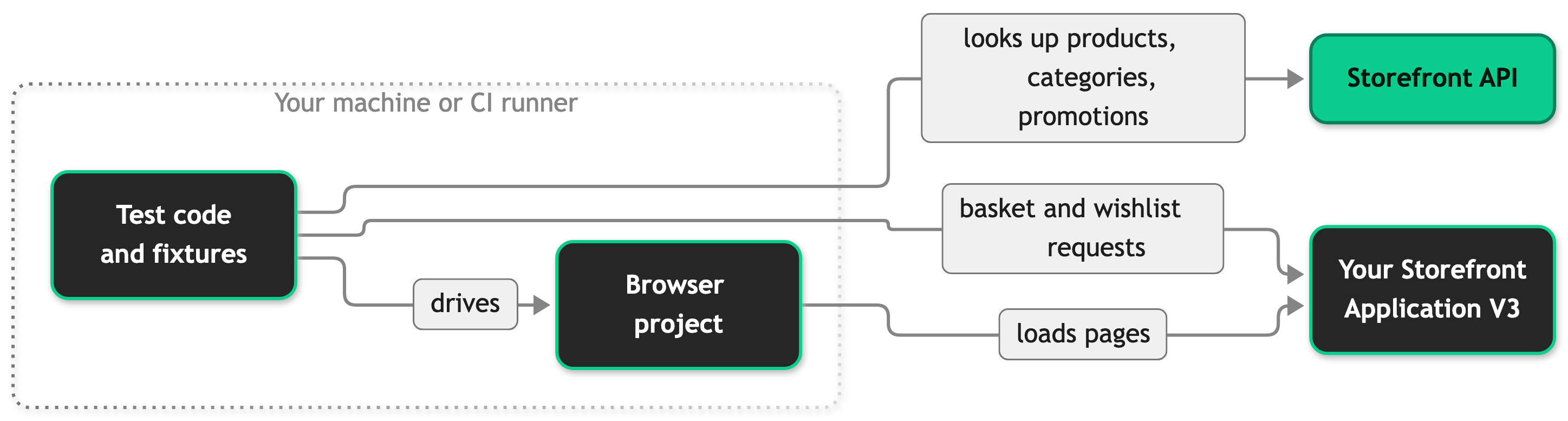
Every test that uses the browser also runs with two kinds of third-party requests blocked. The first is the Usercentrics consent loader, so the tests do not load your consent banner. The second is every request to a URL under https://www.googletagmanager.com/gtag/, the path that serves the Google tag script of Google Tag Manager. The suite blocks nothing else. The Google Tag Manager container script still loads, and requests to any other address, such as your own tracking endpoint, still go out.
Sessions and sign-in
Signing in through the UI in every test would be slow, and it can hit a sign-in rate limit when your shop has one active. The suite signs in once for each browser project instead and saves the sessions.
Each browser project depends on its own setup project, named <browser>-setup. The setup project signs in one customer for each role in AUTH_ROLES. A role names a customer whose session the suite saves:
defaultis the customer of the browser project.hydrationisTEST_CUSTOMER_EMAIL6. The hydration checks use its session. They load each page type and fail when the browser console reports a hydration problem. Hydration is the step where the browser attaches Vue to the HTML that the server rendered, and Vue logs a problem when the two differ.
The setup opens the customer's orders page to confirm the session, then saves the browser state to .auth/<browser>-<role>.json, which Git ignores. A run limited to one browser (--project=webkit) signs in only that browser's customers.
If your shop rate limits sign-ins, the setup waits and signs in again, see Sign-in rate limits.
A test opts into a saved session with authState(role) from support/auth.ts:
Only the tests that call authState start signed in. When a browser project runs without its setup project, such as the happy path with --no-deps, its tests run as a user who is not signed in.
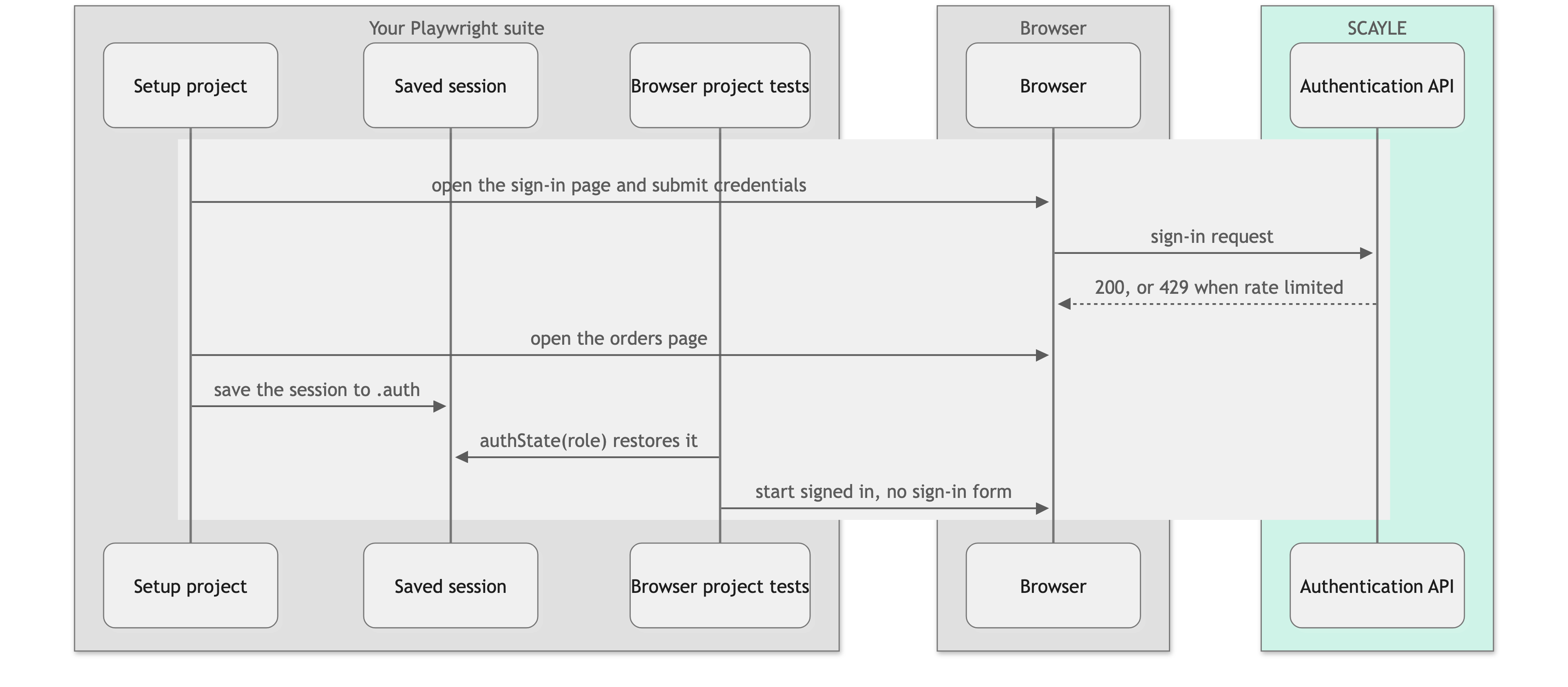
The setup deletes the old session file of a role before it signs in. authState rejects a saved file older than 24 hours with its own message, so a leftover file never passes as a live session.
Do not use authState in a test that signs out. Signing out ends the session on the server for every later test that restores it.
Sign-in rate limits
If rate limiting is active for your shop, the Authentication API answers a sign-in with 429 when one customer signs in too often. How many sign-ins a customer may do per minute depends on your shop. The setup then waits 61 seconds, one rate limit window, and signs in once more. Only the setup waits. A test that signs in through the UI does not wait, and in CI a failed test is retried at once, without the one-minute wait.
Every sign-in attempt counts against the limit of its customer, and the setup signs in again on every retry. Locally, a lower --workers value or one --project at a time reduces the risk. In a pipeline workers is already 1, so the risk comes from several browser jobs that run at the same time against the same customers.
What the setup does when a sign-in fails
| Case | Result |
|---|---|
A TEST_CUSTOMER_* variable is missing | The setup skips that role at once. |
| The sign-in is still rate limited after the one-minute wait | The setup skips that role at once. |
| The password is wrong | The setup skips the role after the last attempt. |
| A saved session lacks the access token of the Checkout web component | The setup skips the role after the last attempt. |
| Any other failure that is not a rate limit | The setup skips the role after the last attempt. |
The other tests of the browser project keep running as users who are not signed in. The tests that restore the missing session fail with No saved session.
Shop data
A test looks up its products and categories in the Storefront API instead of hardcoding IDs, then drives the UI with what it finds. What happens when the shop does not match depends on the test.
- The data is missing and the test checks for it. A catalog gap is data that your shop lacks and a test needs. The test skips with a reason that names the data to add. Some of these skips also carry a
catalog-gapannotation and log[<id>] <reason>, and the skip-rate reporter lists those separately, see Read the results. Other skips can name missing data too, so read their reasons. - The shop structure or a customer's state differs from what the test assumes. The test fails. This covers the shop structure the tests rely on, such as the filters of the default Storefront Application V3, and customer state, such as orders on a customer that should have none.
- The test skips on purpose. A test marked desktop-only or mobile-only skips in the other viewport. The express checkout tests skip unless
E2E_EXPRESS_CHECKOUT_ENABLEDistrueor1. Tests that need a second country skip on a shop that has only one.
The lookups cover a bounded part of your catalog. The storefrontAPIClient pages through a limited number of products to find a match, it looks for most categories among your root categories and their direct children, and it reads only the first page of promotions and campaigns. Data outside that window counts as missing, so a product far down a large catalog or a deeply nested category does not satisfy most tests. The limits are constants in the storefrontAPIClient source under testing/playwright/. The SETUP.md file in testing/playwright/ of your application lists the data each test looks for and repeats the setup steps of this page. It ships with the suite version you run, so when it differs from this page, follow SETUP.md.
Set up the suite
You end with a passing happy path test against your shop.
Before you start, you need:
- The Node.js and pnpm versions listed under Prerequisites in the README at your application root.
- A running storefront that the machine reaches, either a deployed environment or a local
pnpm devserver. - Your SCAYLE account and your Storefront API key, as the values of
STOREFRONT_TENANT_SPACEandSTOREFRONT_API_KEYin your application's.envfile. The suite has no default for either, so set both even when your application runs without them. - A test or staging shop. The tests add products to baskets, change customer data and place orders.
Prepare the workspace
Do this block only when your pnpm workspace does not cover the suite yet, which is usual for a project outside the SCAYLE monorepo. Skip any step your project already meets. When testing/playwright is already listed in your workspace and workspace:* is gone from its package.json, go on with Install the suite and run the happy path.
- Create
pnpm-workspace.yamlat your application root when it does not exist. - Add
testing/playwrightunderpackagesin that file when it is not listed. A file that lists only.needs the extra line: - In
testing/playwright/package.json, replaceworkspace:*for@scayle/storefront-apiwith a published version when it still showsworkspace:*. Take the version from your application'spackage.json, frompnpm-lock.yaml, or fromnode_modules/@scayle/storefront-api/package.jsonin an installed project.
Install the suite and run the happy path
- Install the dependencies from the application root:
Ifpnpm installstops with a missing catalog entry, yourpnpm-workspace.yamldoes not define it. Define the missing entries in that file: put entries that apackage.jsonmarkscatalog:undercatalog:, and entries markedcatalog:appundercatalogs:andapp:, each with a version. Take the versions from thecatalogs:section ofpnpm-lock.yamlor from the installed packages. - Change to the suite's folder:
- Install the browsers:
On a bare Linux machine or runner, usepnpm exec playwright install --with-deps. It installs the system libraries the browsers need and requires root rights. - Copy
testing/playwright/.env.exampletotesting/playwright/.env. - In that file, or in the
.envfile at your application root, setBASE_URLto the homepage of your shop including the country prefix. - In the same place, add
STOREFRONT_TENANT_SPACEandSTOREFRONT_API_KEY..env.examplelists neither. - From
testing/playwright/, run the happy path:
The happy path opens the homepage, goes to a category through the main navigation, adds the first product to the wishlist and the basket, and checks that checkout asks a user to sign in. A passing run lists one passed test and ends with the skip-rate line. It shows that your storefront, BASE_URL and Storefront API credentials work.
See Environment variables for every variable.
The configuration prints a warning for each .env file it does not find. The warning alone is not a failure. If neither file nor your shell holds the variables, the run then fails with STOREFRONT_API_KEY is not set. See Troubleshooting for the other errors.
The happy path needs no test customers. Register the test customers and set the TEST_CUSTOMER_* variables before you run the other specs.
Test customers
You register these customers once in your shop through its own sign-in page, and the suite never creates them. All customers share one password, set in TEST_CUSTOMER_PASSWORD. Register TEST_CUSTOMER_EMAIL1 with a mailbox you control, because the password reset test sends a real reset email to it. The order success test places an order with each browser's customer, so TEST_CUSTOMER_EMAIL1 to 5 need a saved delivery address and an adult birth date, so the checkout offers invoice. The order success test selects invoice itself and fails with a clear message when the checkout disables it. The account flyout test asserts the first name Aqa in the greeting of the desktop customers, so register TEST_CUSTOMER_EMAIL1 to 3 with that first name. Across all browser projects, the sign-in setup signs in TEST_CUSTOMER_EMAIL1 to 6. Each browser project has its own customer for the basket and account tests, so parallel runs do not clash on basket state.
| Variable | Used by | State it needs |
|---|---|---|
TEST_CUSTOMER_EMAIL1 | chromium, and the sign-in, orders and wishlist tests in every browser project | More than 8 orders, so the order list has a second page. Empty wishlist and basket. First name Aqa, a saved delivery address, an adult birth date. |
TEST_CUSTOMER_EMAIL2 | firefox | Empty basket. First name Aqa, a saved delivery address, an adult birth date. |
TEST_CUSTOMER_EMAIL3 | webkit | Empty basket. First name Aqa, a saved delivery address, an adult birth date. |
TEST_CUSTOMER_EMAIL4 | mobile-chrome | Empty basket. A saved delivery address, an adult birth date. |
TEST_CUSTOMER_EMAIL5 | mobile-safari | Empty basket. A saved delivery address, an adult birth date. |
TEST_CUSTOMER_EMAIL6 | The hydration role, signed in by every browser project | Items in the wishlist and the basket, so the hydration checks cover non-empty pages. |
TEST_CUSTOMER_NO_ORDERS | The Orders page empty state test | No orders. |
A run limited to one browser project needs that browser's customer, TEST_CUSTOMER_EMAIL1, TEST_CUSTOMER_EMAIL6, TEST_CUSTOMER_NO_ORDERS, and the password variables.
Run the tests
Run these commands from testing/playwright/.
The happy path has its own script, pnpm test:e2e:happy-path, which pnpm test:e2e does not run. The script passes --no-deps, so it skips the sign-in setup and runs as a user who is not signed in. Without --project, it runs in every browser project.
UI mode and the VS Code extension do not run setup projects unless you select them. Select <browser>-setup before you run a test that restores a signed-in session.
The suite can also scan your pages for accessibility problems with axe. These checks are off by default and only report. See Accessibility Testing.
A run with the CI environment variable set uses a different profile than a local run, see Run the suite in a pipeline.
Configuration
The suite is configured in testing/playwright/playwright.config.ts. These are the settings you are most likely to look up. Local values apply when CI is not set. Any non-empty CI value counts as set, including false, and a set CI also stops the suite from reading .env files.
| Setting | Local | CI (CI set) |
|---|---|---|
testDir | ./tests | ./tests |
fullyParallel | true | true |
workers | Playwright's automatic count | 1 |
retries | 0 | 2 |
forbidOnly | false | true |
baseURL | BASE_URL, default https://localhost:3000/de/ | Same |
trace | on-first-retry | on-first-retry |
ignoreHTTPSErrors | true | true |
projects | The browser projects, each with a <browser>-setup project, and the a11y-crawl projects with A11Y=1 | Same |
reporter | junit, list with steps, and skip-rate, plus playwright-testrail-reporter when TESTRAIL_RUN_ID is set | Same |
The table shows the values in the configuration file. With retries at 0, a local run records no trace unless you pass --retries=1 or --trace on. The setup projects turn traces off, so a retried sign-in does not record the typed password. A pipeline that passes --reporter on the command line replaces the reporters of this file, and the skip-rate reporter then runs only if the pipeline lists it.
Read the results
A run with the reporters of the configuration file prints the list reporter output with steps, writes a JUnit report to test-results/results.xml, and prints a skip-rate line at the end. The rate is the skipped tests divided by the skipped and executed tests, for example:
After that line, the skip-rate reporter lists each skip that carries a catalog-gap annotation with its project and reason, then the other skips grouped by reason with a count. The reporter never fails a run and applies no threshold. If you want a gate, check this line or results.xml in your own pipeline step.
A high skip rate usually means your catalog lacks data the tests look for. Skips listed as a catalog gap name data to add. Other skips can name missing data too, so read their reasons, see Shop data. Even a healthy first run on a shop with partial data has some skips.
When TESTRAIL_RUN_ID is set, the configuration also adds the playwright-testrail-reporter package, which sends the results to TestRail. Without the variable, that reporter is off. The titles of the shipped tests start with a TestRail case ID such as C2139186:, so keep it when you edit a test, or use your own ID scheme consistently.
Run the suite in a pipeline
You end with a pipeline job that runs the suite, reports its results and keeps the files you need to debug a failure.
test-results/ can hold passwords. Playwright writes an error-context.md file into it for every failed test. The file holds a snapshot of the page, which can include a password typed into a form. The .auth/ folder holds the tokens of live sessions. Restrict who can download the artifacts of the job, and never upload .auth/.
- Install the browsers in the job with
pnpm exec playwright install --with-deps, because a runner is usually a bare Linux machine. If your pipeline uses a Playwright Docker image instead, keep its version the same as the version of@playwright/test. - Pass every variable through the environment of the job:
BASE_URL,STOREFRONT_TENANT_SPACE,STOREFRONT_API_KEYand theTEST_CUSTOMER_*variables, see Environment variables.CIis set in a pipeline, so the suite reads no.envfile. Store the keys and passwords as masked variables of your pipeline. - From
testing/playwright/, runpnpm test:e2e. The CI profile runs one worker and retries a failed test twice, and it fails the run on a leftovertest.only, see Configuration. - Keep
test-results/results.xmland the skip-rate line of the log. A--reporteroption on the command line replaces the reporters of the configuration file, and the skip-rate reporter then runs only if you list it. The run never fails on the skip rate, see Read the results. - Keep
test-results/as an artifact of the job, with restricted access, see the warning above.
Browser jobs that run at the same time share the sign-in limits, see Sign-in rate limits. The accessibility checks have their own pipeline steps, see Run the checks in a pipeline.
Write a test
Start from a suite that passes the happy path, see Set up the suite. You end with a spec that uses the shipped fixtures and page objects.
- Pick the spec file for the feature. Specs live in
testing/playwright/tests/e2e/and follow the{feature}.e2e.spec.tsnaming, for exampleplp.e2e.spec.ts. Add the test to the existing file for that feature, or create a new file for a new feature. - Import
testfromfixtures/fixtures, not from@playwright/test. Importexpectfrom@playwright/test. - Ask for the page objects and fixtures the test needs in the destructured parameters.
- Look up the data the test needs through
storefrontAPIClient: - Group the actions in
test.step()calls. Each step shows as its own entry in the report. - If the test needs a signed-in customer, restore a session with
test.use(authState('default'))in thedescribeblock, as shown in Sessions and sign-in. - Before you commit, run
pnpm lintandpnpm typecheckfromtesting/playwright/.
Add a page object
A page object extends Base and declares its locators as readonly properties in the constructor. It finds elements with getByTestId(), which matches the data-testid attributes of your markup.
To make a page object that takes only page available as a fixture, import it and add it to pageObjectMap in fixtures/pageObjects.ts:
The map generates one fixture for each entry and derives its type, so tests can then ask for giftCardBanner by name. A page object with other dependencies, such as basketPage, which also needs rpc, is declared as an explicit fixture in fixtures/fixtures.ts, and its name and type go into the Fixtures interface there.
Environment variables
The suite reads variables from the .env file in testing/playwright/, then from the .env file in your application's root directory. A value exported in your shell wins over both files. With CI set, it reads neither file.
| Variable | Required | What it does |
|---|---|---|
BASE_URL | No | The homepage of the shop under test: the scheme, the origin and the country prefix, for example https://localhost:3000/de/. Falls back to https://localhost:3000/de/. |
STOREFRONT_TENANT_SPACE | For the happy path and catalog lookups | Your SCAYLE account. The suite builds the Storefront API host from it and has no default. Tests that use storefrontAPIClient, the happy path included, fail without it. |
STOREFRONT_API_KEY | For the happy path and catalog lookups | Your Storefront API key. The suite uses it to look up products, categories, promotions and campaigns. Tests that use storefrontAPIClient, the happy path included, fail without it. |
TEST_CUSTOMER_EMAIL1 to 6 | For signed-in tests | The test customers. See Test customers. |
TEST_CUSTOMER_NO_ORDERS | For the Orders page test | A test customer with no orders. |
TEST_CUSTOMER_PASSWORD | For signed-in tests | The password shared by all test customers. |
TEST_CUSTOMER_WRONG_PASSWORD | For the sign-in test | Any value that is not a real password. Only the negative sign-in test uses it. |
E2E_SHOP_ID | No | The shop country ID, as a number. By default the suite reads it from the page data of the rendered storefront. Set it only when your storefront does not expose that data. |
E2E_EXPRESS_CHECKOUT_ENABLED | No | Set to true or 1 to run the express checkout tests. They skip otherwise. |
E2E_RPC_TIMEOUT_MS | No | Timeout in milliseconds for one RPC request the tests send, such as adding a product to the basket. Defaults to 5000. A value that is not a number above 0 is ignored with a warning. |
TESTRAIL_RUN_ID | No | The ID of a TestRail run. When set, the suite adds playwright-testrail-reporter and sends the results to that run. |
A11Y | No | Set to 1 to turn on the accessibility checks. See Accessibility Testing. |
BASE_URL takes no query string or hash, because the suite resolves relative paths against BASE_URL, which drops a query string or hash. It needs a scheme such as https://. The suite adds a missing trailing slash, which keeps the country prefix when specs resolve paths against it.
Best practices
Let a test fetch its own data
Use storefrontAPIClient to find something in the live catalog that satisfies the test, and skip with a reason when nothing matches. A hardcoded ID fails the day that product leaves the catalog.
Locate elements by data-testid
A CSS class or a visible label changes for styling or copy reasons that have nothing to do with the behavior a test checks. A data-testid is more stable, because it changes mainly when the element it marks is gone or restructured. Prefer it, and use a role or text locator only where no test ID exists.
Wait for state, not for time
In tests/, page-objects/ and support/, the lint configuration fails every page.waitForTimeout() call, and it warns on waitForLoadState('networkidle') and the force option. Wait for an element or a response, and call waitForDeferredReloads() before an interaction that a deferred prop could reset when its data arrives late, such as picking a size on a product page.
Use paths relative to BASE_URL
In the same folders, the lint configuration applies the recommended Playwright rules. It also rejects a path written as a string or template literal that starts with / in goto, waitForURL, toHaveURL and the second argument of navigate(), because such a path skips the country prefix of BASE_URL. Use a path relative to it, such as ROUTES.basket. The check only sees paths written directly in the call, not a path held in a variable.
Keep tests independent
Locally, tests run in parallel. A test sets up its own state instead of relying on a previous test, or an ordering dependency shows up as flakiness.
Troubleshooting
Tests fail with "No saved session"
Issue: A test fails with No saved session for role "<role>" in project "<project>", or with a message that the saved session is older than 24 hours.
Possible causes: The <browser>-setup project could not sign in the customer, so it skipped, see Sessions and sign-in for the cases. The setup project did not run, which happens in UI mode and in the VS Code extension unless you select it. The session file is older than 24 hours.
Solution:
- Read the skip message of the setup project and the console output. They name the cause, with the password masked.
- Fix the variable or the password, or wait a minute if the sign-in was rate limited.
- Run the browser project again. Each setup run deletes the old session file first.
Prevention: Check the customers with a manual sign-in before the first run.
Tests that look up catalog data fail
Issue: Tests fail with STOREFRONT_API_KEY is not set or STOREFRONT_TENANT_SPACE is not set.
Possible causes: The variable is missing from testing/playwright/.env, from your application's .env and from your shell. With CI set, the suite reads no .env file.
Solution: Set both variables where the suite can read them. In a pipeline, pass them as environment variables.
Prevention: Run the happy path first. It fails fast on a missing key.
The run stops with "BASE_URL must be the homepage of the shop under test"
Issue: Playwright exits when it loads the configuration, with this message or with Invalid URL.
Possible causes: BASE_URL has a query string or a hash, or it has no scheme such as https://.
Solution: Set BASE_URL to the homepage of the shop, such as https://localhost:3000/de/.
Prevention: Use only the scheme, the origin and the country prefix in BASE_URL.
A test times out waiting for an element
Issue: A test fails with a timeout on a locator, although the element renders when you open the page by hand.
Possible causes: The test opened a different URL than you expected, for example because of a stale BASE_URL or a redirect. Or the element does not render under the test's conditions, such as another country or a missing precondition.
Solution: Check page.url() right before the failing assertion. Run the test with pnpm test:e2e:ui to watch it and see the real page state at the point of failure. In UI mode, select the <browser>-setup project first when the test restores a saved session.
Prevention: Assert on the URL after each navigation in a multi-step journey, so a wrong page fails at the step that caused it.
A failure shows a 429 or a timeout earlier in the log
Issue: A basket test or the shop data check fails, and the log shows a 429 or a timeout before the failure.
Possible causes: Your shop rate limited the requests of the suite, see Sign-in rate limits. The failing assertion is then a consequence of the limit, not a real difference in your data.
Solution: Run the failing test again before you look for a data problem.
Prevention: See Sign-in rate limits for how to lower the risk.
Tests pass locally and fail in CI
Issue: A suite that is green on your machine produces failures in the pipeline.
Possible causes: The CI profile differs from the local one, see Configuration. A variable that only lives in a .env file is missing, a leftover test.only fails the run, and the shop may answer more slowly.
Solution: Reproduce the CI profile locally with CI=true pnpm test:e2e, and export every variable in your shell first.
Prevention: Do not assert exact counts from a live catalog. Assert on presence and shape, and use storefrontAPIClient for the data.


