

SCAYLE Analytics
SCAYLE Analytics sends behavioral events from the Storefront Application V3 to the SCAYLE Storefront API, so product views, list impressions, searches, promotions, and basket and wishlist activity reach SCAYLE without any tag configuration. It ships with the Storefront Application and runs alongside Tracking, the Google Tag Manager (GTM) pipeline, which keeps working unchanged. The browser posts each event to a same-origin route in your application, and your server forwards it to the Storefront API, so the Storefront API token never leaves the server.
The one thing you have to do is connect your consent vendor. Setup walks through it.
Why it matters
SCAYLE can only use behavioral data if every event has the right shape. A basket add that reports the basket item quantity instead of the units added, or a product tile counted twice on scroll, distorts every figure built on top of it. The Storefront API accepts such events without an error, so a wrong shape shows up only as distorted numbers later.
The Storefront Application ships the whole pipeline, typed end to end against the contract in @scayle/storefront-api, so the browser and the server can't drift apart.
Try it
Try it: open the demo shop and watch the SCAYLE Analytics requests in the Network panel
Filter the Network panel to analytics/events. Each event is one request, answered with 202.
What's included
- Event contract: The events listed on SCAYLE Analytics events, fired from the same event-family composables that fire the Tracking events.
- Browser dispatcher: A client plugin that fires
view_pageon every URL change, applies the consent gate, stamps the page and session context, queues events, and sends each one withnavigator.sendBeacon. - Same-origin route:
POST /api/analytics/events, mounted bare and under the country prefix. It checks theOriginheader and requires a knownevent_nameplussession_id,device_type,page_type, andpage_path. Every other key is optional: an over-long text is cut to the length cap, an over-long path is dropped, and unknown keys are stripped. It doesn't check event-specific properties, which the Storefront API validates. It answers202. - Server-side forwarding:
AnalyticsForwardServiceadds the session customer and the shop version, then submits the event through the Storefront API client on the server. - Browser session: A session of its own, kept in
localStorage, with a randomsession_idand the attribution of the page the session started on. Tracking reads the same session, so both report the samesession_id. - Consent gate: A dedicated consent vendor, separate from Google Analytics. Events wait while the consent management platform loads and are sent or dropped on its first report.
- Development fail-safe: In a development build, the route validates and answers
202but forwards nothing to the Storefront API. - Signals for a broken pipeline: Browser console warnings for an unknown vendor id or a grant without a consent id, and throttled server log lines for every rejected or failed event.
What you can change
Configure
- The service for SCAYLE Analytics in your consent management platform (in Usercentrics, a custom Data Processing Service).
- The settings id your consent management platform loads (
STOREFRONT_USER_CENTRICS_APP_IDfor Usercentrics). - Point the pipeline at your consent vendor: set the
scayle-analyticskey insrc/client/consent-vendor.config.jsonto the service id your consent management platform assigns. - Choose which countries require consent through
publicFields.consentManagementRequiredon each country instorefront.config.ts. - The server log level through
STOREFRONT_LOG_LEVEL. Keep it atwarnor lower in production, since every pipeline signal is awarn.
Extend
- Report a surface you add, such as a custom product slider, with the existing events and
product_list_typevalues. - Connect a different consent management platform by writing an adapter that fills the consent manager the way the Usercentrics adapter does.
Constraints and limits
Permanent
- The event set is closed. The contract in
@scayle/storefront-apidefines the events, and the route refuses any otherevent_name. A new surface reports with an existing event and an existingproduct_list_typevalue. - The Storefront Application sends no checkout events to SCAYLE Analytics, and the contract has none. The SCAYLE Checkout web component sends its own funnel events, see Checkout web components. The Storefront Application fires
begin_checkoutandpurchasefor Tracking only. - There is no on or off flag. Consent is the only gate, so there is never a second place that decides whether SCAYLE Analytics is active and could disagree with the first.
- The dispatcher never replays an event after a consent decision. It drops any event that fires once the consent management platform has reported while the SCAYLE Analytics vendor isn't consented. For a first-time user, that includes the interactions while the consent banner is open.
- The dispatcher doesn't retry a sent event. The Storefront API ingest is at least once without a client event id, so a retry could duplicate the event.
Known limitations
- You lose the events held while the consent management platform loads if the tab closes, or a full-page navigation happens, before the platform reports. Sending them earlier would collect data ahead of the user's decision.
- A consent withdrawal reaches only the tab it happens in. Another open tab keeps the grant its consent manager reported until it reloads.
view_basketcarries at most 200 basket items, and at most what fits the 32 KiB body cap. For a larger basket the dispatcher cuts theproductsarray to fit. Each entry still reports the full basket item count intotal, so aproductsarray shorter thantotaltells you the dispatcher cut it.- A size change in the basket has no event of its own.
useBasket().changeItemVariant()reports it asremove_from_basketfor the old basket item followed byadd_to_basketfor the new variant, both on thebasketsurface with the sameproduct_id, which inflates the add-to-basket rate. See Add-to-basket figures are inflated for how to exclude them, and Basket for how a size change works.
Pitfalls
src/client/consent-vendor.config.jsonships the id of the Storefront Application's own Usercentrics configuration. If you use your own Usercentrics configuration and keep that id, you send nothing in countries that require consent management, because your consent management platform never reports that service. Replace the id when you connect your configuration.- An empty
STOREFRONT_USER_CENTRICS_APP_IDholds every event in a country that requires consent management, see Known limitations. - The browser gate and the route read the same
publicFields.consentManagementRequired. Setting it tofalsefor a country that does require consent management sends events there without consent and withoutconsent_id, and nothing logs anything. page_pathandprevious_page_pathcarry the page path verbatim. A token, an order number, or an email address in a path segment travels with every event on that page. Keep such values in the query string or the request body.- The route has no per-client rate limit. It is unauthenticated, so anyone can post events, and one client can use up the forward slots and drop other users' events. Put a per-client limit on
POST /api/analytics/eventsat your CDN or WAF. - Once you enforce the Content Security Policy,
connect-srchas to allow'self', assrc/server/middleware/securityHeaders.tsdoes. Otherwise the browser blocks every beacon, with a CSP violation per event in the browser console and nothing on the server. The shipped policy is report-only. - A catch-all redirect that covers
/api/*redirects the request before it reaches the route. - Behind a TLS-terminating proxy, the proxy has to send
x-forwarded-proto, and the configured domain has to name the host the shop is served on. Otherwise the route answers403to every event, with a serverwarnnaming both origins.
How it works
An event is one flat JSON object. The composable sets the event name and its own properties, the dispatcher adds the page and session context, and the server adds the customer:
Money is integer minor units of the shop currency, for example 8995 for 89.95, the same convention as the rest of @scayle/storefront-api.
The event travels from the composable to the Storefront API like this:
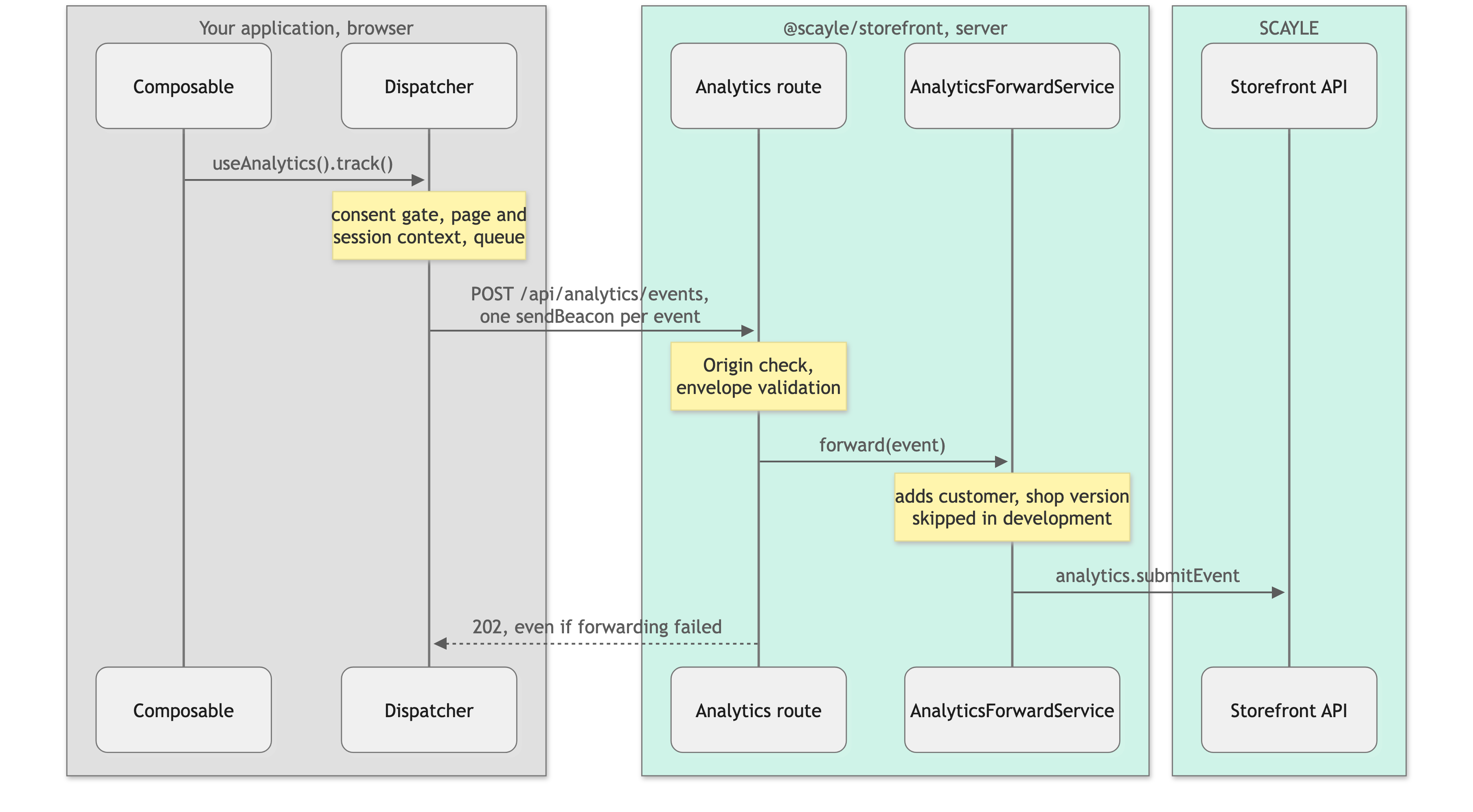
The browser never calls the Storefront API itself. It must not hold the Storefront API token, and it doesn't. The server route forwards each event. sendBeacon can't set the country header the oRPC client uses, so the dispatcher builds the route URL for the current country, and the Storefront Application mounts the route both bare and under the country prefix.
Who sets which field
| Field | Set by | When |
|---|---|---|
event_name and the event's own properties | Composable | At capture |
page_type, page_path, previous_page_path, previous_page_type | Dispatcher | At capture, so a held event keeps the page it happened on |
consent_id, session_id, device_type | Dispatcher | At send, from the consent manager, the browser session, and navigator.userAgent |
landing_page_path, utm_source, utm_medium, utm_campaign, utm_content, referrer | Dispatcher | At send, from the page the browser session started on |
customer_id, customer_type, customer_segments, customer_groups | Server | From the session customer, never from the browser |
shop_version | Server | From version in storefront.config.ts, which reads the version of your package.json |
customer_segments lists the referenceKey of each customer segment of a signed-in customer, and an empty list when the session has none. See Customer Segments. A user has neither customer_segments nor customer_groups.
SCAYLE Analytics events lists each event's own properties and the product_list_type and page_type values.
The shop itself is not part of the payload. The Storefront API resolves the shop country, key, locale, and currency from the shop the server-side client calls with.
The contract also accepts a query_string, which the Storefront Application never sends. A landing URL can carry a password reset or preview token, so the route strips the field even when a caller sends one. Of the landing query, only the four utm_* values reach SCAYLE Analytics. The dispatcher reports the referrer only when it points to another origin, and only as its origin and path, without its query and hash.
Consent
Where the country requires consent management, the dispatcher sends nothing before consent. It sends only while the SCAYLE Analytics vendor is consented and the consent manager holds a consent id. The Usercentrics adapter sets both from the same consent event. What happens depends on the situation:
- While the platform loads, the dispatcher holds the events captured in that window. Before the platform's first report, a returning user who already consented looks just like one who declined, so the first report sends or discards the held events. The dispatcher waits for a decision the user already made.
- For a returning user who consented, the first report grants the vendor, and the dispatcher sends the held events.
- For a first-time user, the platform's first report grants nothing. The dispatcher drops interactions from before the user answers the banner and never replays them.
- When a user declines, now or later, the dispatcher clears the queue, including events waiting on the first report or on a free beacon slot. After a decision, it holds nothing and drops any event that fires while the vendor isn't consented.
- In a country without consent management, the gate is skipped. Events fire without a consent check and without
consent_id. The consent manager plugin still has to be installed. Without it, the dispatcher can't tell which case applies and sends nothing. - In a country that requires consent management, the route refuses an event without
consent_idwith400, whatever the browser did.
Checkout web components
The SCAYLE Checkout web component sends its own funnel events to SCAYLE Analytics. They do not pass through the Storefront Application's dispatcher, so the checkout page sets two attributes on <scayle-checkout>, and the sign-in page sets the second one on <scayle-auth>:
consentcarriesscayleAnalyticsnext topaypalandklarna. The component sends events only whenscayleAnalyticsis the JSON booleantrue. If you rewriteconsentinCheckout.vue, keep the key, or SCAYLE Analytics stays off for the rest of the session.tracking-contextcarries the samecontextobject as the Tracking events, fromuseTracking().context. It never enables or blocks an event. Shared context describes the object.
The checkout web component needs a release that reads both attributes. An older release ignores them without an error and sends no events. The checkout web component forwards both attributes to the scayle-auth it renders, so the login and registration step inside the checkout is covered. The standalone sign-in page gets no consent, because its scayle-auth sends no SCAYLE Analytics events. It only adds tracking-context to its GA4 events.
Two windows lose or thin out data:
- While the consent platform loads, the checkout gets
scayleAnalytics: falseand drops its events, where the dispatcher holds them. A funnel event from that window is lost. Delaying the checkout until the platform reports would block it behind an ad blocker, and leavingconsentoff would bring back the default that treats PayPal and Klarna as consented. tracking-contextis absent until the deferredcustomerprop resolves. When the checkout script was already loaded on the basket page, that can be after the checkout mounts. The component picks the context up only if it re-reads the attribute, so an event from that window may carry no context.
Delivery
Every event is one navigator.sendBeacon request, which the browser keeps alive across a tab close and a navigation. If the browser refuses a beacon because its in-flight budget is used up, the event goes back to the head of the queue and waits for the next send. The queue also flushes on pagehide and on visibilitychange, never on unload or beforeunload, which are unreliable on mobile and break the back-forward cache.
Script can't read a beacon's response. The queue holds at most 1000 events. Once it's full, the dispatcher drops the oldest event and logs a warn in the browser console.
Setup
Every new Storefront Application V3 project includes SCAYLE Analytics. src/client/main.ts and src/client/ssr.ts register the dispatcher after the consent manager plugin, and src/server/index.ts mounts the route. You only need to connect your own consent vendor.
The steps work with any consent management platform. The Storefront Application ships an adapter for Usercentrics. For another platform, write an adapter first, see Connecting a different consent management platform.
- In your consent management platform, add a service for SCAYLE Analytics. Fill in the legal texts and data processor details as your legal team specifies, since they appear in the consent banner.
- Copy the id your consent management platform assigns to the new service into the
scayle-analyticskey ofsrc/client/consent-vendor.config.json. - Publish the consent management platform configuration and deploy the Storefront Application.
- Verify the events, as described below.
Each consent management platform configuration assigns its own service id, so a project that loads a different configuration per environment needs the matching id for each.
Example: Usercentrics
- In the Usercentrics Admin Interface, open the configuration whose settings id your Storefront Application loads (
STOREFRONT_USER_CENTRICS_APP_ID). - Add a custom Data Processing Service named
SCAYLE Analytics. SCAYLE Analytics isn't in the Usercentrics service database. - Copy the id Usercentrics shows for the new service into
src/client/consent-vendor.config.json, then publish the configuration.
Verifying the events
Work from the browser to the Storefront API. Each step has its own signal, so a break shows up in one place.
- Check the vendor id.
src/client/consent-vendor.config.jsonhas to hold the service id your consent management platform assigned to SCAYLE Analytics. If it doesn't, the browser console logsConsent vendor id configured for SCAYLE Analytics is unknown to the consent manager, no event will ever be sent. If your adapter grants the vendor without a consent id, it logsConsent manager granted SCAYLE Analytics without a consent id, no event will ever be sent. - Give consent. Accept the SCAYLE Analytics service in the consent banner. With Usercentrics, check that the
UC_CONSENTevent'sdetail.servicescontains your vendor id withconsent.given: true. - Watch the events leave the browser. After a navigation, the Network panel shows a request to
/api/analytics/events, or/<country>/api/analytics/eventswith a path country selector, answered with202. The request is listed as typepingorbeacon. The body carriesevent_name,page_type,page_path,session_id,device_type, and, where consent is required,consent_id. - Check that the route accepts them. The server logs a status other than
202asSCAYLE Analytics event not forwarded to the Storefront API, with areasonnaming the branch. Each reason logs at most once a minute, and the next line carries asuppressedcount of the ones in between. - Check that the forward succeeds. A production build logs no
forward-failedorforward-limitline. A development build logs the development mode line instead.
| Status | Meaning |
|---|---|
202 | The envelope is valid and the event was accepted. The route answers 202 whether or not the forward to the Storefront API succeeded. An event missing an event-specific property, for example total on view_product_list, also gets 202 and then fails at the Storefront API as forward-failed. |
400 | No country context, a body that isn't JSON, an envelope violation such as an unknown event name, a mistyped value, or a missing envelope field (the log names the fields), or a missing consent_id where the country requires consent management |
403 | The Origin header doesn't match the public origin of the deployment. The log line names both origins. |
413 | The body is over the 32 KiB cap |
Tracking events in window.dataLayer belong to a different pipeline. They don't confirm that SCAYLE Analytics is working.
Configuration
| Setting | Where | Effect |
|---|---|---|
| SCAYLE Analytics vendor id | scayle-analytics in src/client/consent-vendor.config.json | The consent vendor the dispatcher checks. Must match the service id your consent management platform reports. |
| Usercentrics settings id | STOREFRONT_USER_CENTRICS_APP_ID | The Usercentrics configuration the Storefront Application loads |
| Consent requirement per country | publicFields.consentManagementRequired on each country in storefront.config.ts | true gates events on consent and requires consent_id. false, or no publicFields, sends without a consent check. |
| Shop version | version in package.json, which storefront.config.ts reads | Sent as shop_version for release analysis |
| Log level | STOREFRONT_LOG_LEVEL | Keep at warn or lower in production, or every pipeline signal disappears. |
Customization guides
Reporting a surface you add
A new surface reuses the existing events and maps itself to an existing product_list_type value, usually product_slider, with a product_list_id when the list has an id. A new product_list_type value needs a change to the contract. Report it through the same event-family composable that fires the GA4 events. The single product spotlight in the Storefront Application does this for a one-product slider (trimmed, see the file for the full component):
trackViewItemList fires both the GA4 view_item_list and the SCAYLE Analytics view_product_list. trackViewProductTile fires view_product_tile for each tile. Resolve the surface in the component that renders the list and pass it down, rather than having a product card guess it. Fire impressions once per product per list, as useElementVisibility(..., { once: true }) does here.
Connecting a different consent management platform
The dispatcher reads consent from the consent manager, not from Usercentrics directly, so another platform needs an adapter that fills the consent manager. Write an adapter for a different CMP describes what the adapter has to set and shows an example. Install it after the consent manager plugin and before the dispatcher.
Troubleshooting
The route returns 202 but forwards fail
Issue: The Network panel shows 202 for every event, but the server log reports failed or dropped forwards.
Possible causes:
- The forward to the Storefront API fails. The server logs
SCAYLE Analytics event not forwarded to the Storefront APIwithreason: 'forward-failed', once a minute with asuppressedcount. An event missing an event-specific property fails this way too. - Forwards are dropped because 16 are already in flight, logged with
reason: 'forward-limit'. That usually points at a slow ingest, so look for aTimeoutErrornext to it.
Solution:
- Lower
STOREFRONT_LOG_LEVELtowarnif it's higher, and search the server log for the lines above. - For
forward-failed, readerr.cause.code, for exampleECONNREFUSED, or the Storefront API's response for a rejected event. - For
forward-limit, check the Storefront API response times from your server.
Prevention: Keep STOREFRONT_LOG_LEVEL at warn or lower in production, and alert on forward-failed and forward-limit lines.
Add-to-basket figures are inflated
Issue: The units added to the basket in SCAYLE Analytics are higher than the units added in the shop.
Possible causes:
- A custom call site sends the resulting basket item quantity as
quantityinstead of the delta. - Size changes in the basket, which report as one removal and one add. See the size change bullet under Known limitations.
Solution:
- Send the units the interaction added or removed.
- After a stock cap, send the units the reloaded basket gained.
- To exclude size changes from reports, pair a
remove_from_basketwith theadd_to_basketthat directly follows it in the samesession_id, with the sameproduct_idand a differentvariant_id. Expect a remainder the filter can't pair: an add with no removal when the old basket item couldn't be deleted, and a removal with no add when the new size merged into a basket item already at its stock cap.
Prevention: Use trackAddToBasket and trackRemoveFromBasket from useBasketEvents(), and keep view_basket as the only event that reports a basket item quantity.
Duplicate tile impressions on re-render or scroll
Issue: view_product_tile or view_product_list reports the same product or list more than once.
Possible causes:
- A custom product card or list fires impressions on every intersection instead of once.
- The list was mounted again. A category switch, and every open of the add-to-basket confirmation, report the list again by design.
- The add-to-basket confirmation's recommendations report as
product_slider/trending, the same surface as the trending slider on the product detail page beneath it, so both appear.
Solution:
- Fire impressions with
useElementVisibility(..., { once: true }), as the Storefront Application's product cards do. - Report a list once per list identity, not per render.
Prevention: Keep the once guard in the component that observes visibility, not in the dispatcher.
Reference
Related features
Storefront API


