

Country Detection
Country detection offers a user the shop that serves the country their request comes from, so a user who lands on the wrong shop through a shared link or a search result can switch before they see the wrong prices or delivery options. The server reads the country from the CF-IPCountry request header, and the browser opens a modal with the matching shops. The modal is a suggestion, and the user can close it and stay.
Why it matters
A user who opens a link to the wrong country shop may not notice the currency, prices, or delivery options until checkout. Offering the matching shop as soon as the page loads catches that early, without sending every user through a country picker first. Because the user decides, a user who shops abroad on purpose keeps their shop.
Try it
Try it: open the US shop from Germany or Austria
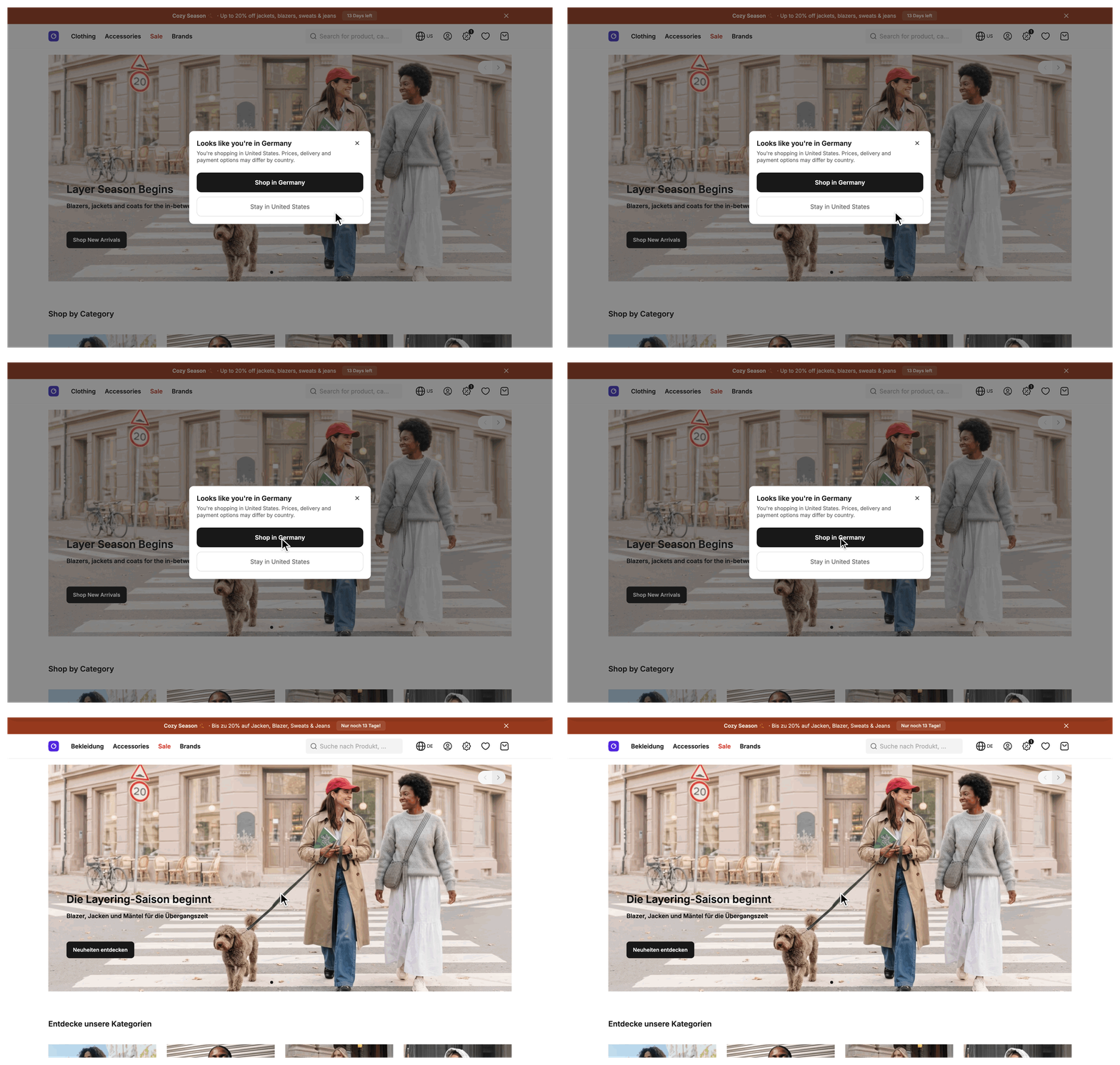
Open the US shop of the demo from a connection in Germany or Austria, signed out and in a new tab. A modal opens after the page loads and offers the shop for your country.
What's included
- Server-side detection:
CountryServicefrom@scayle/storefront/servicesreads theCF-IPCountryheader and suggests the configured shops whosecountryCodeequals that country. - Deferred
shopSuggestionprop:src/server/middleware/sharedData.tsshares the suggestion with the page after the initial HTML, so the user's country never lands in HTML the response cache can store. - Browser-side checks:
useCountryDetectioninsrc/client/composables/decides whether to show the suggestion. See How it works for when it stays closed. - Lazy-loaded modal:
SFCountryDetectioninsrc/client/components/country-detection/is opened bysrc/client/layout/Layout.vuethroughuseOverlay(), so its code loads for users who see it. - One button per language: when the detected country has several shops, the modal lists one button per language and a button to stay. With a single shop, it shows one "Shop in" button and a button to stay. A shop button is a link to the absolute shop URL, so it loads the new shop with a full page load.
- Local override:
STOREFRONT_DETECTED_COUNTRYreplaces the header in development mode, so you can try the flow without Cloudflare.
What you can change
Configure
- Which shops can be suggested: add or remove entries in
countriesinstorefront.config.ts. A shop is suggested when itscountryCodeequals the detected country. - The country you test with: set
STOREFRONT_DETECTED_COUNTRYin.env. It applies in development mode only. See Run it locally. - The prompt copy and the country names: edit the
country_detectionkeys in the files undersrc/i18n/locales/. See Reword the prompt or rename a country.
Extend
- Change the modal itself by editing
SFCountryDetection. - Change who sees the prompt, or whether anyone does, by editing
suggestionActiveinuseCountryDetectionor removing the overlay block inLayout.vue. See Change who sees the prompt. - Send users from a region no shop serves to a catch-all shop by overriding
getShopSuggestionon aCountryServicesubclass. - Read the country from a different source by overriding
resolveRegionon the same subclass.
Constraints and limits
Permanent
- One source feeds detection: the
CF-IPCountryheader, orSTOREFRONT_DETECTED_COUNTRYin development mode. Nothing else counts, such as a customer's saved address or the browser language. - Cloudflare describes IP geolocation as an estimate, so a user can get a suggestion for a country they are not in.
- Signed-in customers don't see the modal, see How it works. On a cacheable route the prompt waits while the deferred
customerprop is stillundefined. - A shop matches by its
countryCode, not by the region in itslocale. A shop withcountryCode: 'DE'andlocale: 'en-GB'serves Germany.
Known limitations
- A region no configured shop serves gets no suggestion, and the user stays on the shop their URL chose. There is no default-shop fallback, and
isDefaultplays no part in detection. To offer a catch-all shop, see Send users from an unserved region to a catch-all shop. - A region equal to the active shop's
countryCodegets no suggestion. A configuration in which all shops share onecountryCodenever produces a suggestion, because the detected region either equals that code or no shop serves it. - A missing header, Cloudflare's
XX(unknown),T1(Tor), and any value that is not two letters give no suggestion. - Nothing checks where the header came from. Cloudflare overwrites it, but behind another edge a client can send its own value. That changes only the suggestion that client gets. See Provide the country header in production.
- The dismissal and switch flags last for one tab and one origin. A new tab asks again, and under the
domaincountry selector each shop host keeps its own flags.
Pitfalls
- You test while signed in or after closing the modal once. The modal stays closed although
shopSuggestioncarries a suggestion, becausecustomeris notnullor a flag is set in that tab'ssessionStorage. Test signed out in a private window. - You run behind an edge other than Cloudflare. The modal does not open in production because nothing sets
CF-IPCountry. Follow Provide the country header in production before you launch. - You treat
CF-IPCountryandx-shop-country-idas one header.CF-IPCountryonly feeds the suggestion.x-shop-country-idselects the shop for the whole request and has its own rules, see Thex-shop-country-idheader.
How it works
The browser receives one prop, shopSuggestion, and decides whether to show it. This is the shape for a user in Germany on the US shop. ShopSuggestion and its languages rows come from @scayle/storefront/types.
When there is nothing to suggest, the prop is null. The server builds the object in three steps:
CountryService.resolveRegion()reads the region. In development mode a setSTOREFRONT_DETECTED_COUNTRYwins. Otherwise it readsCF-IPCountry. It trims and upper-cases the value and drops anything that is not two letters,XXincluded.CountryService.getShopSuggestion()returnsundefinedwhen there is no region or the region equals the active shop'scountryCode. Otherwise it keeps the configured shops whosecountryCodeequals the region, and returns them aslanguages. It returnsundefinedwhen no shop matches.- The
sharedDatamiddleware sharesgetShopSuggestion() ?? nullas a deferred prop in thecustomergroup. It sendsnulland notundefinedbecause Inertia dropsundefinedfrom the payload, and the browser could not tell "nothing to suggest" from "not loaded".
In the browser, suggestionActive is true when languages is not empty, the customer prop is null, and neither sessionStorage flag is set. Layout.vue watches it and opens SFCountryDetection once per page load.
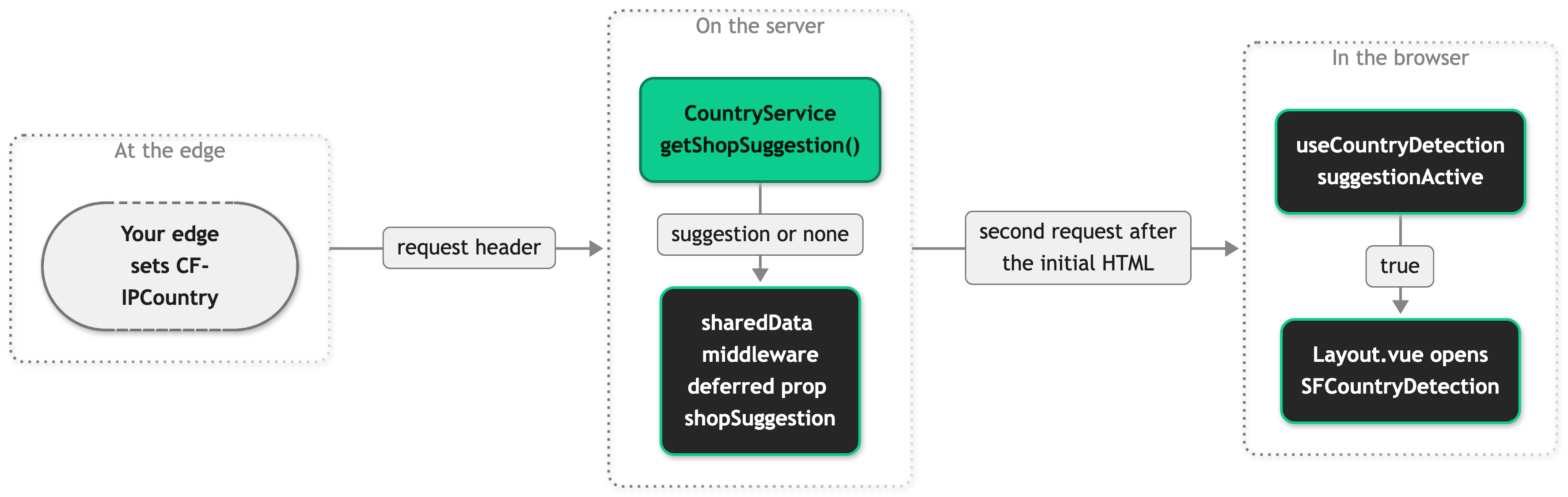
Arrows follow the data. The sharedData middleware calls the service when it resolves the deferred prop.
Closing the modal with the close button, the stay button, the backdrop, or Escape sets hasPromptedCountrySwitch. A shop button in the modal closes it without setting a flag and loads the shop's URL. On the new shop the detected region equals the active shop's countryCode, so no suggestion follows. For the shop switcher, see Routing and Countries.
Setup
Country detection is mounted in src/client/layout/Layout.vue, so there is nothing to install. It needs the CF-IPCountry header on the request that reaches your server.
Provide the country header in production
Behind Cloudflare, switch on IP Geolocation for your domain (Cloudflare dashboard, Network, IP Geolocation). Cloudflare then adds CF-IPCountry to requests to your origin. Behind another edge, pick one of these:
- Set
CF-IPCountryto a two-letter ISO 3166-1 country code at the edge, and strip any value the client sends. - Override
resolveRegionto read the header your edge sets. See Read the country from a different source.
Run it locally
Nothing sets the header on your machine, so you set the country yourself. You end with the modal open on your local shop.
- Choose a country code that another shop in
countriesserves and the active shop does not, such asDEwhile you browse the US shop. - Add it to
.env: - Restart
pnpm dev. The server reads the variable when it starts. - Open the active shop in a private window, signed out.
The modal opens after the page loads and names the country you set. The deferred shopSuggestion request in the Network tab carries the matching shops.
Configuration
| Setting | Where | Effect | Default |
|---|---|---|---|
STOREFRONT_DETECTED_COUNTRY | .env | Replaces the CF-IPCountry header in development mode. A production build ignores it. A change takes a restart. See Environment Variables. | Unset |
countries[].countryCode | storefront.config.ts | The country a shop serves. The detected region is compared with it, and the active shop's own value suppresses a suggestion for that country. | Required |
countries[].locale | storefront.config.ts | Sets the language name and locale of each suggested shop. The active shop's locale also formats the country names in the modal. | Required |
The modal copy lives under country_detection in each file in src/i18n/locales/:
| Key | Placeholders | Used for |
|---|---|---|
country_detection.headline | detectedCountry | The modal headline. |
country_detection.subline_single_language | currentCountry | The description when the detected country has one shop. |
country_detection.subline_multi_language | currentCountry, detectedCountry | The description when the detected country has several shops. |
country_detection.shop_in_country | detectedCountry | The shop button label when the detected country has one shop. |
country_detection.stay_in_country | currentCountry | The button that closes the modal. |
country_detection.override_codes.<REGION> | None | The display name for a region code, replacing the Intl.DisplayNames result. |
The browser keeps two flags in sessionStorage. The composable exports their names as PROMPTED_COUNTRY_SWITCH_KEY and SWITCHED_SHOPS_KEY:
| Key | Set when |
|---|---|
hasPromptedCountrySwitch | The user closes the modal. |
hasSwitchedShops | The user picks a shop in the shop switcher. |
Customization guides
Send users from an unserved region to a catch-all shop
With a subclass of CountryService, a user in a region none of your shops serves gets a prompt for a shop you name, such as the US shop for users from Switzerland. You need a shop in countries that serves everyone else.
getShopSuggestion() is public and returns ShopSuggestion | undefined. Override it when the SDK's answer, no suggestion for an unserved region, is not the one you want. Call super.getShopSuggestion() first, so shops that serve the region keep winning.
- Create the subclass:
- Register it on the
countryslot, and replace theCountryServiceimport in the same file, since the factory no longer uses it: - Reword the copy. The modal names the detected country in its headline and on the button for a single shop, so a user in Switzerland reads "Shop in Switzerland" on a button that opens the US shop. Edit
country_detection.shop_in_countryandcountry_detection.headlineto fit.
A user from an unserved region on any other shop now sees the modal with the catch-all shop. A user already on the catch-all shop sees nothing. The slot needs no ServiceOverrides entry, because the override adds no method and the SDK's type is still accurate. Extend an existing service covers registering a subclass.
If CATCH_ALL_COUNTRY_CODE matches no entry in countries, languages is empty and the method returns undefined. Users from unserved regions then get no prompt again, and nothing logs a warning.
Read the country from a different source
Detection reads the region from CF-IPCountry. An override of resolveRegion reads it from the header your edge sets instead.
resolveRegion() is protected, synchronous, and returns string | undefined. Override it when your edge is not Cloudflare and you would rather read its header than set CF-IPCountry. Both resolveRegion and getShopSuggestion are synchronous, so a lookup that needs a network call does not fit here.
Register the subclass on the country slot as in the previous guide, with your class name. If you override both methods, put them in one class, because the country slot holds one service.
The override replaces the base method. The development override STOREFRONT_DETECTED_COUNTRY and the check for two letters are gone. A value that is not a two-letter code matches no shop, so the user gets no suggestion and nothing reports it.
Reword the prompt or rename a country
Intl.DisplayNames prints a region the way the active locale spells it, which can read badly in a sentence, such as "Looks like you're in United States". A region code under override_codes replaces that name in the headline, the description, the stay button, and the button of a single-shop suggestion.
- Add the region code to
country_detection.override_codesinsrc/i18n/locales/en_GB.json: - Add the same key to every other file in
src/i18n/locales/. ESLint fails when a locale file lacks a key that another one has.
The modal now reads "Looks like you're in the United States" and "Stay in the United States". The code is looked up for both the detected country and the active shop's country.
Change who sees the prompt
Layout.vue creates the overlay and opens it once suggestionActive turns true. To turn the prompt off, remove these lines and any import that nothing else in the file uses. The snippet trims the real file, where the imports sit at the top and the rest sits further down:
To change who sees it and keep it on, edit suggestionActive in src/client/composables/useCountryDetection.ts. Its conditions are listed in How it works. Keep the null check if you keep the customer condition, because undefined means the deferred customer prop has not loaded yet.
Best practices
Test with the development override in a private window
A suggestion depends on the pair of the active shop and the detected country, and the flags in sessionStorage hide a second test in the same tab. Set STOREFRONT_DETECTED_COUNTRY for each pair you ship, restart pnpm dev, and open a private window for each run.
Troubleshooting
The modal never opens although the page loads
Issue: A user in another country than the active shop sees no modal.
Possible causes: The server found nothing to suggest. A proxy in front of your origin removes CF-IPCountry, the user's country is served by no shop, or it equals the active shop's country. Or the browser blocked a suggestion the server did send.
Solution:
- Open the browser's Network tab and find the request after page load whose response contains
shopSuggestion. - If the value is
null, the server found nothing to suggest. Check that the header reaches the server unchanged, and thatcountrieshas a shop whosecountryCodeequals the user's country. - If the value is an object, a browser check blocked it. See the pitfalls under Constraints and limits.
Prevention: Check the header at your origin before launch, and keep a test for each shop pair you ship.
The modal names the wrong country
Issue: The modal offers a shop for a country the user is not in.
Possible causes: The edge's geolocation estimate is wrong for that connection. A client sent its own CF-IPCountry value behind an edge that does not overwrite it. STOREFRONT_DETECTED_COUNTRY is still set in the .env of a development server.
Solution:
- Read the
regionvalue in theshopSuggestionresponse. - Compare it with the header value at your origin. If they differ, a proxy or the override changed it.
- If they match, the edge reported that country. Report the connection to your edge provider, or override
resolveRegionto read a more reliable header.
Prevention: Strip a client-sent CF-IPCountry at your edge, and keep STOREFRONT_DETECTED_COUNTRY out of environments other than local development.


