

Caching
The Storefront Application V3 caches in three places: a CDN keeps the rendered HTML of the routes you list in cacheableRoutes, SCAYLE KV keeps Storefront API and CMS responses across requests, and the browser keeps once props across page visits. A cached page is the same for every user, so everything that belongs to one user, such as the basket, arrives with a partial reload that is never cached. A logged-in customer skips the shared page cache and gets a page rendered for them on every request. You decide which routes are cacheable and for how long, and you set the lifetime of every data cache entry your own code writes. The lifetimes of the SDK's own data cache entries are constants in code, and you can change most of them by overriding the service that uses them.
The three cache layers
| Layer | Where it lives | What it holds | Lifetime set by |
|---|---|---|---|
| Response cache | A CDN | The HTML of a user's full page load on a cacheable route | cacheableRoutes in storefront.config.ts |
| Data cache | SCAYLE KV, shared by all servers | Storefront API and CMS responses, per shop country | The TTL each getOrSet call passes, 5 minutes by default |
once props | The browser, in the Inertia page | Shared props such as the navigation, the footer, and the campaign | The optional TTL of Inertia.once, otherwise until the next full page load |
The server sets the response cache headers, but it doesn't store pages itself, and the browser revalidates a cached page on every visit. Without a CDN in front of the server, no layer keeps the page. Whether your CDN stores HTML depends on its own rules: some CDNs only cache HTML when a cache rule allows it.
The server also sets lifetimes for static files through serveStaticAssets. Hashed files under /assets/ get Cache-Control: public, max-age=31536000, immutable. Other files from public/, such as /favicon.ico, get public, max-age=3600, s-maxage=86400, stale-while-revalidate=14400, stale-if-error=86400, so browsers keep them for one hour and a CDN for one day. To send a different header for a file, register a middleware before serveStaticAssets that sets Cache-Control after await next(), only for the paths it targets and only when ctx.res.ok is true. Otherwise it also overwrites the /assets/ header and the headers of your routes.
Configure cacheable routes
List a route in cacheableRoutes when its HTML is the same for every user. The key is a route pattern with :param segments, such as /p/:identifier, and the value is the response cache TTL in seconds:
You write the pattern without the country prefix, and the SDK adds the prefix of your countrySelector when it matches a request. A parameter can carry a regular expression, as in :slug{.+}, but the wildcard * and optional parameters (:param?) don't work here, so list each route on its own. The values are literals in the file, so a change takes a rebuild, as described in Configuration.
A cacheable response gets Cache-Control: public, max-age=0, s-maxage=<ttl>. The CDN keeps the page for the TTL, and the browser asks the CDN again on every visit, so a browser never shows a logged-out page it kept from before the user logged in. The server sends no ETag or Last-Modified, so whether that revalidation downloads the page again depends on your CDN. A TTL of 0 or less doesn't turn caching off: the route is then cached for 10 minutes. Remove the route from cacheableRoutes instead.
A request to a cacheable route still gets Cache-Control: no-store, no-cache, max-age=0, s-maxage=0 when any of these apply:
- It carries the
scayle-skip-cachecookie of a logged-in customer, as described in Logged-in customers skip the shared cache. - It's an Inertia partial reload, such as the request for deferred props.
- It carries
x-inertia-except-once-props. The browser sends this header on every Inertia visit while it holds aonceprop that hasn't expired. The sharednavigationandfooternever expire, so in the Storefront Application only a user's full page loads, such as a first visit, a reload, or a new tab, land in the response cache. Inertia visits within the application reach your server. - It carries a CMS preview query parameter with a value (
live_preview,_storyblok,_editorMode,vse, or_vse), so editors always see their changes. - The response status isn't a 2xx, such as an error page or a redirect.
Routes that aren't listed get the same no-store header. A response the cache doesn't store keeps a Cache-Control header its handler set itself, as the robots.txt handler does. On a response it stores, the response cache replaces the handler's header.
What a cacheable response leaves out
On a request the response cache treats as cacheable, the session middleware doesn't read the session store and doesn't set the session cookie. The controller still gets a session, but its data is empty, and anything the controller writes to it is dropped. request.isRouteCacheable tells a controller, a service, or a shared prop whether the current request is such a request. If your code sets a cookie on such a request anyway, the response cache middleware removes every Set-Cookie header and logs the warning Stripped Set-Cookie from cacheable response with the cookie names. A CDN doesn't cache a response that sets a cookie, so a stray cookie would turn off CDN caching for that route.
Vary
A cacheable URL answers with two bodies: HTML for a full page load and the Inertia page JSON for a request with x-inertia: true. The response therefore lists x-inertia in Vary. It also lists x-shop-country-id, the request header that selects a country regardless of the URL. A cache that honors Vary keeps one copy per value of these headers. Check that your CDN honors Vary for both headers or adds x-inertia and x-shop-country-id to its cache key. A CDN that keys on the URL alone answers the partial reload in the diagram below with the cached HTML. A CDN that leaves x-shop-country-id out of its cache key serves one country's copy to a request that carries a different value for the same URL.
The response cache doesn't vary on anything else the page reads from the request. A page that reads another header, such as Accept-Language, a geolocation header, or x-forwarded-host without a public origin set, serves the first user's version to everyone.
Logged-in customers skip the shared cache
A page rendered for a logged-in customer must never reach the CDN, and a cached logged-out page must never reach a logged-in customer. The session cookie can't tell the two apart, because a user gets one as soon as the basket reads the session ID. The scayle-skip-cache cookie can:
- Set: on every request the response cache doesn't flag as cacheable, the session middleware sets
scayle-skip-cache=1on the response while the session holds a customer, with the session TTL,HttpOnly,SameSite=Lax, andSecurein production builds. The sign-in response is one of them, so the next page load skips the cache. - Cleared: the session middleware clears it on logout, and on a response to a request that carries the cookie while the session holds no customer, for example when the session store no longer has the session.
- Read: a request that carries the cookie is never cached. The response cache middleware decides this before the session middleware runs, so the session is loaded, and the response gets
no-store. Only the cookie's presence counts, not its value. - Path: the cookie is scoped to the shop:
/<path>for a country selected by path, and/for a country selected by domain and for the default country underpath_except_default. Underpath_except_default, the default shop's cookie reaches its sibling shops too, so a customer logged in there gets uncached logged-out pages on the other shops of that domain until they log out.
Any client can set the cookie by hand, with any value. A request that carries it skips the shared cache and renders on your server, so a client that sends it with every request costs your server a full render per request. It exposes no customer data, because the page is rendered for a user.
Your CDN has to bypass its cache for a request that carries the cookie. A CDN that doesn't answers the customer from its cache with the logged-out page. Every full page load and partial reload of a logged-in customer reaches your server, so check how many full page loads on your shop come from logged-in customers before you plan server capacity. SKIP_CACHE_COOKIE_NAME and getSkipCacheCookiePath from @scayle/storefront give you the cookie's name and path in your own code. The cookie is also why content that varies by customer segment is in the HTML from the first paint for a signed-in customer, see Customer Segments.
How cacheable routes deliver per-customer basket and user data
A cached product page shows each user their own basket, wishlist, and sign-in state. The cached HTML leaves this data out, and the browser fetches it right after the page loads, in a request that reads the session and is never cached:
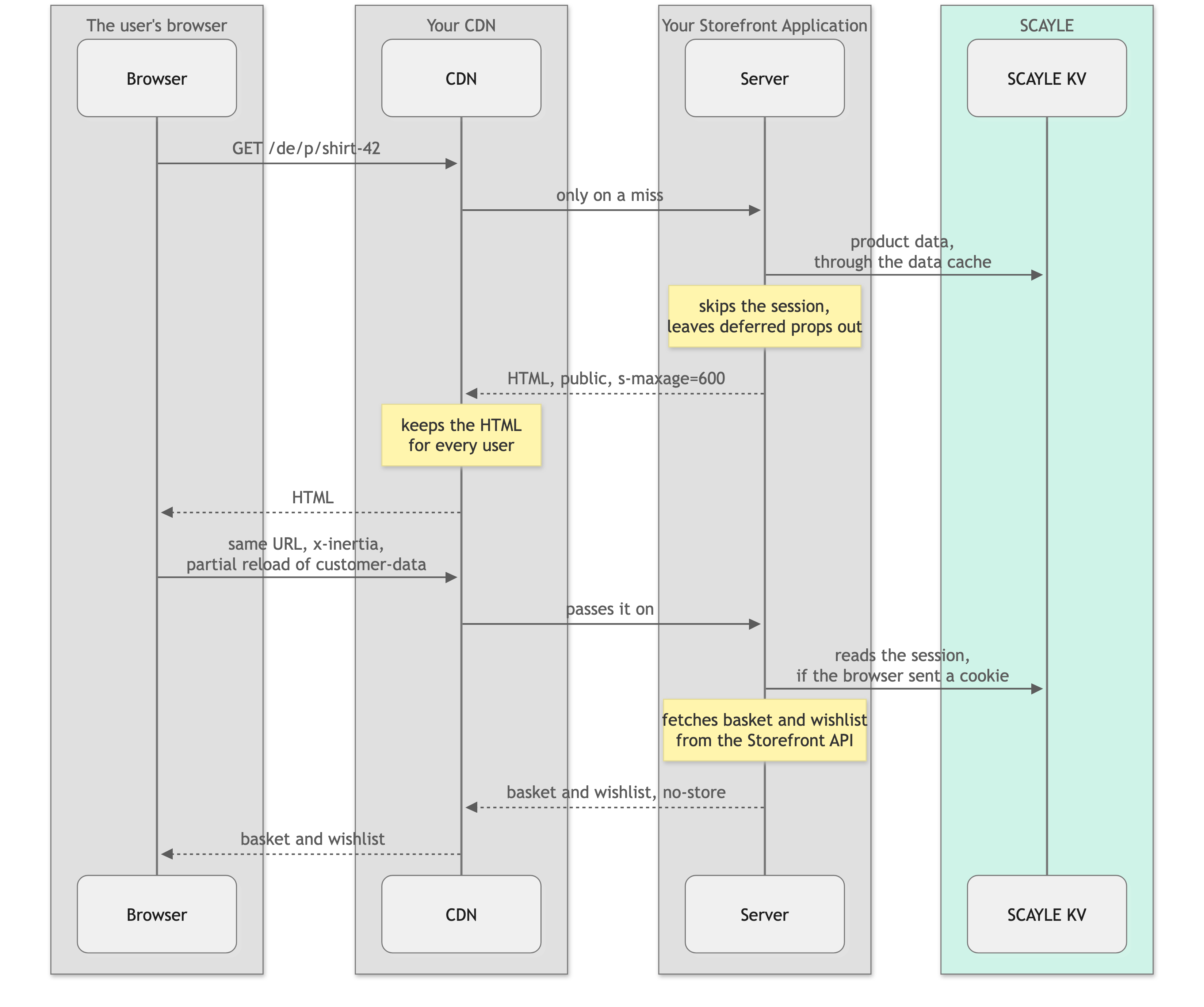
The diagram shows a user. A logged-in customer's request carries the skip-cache cookie, so the CDN passes it on, the server reads the session for the page itself, and the customer prop arrives with the HTML.
A user on a first visit has no session cookie yet. The partial reload that keys the basket by the session ID is the request that sets it.
The browser sends one partial reload per deferred group. The shared props that hold session or user data, basket, wishlist, customer, shopSuggestion, and promotions, are deferred, and Shared props lists their groups. customer is deferred only when request.isRouteCacheable is true. On every other request the session is already loaded, so the customer and its segments are part of the first render. A page can add props and groups of its own, such as recommendations and promotion-data on the product detail page. Pages and Controllers explains Inertia.defer and its groups.
Defer every prop on a cacheable request whose value depends on the session or on the user, or defer it only when request.isRouteCacheable is true, as customer does. An eager prop that reads the session on a cacheable request sees an empty one and renders every user as signed out. An eager prop that reads something else about the user, such as their location, ends up in the cached HTML and reaches everyone who gets that copy.
once props
Inertia.once lets the browser keep a prop's value across Inertia visits, and Pages and Controllers explains how. For caching, it has two consequences. The browser lists the once props it holds in x-inertia-except-once-props, which keeps a request out of the response cache, see Configure cacheable routes. And a once prop with a TTL holds its value in the browser for that long on top of the server cache, so the shared campaign and promotions can lag a change in the SCAYLE Panel by both lifetimes. They pass the TTL of their service, listed under Data cache TTLs. The props that customer segments change reload after a login or logout, as that page describes.
Data cache
Services cache Storefront API and CMS responses in SCAYLE KV, so every server behind your load balancer shares one cache. The cache is part of the storefront context, as this.context.cache in a service and as context.storefront.cache in an oRPC handler. getOrSet(key, fetcher, ttlSeconds) returns the value stored under a key, or runs the fetcher, stores its result, and returns it. Add a custom service shows a full service that caches one call.
The TTL is in seconds and defaults to 5 minutes. A fetcher that returns null caches null, so a missing result isn't fetched again until the TTL ends. A fetcher that throws caches nothing. Within one request, repeated reads of the same key share one store read, and concurrent getOrSet calls for the same key share one fetcher call.
The cache prefixes every key with the shop country ID, and with the build ID when your build sets one, so the data of one shop country never reaches another.
Build keys with buildCacheKey
buildCacheKey from @scayle/storefront joins its arguments with : and encodes each one with encodeURIComponent. A missing argument (undefined, null, or an empty string) becomes % instead of being dropped, so the arguments after it keep their position:
Pass the arguments in the same order on every call.
Rules for cached values
- Put every input that changes the result into the key. The product detail service adds the active campaign key and the price promotion key, because prices differ between them. A key that leaves out an input serves one variant to every caller.
- Decide whether the entry holds the raw response or the mapped result. Caching the mapped result saves the mapping work on a hit.
ProductDetailService.fetchProductandShopConfigService.getShopConfigurationwork this way. Caching the raw Storefront API response means a mapper change takes effect on the next read instead of after the TTL, because mapping runs on every read.PromotionsService,NavigationService, andCampaignsServicework this way. Neither choice is wrong. Pick the one that matches how often you expect the mapper to change, and leave a comment saying which you picked. - Never cache customer data under a shared key. The data cache is shared by every user of a shop country, so a call that sends the customer's access token skips the cache. These services cache the answer for users who aren't signed in and fetch without the cache when you pass them a token:
PromotionsServiceProductListingService.fetchCategory- The category navigation of
CategoryNavigationService
BaseProductListingControllerpassesgetValidAccessToken(session)for the category, andProductListingController.getViewPropsin your application passes it for the two navigations, so a logged-in customer gets the category and its navigation with the product sorting of their customer segments. The basket and the wishlist aren't cached at all. - Round timestamps that go into a key. A query that filters by the current time, such as
sellableAt, would get a new key on every request.createCacheFriendlyTimestamp(seconds)from@scayle/storefrontrounds the time down to a bucket of the given length, and the listing and recommendation services use their TTL as the bucket. - Set
SCAYLE_BUILD_IDon every build. Without it, a mapper change reaches cached entries only once their TTL ends. Invalidation and deployments explains why.
Data cache TTLs
Every TTL below is a constant in code, not a config value. To change one, subclass the service, override the method that makes the cached call, and register the subclass, as described in Extend an existing service. Redeclaring the static constant in your subclass changes nothing, because the base class reads it through its own class name.
Some cached calls need a different override:
- Navigation trees and product counts per category: the cached call sits in a private method, so you override the public method that calls it and reimplement what it does.
- CMS packages: they cache inside the public
fetchPageDataandfetchListingPageData, so you override those. ShopConfigService.getShopConfiguration: it is a property, so redeclare it as a property in your subclass.- Promotions and campaign: change the
onceTTL insharedData.tstoo, because it passes the SDK constant.
The table covers the SDK and its packages. Entries your Storefront Application writes itself, such as the product lookups for CMS components in src/server/api/cms.ts, set their TTL where they call getOrSet, or use the data cache default of 5 minutes when they pass none, as the getProductsByIds lookup does.
| What is cached | TTL | Constant |
|---|---|---|
| Navigation trees, such as the header and the footer | 2 minutes | NavigationService.CACHE_TTL_SECONDS |
| Category navigation for users who aren't signed in | 10 minutes | CategoryNavigationService.CACHE_TTL_SECONDS |
| Product counts per category | 1 hour | CategoryNavigationService.PRODUCT_COUNT_CACHE_TTL_SECONDS |
| Product detail | 5 minutes | ProductDetailService.PRODUCT_CACHE_TTL_SECONDS |
| Product listings, filters, and the user's category | 5 minutes | ProductListingService.LISTING_CACHE_TTL_SECONDS, FILTERS_CACHE_TTL_SECONDS, and CATEGORY_CACHE_TTL_SECONDS |
| Hreflang links of products and categories | 12 hours | ProductDetailService.HREFLANG_CACHE_TTL_SECONDS and ProductListingService.HREFLANG_CACHE_TTL_SECONDS |
| Search term resolution | 5 minutes | SearchService.RESOLVE_CACHE_TTL_SECONDS |
| Recommendations | 15 minutes | RecommendationsService.CACHE_TTL_SECONDS |
| Promotions every user sees | 5 minutes | PromotionsService.PROMOTIONS_CACHE_TTL_SECONDS |
| Active campaign | 5 minutes | CampaignsService.CAMPAIGN_CACHE_TTL_SECONDS |
| Gift products | 5 minutes | GiftService.GIFT_CACHE_TTL_SECONDS |
| Shop configuration | 15 minutes | ShopConfigService.CACHE_TTL_SECONDS |
| Attribute groups | 15 minutes | AttributeService.CACHE_TTL_SECONDS |
| Constructor search and listing results | 5 minutes | ProductListingService.LISTING_CACHE_TTL_SECONDS |
| Published CMS content | 5 minutes | A constant inside each CMS package. Draft content in an editor session skips the cache. |
| SCAYLE Panel redirects, found and not found | 15 minutes | A private constant. The redirect middleware creates the service itself, so you can't change it. |
Invalidation and deployments
Cache entries expire when their TTL ends. Nothing in the Storefront Application removes them earlier, so a change in the SCAYLE Panel shows up once the data cache TTL and then the response cache TTL have passed. A user who keeps navigating sees the old navigation and footer until their next full page load, because those once props never expire. A Panel redirect for a page that the CDN already holds takes effect only when that copy expires.
To remove one data cache entry earlier, for example from a webhook handler you add, call cache.delete(key) with the key you passed to getOrSet. The cache adds the build prefix and the shop country of the current request, so the call removes the entry of that shop country only. Never call cache.clear() on a running shop: the data cache shares the store with the sessions, and clear() removes every key in it, including every session of every shop country. Your CDN keeps its own copies, so purge those in the CDN.
A deployment starts with an empty data cache when your build sets SCAYLE_BUILD_ID. The ID becomes part of every key, so the new build reads and writes under new keys, and the entries of the old build expire with their TTL. Without the variable, a new build reads the entries of the old one. Several SDK services cache the mapped result, which includes the output of the mappers you register, so a mapper change then reaches cached entries only once their TTL ends. Environment Variables describes SCAYLE_BUILD_ID. A deployment doesn't touch the response cache: a CDN serves the HTML of the old build until its TTL ends.
Turn caching off for debugging
- Data cache: set
STOREFRONT_CACHE_DISABLED=trueand restart the server.getOrSetthen runs its fetcher every time and stores nothing. The.env.exampleof the Storefront Application also setsSTOREFRONT_KV_DISABLE_CLUSTER_MODE=true, which connects to a single instance instead of the SCAYLE KV cluster, andSTOREFRONT_CACHE_COMPRESSION=none, which changes how stored values are compressed, and sessions share that store. Make sure your deployed environments don't copy any of these three values. - Response cache: remove the route from
cacheableRoutesand rebuild. Its full page loads then read the session and can set the session cookie, like any other route. To compare with and without your CDN, request the server directly. - Logged-in path: send a
scayle-skip-cachecookie with any value to check the uncached path a logged-in customer takes, without signing in. The page still renders as it does for a user who is not signed in. The session middleware clears the cookie again when the session holds no customer.
Troubleshooting
Every full page load reaches your server and the CDN never keeps the page
Issue: A route you listed in cacheableRoutes is rendered by your server on every full page load, and the CDN shows no cache hit.
Possible causes:
- The route isn't in
cacheableRoutes, or its pattern doesn't match the path. The pattern has no country prefix and doesn't support*or optional parameters. - The request is one the response cache never stores, such as a partial reload, a request that carries
x-inertia-except-once-props, or one with thescayle-skip-cachecookie. Configure cacheable routes lists every case. - Your CDN doesn't store HTML, because it needs a cache rule for that.
Solution:
- Request the route from the server directly, without the CDN, as a user who isn't signed in, and read the
Cache-Controlheader.public, max-age=0, s-maxage=<ttl>means the route is cacheable.no-store, no-cache, max-age=0, s-maxage=0means one of the first two causes applies. - Check the route against
cacheableRoutes, and rebuild after you change it. - If the header is right, add a rule to your CDN that caches HTML for the route and honors
s-maxage.
Prevention: Test a new cacheable route with a plain full page load first, because visits inside the application never reach the response cache.
A signed-in customer sees the logged-out page
Issue: A customer who is signed in sees the page of a user, for example without their segment content.
Possible causes:
- Your CDN doesn't bypass its cache for requests that carry the
scayle-skip-cachecookie, so it answers from the copy it holds for users.
Solution:
- Sign in and check that the browser holds a
scayle-skip-cachecookie for the shop. - Request the page directly from the server with the cookie. If that response is right, the CDN is the cause.
- Add a CDN rule that bypasses the cache whenever the cookie is present, whatever its value.
See Logged-in customers skip the shared cache for how the cookie is set, cleared, and scoped.
Prevention: Add the bypass rule when you put a CDN in front of the server, before the first customer signs in.
The CDN answers a partial reload with HTML, or shows the wrong country
Issue: The page breaks after the first load, because a request for deferred props returns the full HTML. Or a user of one shop country gets the copy of another.
Possible causes:
- Your CDN builds its cache key from the URL alone and ignores
Vary: x-inertia, so the Inertia JSON request gets the cached HTML. - Your CDN leaves
x-shop-country-idout of its cache key, so one country's copy answers a request that carries another value for the same URL.
Solution:
- Copy a partial reload request from the browser's network panel, replay it with all its headers, and compare the body with the page's HTML. The partial reload must get JSON.
- Make the CDN honor
Varyforx-inertiaandx-shop-country-id, or add both headers to its cache key.
See Vary.
Prevention: Check these two headers in your CDN's cache key whenever you change its rules.
A prop shows empty or the same data for every user
Issue: On a cacheable route, a prop you added shows a user as signed out, or shows the same value to everyone, for example a location.
Possible causes:
- The prop is eager and reads the session. A cacheable request has an empty session, so the prop renders every user as signed out.
- The prop is eager and reads something else about the user, such as their location. It ends up in the cached HTML and reaches everyone who gets that copy.
Solution:
- Defer the prop, or defer it only when
request.isRouteCacheableistrue, as thecustomerprop does. - Rebuild, purge the page in your CDN, and load the page again.
See How cacheable routes deliver per-customer basket and user data.
Prevention: Check each prop you add to a cacheable route against the deferral rule in the section linked above.
A change in the SCAYLE Panel doesn't show up
Issue: You changed navigation, a campaign, a promotion, or a redirect in the SCAYLE Panel, and the storefront still shows the old state.
Possible causes:
- The data cache still holds the old response. Nothing removes entries before their TTL ends.
- The CDN still holds the old page until its
s-maxageends. A deployment doesn't clear it. - The browser keeps the
navigationandfooteronceprops until the user's next full page load. Thecampaignandpromotionsprops lag by their own TTL on top of the server cache.
Solution:
- Wait for the data cache TTL, then the response cache TTL. Data cache TTLs lists the first.
- Purge the page in your CDN.
- Reload the page with a full page load, not an Inertia visit.
- To remove one data cache entry earlier, call
cache.delete(key). Don't callcache.clear(), it removes the sessions too.
See Invalidation and deployments.
Prevention: Pick TTLs that match how fast your team needs a Panel change to show, and shorten cacheableRoutes TTLs for routes that change often.
A mapper change has no effect after a deployment
Issue: You changed a mapper and deployed, but the pages still show the old output.
Possible causes:
- The build has no
SCAYLE_BUILD_ID, so the new build reads the data cache entries of the old one. - The CDN still serves the HTML of the old build.
Solution:
- Set
SCAYLE_BUILD_IDfor the build and deploy again. - Purge the affected pages in your CDN.
See Invalidation and deployments.
Prevention: Set SCAYLE_BUILD_ID on every build, for example to your commit SHA.


