

Configuration
What goes in storefront.config.ts, and when does a change take effect? The file holds every value that differs between shops or between countries: your tenant space and shop, the credentials your server uses, the countries you serve, the routes the response cache may store, and the fields your own code adds. Literal values in the file are compiled into the server bundle, so changing one takes a rebuild. Values the file reads from process.env are evaluated when the server starts, so changing one takes a restart.
@scayle/storefront validates the result when the server starts and refuses to boot on an invalid config. Only an allowlisted part of it ever reaches the browser. Environment Variables lists the variables the Storefront Application V3 reads and links to the feature pages that list their own.
What goes in the file
storefront.config.ts sits at the project root and default-exports a call to defineStorefrontConfig from @scayle/storefront/config. The function returns its argument unchanged. It exists for the types, so your editor checks the object against StorefrontConfig while you type.
The schema is deliberately narrow: it only has fields for values that vary per shop or per country. A value every shop would set the same way is a constant in the code that uses it. What your own code needs goes under publicFields and privateFields, which you extend with your own types. Config fields lists every field.
Two topics have their own pages: Caching covers cacheableRoutes, and Routing and Countries covers countrySelector, countries, and the top-level domain.
Build time and runtime
Vite compiles storefront.config.ts into the server bundle when you build, but it doesn't run the file. storefrontConfigPlugin from @scayle/storefront-build exposes it as the virtual module virtual:storefront-config, which @scayle/storefront imports. The literals are compiled in, and the process.env reads stay in the bundle as code. They run when the server starts and the module evaluates.
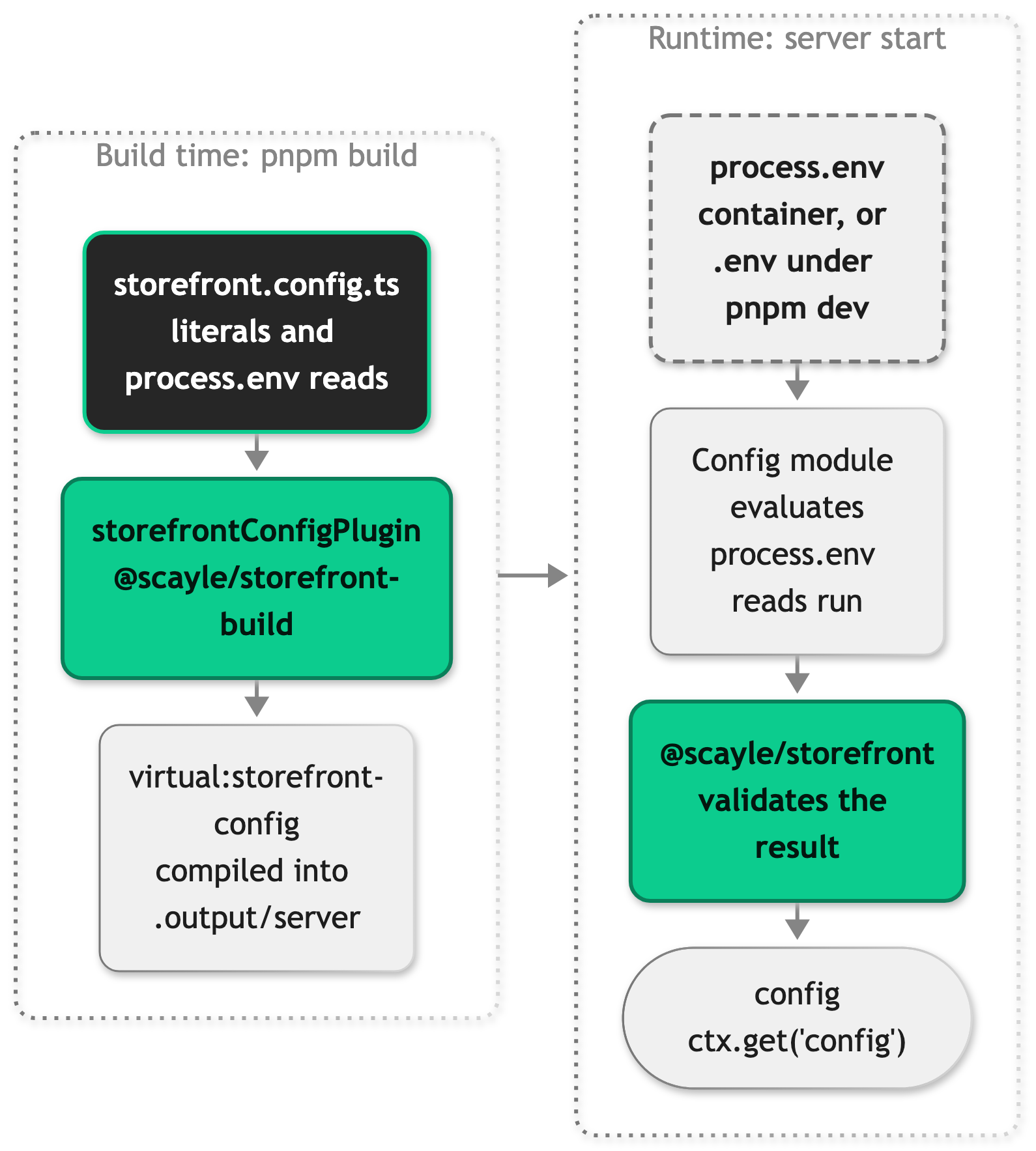
A change therefore takes effect at one of two points:
| You change | It takes effect after |
|---|---|
A literal in storefront.config.ts, such as a country's path or a route's TTL | A rebuild and redeploy |
A variable that storefront.config.ts reads, such as STOREFRONT_API_KEY | A restart |
A variable another server module reads, such as STOREFRONT_LOG_LEVEL | A restart |
A variable Vite reads during the build, such as CMS_PROVIDER | A rebuild and redeploy |
The split lets one build run everywhere. You build once and run the same output in staging and production with different variables, and the secret values never become part of the build output. It also means that editing the file on a server does nothing: storefront.config.ts doesn't ship in .output/, only its compiled copy does.
Where the variables come from depends on how you run the server. Under pnpm dev, storefrontConfigPlugin loads your .env file into process.env before the config evaluates, and a variable already set in your shell wins over the file. In production, nothing reads .env: the variables come from your container or hosting environment.
Validation at startup
@scayle/storefront validates the config once, when the server starts, and every request then reads the validated object. A config that fails throws at that point, so the process stops before it serves a request, and the error names the field. Validation runs in two steps:
- A Zod schema checks each field's type and format, such as a
localelikede-DEor a sessionsecretof at least 32 characters. The schema is a discriminated union oncountrySelector, so the selector decides whether every country needs apathor adomain. - Cross-field rules that the schema can't express: at most one country sets
isDefault,path_except_defaultneeds one that does, and no two countries share ashopCountryId.
Three things fall outside these checks:
- The
!after aprocess.envread only silences TypeScript. An unset variable arrives asundefinedand fails the schema, but an empty one passes forstorefrontApiKeyand the three checkout values, which accept any string. - Your own fields aren't checked. The schema declares
publicFieldsandprivateFieldsas empty objects and keeps whatever you put in them. Add your own config field shows how to validate them yourself. - CMS credentials aren't part of the config.
parseCmsEnv()checks them separately whensrc/server/index.tsloads, so a missing credential stops the boot as well.
Your server code reads the validated object as ctx.get('config') in middleware, as this.storefront.config in a controller, or as config imported from @scayle/storefront at module level.
What reaches the browser
The config holds your Storefront API key, the OAuth client secret, the session secret, and every country's checkout credentials, so the object itself never leaves the server. The browser gets an allowlisted copy instead. The Inertia middleware in @scayle/storefront builds the shared storefront prop field by field, so a field reaches the browser only when it's on this list or under publicFields:
| Reaches the browser | Stays on the server | |
|---|---|---|
| Shop | tenantSpace, shopKey, countrySelector, oauth.clientId, version, publicFields | storefrontApiKey, oauth.clientSecret, session, domain, cacheableRoutes, sitemaps, clientIpHeader, privateFields |
| Active country | name, locale, countryCode, currency, shopCountryId, isDefault, path or domain, publicFields | checkout, privateFields |
Instead of the top-level domain, the browser receives the public origin the server resolved for the request, as storefront.origin. Shared props are embedded in the HTML of a first page load and sent with every Inertia visit, so treat anything under publicFields as published.
That gives your own values two homes. A value the browser needs, such as a tag manager ID, goes under publicFields. A value only the server may see, such as an API key, goes under privateFields, which no part of the SDK copies to the browser.
Environment variables follow the same line. Vite exposes only VITE_* variables to client code, through import.meta.env, and inlines their values into the browser bundle when you build. Vite never inlines a STOREFRONT_* variable, so one reaches the browser only when storefront.config.ts copies it into publicFields, as it does with STOREFRONT_GTM_ID. Don't add STOREFRONT_ to envPrefix in vite.config.ts: Vite would then inline every variable with that prefix, secrets included, into client JavaScript.
Storage backend
Sessions need a reachable storage backend in every environment. The same store also holds the cached Storefront API and CMS responses, see Caching.
Local development uses the Redis container from the docker-compose.yml in your project root. Set Up Your Storefront shows how to start it. A plain Redis is a single instance, so set STOREFRONT_KV_DISABLE_CLUSTER_MODE to true, see Cache and SCAYLE KV.
Production uses SCAYLE KV on Storefront Hosting, which the application connects to in cluster mode. The server starts without a reachable store, because the connection opens on the first read or write. Requests that read or write a session then fail.
Common tasks
Change a value per environment
Read the value from process.env in storefront.config.ts, then set the variable in every environment: in .env for local development, and in the container or hosting settings of each deployment. A restart applies a new value. The shipped file shows the patterns for each kind of value:
Every variable arrives as a string, so convert numbers and booleans yourself. For an optional field, map an empty variable to undefined the way the domain line does. An empty string is still a value, and domain rejects it as an invalid host, while undefined leaves the field unset.
Name a new variable by the naming conventions.
Add your own config field
Your shop needs a setting that the schema doesn't have. Pick the interface by where the value applies and who may read it:
| Shop-wide | Per country | |
|---|---|---|
| The browser and the server | PublicConfigFields | PublicCountryFields |
| The server only | PrivateConfigFields | PrivateCountryFields |
All four start out empty, and @scayle/storefront/config exports them for you to extend. Add your field in the declare module block at the top of storefront.config.ts, where the application already declares its own, then set the value. Since the schema doesn't check your fields, parse the value in the same file, so a bad one stops the boot like a schema error. This example adds a return period per country:
A field you declare without ? is required in every publicFields object you write, so TypeScript reports a country that leaves it out. Server code reads the value from the active country, as this.storefront.country.publicFields?.returnPeriodDays in a controller. publicFields is optional on the type, which is why the read needs ?..
Add the variable to the test.env block in vitest.config.ts as well. Server tests load the real storefront.config.ts, so a variable that's missing there fails them on import.
Expose a value to the browser
Declare the value on PublicConfigFields or PublicCountryFields and set it under publicFields, as in Add your own config field. A component then reads it through useStorefrontConfig():
config is the whole shared storefront prop, which is why a shop-wide value sits one level down, under config.value.config. country is the active country. SFAnalyticsHead.vue reads gtmId the same way.
Don't hand this.storefront.config or a country entry to a page yourself, as a page prop or as shared data. Both carry the secrets listed in What reaches the browser, so copy only the fields the page needs.
Configure a third-party API
Your shop calls a service the SDK doesn't know, such as the review provider from Add a custom service. Split its settings by who may see them: a public key or app ID that the browser needs goes under publicFields, and the URL and API key the server calls it with go under privateFields.
Add a custom service shows the service reading them from the context it receives. The parse in storefront.config.ts guarantees that both values exist once the server is running, which is what makes the ! there safe. privateFields never reaches the browser, so the key stays on the server unless your own code returns it, for example in a page prop or an oRPC response.
Config fields
Top-level fields
| Field | Type | Required | Description |
|---|---|---|---|
tenantSpace | string | Yes | Your tenant space. The SDK builds the SCAYLE Storefront API host from it, as <tenantSpace>.storefront.api.scayle.cloud. |
shopKey | string | Yes | Your parent shop key, from SCAYLE Panel ➜ Shops. |
storefrontApiKey | string | Yes | Token for the SCAYLE Storefront API. |
oauth | { clientId, clientSecret } | Yes | Client credentials for the SCAYLE Authentication API. Only clientId reaches the browser. |
session | { secret, ttl?, cookieName? } | Yes | secret signs the session cookie and needs at least 32 characters. ttl is in seconds and defaults to 30 days. The cookie is named <shopCountryId>-<cookieName>, and cookieName defaults to session. See Session. |
countrySelector | 'path', 'path_except_default', 'domain' | Yes | How a URL names its country, and which country fields the schema requires. See Choosing a country selector. |
countries | array | Yes | One entry per shop country. See Country fields. |
domain | string | No | Path selectors only. The public host for absolute URLs, as a bare host without a scheme. Unset uses the request host. See Public origin. |
cacheableRoutes | Record<string, number> | No | Response cache TTL in seconds, keyed by Hono route pattern. See Caching. |
publicFields | PublicConfigFields | No | Your shop-wide fields that the browser may read. |
privateFields | PrivateConfigFields | No | Your shop-wide fields that stay on the server. |
version | string | No | Your release version, sent as shop_version on SCAYLE Analytics events. The Storefront Application passes the version from package.json. |
clientIpHeader | string | No | Request header that holds the user IP for request.originalIp. Unset uses X-Forwarded-For. |
sitemaps | { bucket, region } | No | S3 bucket and AWS region of the Robots and Sitemaps add-on. When set, the server answers /robots.txt and the sitemaps from that bucket. |
Country fields
Each entry in countries:
| Field | Type | Required | Description |
|---|---|---|---|
name | string | Yes | Display name. |
locale | string | Yes | Language and region, such as de-DE or en-US: two to four lowercase letters, a hyphen, and two to four uppercase letters. |
countryCode | string | Yes | Two uppercase letters, ISO 3166-1 alpha-2. |
currency | { currencyCode, fractionDigits?, display? } | Yes | currencyCode is the ISO 4217 code, such as EUR. fractionDigits caps the fraction digits of formatted prices. display is symbol (the default), narrowSymbol, code, or name. |
shopCountryId | number | Yes | Shop country ID from the SCAYLE Panel. A positive integer, unique across countries. |
checkout | { user, token, secret } | Yes | SCAYLE Checkout credentials for this shop country. Never reaches the browser. |
isDefault | boolean | No | Marks the default country. At most one country sets it, and path_except_default requires one. |
path | string | Path selectors only | URL prefix, such as de. |
domain | string | Domain selector only | Host of this country, as a bare host such as example.de. |
publicFields | PublicCountryFields | No | Your per-country fields that the browser may read. |
privateFields | PrivateCountryFields | No | Your per-country fields that stay on the server. |


