

Internationalization
Serve each country in its own language, with text and price formats that match on the server and in the browser. You add a shop country by adding a country to storefront.config.ts and a JSON file named after its locale.
Why it matters
A storefront that renders on the server and again in the browser has two chances to disagree on a string. When they do, a user sees text flip during page load. The Storefront Application V3 removes that chance by design. The server and the browser build their vue-i18n instances with the same factory, from the same locale file, and the browser mounts only after that file has loaded. Launching a new shop country stays a configuration and content task: one country entry and one file.
Try it
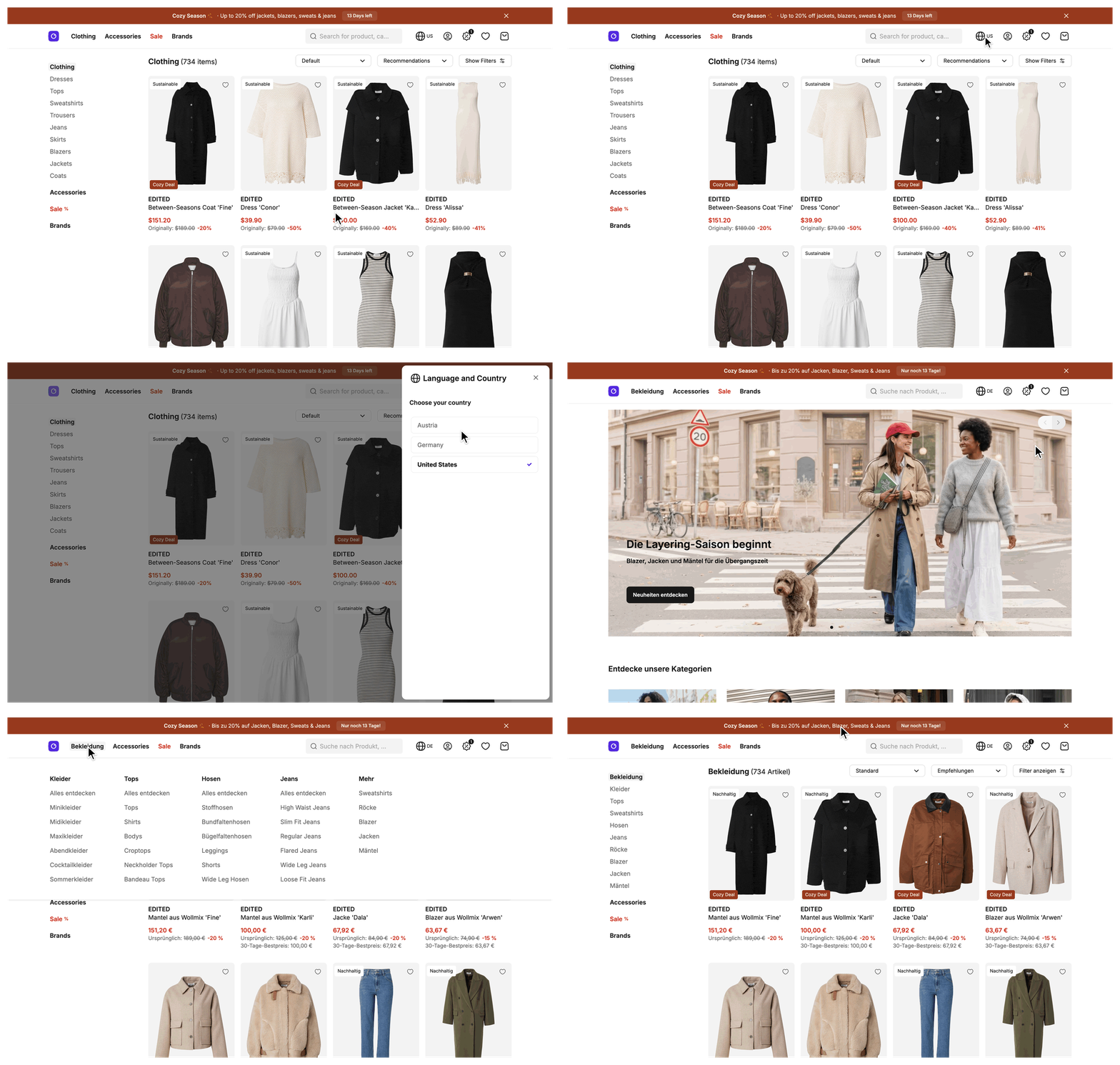
Try it: open the storefront in the United States (English)
Try it: open the storefront in Germany (German)
What's included
- Locale files: One JSON file per language and region under
src/i18n/locales/, named after the locale with an underscore, such asen_GB.jsonforen-GBandde_AT.jsonforde-AT. - Locale resolution:
resolveLocaleFilepicks the file for the active country'slocale. - Message loading for server and browser: The server bundles every locale file. The browser loads only the file of the active locale.
- Shared i18n factory:
createI18nInstance(locale, messages)creates thevue-i18ninstance for the browser entry, the server render, andServerI18nService. - Server translation service:
ServerI18nServicetranslates text in mappers and other server code. It is registered as thei18nslot of the mapper registry, the place where the application registers the classes its mappers and services use. See Extending the SDK. - Country locale and currency settings:
storefront.config.tsgives each country alocaleand acurrencywith its code, fraction digits, and display style. - Formatting helpers:
formatCurrencyandformatPercentagefrom@scayle/storefront/shared, andformatDateandformatDateTimefrom the application's@shared/utils/formatter. - Locale-aware URL helpers: Helpers in
@scayle/storefront/sharedbuild canonical links, country-prefixed links, and hreflang alternates, the links that tell search engines which page serves which language and country. - Locale file checks: ESLint rules check that every locale file carries the same keys, and that every key in use exists.
What you can change
Configure
- Which countries your shop serves and which locale and currency each country uses, via
storefront.config.tsand the SCAYLE Panel. - How prices and percentages show per country. Pricing covers the currency settings and Show whole currency units for one country the whole-unit case.
- The wording of any translation, by editing the JSON files in
src/i18n/locales/.
Extend
- Add a locale for a new country.
- Translate inside a mapper through the
i18nslot of the mapper registry. - Change the
fallbackLocaleconstant insrc/i18n/config.tsto another locale that has a file. Countries without their own file then render that locale's text. - Override locale, fraction digits, or currency display for a single call, through the options of
formatCurrency, see Pricing. - Return a page path per locale from your CMS service, through its optional
getAlternatePathsmethod, so hreflang alternates for CMS pages point at each locale's own page. The Storyblok provider implements it. See Storyblok.
Replace
- The translation library.
createI18nInstancereturns avue-i18ninstance,ServerI18nServicecalls it, and components calluseI18n()and$tfromvue-i18ndirectly. A different library means replacing the factory, the server service, and every one of those call sites.
Constraints and limits
Permanent
- The locale file name is the contract.
de_AT.jsonserves the localede-AT:localeOfFilereplaces underscores with hyphens, and the match against the country'slocaleis exact and case-sensitive. - Each
vue-i18ninstance registers only the messages of its active locale. A key missing from that file renders as the key itself, because no other language's messages are registered as a fallback. - In application code, only
src/server/registries.tsconstructsServerI18nService. Mappers read thei18nslot of the mapper registry instead, so every mapper in a request shares one instance. A secondnew ServerI18nService(...)builds anothervue-i18ninstance for no benefit. - Browser code must not import
src/i18n/messagesServer.ts. It bundles every locale file, so one import ships all of them to every user. The ESLintno-restricted-importsrule reports it as an error insrc/client/andsrc/shared/. Onlysrc/client/ssr.tsand test files are exempt, because the server render never reaches the browser. - The browser mounts only after the locale file has loaded, because hydration has to render the text the server rendered.
Known limitations
datetimeFormatsandnumberFormatsinsrc/i18n/config.tslist onlyen-USandde-DE. For any other locale, thed()andn()functions ofvue-i18nuse thede-DEentry. If you call them for a third shop country, add an entry for its locale.formatCurrency,formatPercentage,formatDate, andformatDateTimeuseIntldirectly and don't read these tables.- Your fork has no translation pipeline. The
translate-localesskill, or a translator, brings a new key into every locale file.
Pitfalls
- A country whose
localehas no matching file renders thede-DEmessages. The server logs one warning per locale, with the message "No locale file is named after the shop locale, so it renders the fallback locale messages". Dates and prices still format with the country's own locale. Give every country its own file. - If neither the country's file nor the
de-DEfile exists,resolveLocaleFilethrows. A shop that deletesde_DE.jsonalso has to changefallbackLocale. - Locale files are collected when the application is built. A new file reaches a deployment only with a new build.
@intlify/vue-i18n/no-missing-keys-in-other-localesonly warns locally. It fails as an error when theCIenvironment variable is set, so a locale file that is out of step passes on your machine and fails in the pipeline.no-unused-keysruns only in CI too, and it can't see keys built at runtime. List those as patterns inunusedKeyIgnoresineslint.config.mjs.localeinstorefront.config.tsmust be a lowercase language code, a hyphen, and an uppercase region code, such asde-AT: two to four lowercase letters, a hyphen, and two to four uppercase letters. The config schema rejects anything else.
How it works
The page language comes from the country. Each country in storefront.config.ts has a locale. The SDK resolves the country before a controller runs, and the locale of that country picks one file in src/i18n/locales/. Controllers and components never choose a language themselves.
resolveLocaleFile makes that choice, and the server and the browser both call it. It returns the file named after the locale, or else the file of fallbackLocale, which is de-DE. The two sides differ only in how they get the files.
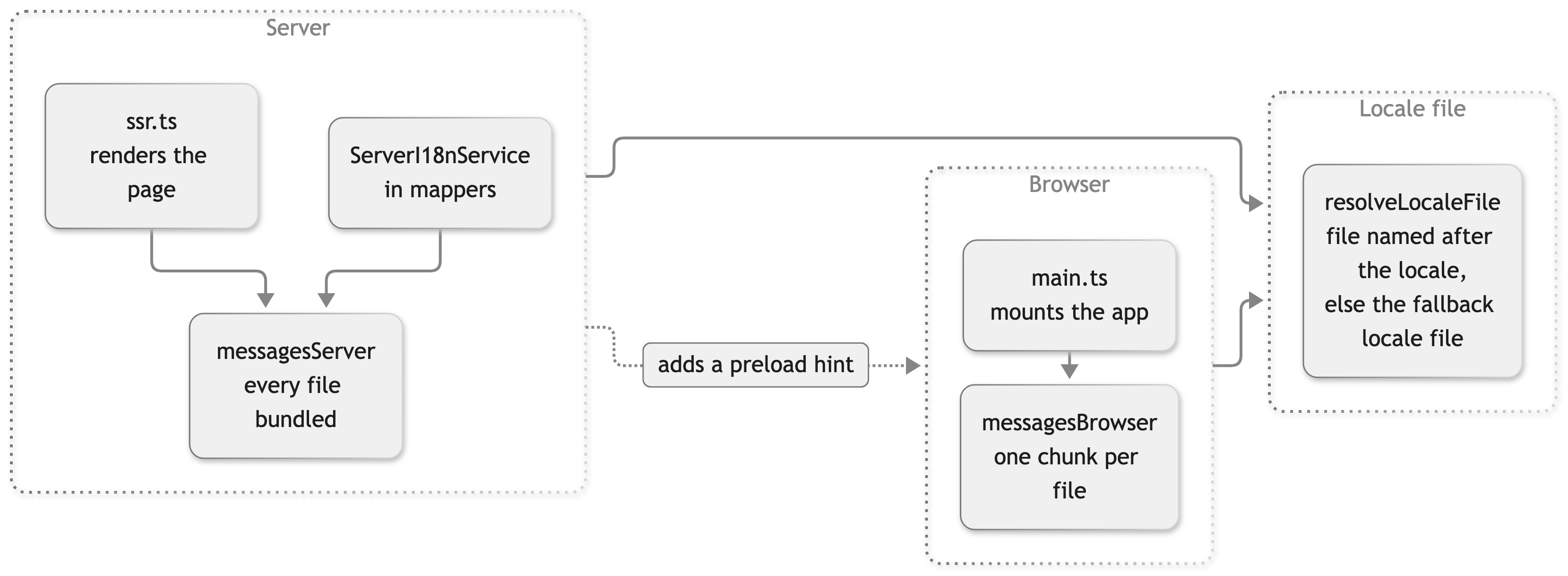
On the server, messagesServer.ts bundles every locale file, so any request can read its country's file without a network call. ServerI18nService builds a vue-i18n instance with only that file's messages. The server render does the same for the Vue app. In the browser, the build emits one chunk per locale file and keeps them out of the entry chunk. main.ts creates an instance with no messages, loads the chunk of the active locale with loadLocaleMessages, registers the messages, and only then mounts the app. The server render adds the locale file to the modules it reports, so the page carries a modulepreload hint for that chunk and the browser fetches it next to the entry chunk.
Money and dates don't go through vue-i18n. See Pricing for formatCurrency. formatDate and formatDateTime format a Date for a locale you pass in.
buildCanonicalUrl doesn't add a country prefix, so pass the request URL, which already carries it. localizeHreflang builds the absolute URL of a page for one country, so callers loop over the countries. It reads the country selector and the request origin, and with the domain selector it uses the target country's own domain. Caches hold the paths, and the origin is added per request. See SEO for the canonical and hreflang links of each page.
Setup
Translations work out of the box. vue-i18n is a dependency of the Storefront Application V3, and both entries and ServerI18nService create their instance with createI18nInstance. You install and register nothing.
To serve a country in a new language, follow Add a locale for a new country.
Configuration
SCAYLE Panel
Each locale in the storefront corresponds to one shop country in the SCAYLE Panel. To add a locale, create the matching shop country through Shop Management, then add it to the storefront config. See the SCAYLE Panel documentation for Shop Countries.
The currency and tax rules for a country are set on the shop in the Panel, see Pricing.
Storefront Application
A country's locale and currency live in storefront.config.ts, next to its URL settings. The Storefront Application V3 ships with Germany, the United States, and Austria as working examples. Your project replaces or extends this list with your own shop countries. See Routing and Countries for path, domain, isDefault, and the country selectors.
| Field | Type | Description |
|---|---|---|
countries[].locale | string | Language and region, such as 'de-AT' or 'en-US'. Names the locale file (de_AT.json) and sets the Intl locale for formatting. |
countries[].countryCode | string | ISO 3166-1 two-letter country code, such as 'DE'. Countries that share it are grouped in the shop switcher. |
Each country also has a currency object. Pricing lists its fields.
Customization guides
Add a locale for a new country
You end up with a country that renders in its own language. Locale files are discovered by name, so no registry needs an edit.
Before you start, create the shop country in the SCAYLE Panel and note its shop country ID. This guide uses Brazil with the locale pt-BR, which has no file yet.
- Add the country to
storefront.config.tsby following Add a country. Setlocaleto'pt-BR'. - Create
src/i18n/locales/pt_BR.json. Copy the file of the closest language, herept_PT.json, and have a translator adjust the wording. A copy carries every key, which the ESLint key checks require. - Build the application again. The build collects the locale files.
Open the new country's URL. The text comes from pt_BR.json, and the server log shows no warning about a missing locale file. If the log shows "No locale file is named after the shop locale", the file name doesn't match the locale value. The underscore, the capitals, and the region have to line up exactly.
Translate a new key in all locales
You end up with the same key in every locale file, which keeps the ESLint key checks passing. en_GB.json is the file you author keys in.
Before you start, make sure the translate-locales skill is available in your coding agent. It lives in .claude/skills/translate-locales/ in the application.
- Add the key to
src/i18n/locales/en_GB.json, nested under an existing parent: - Ask your coding agent to run the
translate-localesskill. It finds the keys you added, changed, or removed inen_GB.json, dispatches one translation subagent per other locale file, and checks that every file has the same keys afterwards. - Commit the changed locale files with your change.
If you edit the English text of a key or remove a key, run the skill again. You can also edit any single translation by hand to fix a typo.
Translate inside a Vue component
vue-i18n provides $t in every template, without an import:
Call useI18n() only when the script needs t(), for a computed value or a helper:
Translate inside a mapper
A mapper translates through the i18n slot of the mapper registry. You end up with mapped data that already carries text in the active country's language. ShopConfigMapperService is the worked example. Its factory in src/server/registries.ts passes mappers to the constructor, and the mapper keeps mappers.i18n in a private field:
The slot is typed through the MapperOverrides augmentation in src/server/types/index.ts, so mappers.i18n needs no type assertion. Don't call new ServerI18nService(...) in a mapper. registries.ts builds the one instance for the request.
Best practices
Author every key in en_GB.json first
Everything downstream reads en_GB.json. The translate-locales skill diffs it to find what to translate, and it inserts each key at the same position in every other file. A key that exists only in another locale file puts the files out of step, and ESLint reports it.
Pass the count to a plural message as a number
A plural message keeps its forms in one string, separated by |, such as {count} result | {count} results in search_page.a11y.result_count. vue-i18n picks the form from a number you pass. In components, pass the count as the second argument. It also fills {count} and {n} in the message:
A named value selects a form only when it is called count or n and holds a number. Any other name, or a number as a string, doesn't select a form. In a message with two forms, the first form renders for every count:
ServerI18nService.t accepts only named values and no positional count. In mappers and other server code, pass the count as a number named count.
Group keys by feature with nested objects
Keys use nested objects, such as product_details.information.fit_size and basket_summary.delivery_fees. Add a new key under the parent for its feature in en_GB.json instead of at the top level. Subscription keys live under the single subscription namespace.
Troubleshooting
A page shows the literal translation key instead of the translated text
Issue: A page shows the literal translation key, such as add_to_basket.add_to_basket, instead of the translated text.
Possible causes: The key is missing from the locale file the country uses. Or the key is built at runtime, so the ESLint missing-key check couldn't verify it, because no-dynamic-keys is off.
Solution:
- Search
src/i18n/locales/for the key in the file named after the country'slocale. - If the country renders the fallback locale messages, it has no locale file of its own. See Constraints and limits.
- For a key built at runtime, log the final string and compare it with the files.
Prevention: Use static keys where you can, and list runtime keys in unusedKeyIgnores in eslint.config.mjs.
The page renders but nothing responds to clicks
Issue: The page shows server-rendered content, but links, buttons, and the basket don't respond.
Possible causes: The browser couldn't load the locale file's chunk. The app mounts only after it has loaded, so a failed request leaves the server-rendered page without hydration.
Solution:
- Open the browser console and look for the error "Failed to load the locale messages, so the app did not mount".
- Open the network panel and find the request for the chunk of the active locale. Check why it failed.
- Reload the page once the chunk is reachable.
Prevention: Serve every asset of a build from the same deployment as its HTML.

