

Integration with Constructor
With the @scayle/storefront-constructor package, Constructor ranks the products on the product listing page, the search results page, and the search suggestions. Constructor ranks from its own index of your catalog, using its AI models and the rules your merchandisers set in the Constructor dashboard. The Storefront API still supplies the data for every product Constructor returns. The package connects Constructor to the Storefront Application V3 through the same controllers, services, and registries that the built-in listing and search already use.
Why it matters
Changes that merchandisers make in the Constructor dashboard reach the product listing page, the search results page, and the search suggestions without a deployment.
Product data, prices, promotions, and campaigns stay on SCAYLE. Before a page renders, @scayle/storefront-constructor loads every product Constructor returns through the Storefront API, so product cards look the same as on the built-in listing.
What's included
- Product listing page:
ConstructorProductListingControllerbrowses Constructor by category id and renders the product listing page. Constructor's facets become filters, and Constructor's sort options fill the sort dropdown. - Search results page:
ConstructorSearchControllersearches Constructor by term and renders the search results page. - Search suggestions:
ConstructorSearchServicefills the type-as-you-go search suggestions in the header from Constructor autocomplete, six products by default. - Redirect rules: A search term that matches a Constructor redirect rule takes the user straight to the rule's target.
- Product data from the Storefront API: Every Constructor result carries a Storefront API product id.
@scayle/storefront-constructorloads those products through the Storefront API and maps them with the product mapper. - Sellable window: The listing, the search results and the search suggestions only show products whose sellable timeframe includes the current time. This needs two facets in your index, listed in Index requirements.
- Price and reduction sliders: Constructor's price and savings facets drive the existing price and reduction sliders.
- Caching: Constructor browse and search results, plus mapped products, come from the data cache. See Constraints and limits.
What you can change
Configure
- Ranking, merchandising rules, redirect rules, facets and sort options in the Constructor dashboard.
- The Constructor index key for each country, through the
STOREFRONT_COUNTRIES_<CODE>_CONSTRUCTOR_INDEX_KEYenvironment variables.
Theme
- How the filter and sort components display Constructor's facets and sort options.
Extend
- Choose which pages use Constructor by setting the base class of each controller and the class on the
searchservice slot. - Hide sold-out products, or narrow the results in other ways, by overriding
preFilterExpression. - Use custom facet names for price and reduction by overriding
priceFacetNameandreductionFacetNameon the filter mapper. - Personalize results by overriding
userParameters.
Constraints and limits
Permanent
- Constructor decides the order, and the Storefront API supplies the product data. The page drops a product that Constructor returns but the Storefront API doesn't know. The total count still comes from Constructor, so a page can show fewer products than the page size.
ConstructorSearchServicedoesn't resolve search terms the way the built-in search does, so pressing Enter in the search field always opens the search results page. To send a term straight to a product or category page, set up a Constructor redirect rule.- The Constructor index defines the sort options. They replace the default sort options of the product listing page and appear in dashboard order, with the first one as the page default. The search results page still has no sort control.
Known limitations
- Constructor search suggestions only include products. Category and navigation suggestions stay empty.
- The built-in search term limits of 60 bytes and 10 words do not apply. A long term still goes to Constructor, and the search results page shows no hint for it.
includeSoldOutandincludeSellableForFreehave no effect. The Storefront API returns sold-out products and products sellable for free when you request them by id, so they appear whenever Constructor ranks them. See Hide sold-out products.- The filter mapper drops hierarchical facets, because a listing filter holds one flat list of values.
- A facet whose only options are
trueandfalserenders as a switch, and the switch can only filter ontrue. A facet that mixestrueorfalsewith other values stays a regular attribute filter. - The search controller redirects to rule targets as written, without localizing them. A rule for a country with a path prefix must contain the prefixed path, unless you override
redirectToRuleto add it. Rule targets can be relative paths orhttpandhttpsURLs. A target with another scheme is ignored, and the search results page renders normally. - Constructor ranked product ids, filters, sort options, redirect rules, and mapped products stay in the data cache for up to 5 minutes, so a change in the Constructor dashboard or the catalog shows up that late. See Data cache TTLs.
- The sellable window rounds the current time down to 5 minutes, so a product can appear or drop out up to 5 minutes late.
@scayle/storefront-constructorsends no behavioral events to Constructor, so Constructor's learning-to-rank gets no signal from the storefront.
How it works
Constructor ranks the results, and the Storefront API loads the products behind them:
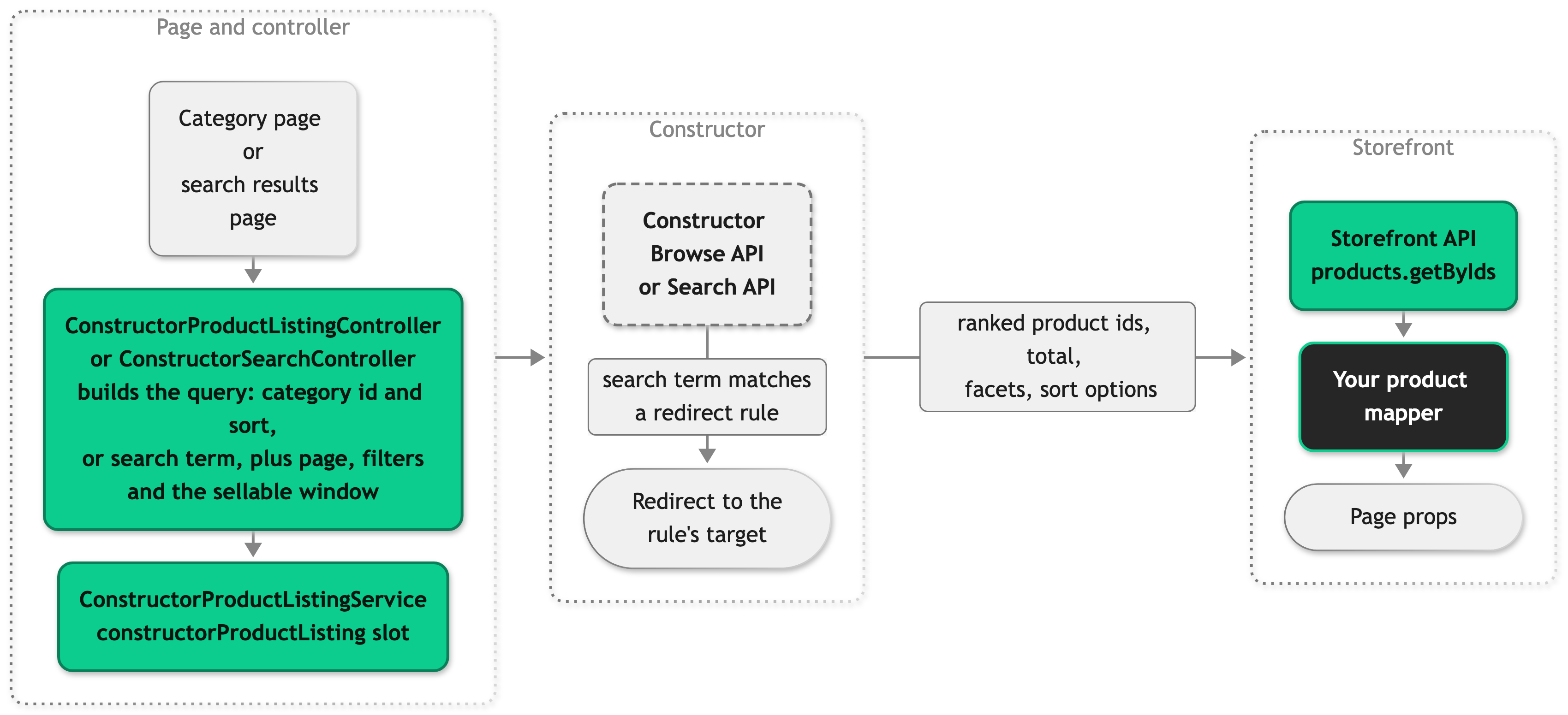
Within one request, products, filters, and sort options share one Constructor call. Autocomplete responses are not cached, but their mapped products are.
Product listing controller
The product listing controller extends ConstructorProductListingController instead of the SDK's BaseProductListingController. It inherits the category lookup and the canonical redirect from the SDK. The category lookup reads from the unchanged productListing service slot, so an unknown category still renders the 404 page. The controller also keeps loading hreflang links through productListing. Products, filters, and sort options come from Constructor through the constructorProductListing service slot.
Search controller
The search controller extends ConstructorSearchController instead of BaseSearchController. Before it renders, it looks for a matching redirect rule in the Constructor response and redirects to the rule's target, on any page and with any filters applied. The redirect is a 302, except during an Inertia visit to a target on another origin, which gets an Inertia external redirect. The rule arrives in the same Constructor response as the products and filters, so the check adds no request.
Search suggestions
Search suggestions read from the search service slot, where ConstructorSearchService takes the place of the SDK's SearchService. It requests Constructor autocomplete for the Products section and loads the suggested products through the Storefront API.
Filter mapper
ConstructorFilterMapper on the constructorFilter mapper slot turns Constructor's facets into listing filters. Attribute values go from the URL to Constructor unchanged, because the URL already holds Constructor's facet values. The price and reduction sliders write bounds, and the mapper turns the bounds of each slider into one Constructor range value:
| Query parameters in the URL | Constructor filter |
|---|---|
?filters[minPrice]=11100&filters[maxPrice]=17900 | filters[prices]=11100-17900 |
?filters[maxReduction]=50 | filters[max_savings_percentage]=-inf-0.5 |
Errors
Every Constructor call times out after 10 seconds. A failed browse or search logs Constructor query failed and renders the error page with a 500, as a failed Storefront API listing does. @scayle/storefront-constructor doesn't cache the failure, so the next request asks Constructor again. A failed autocomplete logs Constructor autocomplete failed and fails the search suggestions request, which lets the storefront tell an outage apart from a term without matches.
Index requirements
The package reads a Constructor index that holds your SCAYLE catalog. Most gaps in the index don't raise an error. They show up as an empty grid or a missing slider instead, so check the index before you change any code.
Each product in the index needs:
data.productIdwith the Storefront API product id, set up as a displayable field so that browse, search, and autocomplete responses include it. Without it, the package can't load the product and leaves it out of the grid. The server logsConstructor result is missing data.productIdfor each of those results. The package ignores Constructor's own item id.- Group ids that match the SCAYLE category ids of the product's categories. A category page browses
group_id = <category id>.
The index also needs a Products section, which listing, search, and autocomplete all query.
The default sellable window pre-filter needs two facets under these exact names. If the index doesn't have them, turn off the pre-filter.
| Facet name | Type | Values |
|---|---|---|
sellableFrom | Range, hidden facet | Unix seconds, the first moment the product is sellable |
sellableUntil | Range, hidden facet | Unix seconds, the last moment the product is sellable |
Set up both as hidden facets in the Constructor dashboard. That keeps them out of the filter list while the pre-filter still reads them. Both bounds are optional for each product, as they are on a SCAYLE product's sellable timeframe. A product without sellableFrom is sellable until its sellableUntil. A product without sellableUntil stays sellable once its sellableFrom has passed.
The price and reduction sliders need two more facets. Both are optional, but the product listing page and the search results page only show a slider when its facet exists under this name. If the index uses other names, see Use different facet names for price and reduction.
| Facet name | Type | Values | Used for |
|---|---|---|---|
prices | Range | Integer minor units, for example 2999 for 29.99 | The price slider. |
max_savings_percentage | Range | Fractions from 0 to 1, for example 0.5 for 50% | The reduction slider. The mapper converts it to percentages. |
A prices facet in major units instead of minor units puts the price slider off by a factor of 100.
The filter mapper drops a category facet, because the product listing page already renders category navigation from the Storefront API.
Set up the sort options you want to offer in the Constructor dashboard, and don't hide them.
Setup
The Storefront Application V3 doesn't include Constructor, and @scayle/storefront-constructor doesn't create a Constructor index for you. Before you start, set up an index of your catalog that meets the index requirements.
Then follow the steps below in order. They switch the product listing page, the search results page, and the search suggestions to Constructor. If you want some of these to keep using the built-in listing or search, see Choose the pages that use Constructor.
Install the package
Add @scayle/storefront-constructor. The Storefront Application V3 installs its peer dependency @constructor-io/constructorio-node automatically, in the version range the package declares:
@scayle/storefront-constructor is a prerelease. Use @alpha, because the latest tag points to an older prerelease than the alpha tag.
Add the index key
Add one index key variable per country to the environment, and add the same variables without a value to .env.example:
Then read each variable into privateFields.constructorIndexKey for its country. Private fields stay on the server and never reach the browser. @scayle/storefront-constructor adds constructorIndexKey to the config types itself, so you don't need a type augmentation.
A country without an index key throws MissingConstructorIndexKeyError on its first Constructor call. Its product listing page and search results page then render the error page, and its search suggestions fail. Keep real index keys out of the repository.
Register the services and the mapper
Register three classes in the registries:
ConstructorFilterMapperon theconstructorFiltermapper slot.ConstructorProductListingServiceon theconstructorProductListingservice slot.ConstructorSearchServiceon thesearchservice slot.
Leave the productListing and filter slots as they are. The product listing controller still looks up the category and loads hreflang links through productListing, and filter maps Storefront API filters for every page that doesn't use Constructor.
Once you import @scayle/storefront-constructor, the constructorFilter and constructorProductListing factories become required. The registry only builds a slot when a page uses it, so an unused Constructor slot costs nothing.
Remove the SearchService import from src/server/registries.ts when ConstructorSearchService replaces it, so the file has no unused import.
The search entry in src/server/types/index.ts can stay on SearchService, because ConstructorSearchService adds no public methods. Don't declare constructorFilter or constructorProductListing there. The package already declares both.
Switch the controllers
Change the base class of the product listing controller:
If the controller overrides createSortingOptions, for example to add a sort option, remove that override. The Constructor index defines the sort options, and the override would replace them.
Then change the base class of the search controller and remove the search resolve redirect from its beforeRender. With ConstructorSearchService on search, resolve always returns null, so that redirect never fires. If you keep a beforeRender override for something else, call super.beforeRender(params) first and return its response when it returns one. That call follows the Constructor redirect rules.
Adjust the filter and sort UI
Constructor's facets and sort options differ from the ones the Storefront API returns, so the filter and sort components might need small changes to display them correctly. Two examples:
- Sort labels: Nothing to change. Constructor returns a display label for each sort option in
SortOption.label.SFSortSelection.vueandSFMobileSortSelection.vueshow it throughgetSortOptionLabelinsrc/client/utils/sorting.ts. That function uses the label first, then the translation for a built-in sort key, then the raw key. - Color swatches: Map the facet values returned by your Constructor index. They can differ from SCAYLE attribute slugs.
Swatches render only for thecolorfilter slug. The mapper uses the facet name as the slug, so a facet namedcolourrenders as a plain attribute filter and never readsFILTER_COLORS.
Each swatch readsFILTER_COLORS[item.value]fromsrc/client/constants/index.ts. The default map contains SCAYLE slugs such asweissandschwarz. An unmapped value renders with the gray fallback,#cccccc.
Add an entry for every color value in your Constructor index:
Set test index keys
If your tests load storefront.config.ts, set the STOREFRONT_COUNTRIES_<CODE>_CONSTRUCTOR_INDEX_KEY variables to test values in vitest.config.ts.
Configuration
Constructor dashboard
Configure ranking, merchandising rules, redirect rules, facets, sort options, and the displayable data.productId field in the Constructor dashboard. Index requirements lists the facet names and value formats that the Storefront Application V3 expects.
Environment variables
| Variable | Required | Purpose |
|---|---|---|
STOREFRONT_COUNTRIES_<CODE>_CONSTRUCTOR_INDEX_KEY | Yes | Constructor index API key for the country's catalog. |
In application code
The @scayle/storefront-constructor classes hold these defaults. Change them in a subclass:
| Setting | Default | Override |
|---|---|---|
| Price facet name | prices | priceFacetName on ConstructorFilterMapper. |
| Reduction facet name | max_savings_percentage | reductionFacetName on ConstructorFilterMapper. |
| Facets hidden from the UI | sellableFrom, sellableUntil, category | hiddenFacets on ConstructorFilterMapper. |
| Category browse field | group_id | browseTarget on your product listing controller. |
| Index section | Products | section on both controllers. The search suggestions always query Products. |
| Search suggestion count | 6 | productsPerSuggestion on ConstructorSearchService. |
| Request timeout | 10 seconds | requestTimeout on ConstructorProductListingService and ConstructorSearchService. |
Customization guides
Choose the pages that use Constructor
The product listing page, the search results page, and the search suggestions switch to Constructor independently. Each one uses Constructor or the built-in provider depending on the class that the controller extends, or the class registered on the search service slot:
| Feature | Constructor | Built-in |
|---|---|---|
| Product listing page | Extend ConstructorProductListingController. | Extend BaseProductListingController. |
| Search results page | Extend ConstructorSearchController. | Extend BaseSearchController. |
| Search suggestions | Register ConstructorSearchService on search. | Register SearchService on search. |
The constructorFilter and constructorProductListing registrations stay required in every combination, as long as you import @scayle/storefront-constructor. Two combinations change how search terms redirect:
- With the built-in search suggestions, pressing Enter still runs the built-in search
resolve, even when the search results page ranks through Constructor. - With Constructor search suggestions and the built-in search results page, a search term never redirects.
ConstructorSearchServicedoesn't resolve terms, and the built-in search results page doesn't follow Constructor redirect rules.
Hide sold-out products
@scayle/storefront-constructor can't tell which field in the index holds stock, so sold-out products appear whenever Constructor ranks them. To hide them, combine the default sellable window with a condition on your own index field, such as inStock.
The base hook always returns the sellable window pre-filter, so asserting the value with ! is safe. Its return type includes undefined only so that overrides can turn the pre-filter off.
Add the same override to your search controller and to a ConstructorSearchService subclass on search. Each of the three builds its own pre-filter, so change them together, or the search suggestions can include a product the search results page doesn't show. The hook takes SearchViewData on the search controller and no argument on the service, so pass the matching argument to super.preFilterExpression.
Turn off the sellable window pre-filter
If the index doesn't carry sellableFrom and sellableUntil, return undefined from preFilterExpression on the product listing controller, the search controller, and a ConstructorSearchService subclass:
Without the pre-filter, products that aren't sellable yet or are no longer sellable appear whenever Constructor ranks them. The Storefront API doesn't filter them out either, because it returns products by id regardless of their sellable timeframe.
Use different facet names for price and reduction
If the index uses other names for the price and savings facets, set them in a mapper subclass and register that subclass on the constructorFilter slot:
The filter components only render the price and reduction sliders for the prices and max_savings_percentage filter slugs. Change those slugs together with the mapper, or no slider renders. If some pages stay on the built-in listing, keep the original slugs working there, since the Storefront API still returns them. The value formats from Index requirements still apply.
Personalize results
Override userParameters on both controllers and on ConstructorSearchService to send the user's Constructor identity. @scayle/storefront-constructor keeps personalized responses out of the shop cache, but cacheableRoutes still marks both pages as publicly cacheable. Remove the product listing and search routes from cacheableRoutes in storefront.config.ts. Otherwise, a CDN serves the first user's personalized results to everyone.
Constructor sends userParameters as the i, s, ui, and us query parameters. Add these keys to additionalRedactedQueryParams in @scayle/storefront-opentelemetry, so customer identifiers don't reach request trace spans.
Best practices
Build sort links from Constructor sort keys
A Constructor sort key combines the sort_by field and the direction as <sort_by>_<sort_order>, for example ?sort=price_ascending. Write sort links in a CMS block in that format. In code, build them with buildConstructorSortKey and read a ?sort= value back with parseConstructorSortKey. A link that only names a field, such as ?sort=price, reorders the grid without selecting an option in the dropdown.
Troubleshooting
A product appears on the built-in listing but not on the Constructor listing
Possible causes: The product's sellableFrom or sellableUntil in the index doesn't match its sellable timeframe in SCAYLE. For example, the values might use milliseconds instead of the seconds that Index requirements describes. Constructor then leaves the product out of the pre-filtered result and reports no error. Less often, the product's group ids don't include the category id, or the product has no data.productId.
Solution:
- Compare the product's
sellableFromandsellableUntilin the index with its sellable timeframe in SCAYLE. - Correct the values in the index to the format in Index requirements.
- If the timeframe matches, check that the product's group ids include the category id and that the product carries
data.productId.
Prevention: Keep the sellable facets aligned with the SCAYLE sellable timeframe.
The product listing or search results page renders a 500 error
Issue: The product listing or search results page renders a 500 error.
Possible causes: A Constructor browse or search failed or ran past the 10-second timeout, or the country has no index key. The server logs Constructor query failed, with the HTTP status if Constructor answered.
Solution:
- Check the logged HTTP status. A 4xx status means Constructor rejected the request, for example because of a wrong index key or rate limiting. A 5xx status means Constructor itself failed.
- No status means Constructor didn't answer in time, the server couldn't reach it, or the country has no index key. For a missing key, the logged reason starts with
Constructor index key is missing.
Prevention: Nothing prevents an outage. The error page is the intended fallback, the same as for a failed Storefront API listing. @scayle/storefront-constructor doesn't cache failures, so the page works again as soon as Constructor answers.


