

Session and Authentication
How does the Storefront Application V3 remember a customer between requests, and how does it decide who may open a page or call a procedure? Customer data, authentication tokens, and custom data all live in one session object. The session persists in SCAYLE KV storage and attaches to every request. An auth guard protects pages by checking the session for a customer, and the authed builder protects oRPC procedures by checking it for a valid access token.
You read and write the session from your own code, add fields to the customer, and set the session lifetime, the secret, and the cookie name suffix in storefront.config.ts. You can't change the cookie attributes, see Cookie security.
What you can do
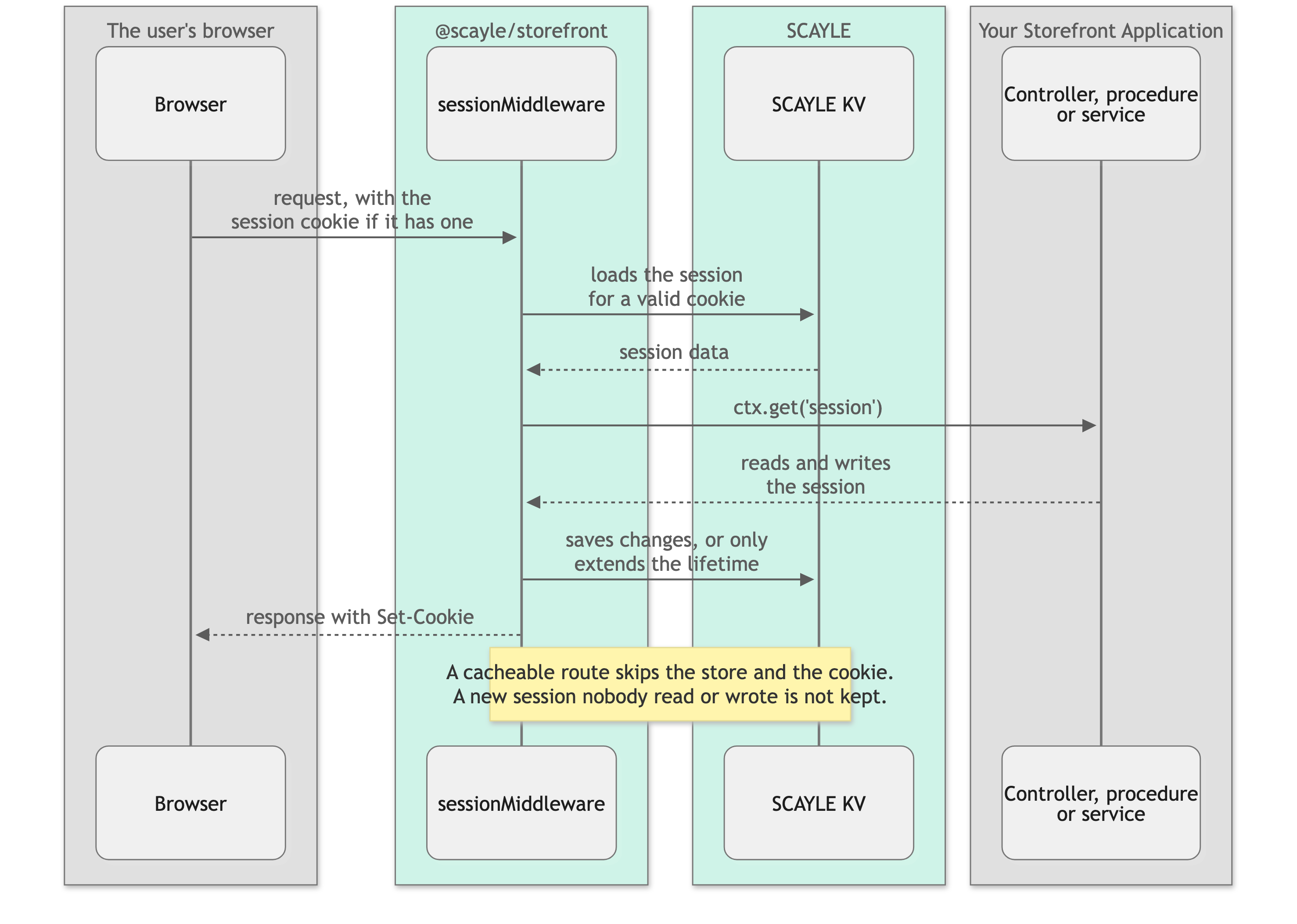
Sessions are initialized and available in every controller, service, and oRPC handler: as this.request.session in a controller, as request.session on the request a service's factory passes in, as ctx.get('session') in Hono middleware, and as context.request.session in an oRPC handler. You read and write session data through the same interface throughout the request. Changes are persisted automatically at the end of the request.
Reading and writing session data
Access the session in your middleware:
The session carries a typed shape you can augment:
Read values with get() and write with set():
The sign-in procedures write customer, accessToken, and refreshToken for you, as described in Sign in and sign out.
To add a field to the customer, see Add a field to a mapped entity.
Session lifecycle
When a customer signs in, the session ID rotates to prevent session fixation attacks:
The new session ID is prefixed with the customer ID (e.g. 123:a1b2c3d4-...), making it possible to find all active sessions for a customer in the store.
When a customer signs out, the session is cleared entirely:
The middleware automatically clears the session cookie and removes the data from storage.
Sign in and sign out
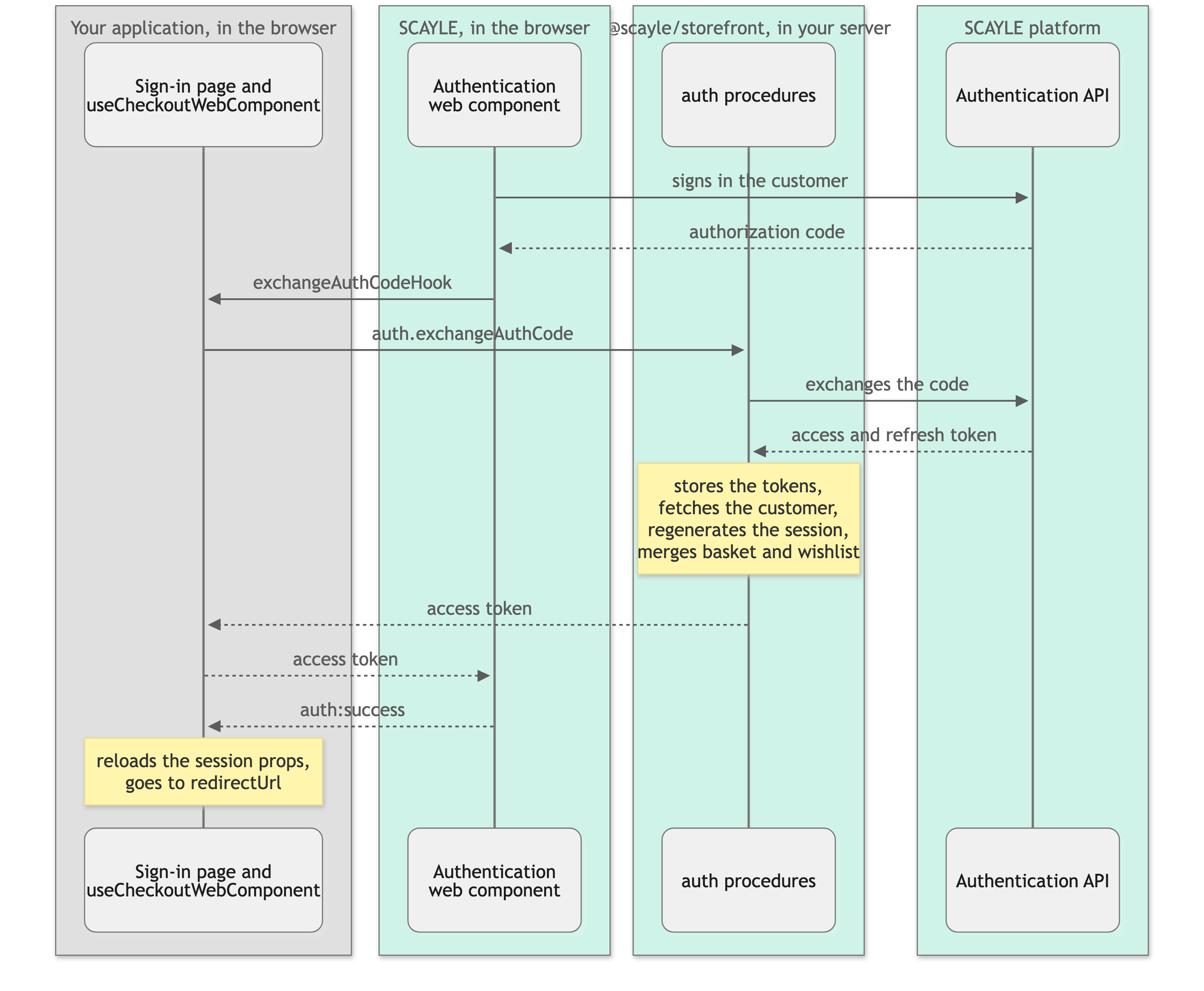
The SCAYLE Authentication web component renders the sign-in, registration, and guest forms on the /signin page and talks to the SCAYLE Authentication API from the browser. The web component hands an authorization code to a hook that the Storefront Application passes to it in useCheckoutWebComponent. The hook calls the auth oRPC procedures from @scayle/storefront, which store the tokens in the session, so your server can act for the customer. The web component also keeps its own copy of the tokens in localStorage. The Login & Registration page covers the forms and their configuration.
Sign in
auth.exchangeAuthCode signs the customer in on the server:
- It exchanges the authorization code for an access token and a refresh token, stores both in the session, and fetches the customer through
services.customer. - It regenerates the session, then stores the customer in it.
- It merges the basket and wishlist the user had before signing in into the customer's.
Your application registers the auth procedures with createAuthRouter(base) in src/server/api/index.ts.
The basket and wishlist keys change with the session, so the procedure reads both keys once before it regenerates and once after it stores the customer. Capture the basket and wishlist keys around the session change explains why a custom sign-in flow follows the same order.
When the exchange or the customer fetch fails, the procedure destroys the session, so no request ever sees tokens without a customer. A rate limit answers TOO_MANY_REQUESTS, and every other failure answers a 500. The customer has to sign in again, and the basket and wishlist the user built before signing in are not merged.
A session that already holds a customer gets ALREADY_SIGNED_IN (409) before the code is exchanged, and the session stays as it is. The check does not compare customers, so switching to another account needs auth.logout first. The error carries no access token. The hook in useCheckoutWebComponent falls back to auth.refreshAccessToken for it, which returns the token of the session that is already signed in.
A failed basket merge ends differently. The session stays, and the procedure answers with an error. The exchange hook then fails with "Unable to get access token", so the page doesn't complete the sign-in. A failed wishlist read or add doesn't fail the sign-in. The SDK logs it and leaves those items out.
What the browser does after auth:success is in Sign in and register.
Sign out
Call useAuthentication().logout from every sign-out control. It runs in this order:
- It clears the web component's tokens from
localStorage, before it calls the server, so a failed sign-out leaves no tokens on a shared device. - It calls the
auth.logoutprocedure, which destroys the session and then revokes the access token at the Authentication API while that token is still valid. The Authentication API revokes the refresh tokens issued with that access token as well. - It sets the
customer,basket,wishlist, andpromotionsprops toundefined. - It clears the encrypted browser history so Back can't restore the customer's pages, see the history key below.
- It reloads the current page, so the customer stays on it. On a protected page, that reload ends at the sign-in page.
- It reloads the shared once props that vary by customer segment, if you list any, see Reload a shared prop that varies by customer segment.
The revocation is skipped when the session has no access token, or when the token has expired or can't be decoded. A failed revocation is logged and doesn't stop the sign-out. That includes a token without a jti claim and a revocation that takes longer than 3 seconds, which the SDK aborts. A session with neither a customer nor an access token is left alone, so a sign-out call from a user who never signed in can't discard their basket.
When the auth.logout call fails, the customer sees an error toast, the session stays alive, and logout returns false. A web component that already started on the page keeps its in-memory token until the next full page load, while localStorage stays empty.
The history clearing works through a key. Inertia stores each page's props in the browser history, customer, basket, and wishlist included, so Back can restore a page without a request. The Storefront Application V3 registers createEncryptHistoryMiddleware() from @scayle/storefront on the whole page router in src/server/ssr-routes.ts, so Inertia encrypts the history entry of every page with an AES-GCM key. The browser keeps that key in sessionStorage, and logout deletes it through router.clearHistory(). The SDK encrypts no page until that middleware runs for it, so a page you leave out keeps a plain history entry that logout can't make unreadable.
When the customer presses Back after a sign-out, Inertia can't decrypt the entry. It requests the page from the server again and replaces the entry. A public page loads with the signed-out props, and a protected page redirects to the sign-in page. This applies to every page, public ones included, so Back after a sign-out costs at least one server request per page.
Two limits to know:
- Secure context: the encryption needs the browser's Web Crypto API, which exists only in a secure context, such as an HTTPS page or
localhost. A development server that you open over HTTP on a LAN IP address or a custom hostname has none. There Inertia can't create the key and its history write never completes. The server-rendered first page still shows, but the initial visit never finishes and client-side navigation stalls. - Current tab only:
sessionStoragebelongs to one browser tab, sologoutdeletes only the key of the tab that signed out. Other open tabs keep their keys, and their history entries stay readable until the tab closes. A session that ends withoutlogout, for example when it expires or when a failed token refresh destroys it, never touches the key or the history. The entries stay readable in that tab and show the customer's data as it was.
Calling window.scayle.auth.V3.logout() directly only signs the customer out of the web component and leaves the server session signed in.
Access tokens
Being signed in and holding a valid access token are two different states. The session keeps the customer and the refresh token after the access token expires, so a customer can be signed in with an expired token until something refreshes it. The auth guard for pages checks for the customer. The authed builder for oRPC procedures checks for a valid token.
Read the token with getValidAccessToken
getValidAccessToken(session) from @scayle/storefront returns the access token from the session, or undefined when there is none, when its exp claim lies in the past, or when it isn't a well-formed JWT. Pass the result to calls that act for the customer. A user who isn't signed in and a customer with an expired token both get undefined, so such calls answer as they would for any anonymous user:
getValidAccessToken never refreshes a token.
How a token gets refreshed
A refresh uses the refresh token in the session to get a new pair of tokens from the Authentication API and stores both in the session. Three places start one:
- The web component, in the browser. When it needs a new token, it calls the refresh hook the Storefront Application passes to it in
useCheckoutWebComponent, and the hook callsauth.refreshAccessToken. When the component hands the hook an authorization code instead, the hook callsauth.exchangeAuthCode, see Sign in for itsALREADY_SIGNED_INcase. Without a refresh token in the session, the procedure answersUNAUTHORIZED. A rate limit answersTOO_MANY_REQUESTSand keeps the session. Every other failure destroys the session and answers a 500, so the customer has to sign in again. - Your server code.
this.services.auth.getAccessToken({ minimumLifetimeMs })returns the session token, and refreshes it first when it expires withinminimumLifetimeMs. It returnsundefinedwhen the session has no access token, or when a refresh is due and there is no refresh token. Unlike the procedure, it leaves the session alone when the refresh fails and throws the error to you. WithoutminimumLifetimeMs, it returns the stored token without checking it. The checkout controller uses it with 30 minutes, so the token the web component on the checkout page receives stays valid through the checkout. - The SDK's Customer Account API calls.
CustomerService,CustomerAddressService, andOrderServicerefresh the token and retry once when the Customer Account API rejects a call with a 401 for an invalid token or with a 403. The session is destroyed when the Authentication API rejects the refresh with a 401, or when the retried call is rejected again. Five calls opt out of the second case, because a 403 can mean a business reason such as a wrong current password rather than a dead token:updatePassword, adding, updating, and deleting an address, andgetOrder.updateContactInfoandupdatePersonalInfodo not opt out.
Protect pages and procedures
A page and an oRPC procedure are protected by different checks, because they fail differently: a page redirects to sign-in, and a procedure returns a typed error to the client that called it.
Pages: createAuthGuardMiddleware
createAuthGuardMiddleware from @scayle/storefront lets a request through when the session holds a customer. Any other request is redirected to redirectTo, with the requested path and query string in the redirectUrl query parameter. A site-relative redirectTo gets the country prefix of the active country, and an absolute one is reached with a full page load. The Storefront Application guards the account area in src/server/ssr-routes.ts:
The guard protects only the routes you mount it on. /account/* covers /account and every page below it, and a page outside that prefix is public until you mount the guard for it. When the storefront or Inertia context is missing, the guard renders the 500 error page instead of letting the request through. What the sign-in page does with redirectUrl is described in Login & Registration.
The steps to protect a page of your own are in Require a signed-in customer.
oRPC procedures: authed
src/server/api/base.ts defines two builders for procedures:
A procedure built on authed runs only when getValidAccessToken finds a token, and a handler chained directly on it reads that token as context.accessToken, typed as a string. Every other call fails with the typed UNAUTHORIZED error, status 401, before the handler runs. That includes a signed-in customer whose token has expired. A defineRpc handler doesn't see the token in its types. A procedure that has to work for any signed-in customer, such as sign-out, is built on base and checks the session in its handler. See RPC API for how to build and register procedures.
Configuration
You configure sessions in the session field of storefront.config.ts. Top-level fields lists its secret, ttl, and cookieName, and the Storefront Application reads the secret from STOREFRONT_SESSION_SECRET. The ttl defaults to 30 days. Every request that loads a stored session extends it by the TTL again, so sessions expire either when the TTL passes without a visit or the cookie is cleared.
The session cookie is named {shopCountryId}-session, such as 1918-session, so each country has its own session. The optional cookieName replaces the session suffix.
How it works
The session system relies on SCAYLE KV, or a Redis-compatible store in local development. Storage backend explains the setup. Each user gets a unique session ID stored in a signed, HTTP-only cookie. When a request arrives, the middleware reads the cookie, looks up the session data in SCAYLE KV, and attaches it to the request context. At the end of the request, any changes are written back to the store.
Cookie security
The session middleware sets two cookies. Both are HttpOnly and SameSite=Lax, and both are Secure in production builds (import.meta.env.PROD). Development builds leave the flag off. Neither sets a Domain.
- The session cookie: it carries the session ID, so client-side JavaScript cannot read it. It uses
Path=/andMax-Ageset to the session time-to-live. The ID is signed with HMAC-SHA256 using your session secret, so tampering is detected on every request. scayle-skip-cache: it tells your CDN and the response cache to skip the shared page cache for a request. The session middleware sets it while the session holds a customer, withMax-Ageset to the session time-to-live, and clears it on sign-out. Its path is the country's path, or/for a country selected by domain and for the default country underpath_except_default. Only its presence counts, never its value.
These defaults are not configurable. The session secret, time-to-live, and cookie name suffix are the only settings exposed through storefront.config.ts.
Cacheable routes
A request counts as cacheable when its path matches a route in cacheableRoutes, unless one of the exclusions in Configure cacheable routes applies. On a cacheable request, the session middleware reads no session and sets no cookie, see What a cacheable response leaves out. Keep routes behind the auth guard out of that list, because the guard would find no customer and redirect every visitor to sign-in.


