

Redirects
Redirects send your users from an old URL to its new home without a code change or a deployment. You manage the rules in the SCAYLE Panel, and the Storefront Application V3 looks up a matching rule before a page renders. A rule applies even when the old URL still shows a page.
Why it matters
URLs stop resolving for ordinary reasons: a category gets renamed, a seasonal landing page goes dormant, a campaign wraps up. Each one left unhandled is a dead link a user or a search engine can land on. With the rules in the SCAYLE Panel, you retire or redirect a URL the same day it changes, instead of filing a ticket and waiting for a release.
You can also use a rule to move traffic away from a live page, for example a product you stopped selling. A new or changed rule can take a while to reach every URL, see Constraints and limits.
Try it
Try to create a test redirect in the SCAYLE Panel and visit the old URL.
This requires your own SCAYLE Panel access. The public demo shop has no test redirect configured.
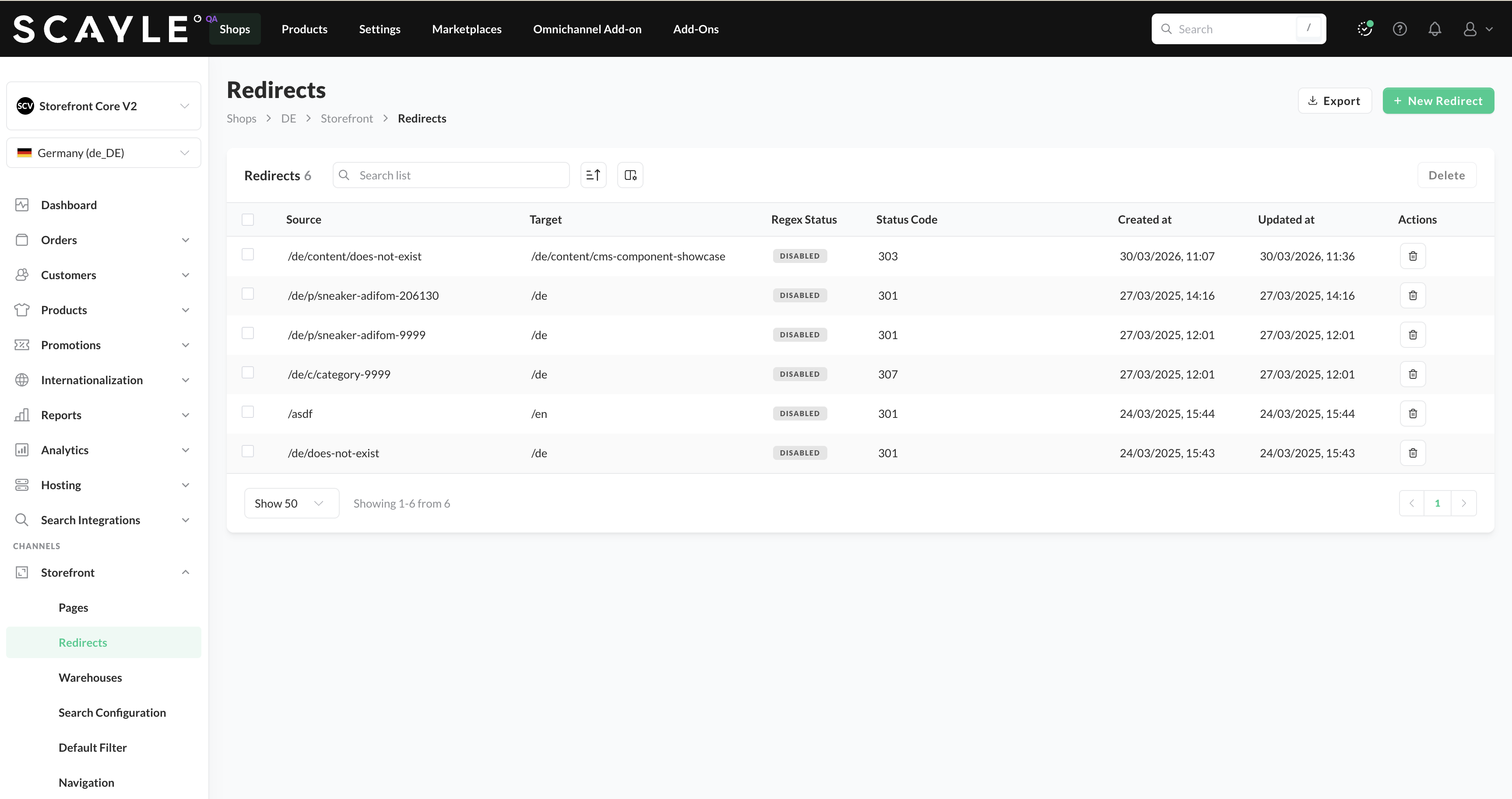
Redirects in the Panel
What's included
- Lookup before the page renders:
createRedirectMiddleware()returns Hono middleware that asks the Storefront API for a rule matching the requested URL. The Storefront Application V3 mounts it on the SSR router insrc/server/ssr-routes.ts, ahead of every page controller. - Cached lookup: The middleware caches both found rules and "no rule" answers, so a repeated request for the same URL does not call the Storefront API again.
- Path and absolute targets: A rule can point to a path on your shop or to an
http(s)URL on another site. - Query parameter forwarding: Query parameters on the old URL carry over to the target. An optional allowlist names the parameters that take part in the lookup instead, so a rule can differ by their values. A repeated parameter keeps all its values.
- Loop protection: A rule that would send the browser back to the URL it came from is ignored, and the page renders as if no rule existed.
- Traced lookup: Every lookup runs in a
redirect_lookupspan that records whether the cache answered and whether a rule was found.
What you can change
Configure
- The rules themselves in the SCAYLE Panel: source, target, status code, priority, global or country scope, tags, and activation. No deployment is needed, and a changed rule reaches users within the cache window described in Constraints and limits.
Extend
- Pass
queryParamAllowlisttocreateRedirectMiddlewareinsrc/server/ssr-routes.tsto let a rule match on the value of a query parameter. - Change the pattern in
ssrRouter.use('*', ...)to run the lookup on fewer routes. - Construct
RedirectServicefrom@scayle/storefront/servicesin your own middleware and callresolve(context, path, searchParams)to run the same lookup, cache and loop checks from your own code.
Replace
- Mount your own middleware in place of
createRedirectMiddlewareto read redirect rules from somewhere other than the Storefront API. The Panel rules then stop applying, and you own the cache, the loop checks and theredirect_lookupspan.
Constraints and limits
Permanent
- A rule wins over a page that still renders. The lookup runs before the page controllers, so a rule for a live product or category redirects anyway. Deactivate or delete the rule in the SCAYLE Panel to show the page again. This includes the product and category pages that redirect an outdated slug themselves, because the Panel rule answers first. See Product detail page and Product listing page.
- The lookup runs for
GETandHEADrequests that load a full page: a first page load or a full Inertia visit. A partial reload skips it, and so does a request that resolved no country. Because the middleware sits on the SSR router, oRPC calls, the analytics route and static assets never trigger a lookup. - The Storefront Application V3 does not localize or prefix a target. It sends the browser to the target exactly as stored in the SCAYLE Panel, so a shop with country prefixes needs the prefix in the target.
- An absolute target keeps the Panel status code on a full page load. On an Inertia visit, the Storefront Application V3 answers with
409and anX-Inertia-Locationheader instead, so the browser does a full page load of the target. - The
LocationandX-Inertia-Locationheaders are percent-encoded, so they are ASCII only. - The cache lifetime is the same for found rules and "no rule" answers, and it is not configurable. Each lookup URL has its own entry.
Known limitations
- A rule matches against the lookup URL. The lookup URL is the request path as your users see it, decoded and without a trailing slash, plus the allowlisted query parameters. A literal source with a host or a trailing slash never matches.
- The lookup URL includes the country prefix with the
pathcountry selector, and for a non-default country underpath_except_default, for example/en/old-shoes. A literal source without that prefix never matches. With thedomainselector the lookup URL has no prefix. - The runtime redirects a URL with a trailing slash to the slash-free form before the lookup. With the
pathcountry selector, it also redirects an unprefixed URL to the default country first. - A rule stops firing without any error when it would loop. The first check compares the source and target stored in the Panel. If they are equal, the Storefront Application V3 caches "no rule" for the whole shop. The second check compares the finished target, with forwarded query parameters, to the lookup URL. It runs on every request and is never cached, so one request cannot switch the rule off for other users.
- A target that is neither a path starting with
/nor anhttp(s)URL counts as no rule. A barenew-shoeswould resolve against the current path, and ajavascript:target would run as script on your shop's origin when Inertia assigns it to the browser location. - An absolute target on your own origin still redirects, but the Storefront Application V3 logs the warning "Redirect target is an absolute URL on the current origin" and an Inertia visit costs a full page load. Store a path such as
/en/c/shoes-42instead. - A changed rule can take up to 15 minutes to reach a URL that was already looked up inside that window. A URL nobody requested yet picks up a new rule right away. The lifetime is set in code, see Data cache TTLs. If a CDN holds a cacheable page, it serves that page until its
s-maxageends without reaching the middleware, even after you add a rule for it. - The lookup times out after one second, and no setting changes that. On a cache miss, a slow Storefront API delays the page by up to that second. A failed lookup is not cached, so the next request tries again. The middleware logs the error and renders the page as if no rule existed.
How it works
Redirects run inside the SSR router, so the stages in Request Lifecycle come first. Then the middleware you mounted in src/server/ssr-routes.ts decides whether a rule answers the request or the page controllers do.
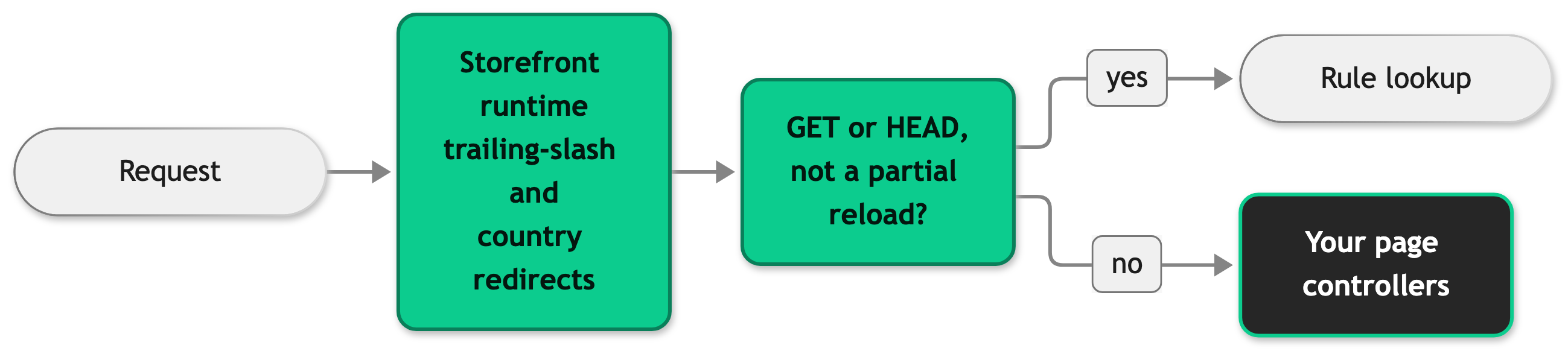
A request that passes this check goes through the lookup:
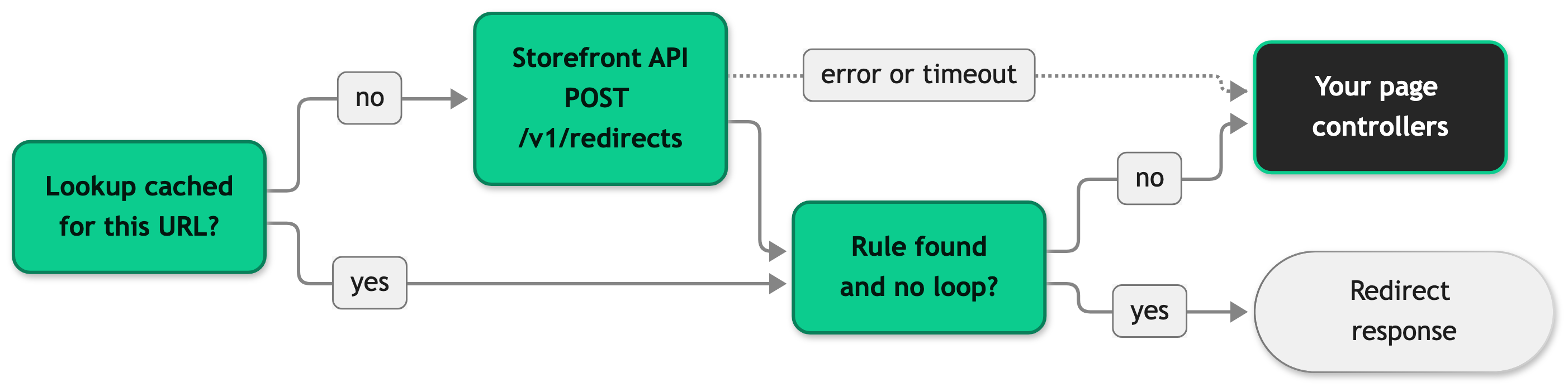
In order, the middleware does this:
- It builds the lookup URL from the request path and the allowlisted query parameters.
- It reads the shop's cache for that URL. On a miss, it posts the lookup URL to the Storefront API and caches the answer. The cache keeps the target as stored, so each request forwards its own query parameters onto it.
- It builds the target and forwards every query parameter that is not in the allowlist, unless the target already sets that parameter.
- It answers with the target and the Panel status code, or passes the request on when it found no rule or the loop check failed.
Say a rule redirects /en/old-shoes to /en/c/shoes-42, and the allowlist is empty. A request for /en/old-shoes?utm_source=newsletter sends the lookup URL /en/old-shoes, and the browser lands on /en/c/shoes-42?utm_source=newsletter. The tracking parameter survives even though it played no part in matching the rule.
Configuration
SCAYLE Panel
You create and manage redirect rules in the SCAYLE Panel, which synchronizes them with the Storefront API. The Storefront Application V3 reads them from the Storefront API at request time. Open the rules at Shops ➜ [Shop] ➜ Storefront ➜ Redirects.
Each rule has a source URL (or a regular expression when you toggle Regex on), a target URL, a status code, and a priority. The status code is one of 301, 302, 303, 307, or 308. The Storefront Application V3 sends whichever code the Storefront API returns. A rule created at the global level is inherited by all countries, and a rule created for one country applies to that country only. For full details, including regex formatting and inheritance, see Redirects in the SCAYLE Panel.
Storefront Application
You set the middleware option where the Storefront Application V3 mounts the middleware.
| Option | Type | Default | Effect |
|---|---|---|---|
queryParamAllowlist | string[] | empty | Names the query parameters that take part in the lookup URL. Every other parameter is left out of the lookup and forwarded to the target. An empty list means no parameter takes part in the lookup. |
This example lets a rule differ by color and size:
Keep the middleware before the page controllers, or a rule stops winning over a page. Delete the createRedirectMiddleware line to turn off the Panel rules. Your shop then serves every URL that has a page and answers every other URL with the not-found page.
Best practices
Keep the query parameter allowlist small
Every parameter you add gives the same visible path another lookup URL and another cache entry, and a cache miss on each one calls the Storefront API. Adding or removing a parameter changes the key of requests that carry it, so those requests start with fresh entries. List only the parameters your rules need to tell apart.
Troubleshooting
A rule exists in the SCAYLE Panel but the URL does not redirect
Issue: You created and activated a rule, but the URL still renders a page or returns the not-found page.
Possible causes: The lookup URL differs from the rule's source, for example because the source lacks the country prefix. A cached "no rule" answer from before you created the rule is still valid. A CDN serves a cached copy of the page. The request skipped the lookup, for example a partial reload or a route outside the SSR router.
Solution:
- Open the trace of the request and find the
redirect_lookupspan. See OpenTelemetry. - If there is no span, the request never reached the lookup. A CDN may have served a cached copy, the request may have skipped the lookup under the conditions in Constraints and limits, or
src/server/ssr-routes.tsmay no longer mountcreateRedirectMiddleware. - If
scayle.storefront.redirect.cacheishitandscayle.storefront.redirect.foundisfalse, a cached "no rule" answer applies, or the loop check on the finished target dropped the rule. Wait for the cache lifetime to pass, and compare the rule's target to the lookup URL. - If
scayle.storefront.redirect.cacheismissandscayle.storefront.redirect.foundisfalse, the Storefront API has no rule for the lookup URL, or the rule's target is not a path or anhttp(s)URL, or it points back at the lookup URL. Compare the rule's source in the SCAYLE Panel to the URL the browser requested, including the country prefix.
Prevention: Store sources the way the lookup URL looks, and test a new rule on a URL nobody requested.
The log shows "Redirect lookup failed"
Issue: The Storefront Application V3 logs an error from the redirect lookup, and the page renders without the redirect.
Possible causes: The Storefront API returned an error, or it did not answer within one second.
Solution:
- Read the
errfield of the log entry to see whether it is a timeout or an API error. - Check the Storefront API status and your network path to it.
- Retry the request. The failure is not cached, so the next request tries the lookup again.
Prevention: Watch for this log message in your monitoring, because every cache miss during an outage renders the page without its redirect.


