

Login & Registration
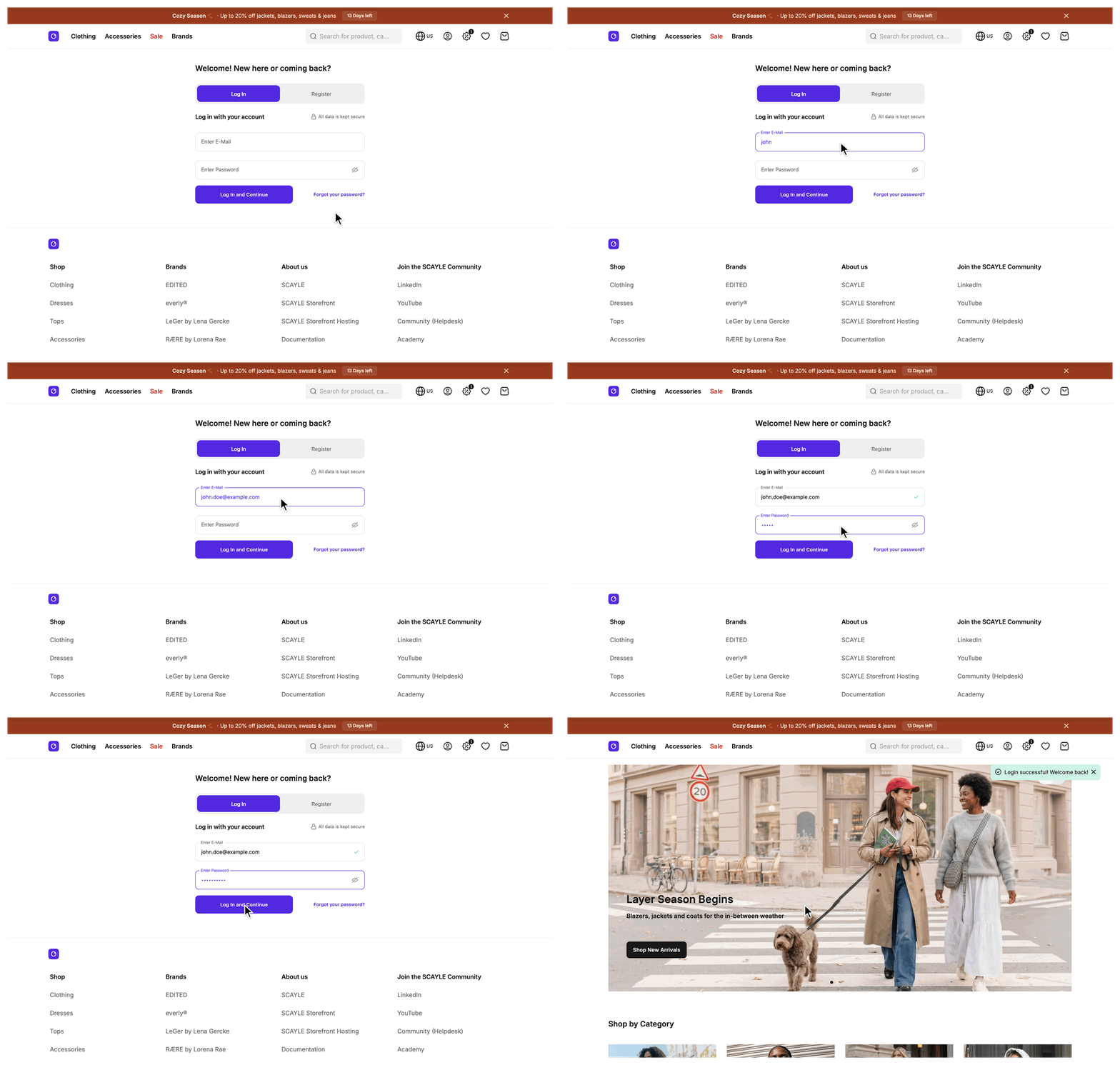
Customers sign in, register, and reset their password on one page, /signin, through the SCAYLE authentication component. In these three flows the Storefront Application V3 never receives a password. It mounts the component, trades the authorization code the component produces for tokens and the customer in one oRPC call, and merges the basket and wishlist the user built before signing in into the new signed-in session.
Why it matters
Every signed-in feature starts here: the account area, a basket tied to the customer, and checkout. The @scayle/storefront package owns the session and the basket and wishlist merge. Your application owns the page the customer lands on, the success toast, the reload of the customer props, and the extension points around them.
Try it
- Sign in with an existing account.
- Register a new account. Add
?register=trueto the URL to open the form on the registration view. - Reset a forgotten password. Select "Forgot your password?" underneath the form.
What's included
- Sign-in page:
/signin, rendered bySignInControllerandSignIn.vue. It mounts the SCAYLE authentication component and switches it to registration when the URL carries?register=true. - Password reset: the same page mounts the SCAYLE new-password component instead when the URL carries a
?hash=query parameter, which is the link in the password reset email. - Authorization code exchange: the
exchangeAuthCodeoRPC procedure. It trades the code for tokens, stores the customer on a new session, merges the basket and wishlist the user built before signing in, and returns only the access token. - Token refresh: the
refreshAccessTokenoRPC procedure. The authentication component calls it through a refresh hook that the application registers when the component starts. - Sign-out:
useAuthentication().logout()and thelogoutoRPC procedure. The session ends and the access token is revoked at the Authentication API. - Return path: a
redirectUrlquery parameter that sends the customer back to the page they came from, andgetSignInRoute()to build links that carry it. - Auth guard: a middleware, registered for every route under
/account/*, that redirects a user without a signed-in session to/signin. See Pages:createAuthGuardMiddleware. - Sign-in analytics: a GA4
loginevent after sign-in and asign_upevent after registration.
What you can change
Configure
- The OAuth client ID and client secret, and the session secret, through the
STOREFRONT_OAUTH_CLIENT_ID,STOREFRONT_OAUTH_CLIENT_SECRET, andSTOREFRONT_SESSION_SECRETenvironment variables. The Storefront CLI asks for all three when you set up your shop. - The identity providers and authentication methods the component offers, in the SCAYLE Panel.
Theme
- The layout, heading, and spacing around the form in
src/client/pages/SignIn.vue. The SCAYLE component renders the form itself.
Extend
- Change the page title, meta tags, or the props the page receives by editing
SignInControllerinsrc/server/controllers/signin.ts. It extendsBaseController, sogetTemplate(),getViewProps(), andbeforeRender()are the hooks.getMeta()is private, so edit it in place. - Add your own fields to the customer by extending
CustomerMapperServiceinsrc/server/services/mappers/customer-mapper.tsand augmentingCustomerinsrc/shared/types/Customer.ts. Both files already addidHash, so follow that pattern. - Run your own code after sign-out by subclassing
AuthFlowServiceand registering the subclass in theauthservice slot ofsrc/server/registries.ts. A slot is one entry in the service registry, see Extending the SDK. - Change the errors or middleware of the exchange, refresh, or sign-out procedures by replacing the
authkey insrc/server/api/index.ts. - Reload a shared prop that varies by customer segment after sign-in and sign-out.
- Report your own sign-in surface to analytics through
useAuthEvents()insrc/client/composables/tracking/useAuthEvents.ts.
Replace
- Swap the SCAYLE component for your own sign-in form or identity provider flow. You then write the form, the password handling, the token exchange, and the session write yourself, and
SignIn.vueno longer handles the password reset link described on this page. Take this step only when the SCAYLE component cannot cover your sign-in method.
Constraints and limits
Permanent
- All three flows run on
/signin. There is no/registerroute. Registration is the same page with?register=true, and the value must be the stringtrue. With thepathorpath_except_defaultcountry selector, the route carries the country prefix, for example/us/signin. When the URL carries both?hash=and?register=true, the password reset step wins and the registration form does not appear. - Password reset has no route and no server code of its own. Both steps, requesting the email and setting the new password, run inside the SCAYLE component. See Reset a password.
- Keep the
pw-reset-urlattribute on<scayle-auth>, and build its value by string concatenation. Without the attribute, the component builds the reset link fromwindow.location, so the current query string ends up in the email. The Authentication API replaces{hash}and rejects any host other than the shop domain you set in the SCAYLE Panel.buildRouteis the wrong tool here, because it percent-encodes the literal{hash}placeholder and breaks the replacement. redirectUrlaccepts only a site-relative target that resolves on the same origin. An absolute URL, even one on your own host, a protocol-relative URL such as//example.com, and a backslash form such as/\example.comare all discarded. This prevents open redirects. The server and the client use the same check, but the fallback differs, see the next entry.- A customer who already has a session and requests
/signinis redirected with a 302 on any visit that is not a partial reload, which is a request for only some of the page's props. The target is the validredirectUrl, or/account/orderswhen there is none. After a sign-in on the page itself, the client navigates to the validredirectUrl, or to the home page when there is none. - On the Checkout page, a successful sign-in only reloads the session props. The checkout web component manages the navigation after sign-in, so the success toast and the
redirectUrlnavigation are skipped. - Sign-out ends the session before it revokes the access token, and a failed revocation does not fail the sign-out. See Sign out.
Known limitations
- A failed token exchange or customer profile request ends the session. The customer has to sign in again, and the basket and wishlist the user built before signing in are not merged. See Sign in for the answers each failure gives.
- A failed basket merge stops the page from completing the sign-in, and a failed wishlist merge never does. See Sign in.
- A failed token refresh through the authentication component ends the session, and the customer has to sign in again. A rate limit and a missing refresh token keep the session, see How a token gets refreshed.
- When the sign-out call fails, the customer sees an error toast and stays signed in. See Sign out.
How it works
A user reaches /signin in one of two ways. The auth guard sends them there from an /account/* page and appends the original path as redirectUrl, or they follow a link you built with getSignInRoute().
Sign in and register
SignInController renders the SignIn page with three props: showRegistration, a valid access token from the session (or undefined for a user), and the head meta with noindex,follow. SignIn.vue loads the SCAYLE script, then useCheckoutWebComponent waits for the script's scayle.auth.ready event and starts the authentication API with your OAuth client ID, the current access token, and two hooks, one for the code exchange and one for the token refresh. The page renders the component only after that start finishes.
The customer completes the form inside the component. The component hands the authorization code to the exchange hook, and the hook calls the exchangeAuthCode procedure on your server. Sign in and sign out shows the sequence and what the procedure does.
After auth:success, useCheckoutWebComponent runs authenticated(source) from useAuthentication and tracks the event once that finishes. authenticated shows a success toast chosen by the source (login, register, new-password, or login-guest), reloads the customer, basket, wishlist, and promotions props, and navigates with a replace to the valid redirectUrl or the home page. The customer the procedure stores carries the customer's segments in customer.segments, see Customer Segments.
Reset a password
The email link opens /signin?hash=<hash>. SignIn.vue reads hash from the query string and mounts <scayle-auth-new-password> instead of <scayle-auth>. When the customer sets the new password, the component reports the new-password source and the same authenticated(source) step runs.
Refresh a token
The application never calls refreshAccessToken on its own. The authentication component calls the refresh hook when it needs a new access token, and the hook calls the refreshAccessToken procedure. When the component hands the hook an authorization code instead, the hook calls exchangeAuthCode with it. How a token gets refreshed covers what the procedure and the server-side services do.
Sign out
logout() in useAuthentication signs the customer out on the server and in the browser. The customer stays on the current page. On an /account/* page, the auth guard answers the reload with a redirect to sign-in. Sign out lists the steps in order.
The sign-out button in the account popover and the mobile sidebar both call logout(). The call fires no analytics event.
Setup
Sign-in ships with the Storefront Application V3. The /signin route, the oRPC procedures, and the return path handling are already registered.
- Set
STOREFRONT_OAUTH_CLIENT_IDandSTOREFRONT_OAUTH_CLIENT_SECRETto your OAuth client ID and client secret..env.examplelists the names. - Set
STOREFRONT_SESSION_SECRETto a string of at least 32 characters. - Start the application and open
/signin.
You know it worked when the SCAYLE sign-in form appears under the page heading.
Configuration
SCAYLE Panel
You configure the identity providers and the authentication methods the component offers in the SCAYLE Panel. See Configure identity providers in SCAYLE Panel for the setup steps.
Storefront Application
| Field | Type | Description |
|---|---|---|
oauth.clientId | string | The OAuth client ID. The page passes it to the authentication component as an integer, so it must be a number written as a string. Env: STOREFRONT_OAUTH_CLIENT_ID. |
oauth.clientSecret | string | The OAuth client secret, used on the server during the code exchange. Env: STOREFRONT_OAUTH_CLIENT_SECRET. |
The session.secret, session.ttl, and session.cookieName fields are covered in Session and Authentication.
Customization guides
Link to sign-in and return the customer to the same page
You end up with a link that opens /signin and brings the customer back after sign-in.
- Import
getSignInRouteandroutesfrom@shared/routes. Its signature isgetSignInRoute(redirectUrl: string = routes.home, register: boolean = false): string. - Pass the return path as the first argument. Use
$page.urlfor the current page, or a localized route such aslocalizeLink(page.props.storefront, routes.basket), because route constants carry no country prefix. - Pass
trueas the second argument to open the registration form. - Use the result as the link target.
You know it worked when the link points to /signin?redirectUrl=<current page>, with register=true added for the second button, and the customer returns to that page after signing in. The helper omits redirectUrl when the return path is exactly /. A country-prefixed home page such as /us stays in redirectUrl. When you pass a /signin URL that carries its own redirectUrl, as $page.url does on the sign-in page, the helper unwraps the inner value so the customer does not loop back to sign-in. A bare /signin becomes the home page.
Run your own code after sign-out
You end up with your own code that runs after every sign-out of a signed-in customer, with the session already destroyed.
- Subclass
AuthFlowServiceand overridelogout(). Callsuper.logout(), because the base method destroys the session and revokes the token. If you skip it, thelogoutprocedure no longer ends the session and the customer stays signed in. - Point the
authslot insrc/server/registries.tsat your subclass.
You know it worked when your code runs on every sign-out of a signed-in customer. Move the class into its own file next to your other services once it grows past a few lines.
Best practices
Sign out through useAuthentication().logout()
Calling the logout procedure directly ends the session and revokes the access token, but nothing on the client changes. The composable also clears the checkout tokens, the history key, and the customer, basket, wishlist, and promotions props, so the page does not keep showing the previous customer.
Keep the analytics call when you replace the page
The login and sign_up events come from useCheckoutWebComponent through useAuthEvents().trackAuthSuccess, which runs for the auth:success event of the SCAYLE component. A replacement sign-in surface needs its own call to trackLogin() or trackSignUp() once the customer is authenticated, or those events stop without any error.
Capture the basket and wishlist keys around the session change
If you write your own exchange handler, read the basket and wishlist keys before session.regenerate(customer) and again after you store the customer on the session. Regenerating the session and storing the customer give the customer new keys, so a merge that uses keys captured afterward runs against keys the pre-sign-in items do not belong to. Nothing throws, and the customer sees an empty basket and wishlist after signing in.
Read the basket key with services.basket.getBasketKey(session) and the wishlist key with mappers.wishlist.getWishlistKey(session), which calls getWishlistKey of your WishlistMapperService. The procedure calls getWishlistKey once before and once after the session changes. The SDK's auth.exchangeAuthCode procedure follows this order and runs the basket merge and the wishlist merge at the same time.
Troubleshooting
The sign-in form never appears
Issue: /signin shows the page heading and an empty area where the form belongs.
Possible causes: The page renders the component only after the authentication API has started. The start needs the SCAYLE script to load and fire scayle.auth.ready, and it needs a usable oauth.clientId.
Solution:
- Open the browser console and look for the log entries
Checkout OAuth client ID not configuredorFailed to initialize the checkout auth API. - Confirm that
STOREFRONT_OAUTH_CLIENT_IDis set and holds a number. - Check the network panel for the SCAYLE web component script request and for anything that blocks it, such as an ad blocker or a content security policy.
Prevention: Complete the Setup steps before you first open /signin in a new environment.
A customer completes the form but is not signed in
Issue: The component accepts the credentials, but the page shows no success toast and the customer stays signed out.
Possible causes: The exchangeAuthCode procedure failed. The Authentication API rate-limited the exchange, the token exchange or the customer profile request failed, or the basket merge failed.
Solution:
- Search the server logs for
Failed to exchange authorization code, or forAuth API rate-limited the code exchangefor a rate limit. - Read the
errfield of the entry for the upstream cause. A failed basket merge does not write the first two messages. The browser console showsFailed to exchange auth codefor it. - Ask the customer to sign in again.
Prevention: None on your side for an upstream failure.
A signed-in customer is signed out without clicking sign-out
Issue: A customer who was signed in lands on the sign-in page, or sees the signed-out header, after some time on the site.
Possible causes: The token refresh failed, see the token refresh limitation above. A call to the Customer Account API can also end the session when it is rejected again after a token refresh, or when the refresh answers with a 401. The session can also reach its session.ttl, or the refresh token can reach its own lifetime.
Solution:
- Search the server logs for
Failed to refresh access token. - Read the
errfield of the entry for the upstream cause, for example a revoked or expired refresh token. - Ask the customer to sign in again.
Prevention: None on your side.
Reference
SCAYLE documentation
- SCAYLE authentication components
- SCAYLE Authentication API
- Configure identity providers in SCAYLE Panel
- SCAYLE token management

