

CMS
Your editors build the homepage, content pages, and category page content in a headless CMS, and the Storefront Application V3 renders it without a code change. It includes integrations for Storyblok, Contentful, Contentstack, and Amplience behind one provider contract, plus a local placeholder provider, so a new project runs before you connect a CMS.
Why it matters
A storefront mixes commerce data with editorial content such as a homepage hero, a category teaser, or a seasonal landing page. Editors change that content in the CMS and publish it without a deployment.
Every provider implements the same contract. Controllers, pages, caching, and editor preview work the same way for each of them, so you choose the vendor your editors already use.
Try it
- Open the demo homepage: a homepage rendered from CMS blocks.
What's included
- Provider contract:
CMSProviderServicefrom@scayle/storefront/cmsdefines how a CMS integration fetches a page by slug, fetches the content of a category page, and detects editor sessions, the requests an editor makes while previewing a page inside the CMS. It also defines optional members for per-locale page paths and a preview redirect. - Provider integrations: Storyblok, Contentful, Contentstack, and Amplience each ship as an
@scayle/storefront-cms-<provider>package. The package calls the vendor API and caches published content. - Local placeholder provider: The
scayleprovider is active until you setCMS_PROVIDER. It needs no credentials and renders a static welcome page. - CMS page routes: The homepage at
/and/homepage, and content pages at/content/:slug. Both render theCmsPagepage. - Category page content: Product listing pages fetch the CMS content of their category and render it as teaser content above the product grid and as SEO content on the first page.
- Editor preview support: Each provider detects its editor session. A middleware lets the editor embed your shop in a frame, and a second middleware redirects preview requests for providers that open a placeholder path.
- Draft content switch:
STOREFRONT_CMS_ALLOW_DRAFTSdecides whether an editor session sees unpublished content. - Content blocks: Editors assemble pages from layout, content, and product blocks. Each block maps to a Vue component in
src/client/cms/providers/<provider>/components/. The block table shows which blocks each provider renders.
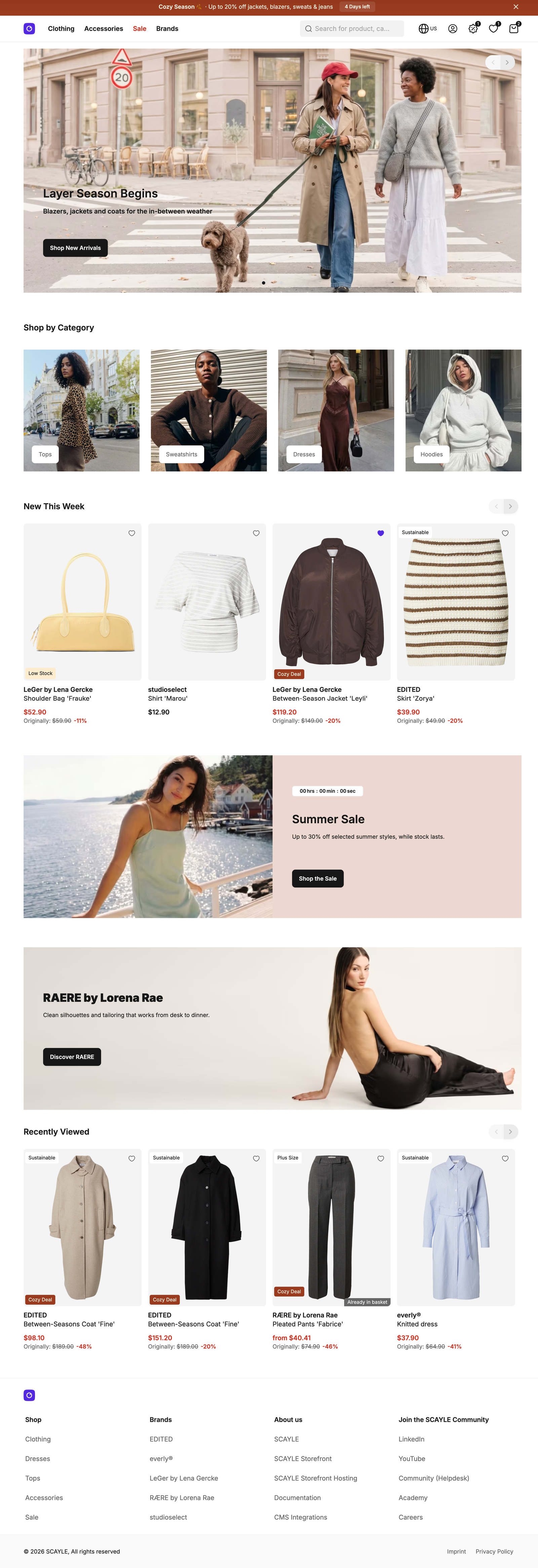
Homepage with CMS content
What you can change
Configure
- Which provider your shop uses, with
CMS_PROVIDER. The Vite build reads it, so a change needs a rebuild. - Whether editor sessions see draft content, with
STOREFRONT_CMS_ALLOW_DRAFTS. The server reads it when it creates the CMS service, so a change needs a restart. - The credentials of your provider, which are environment variables listed on the provider page.
Theme
- The markup and styling of any block, by editing its Vue component in
src/client/cms/providers/<provider>/components/.
Extend
- Add a block type to the dispatcher of your provider, the Vue component that picks a component for each block type.
- Read your own SEO fields by editing
getPageMetain your provider'sservice.ts. - Add a prop to a CMS page or change its template by overriding
getViewPropsorgetTemplateon a controller insrc/server/cms/controllers/cms-page.ts. - Change how many CMS images load eagerly by editing
CMS_EAGER_LOADING_COUNTinsrc/client/cms/shared/useLcpPriority.ts. The server does not know the viewport, so the count is a fixed value. See Image priority. - Render a different 404 response for CMS pages by overriding
renderNotFoundon the controller. - Serve a CMS page at a new route by adding a subclass of
CmsPageControllerthat implementsgetSlug.CmsContentControlleris the model.CmsPageControlleris not exported, so export it fromsrc/server/cms/controllers/cms-page.tsor add your subclass in that file. The route pattern, the mount, and thecacheableRoutesentry work as in Add your first page. - Change how a provider queries its CMS by subclassing its service in
src/server/cms/providers/<provider>/service.tsand overriding its protected query methods, for examplebuildStoryQueryon Storyblok. Return your subclass fromcreateCMSService.
Replace
- Integrate a CMS the Storefront Application V3 has no provider for. You write a server provider that implements
CMSProviderService, a client provider with the page components, and a types module, and you add its name to theCMS_PROVIDERlist invite.config.ts. See How it works for the files the application imports from each provider.
Constraints and limits
Permanent
- Your build includes one provider.
CMS_PROVIDERacceptsscayle,storyblok,contentful,contentstack, oramplience, and any other value, including an empty string, fails the build withInvalid build environment. Each provider package pulls its own vendor SDK, so the build includes only the one you select. The directories of the other providers stay in the project and are not part of the build. - A missing slug, an empty result from the provider, and a
CMSContentNotFoundErrorall end in your application's not-found page. There is no "coming soon" state for CMS content. /content/:slugtakes one path segment. A request with a/inside the slug, or with.or..as the slug, gets the not-found page. The provider is asked for the slugcontent/<slug>.getAlternatePathsandgetPreviewRedirectPathare the optional members of the contract.fetchListingPageDatais required, and a provider whose CMS holds no category content returnsundefinedfrom it. A listing page then renders without CMS content.- Each provider detects an editor session from a query parameter its editor adds to the preview URL. The Configuration section lists them.
Known limitations
- The placeholder provider renders the same welcome page for every slug and marks it
robots: noindex, nofollow. Category pages get no CMS content from it. Use it for component development, not in production. It also stays active whenCMS_PROVIDERis set only in the runtime environment, because the build reads the variable. Every page then shows the welcome page. - The provider package caches published content, so a change in the CMS can take up to 5 minutes to show up, see Data cache TTLs. To remove one entry earlier, call
cache.deletewith its key,cms:<provider>:page:<slug>:<locale>for a page orcms:<provider>:plp:<categoryId>:<locale>for a category page. Amplience usescms:amplience:page:<deliveryKey>andcms:amplience:plp:<deliveryKey>./,/homepage, and/content/:slugare also listed incacheableRoutesinstorefront.config.tswith 600 seconds, so a CDN that honors thes-maxageheader of these responses can serve a page for up to ten more minutes. - A CMS failure that is not a not-found result, such as a network error or a rate limit, is rethrown on
/and/content/:slugand reaches the error handler registered insrc/server/index.ts. Category pages catch it, log it, and render without CMS content. - Any request that carries the editor query parameter of the provider counts as an editor session. On Amplience the
vsevalue must also be an Amplience staging domain. Otherwise the server ignores the parameter, logs a warning, and treats the request as a normal one. Nothing checks who sent the request. With drafts enabled, anyone who adds the parameter to a URL receives draft content, so leaveSTOREFRONT_CMS_ALLOW_DRAFTSunset on production. - With drafts disabled, an editor session still shows published content, but its response carries the provider's framing policy, so the page can be embedded in the editor's origin. The response cache gives every request with a non-empty editor parameter
no-storeheaders, so a CDN never keeps an editor's preview. See Configure cacheable routes. - Rich text blocks of every provider pass their HTML through
sanitizeCmsHtmlinsrc/client/cms/shared/richtext.ts, which uses the DOMPurify defaults. The defaults removetargetfrom links, so a link an editor sets to open in a new tab opens in the same tab. They also remove iframes. To keeptarget, addADD_ATTR: ['target']to theDOMPurify.sanitizecall. - The Storyblok package maps the slug
homepageto/when it builds alternate paths and keeps its own copy of that value. If you changeHOMEPAGE_SLUGinsrc/server/cms/constants.ts, the homepage alternates point at the new slug instead of/.
How it works
A request for a CMS page runs through an SDK controller class that your application extends. The application also owns the provider factory, which creates the provider service for each request.
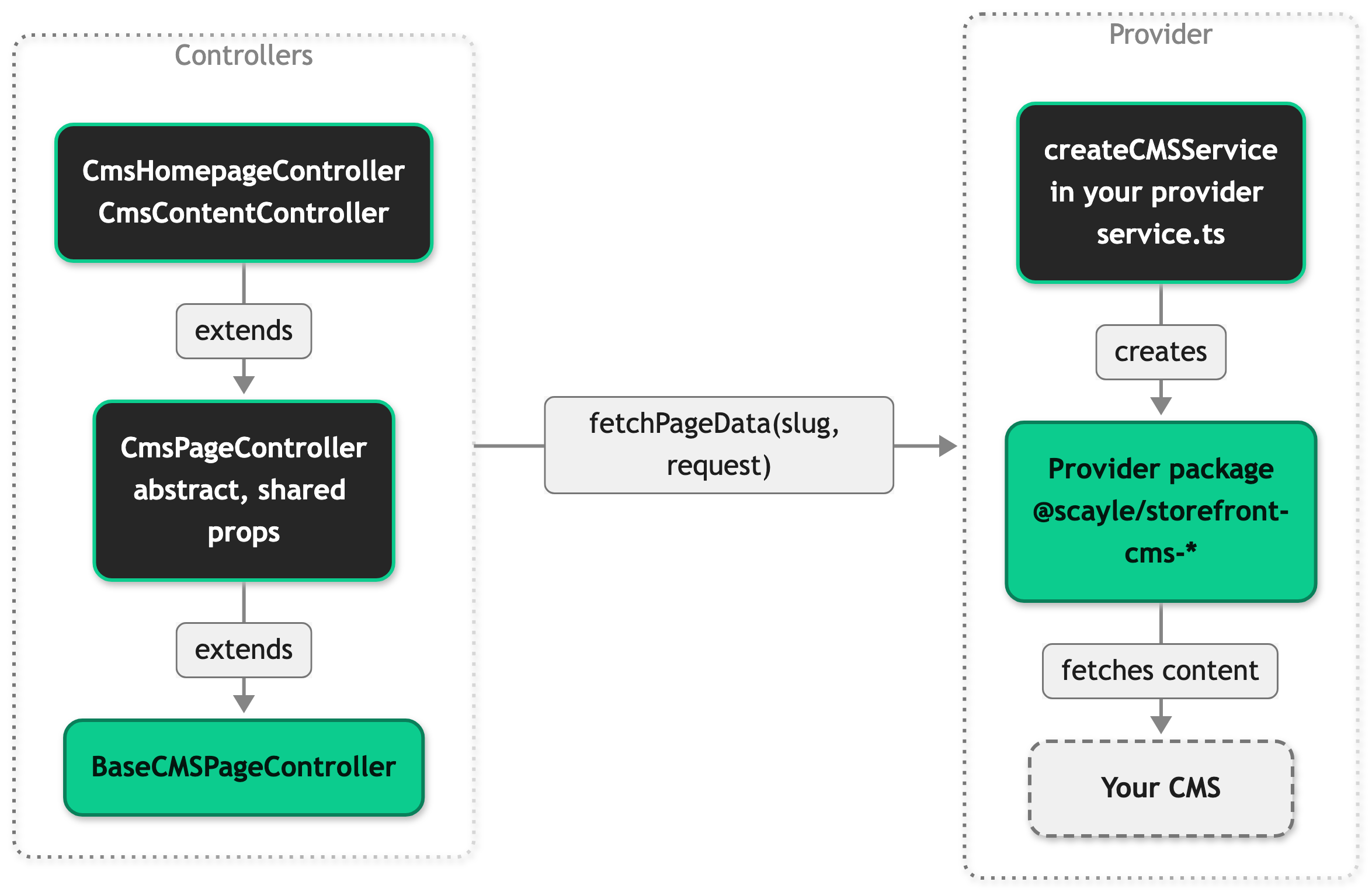
The diagram shows the vendor providers. The placeholder provider is a class in your application and calls no CMS.
BaseCMSPageController comes from @scayle/storefront/controllers. Its view() method asks getSlug() for the slug, calls services.cms.fetchPageData(slug, request), and renders the result. services.cms is the cms slot, a named entry that src/server/registries.ts registers and the server resolves per request. The provider reads the locale from the storefront context it was created with, so the call carries no locale. view() renders the not-found page through renderNotFound() when getSlug() returns nothing, when the provider returns nothing, and when it throws CMSContentNotFoundError. It rethrows every other error.
Your application subclasses the base controller in src/server/cms/controllers/cms-page.ts. An abstract CmsPageController there builds the shared page props, and the two route controllers extend it. CmsHomepageController requests the slug homepage from the HOMEPAGE_SLUG constant and serves both / and /homepage. CmsContentController requests content/<slug> for /content/:slug. Both build the same page props. pageData and slug come from the fetch. meta comes from getPageMeta in your provider's service.ts. hreflangs, the tags that tell search engines which URL serves each country and language, use the per-locale paths from getAlternatePaths when the provider implements it and the page's own path otherwise. The homepage adds OnlineStore structured data.
Category pages use the same contract. ProductListingController calls fetchListingPageData(category.id, request) and passes the result to the listing page, which renders it as teaser and SEO content. A failed or empty fetch costs the CMS content and not the page.
In an editor session, the provider's isEditorMode(request) reads the editor query parameter. The CSP middleware in src/server/cms/middleware/csp.ts then merges the provider's cspConfig into every Content-Security-Policy header on the response, so the editor can frame your shop. The provider pages list the origins each one adds, and CMS preview requests on the Security Headers page explains the merge rules and how they affect each header.
The preview redirect middleware in src/server/cms/middleware/preview-redirect.ts calls the optional getPreviewRedirectPath, which only the Amplience provider implements. It opens a category page preview on a placeholder path and passes the edited item as a query parameter.
The cmsEditorData shared prop is a once prop, so the client keeps it after the first load instead of asking for it on every visit. It holds editor data only in an editor session, and on Amplience only when STOREFRONT_CMS_ALLOW_DRAFTS is true. The client-side editor code reads it to start the live preview.
If you replace the provider, these are the files the application imports from the active provider. On the server, @cms-server/service must export createCMSService, parseCmsEnv, and getPageMeta. On the client, @cms-client/plugin must export createCmsPlugin, and @cms-client/components/PageComponent.vue and @cms-client/components/ProductListingPageComponent.vue must exist. @cms-shared must export the CMSPageData type. All three aliases are set in vite.config.ts from CMS_PROVIDER.
Content blocks
Each provider renders its blocks through a dispatcher component in src/client/cms/providers/<provider>/components/. The table lists the blocks each dispatcher renders. The root page types, such as PageComponent, are not blocks.
| Block | What it renders | Storyblok | Contentful | Contentstack | Amplience |
|---|---|---|---|---|---|
TextComponent | A heading or a paragraph | Yes | Yes | Yes | Yes |
RichTextComponent | Formatted prose | Yes | Yes | Yes | Yes |
ImageComponent | A responsive image | Yes | Yes | Yes | Yes |
VideoComponent | A video | Yes | Yes | Yes | Yes |
LinkComponent | A link around nested blocks | Yes | Yes | Yes | Yes |
ButtonComponent | A link styled as a button | Yes | Yes | Yes | Yes |
AccordionComponent | A group of accordion items | Yes | Yes | Yes | Yes |
AccordionItemComponent | One accordion pane | Yes | Yes | Yes | Inside the accordion block |
CountdownTimerComponent | A countdown to an end date | Yes | Yes | Yes | Yes |
SectionComponent | A container with a background | Yes | Yes | Yes | Yes |
GridComponent | A grid of nested blocks | Yes | Yes | Yes | Yes |
DividerComponent | Vertical spacing with an optional line | Yes | Yes | Yes | Yes |
SliderComponent | A carousel of nested blocks | Yes | Yes | Yes | Yes |
ProductSliderComponent | A slider of products an editor picks | Yes | Yes | No | Yes |
SmartSortingProductsSliderComponent | A slider of products ranked by a smart sorting key | Yes | Yes | Yes | Yes |
RecentlyViewedProductsComponent | A slider of the products the user viewed before | Yes | Yes | Yes | Yes |
SingleProductComponent | A spotlight card for one product | Yes | Yes | Yes | Yes |
The names are the component names of the Vue files. The CMS identifies a block by its own name for it. That is the component name in Storyblok, the content type ID in Contentful, the content type UID in Contentstack, such as richtext-component, and the componentType value in Amplience, such as richText. The Storyblok page describes what each block renders in more detail.
Image priority
A CMS image is often the largest contentful paint (LCP) element of a page, the biggest piece of content the browser paints. The Storefront Application V3 sets fetchpriority and loading on the images of image blocks and section backgrounds so the browser fetches the likely LCP image first.
The page component of each vendor provider calls provideLcpPriority() from src/client/cms/shared/useLcpPriority.ts once per page. Every image block and every section with a background image then takes the next position in document order while it renders, including those inside nested sections, grids, and sliders. A section without a background image takes no position. Vue renders in the same order on the server and in the browser, so the positions match and hydration does not mismatch.
- The image at position 0 gets
fetchpriority="high". Every other image getsauto. - The images at positions 0 to 2 get
loading="eager". The count isCMS_EAGER_LOADING_COUNTin the same file, and it is separate from the eager counts of the product image components. Every later image getslazy.
On a category page, only the teaser content provides the counter. The SEO content below the product grid provides none, so its images load lazily with auto priority unless an editor marked them.
An editor forces high priority and eager loading on top of the automatic choice, per image, where the provider has a field for it:
- Contentful: the
isPriorityImagefield, labeled "Priority image (LCP)", on the image and section content types. The section field applies to its background image. - Contentstack: the
is_priority_imagefield, labeled "Priority image (LCP)", on the image and section content types. - Storyblok: the
isPriorityImagefield on the image and section blocks. - Amplience: no field exists, so the automatic choice always applies. To change it, pass
fetchPriorityorloadingoverrides toresolveImagePriorityinImageComponent.vueorSectionComponent.vueof the Amplience provider.
When the field is on, the image gets fetchpriority="high" and loading="eager" whatever its position. The first image keeps its own high priority, so two images can both be high. The bundled content models advise editors to turn it on for one image per page, and several high-priority images compete for bandwidth.
Setup
Connect your shop to a CMS provider. You need a space or project in the CMS with a content model that matches the blocks you want to use, and your provider's credentials.
- Set
CMS_PROVIDERtostoryblok,contentful,contentstack, orampliencein every environment that builds your shop. - Set the credentials of your provider in the environment that runs the server. The provider page lists the variable names.
- Run
pnpm cms:syncwithCMS_PROVIDERset. It pulls your content model and regenerates the types insrc/shared/types/cms/<provider>/. Run it again whenever the content model changes. The provider page lists the extra variables the script needs. - Create the entries your pages request, using the slugs in the table below. The provider page explains how a slug maps to an entry in that CMS.
- Build and start the shop, then open
/.
| Page | Slug the application requests |
|---|---|
Homepage at / and /homepage | homepage |
Content page at /content/:slug | content/<slug> |
| Category page | c/c-<categoryId> |
You see the content of your homepage entry instead of the welcome page of the placeholder provider. When you use a real provider, the server checks its credentials at startup and stops with an error if one is missing.
The Storefront CLI can do steps 1 and 2 for you. pnpx @scayle/storefront-cli setup cms <provider> writes CMS_PROVIDER and the credentials into .env and can import the bundled content model into a new space. It never writes STOREFRONT_CMS_ALLOW_DRAFTS, so set that yourself where editors preview, and restart the server afterward. The setup cms flags list the flags and the variables each provider writes.
Configuration
| Variable | When it is read | Default | Effect |
|---|---|---|---|
CMS_PROVIDER | Build time | scayle | Selects the provider directory behind the three CMS aliases. |
STOREFRONT_CMS_ALLOW_DRAFTS | When the server creates the CMS service | Drafts off unless the value is true in any letter case | Lets an editor session fetch draft content. |
An editor session sees draft content only when both conditions hold: the request carries the provider's editor query parameter, and STOREFRONT_CMS_ALLOW_DRAFTS is true. Without the variable, an editor session reads the same cached published content as every other request. Enable it only in the environment that serves editor previews. Each provider page lists the variables it needs, including the preview token for the providers that have one.
| Provider | Editor query parameter |
|---|---|
| Storyblok | _storyblok |
| Contentful | _editorMode |
| Contentstack | live_preview |
| Amplience | vse (or _vse), which must be an Amplience staging domain |
The three aliases @cms-server, @cms-client, and @cms-shared are described in Project Structure. Files that work with every provider import the page payload type through @cms-shared. Files that belong to one provider import @shared/types/cms/<provider> directly.
Customization guides
Add a block type
Add a block that editors can place on pages. Every provider follows the same four steps and differs in how its dispatcher recognizes a block.
- Create the block in your CMS and allow it inside the blocks where editors may use it.
- Run
pnpm cms:syncto regenerate the types. - Create the Vue component in
src/client/cms/providers/<provider>/components/.DividerComponent.vueis a small model. It takes the block as acontentElementprop typed with the generated type. - Import the component in your provider's dispatcher and add an entry for your block type to its
BLOCKSmap. Setsuspense: truewhen the component awaits insetupor is wrapped indefineAsyncComponent, andfalseotherwise. Contentful uses aBLOCKSlist oftoBlockEntry({ guard, component, suspense })entries instead of a map.
You see the block render when you open a page that uses it in the editor preview. A block type without an entry shows a "not implemented" notice in development and renders nothing in a production build. On Storyblok and Amplience, BLOCKS has a key for every generated block type, so pnpm typecheck also fails until the entry exists. Contentful checks only that the component accepts the type its guard narrows to. Contentstack keys are plain strings, so nothing checks them.
The provider pages show the dispatcher code: Storyblok keys the map by the component name, Contentful pairs a generated type guard with the component, and Contentstack keys it by the content type UID. The Amplience map is keyed by the componentType value in AmplienceBlockDispatch.vue.
Read your own SEO fields
Point the page metadata at the fields of your own content model. The CMS page controller calls getPageMeta and builds the title, description, robots directive, and share image from the result.
- Open
src/server/cms/providers/<provider>/service.ts. - Change the field names in
getPageMeta.
getPageMeta takes the page payload of the provider and returns a CMSPageMeta with optional title, description, robots, and image values. It returns undefined for a page type it does not map. Storyblok shows a full example.
The title, description, and robots directive from getPageMeta apply to CMS pages. A CMS page with a title from getPageMeta uses it. A CMS page without one falls back to the shop name. A category page that shows CMS content takes only the share image from getPageMeta, and only where the provider returns one for a listing. Of the bundled providers, only Storyblok does. Its title, description, and robots directive come from the listing page's own translations and indexability rule.
Add a prop to a CMS page
Send an extra value from the server to the CmsPage page. The homepage controller already does this for its OnlineStore structured data.
- Override
getViewPropson the controller. Spreadsuper.getViewProps(data)first so the page keeps its base props. - Declare the prop in
definePropsinsrc/client/pages/CmsPage.vue.
Override it on CmsPageController in the same file to reach every CMS page, or on one subclass to reach one route. Inertia.serverOnly sends the prop with the server-rendered page and leaves it out after a client-side navigation.
Best practices
Import the page payload through the CMS aliases
Code outside a provider directory imports the page payload type from @cms-shared and reads provider functions from @cms-server/service. Importing @shared/types/cms/storyblok from a page or controller ties it to one vendor. The per-provider typecheck verifies this boundary.
Commit the generated types and the content model files
Run pnpm cms:sync after every content model change and commit the result: src/shared/types/cms/<provider>/ and .scayle/cms/contentModel/<provider>/. CI and deployments then build without the credentials the sync needs, and a review shows what a content model change did to the types. The Storefront CLI import reads the committed content model folder.
Run the full typecheck after changing CMS code
pnpm typecheck runs vue-tsc once with the aliases pointing at the placeholder provider and then once per real provider through typecheck:cms-providers. A plain vue-tsc --noEmit does not check the types of your provider.
Return undefined from getPageMeta for content you do not recognize
The getPageMeta of every provider returns undefined for a page type it does not map. A CMS page then uses the shop name as its title and sends no robots directive and no share image. A category page keeps its own title, description, and robots directive and shows no share image. Guessing fields for an unknown page type sends wrong metadata to search engines.
Troubleshooting
Issue: The server stops at startup with Invalid <Provider> CMS environment.
Possible causes: A credential of the selected provider is not set or is empty. The message lists each invalid variable by name and never prints its value.
Solution:
- Set every variable the message lists.
- Start the server again.
Prevention: Compare the environment with the provider page before you deploy.

