

Order Details
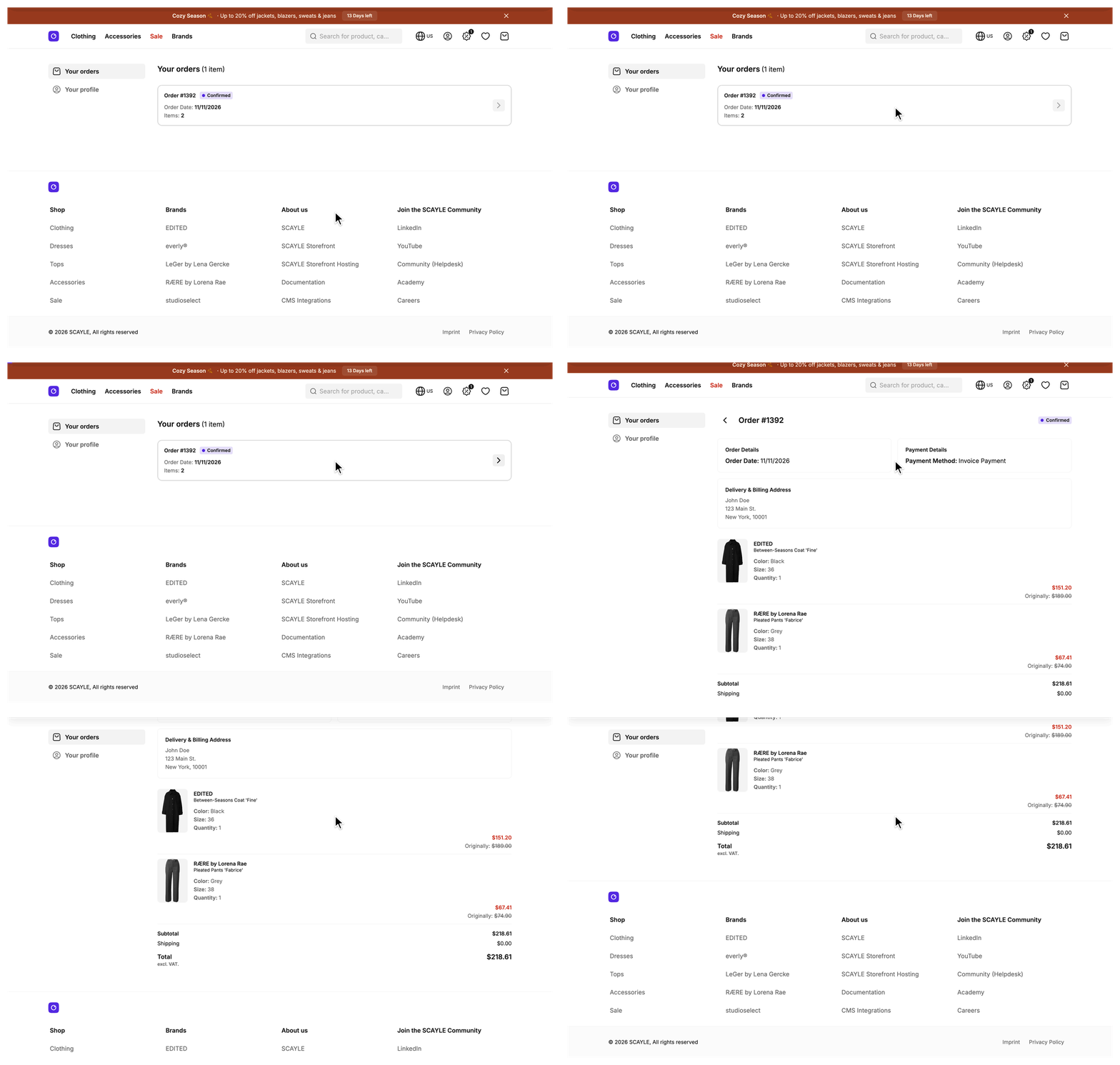
A signed-in customer opens one past purchase at /account/orders/:id and sees its status, confirmation date, payment method, addresses, items grouped by delivery package, and cost breakdown on one page. An order that the Customer Account API reports as missing renders the not-found page, and a signed-out user goes to the sign-in page first.
Why it matters
The page fetches the order with the signed-in customer's own access token, so the Customer Account API decides which orders that customer may read. The Storefront Application V3 adds no ownership check of its own.
Try it
Try it: open an order from your account order list (requires signing in)
What's included
- Headline and status: A back link to the order list, the title "Order #ID", and a badge for the order status. The badge groups the known statuses into four labels: Open, Confirmed, Shipped, and Cancelled. A status outside the known ones shows as the raw status text. Order History lists the statuses.
- Order and payment details: The confirmation date and the payment method. The date row is hidden when the order has no date. The payment method label comes from the first payment entry of the order, and an order without payment entries shows the
defaultlabel. - Addresses: One box titled "Delivery & Billing Address" when both addresses read the same, and one box each when they differ. The page compares the formatted address lines, so two address records with different IDs but the same text count as one address.
- Line items by delivery package: The mapper groups items by package and sorts the packages by earliest delivery date. An item whose package is not in the order does not appear. Each item card links to the product page and shows the image when the order has one, plus brand, name, color, size, quantity, and price. The delivery dates exist on the order but this page does not show them.
- Cost breakdown: Subtotal, shipping, an Other fees row when the order has fees that are not delivery fees, and total, with a note that says whether the total includes VAT.
- Subscription details: A notice with a link to the subscriptions page when any item was bought as a subscription. Each subscription item also shows its interval and, when the order stored one, the delivery day of the month.
- Page title and indexing: The browser tab title carries the order ID, with the shop name appended when the shop has one. The page tells search engines not to index it.
What you can change
Configure
- The page text in the locale files under
src/i18n/locales/. See Configuration for the keys.
Theme
- The page composes five components from
src/client/components/account/orders/detail/:SFOrderDetailHeadline,SFOrderDetailBaseInformation,SFOrderDetailProductList,SFOrderDetailPaymentSummary, andSFOrderDetailSubscriptionNotice. Edit them in place. The pagesrc/client/pages/AccountOrderDetail.vuedecides which of them render and in which order. - The same folder holds the card-level components those five render:
SFOrderDetailAddressBoxfor an address, andSFOrderDetailProductCardwithSFOrderDetailProductDetailsfor an item. - The status badge is
SFAccountOrderStatusinsrc/client/components/account/orders/. The order history card uses it too, so a change to the badge labels or colors shows on both pages.
Extend
- Override
mapProduct(product: ProductResponse): OrderProductinOrderMapperServiceto change the product link, image, name, brand, or color on an order item. - Override
formatDate(date: Date): string | undefinedinOrderMapperServiceto change how the confirmation date reads. - Override
mapCost,mapAddress, ormapOrderIteminOrderMapperServiceto change the cost values, the address lines, or the item values the page receives. - Edit
getMeta(order: Order): Promise<SEOMeta>inAccountOrderDetailControllerto change the title, description, or robots directive of the page. - Override
getTemplate(order: Order)orgetViewProps({ order })inAccountOrderDetailControllerto render another page component for an order or to pass more props to the page. - Override
renderNotFound()inAccountOrderDetailControllerto answer a missing order differently on this page only.
Constraints and limits
Permanent
- The route only matches digit IDs (
/account/orders/:id{\d+}). A path with any other segment reaches no controller and ends in the application's not-found handler. The controller also rejects the ID0, which the route lets through. - The page is not cacheable, because order data belongs to one customer.
Known limitations
- Only a 404 from the Customer Account API renders the not-found page. Any other failure, including a 403, is rethrown and ends in the application's error handler. The page does not decide which status the API sends for an order that belongs to another customer.
- The not-found mapping covers the whole fetch and render block, not only the order fetch. A 404 raised by your own code in
beforeRenderor during the render also renders the not-found page. Catch the 404 of an unrelated fetch there if it must not read as a missing order. - The page sends the whole order in the first response.
orderis an eager prop, so a large order puts every delivery, item, and address into the initial HTML. - The page shows the first payment entry only. An order with several payments shows one method.
- The mapper sets the quantity of every item to 1 and the list renders one card per item. The quantity row reads 1 on every card.
- The subtotal is the order total minus every fee on the order. The shipping line adds up the delivery fees only. The Other fees row shows the fees that are not delivery fees and is hidden when they add up to zero.
How it works
The page receives an order with the status, the formatted confirmation date, shipping and billing addresses as display lines, a cost block, and the deliveries that hold the items. A request for one order takes this path:
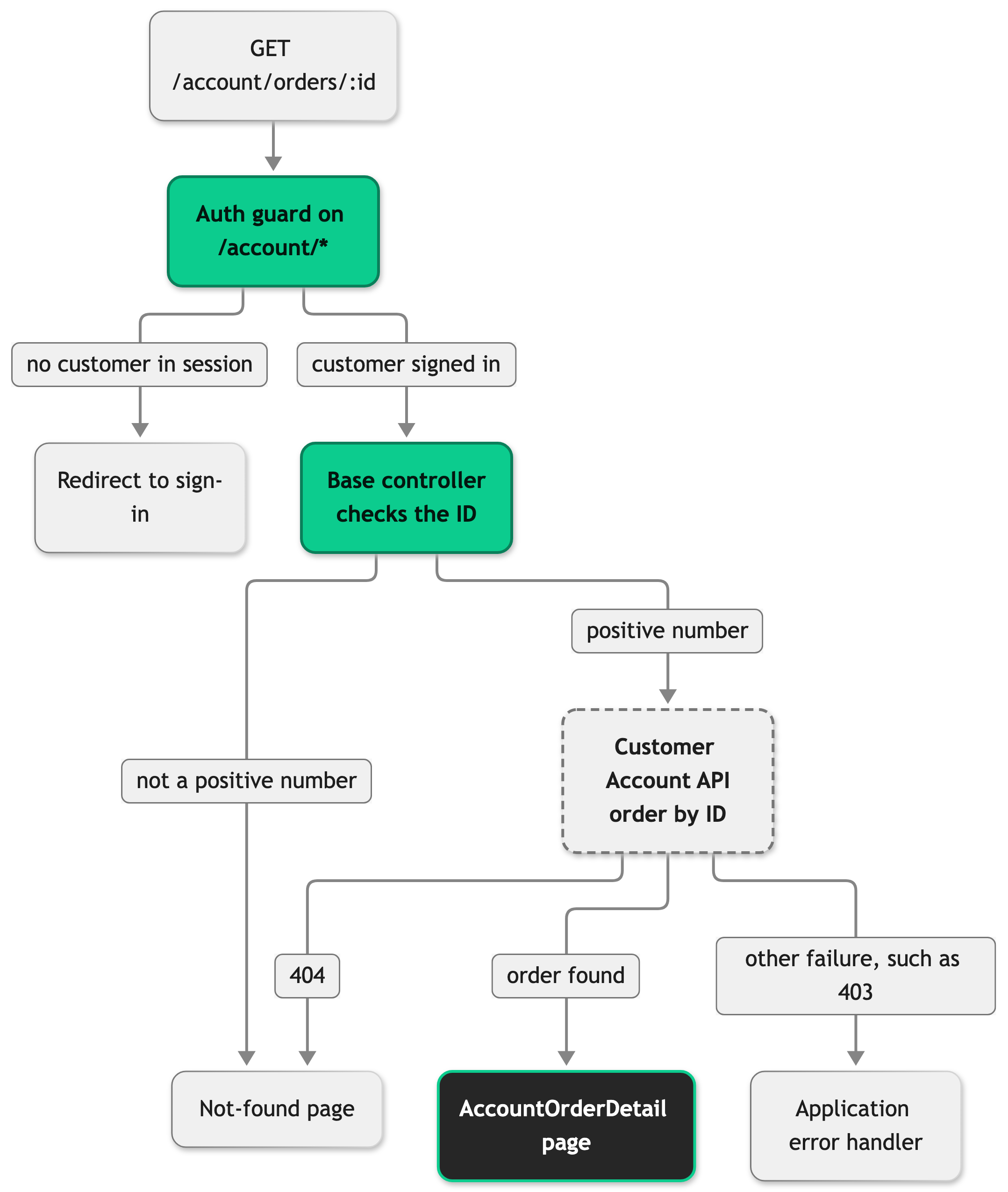
The SDK base class BaseAccountOrderDetailController owns this lifecycle. It parses the ID, fetches the order through services.order.getOrder, maps it with the order mapper, and renders the page. The fetch sends the customer's access token and refreshes it once when the API answers 403 or answers 401 for an expired token. When the retried order request fails, the customer's session stays, because a 403 here can also mean the order belongs to another customer. A refresh token that the Authentication API rejects with 401 still ends the session.
Your AccountOrderDetailController supplies the three things the base class cannot know: the page component name, the page props, and the SEO meta. renderNotFound() inherits from the base class and calls ctx.notFound(). The file is shown without its JSDoc comments:
The order mapper turns the raw order into the Order shape. OrderMapperService in your project extends the SDK OrderMapper and overrides two methods. formatDate formats dates with the locale of the current country, and mapProduct builds the product link and the image URL. The file is shown without its JSDoc comment: It reads the name, brand, and color of a product through the constants that Attribute Keys describes.
src/server/registries.ts registers this class on the order mapper slot with order: ({ storefront }) => new OrderMapperService(storefront). The factory passes storefront and nothing else, so a constructor that needs more arguments needs the factory changed too. The base OrderMapper returns an empty link and no image, because only your shop knows its product URLs and image host, so skipping mapProduct leaves every item without a working link.
The order slot also serves two other pages. The order confirmation maps its order through the same mapOrder, so a mapProduct override reaches it too. The order history formats its dates through the same formatDate, so that override reaches it as well.
On the client, AccountOrderDetail.vue composes the five components and computes hasSubscriptionItems, which decides whether to show the subscription notice. The check reads every item of every delivery, so a subscription item in a later package still triggers the notice. An item counts when it has a subscriptionDefinition.
The mapper sets subscriptionDefinition on an item from the item's custom data. It keeps the value only when it has a non-empty subscriptionInterval string and string or missing optional fields.
Configuration
The page text lives in the locale files in src/i18n/locales/. To add a key, see Translate a new key in all locales.
| Namespace | What it controls |
|---|---|
account.order_detail | The headline, the box titles, the labels, the payment summary labels, and the page title and description under meta. |
subscription.order_notice | The title, text, and link of the subscription notice. |
global.payment_key | The payment method label for each payment key. Add a key here for every payment method your shop offers and keep the default key, which an order without payment entries uses. |
account.orders.status | The status badge labels, shared with Order History. |
global.including_vat, global.excluding_vat | The note next to the total that says whether it includes VAT. |
global.quantity | The label of the quantity row on an item card. |
subscription.interval, subscription.follow_up_delivery, subscription.day_of_month_selection_caption | The interval and delivery day rows on a subscription item. |
Best practices
Fetch the order with the customer's own token
Use services.order.getOrder(orderId) for any account page that shows an order. It sends the signed-in customer's access token, so the Customer Account API scopes the result to that customer. getOrderFromCBD authenticates with the checkout credentials of the shop and a signed callback token instead. It exists for the order confirmation page, where the redirect can arrive without an access token, and it carries no tie to the signed-in customer.
Guard every nested read in mapProduct
The Customer Account API can return product fragments without images or attributes. The application's mapProduct reads product.images?.[0] and falls back to product.name for this reason. A field that OrderProduct requires and that you leave out fails the type check, while a missing guard fails only for the orders that lack the data.
Troubleshooting
A link to an order renders the not-found page
Issue: /account/orders/<id> renders the not-found page for an ID that looks valid.
Possible causes: The Customer Account API answered 404 because no order with that ID exists for the signed-in customer.
Solution: Compare the ID in the URL with the IDs on the account order list of the same customer. Check the response the Customer Account API returns for that ID.
Prevention: Take the ID from an order the customer's own list returned and build the link with buildOrderDetailRoute(order.id) from @shared/routes, which fills the route pattern and returns a path without a country prefix. Pass that path to SFLink, which adds the prefix for the active country.
The subscription notice does not show for a subscription order
Issue: An order that contains subscription items renders without the notice and without interval rows on the items.
Possible causes: The subscriptionDefinition stored in the item's custom data has no non-empty subscriptionInterval string or has a non-string optional field. The mapper drops a definition that fails this check without an error, so hasSubscriptionItems stays false.
Solution: Read the custom data of the order items in the response of the Customer Account API and compare the stored subscriptionDefinition with the shape described in How it works.
Prevention: Store the definition with a non-empty subscriptionInterval when the subscription item is added to the basket.


