

Security Headers
The Storefront Application V3 sends a set of security headers with the pages and API responses it renders. The headers tell the browser to use HTTPS, to refuse framing, to share less referrer data, and to report every script, style, or connection that falls outside a Content-Security-Policy. The policy ships report-only. Violations are reported and nothing is blocked until you decide to enforce it.
Why it matters
Browsers apply these headers on every page load, so they protect your users in places your own code cannot reach: a page that another site frames to trick a click, a script from an origin you never approved, a file the browser guesses the type of.
A Content-Security-Policy that blocks from the first request would break a live shop. The checkout web component bundles payment provider SDKs, and tags that you load through Google Tag Manager pull in further origins. Neither list can be read from the code, so only reports from a real environment can complete it. That is why the policy starts report-only. The browser tells you what it would block, you add the missing origins, and you enforce one directive at a time.
Framing is the exception. It is enforced from the first request, because clickjacking protection cannot wait for a rollout. The CMS editor can still frame your shop in a preview session, and nothing else can.
Try it
Try it: read the security headers of your own storefront
Run this against a page of a deployed storefront. Replace <your-storefront-url>/<country-path> with the URL of a page, including its country prefix and without a trailing slash. With the default path country selector, a request without the prefix gets a redirect that the runtime answers itself, and that response carries only x-content-type-options.
The output lists the headers from the table below. Header names can appear in lowercase. reporting-endpoints is missing until you set a report URI.
What's included
The table lists what a page response carries with the defaults. The Mode column says whether the browser enforces the header or only reports.
| Header | Value | Mode | Why |
|---|---|---|---|
Strict-Transport-Security | max-age=31536000; includeSubDomains | Enforced | Makes the browser use HTTPS for one year, for the host and its subdomains. |
X-Content-Type-Options | nosniff | Enforced | Stops the browser from guessing a file type. |
Referrer-Policy | strict-origin-when-cross-origin | Enforced | Sends only your origin, not the full URL, to other sites. |
X-Frame-Options | DENY | Enforced | Refuses framing by any site. |
Content-Security-Policy | frame-ancestors 'none', plus any directive you list in enforcedDirectives | Enforced | Refuses framing, and holds the directives you have moved out of report-only. |
Content-Security-Policy-Report-Only | the rest of the policy | Reports only | Shows what enforcing would block. |
Permissions-Policy | camera, microphone, geolocation, and USB denied. payment allowed for your origin and the Checkout origin | Enforced | Keeps those browser features off. payment stays on because express checkout needs the Payment Request API. |
Cross-Origin-Opener-Policy | same-origin-allow-popups | Enforced | Keeps window.opener alive for the PayPal and Klarna popup flows. |
Cross-Origin-Resource-Policy | cross-origin | Enforced | Keeps responses embeddable, which the CMS editor preview needs. |
Reporting-Endpoints | your report URI | Only with a report URI | Tells browsers that support the Reporting API where to send violation reports. |
The same call also sends Origin-Agent-Cluster, X-DNS-Prefetch-Control, X-Download-Options, X-Permitted-Cross-Domain-Policies, and X-XSS-Protection with the values Hono's secureHeaders middleware uses by default.
- Report-only policy: The report-only header holds the full policy, from
default-src 'self'to the allowed origins of the checkout web component, Google Tag Manager, Google Analytics, and Usercentrics. See the shipped policy. - Violation reports: With a report URI set, both CSP headers send violations to your collector, so a directive you enforce later keeps reporting.
- Per-country origins: The add-on origin for subscriptions appears in
script-srcandconnect-srconly on requests for a country that setssubscriptionEnabled. - Content type protection for static assets: A separate middleware sets
X-Content-Type-Optionson the static files the application serves itself, because those responses carry no other header from this page.
What you can change
Configure
- Set
STOREFRONT_CSP_REPORT_URIto a collector that accepts CSP reports. See Collect violation reports. - Set
STOREFRONT_COUNTRIES_<COUNTRY_CODE>_SUBSCRIPTION_ENABLEDtotruefor a country to add the subscription add-on origin to its policy. Each country entry instorefront.config.tsreads its own variable.
Extend
- Allow a third-party origin by adding it to the matching directive in
src/server/middleware/securityHeaders.ts. - Enforce the policy by listing clean directives in
enforcedDirectivesin the same file. - Let a partner page or app shell frame your storefront by changing
frameAncestorsandxFrameOptionstogether. - Change the Strict-Transport-Security, Referrer-Policy, or Permissions-Policy value in the same
secureHeaderscall. - Change the origins the CMS editor may use by overriding
cspConfigon your own subclass of the CMS provider service. See CMS preview requests.
Replace
- Remove
app.use(securityHeadersMiddleware)fromsrc/server/index.tsand send the headers from your own middleware or from a proxy. You then own every header in the table, including the framing protection that the CMS preview middleware relies on.nosniffMiddlewareis a separate registration and stays.
Constraints and limits
Permanent
- A report-only policy blocks nothing. The browser logs a violation in the console of the user and sends a report to your collector when you set one. The page works as before.
- Framing is enforced even though the rest of the policy is not.
frameAncestorsgoes into the enforcing header whether or not you list it inenforcedDirectives. The CMS preview middleware removesX-Frame-Optionson a preview request and needs an enforcedframe-ancestorsto take over. X-Frame-Optionsandframe-ancestorsapply only to nested browsing contexts. A native app WebView that loads your storefront as its top-level document is not framed, so neither header affects it.- The health probe carries none of these headers, because it is registered before every other middleware. Responses that the runtime answers itself carry only
X-Content-Type-Options, because they are sent beforesecurityHeadersMiddlewareruns. That covers trailing-slash redirects, the redirect that adds the country prefix with thepathcountry selector, and the sitemap androbots.txtresponses. Static files the application serves itself carry onlyX-Content-Type-Optionstoo. - A request that resolves no country gets the policy without the subscription origins. This covers an
/apirequest without anx-shop-country-idheader, and a host that no country matches when you use thedomaincountry selector. No subscription component renders without a country. Permissions-Policyhas no report-only stage. A change to it takes effect right away.
Known limitations
- The report-only policy is incomplete on purpose. The checkout web component bundles the SDKs of Adyen, Klarna, PayPal, and further payment providers, and loads the ones your enabled payment methods need. Only the Klarna SDK host is listed, because express checkout loads it on page view. Expect the other hosts in your first reports. Some payment SDKs also render frames, so reports can name
frame-srcas well asscript-src. - Tags that Google Tag Manager loads add origins that the code cannot list. They also show up in your first reports.
- The consent banner and the checkout web component inject inline
<style>blocks. These reports name no origin to add. The Storefront Application V3 does not generate nonces. To enforcestyle-src, add a nonce or hash of your own, or accept'unsafe-inline'onstyleSrc. - The structured data that
src/client/components/meta/PageMetaHead.vuerenders is an inline<script type="application/ld+json">block. A JSON-LD block is data that the browser does not execute, soscript-srcdoes not apply to it and it needs no nonce. The defaultscriptSrchas no'unsafe-inline', nonce, or hash source. - The stylesheet of the checkout web component imports the Inter font from Google Fonts. The report names
style-src.https://fonts.googleapis.comis left out on purpose, because the storefront self-hosts Inter. EnforcingstyleSrcblocks that import. imgSrcandmediaSrcallow any HTTPS origin. CMS media hosts differ per provider and per shop, and images cannot execute, so this keeps the policy usable without weakening the script controls. The report-only policy therefore never reports an image or video origin.
Pitfalls
- A directive you enforce blocks every origin it does not list. Enforce it before its reports are clean and the missing origin stops working.
- Redirect-based payment flows such as 3-D Secure and Klarna post a form to another origin.
form-action 'self'blocks that post once you enforceformAction. Add the origins that your reports name before you enforce it. - Replace
paymentinPermissions-Policywith a barepayment=()and the express checkout buttons disappear without any report. - Change
xFrameOptionsandframeAncestorstogether when you allow framing. Change onlyxFrameOptionsandframe-ancestors 'none'still blocks every frame. Change onlyframeAncestorsand a browser withoutframe-ancestorssupport still obeysDENY. See Let a partner page or app shell frame your storefront. - Register
securityHeadersMiddlewarebeforecmsCspMiddlewareand the CMS editor iframe stops loading. See How it works.
How it works
The Storefront Application V3 registers the middlewares in src/server/index.ts. The health probe, nosniffMiddleware, static asset serving, and createStorefrontRuntime come first, see Request Lifecycle. The two middlewares that decide the headers come after it, in this registration order:
cmsCspMiddlewareinsrc/server/cms/middleware/csp.ts. It adjusts the CSP headers on CMS preview requests.securityHeadersMiddlewareinsrc/server/middleware/securityHeaders.ts. It sets the baseline headers.
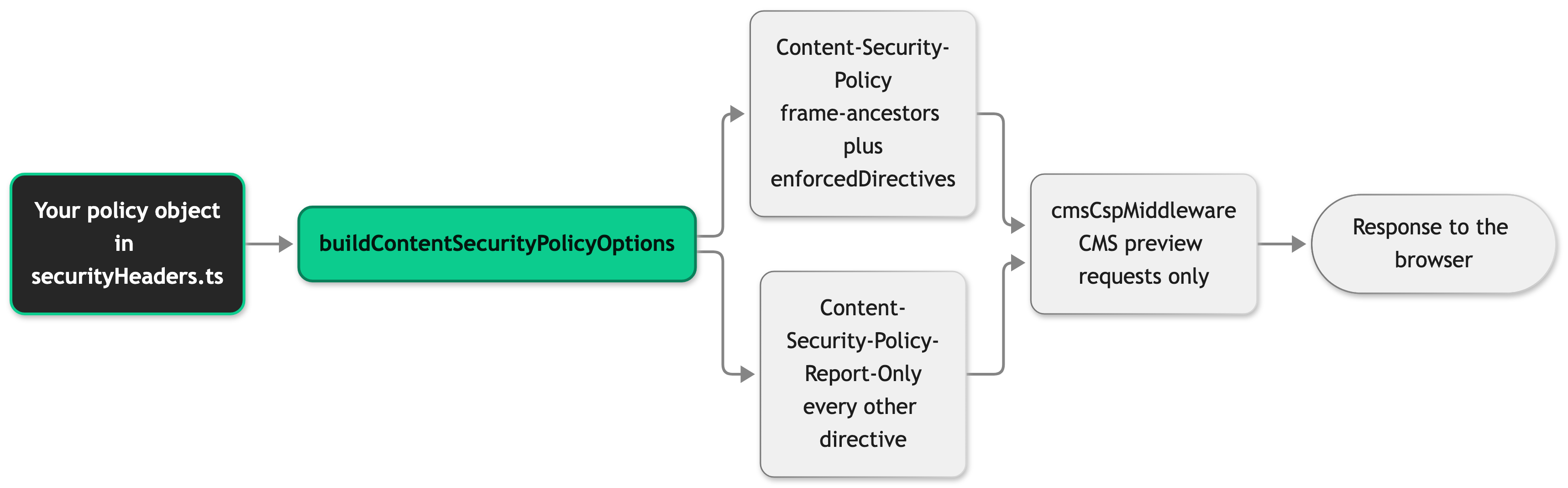
Both cmsCspMiddleware and securityHeadersMiddleware write headers after the page is produced. Hono unwinds that step in reverse registration order, so the middleware registered last writes first. The baseline therefore writes its headers, and then the CMS middleware changes them. Swap the two and the baseline overwrites the CMS changes.
securityHeadersMiddleware builds the policy on every request from your config and the country of the request. It declares the policy once, as a plain object. buildContentSecurityPolicyOptions from @scayle/storefront splits that object into two headers. A directive you list in enforcedDirectives goes to Content-Security-Policy, and frameAncestors always does. Every other directive goes to Content-Security-Policy-Report-Only. When you set a report URI, the function also adds the reporting directives to both headers. In pnpm dev, it appends the sources Vite needs to script-src, style-src, and connect-src. A production build does not carry them.
CMS preview requests
Each CMS provider decides from the request whether it is a preview request. For the CMS vendor providers, that is a query parameter that the editor of the vendor adds to the preview URL. The default scayle provider never reports a preview request. On a preview request, cmsCspMiddleware merges the cspConfig of the provider into every CSP header on the response. How a provider detects a preview request is described on the CMS page, and each provider page lists the origins it adds: Contentful, Contentstack, Storyblok, and Amplience.
- Framing: A
frame-ancestorsvalue incspConfigreplaces the baseline'none'outright, because'none'cannot be widened by adding an origin. The editor origin and'self'can then frame the page. The middleware also removesX-Frame-Options, because a browser withoutframe-ancestorssupport would otherwise keep obeyingDENY. - No framing value: A
cspConfigwithoutframe-ancestorsleavesX-Frame-Optionsin place. Anyone can append the preview parameter to a URL, so removing the header without a replacement would remove the protection for every request. - Other directives: Directives such as
script-srcandconnect-srcadd their origins to a header only when it declares that directive ordefault-src. With the defaultenforcedDirectives, the enforcing header holds onlyframe-ancestors, so it stays framing-only and the report-only header receives the origins. Once you enforce a directive, preview requests add the provider origins to it in the enforcing header. - Inline scripts: The Contentful, Contentstack, and Storyblok configs add
'unsafe-inline'toscript-src, because Inertia injects inline scripts for the page data. An enforcedscript-srctherefore allows inline scripts during a preview session. - No provider values: A provider with no directives, such as the default
scayleprovider, leaves the response as the baseline wrote it. - Change the origins: Override the
cspConfigproperty on your own subclass of the CMS provider service insrc/server/cms/providers/<provider>/service.ts.cmsCspMiddlewarereads the property from the service instance thatcreateCMSServicereturns. WherecreateCMSServicecreates the package class directly, return your subclass instead. Theexport { cspConfig }line in that file does not reach the middleware, so a changed copy there has no effect.
Setup
Collect violation reports
Without a collector, violations appear only in the browser console of your users, where nobody reads them. You cannot finish the rollout without reports, so set a collector first.
- Choose an endpoint that accepts CSP reports. You run it or use a reporting service.
- Set
STOREFRONT_CSP_REPORT_URIto its URL in a production-like environment. - Restart the server.
- Load a page and read the response headers as in Try it.
When it worked, the response carries a Reporting-Endpoints header with csp-endpoint="<your URL>". Both CSP headers carry report-to csp-endpoint and report-uri <your URL>. Browsers that support the Reporting API use report-to. MDN marks report-uri as deprecated, but older browser versions only understand it, so both are sent. Without it, you would tune the policy on the traffic of newer browsers alone.
Configuration
Environment variables
| Variable | Purpose | Default | Change needs |
|---|---|---|---|
STOREFRONT_CSP_REPORT_URI | The collector that CSP violation reports go to. | Unset, reports reach the browser console only | Restart |
Each country entry in storefront.config.ts that reads STOREFRONT_COUNTRIES_<COUNTRY_CODE>_SUBSCRIPTION_ENABLED sets subscriptionEnabled for that country. The value true, in any letter case, adds the subscription add-on origin to the policy for requests of that country. Any other value leaves it out.
See Environment Variables for every variable.
Settings in the security headers file
You edit these in src/server/middleware/securityHeaders.ts.
| Setting | What it does |
|---|---|
policy, passed to buildContentSecurityPolicyOptions | The full policy as one object. Each key is a camelCase directive name such as scriptSrc, with an array of sources. |
enforcedDirectives | The directives that move from the report-only header to the enforcing one. The shipped value is an empty array. |
strictTransportSecurity | The HSTS value. It has no preload flag, because preloading commits every subdomain to HTTPS and is slow to undo. Whoever owns the domain makes that call. |
xFrameOptions and policy.frameAncestors | The two framing controls. Change them together. |
permissionsPolicy | The browser features the page may use. payment lists your origin and the Checkout origin. |
Browsers ignore Strict-Transport-Security over plain HTTP, so local development on http://localhost is not affected.
The shipped policy
The Checkout origin is https://<tenantSpace>.checkout.api.scayle.cloud, built from tenantSpace in your config. The subscription origin is https://<tenantSpace>-subscription.addon.scayle.cloud, and it appears only for a country that sets subscriptionEnabled.
| Directive | Allows |
|---|---|
defaultSrc, baseUri, formAction | 'self' |
objectSrc | 'none' |
frameAncestors | 'none', enforced from the start |
scriptSrc | 'self', the Checkout origin, the checkout CDN, the Klarna SDK host, the subscription origin, Google Tag Manager, and the Usercentrics loader |
connectSrc | 'self', the Checkout origin, the checkout CDN, the subscription origin, Google Tag Manager, Google Analytics hosts, and the Usercentrics API hosts |
styleSrc | 'self' and the checkout CDN |
styleSrcAttr | 'unsafe-inline', for the style attributes that Vue :style bindings produce. A nonce cannot apply to an attribute. |
imgSrc | 'self', data:, and any HTTPS origin |
mediaSrc | 'self' and any HTTPS origin |
fontSrc | 'self', because Inter is self-hosted |
frameSrc | 'self'. The checkout web component and the subscription components are custom elements in your document, not frames. |
workerSrc | 'self' and blob: |
Customization guides
Allow a third-party origin
Every origin the storefront loads from has to be in the matching directive before you enforce it. The policy has no environment variable for extra origins, so you add them in code. You end up with a directive that lists your origin, and a report-only policy that stays quiet about it.
- Open
src/server/middleware/securityHeaders.ts. - Add the origin to each directive its use needs. A script loaded from another host goes into
scriptSrc. A call withfetch,XMLHttpRequest,sendBeacon, or a websocket goes intoconnectSrc. An iframe goes intoframeSrc. A webfont goes intofontSrc. A form that posts to another origin goes intoformAction. - Keep origins in named constants when the origin appears in more than one directive.
When it worked, loading a page that uses the widget produces no report for that origin. If you use a consent provider other than Usercentrics, add its hosts the same way. See Consent Management.
Enforce the policy
You end up with the directive in the Content-Security-Policy header and out of the report-only one.
- Collect violation reports in a production-like environment.
- Run real traffic through it. Include checkout, express checkout, a CMS preview session, and every page that renders a third-party widget.
- Add the origins your reports name to the matching directives, as in Allow a third-party origin. Add payment provider hosts to
scriptSrc,frameSrc,connectSrc, andformActionas your reports require. - Repeat steps 2 and 3 until reports for a directive stop arriving.
- List that directive in
enforcedDirectiveswith its camelCase name. - Update the tests in
src/server/middleware/securityHeaders.test.tsthat read the moved directive from the report-only header. The test that asserts the enforcing header holds onlyframe-ancestorsfails too. - Deploy and watch for breakage. The browser blocks any origin you missed.
When it worked, content-security-policy lists script-src and connect-src next to frame-ancestors, and content-security-policy-report-only does not list them. When every directive is enforced, the report-only header disappears. The reporting directives stay on the enforcing header, so a blocked request still reaches your collector.
Keep styleSrcAttr: ["'unsafe-inline'"] when you enforce styles. Vue :style bindings in components such as SFProgressBar and SFRangeSlider produce style attributes, and a nonce cannot cover an attribute. Inline <style> blocks stay under the stricter styleSrc.
Let a partner page or app shell frame your storefront
You only need this when something embeds your storefront in a real iframe, such as an app shell or a partner page. A native app WebView that loads the storefront as its top-level document is not framed and needs no change. You end up with your storefront framable by the origins you name and by no one else.
- Open
src/server/middleware/securityHeaders.ts. - Set
xFrameOptionstofalse. Do not delete the line. Without it, Hono's default sendsX-Frame-Options: SAMEORIGIN. Browsers that supportframe-ancestorsignore it, but browsers without that support still block other origins. - Set
frameAncestorsinpolicyto'self'plus the origins that may embed you.
When it worked, the response has no x-frame-options header and content-security-policy holds frame-ancestors 'self' https://app.example.com.
Name the embedding origins. A frame-ancestors * value lets every site on the web frame your storefront.
Best practices
Enforce one directive at a time
Each enforced directive blocks every origin it does not list. One directive per release shows which change caused a break, and you can move it back by removing it from enforcedDirectives.
Troubleshooting
The CMS editor shows a blank frame
Issue: The preview opens in the CMS editor, and the frame stays empty.
Possible causes: A proxy or CDN in front of the shop sets its own Content-Security-Policy or X-Frame-Options header. The request lacks the preview query parameter of your provider.
Solution:
- Request the preview URL, including the query parameter, and read the response headers.
- Check that
content-security-policyholds aframe-ancestorsvalue that names the editor origin, and that nox-frame-optionsheader remains. - Request the same URL directly from the application, bypassing the proxy, and compare the headers.
- If the headers differ, change the proxy or CDN rule.
Prevention: Check the response headers of a preview URL after each change to the proxy or CDN rules.
No violation reports arrive at my collector
Issue: You set a report URI, and the collector receives nothing.
Possible causes: The process did not restart after you set STOREFRONT_CSP_REPORT_URI. No violation happens, because the pages you loaded stay inside the policy. The collector rejects the reports.
Solution:
- Read the response headers. Look for a
reporting-endpointsheader and areport-uridirective incontent-security-policy-report-only. - If both are missing, check that the variable is set in the environment of the running process and restart.
- Load a page that uses a third-party widget you have not listed. A report for it shows that the path works.
- Check the logs of the collector for rejected requests.
Prevention: Test the collector with one known violation after each deployment that changes the policy.


