

Pages and Controllers
How do you add a page to the Storefront Application V3, or change one it ships with? A page is four pieces of code you own: a route pattern in src/shared/routes.ts, a controller in src/server/controllers/ that picks a Vue page and builds its props, a mountController call in src/server/ssr-routes.ts that connects the two, and the Vue component in src/client/pages/. The page's name links the controller to the component, so TypeScript checks the props the controller returns against the props the component declares. Changing a page usually means editing its controller.
For the middleware that runs before any controller, see Request Lifecycle.
How a request becomes a page
src/server/ssr-routes.ts builds ssrRouter, a Hono router, and mounts one controller per route pattern, as in mountController(ssrRouter, routes.basket, BasketController). src/server/index.ts mounts this router after every global middleware, under the country prefix when your country selector uses one, so a pattern never names a country. Hono hands the request to the first mounted pattern that matches, and a path that matches none reaches the not-found handler.
mountController from @scayle/storefront/controllers registers a GET handler that creates a new controller for every request and calls its view() method, which returns the response. On the product detail page, view() runs these steps:
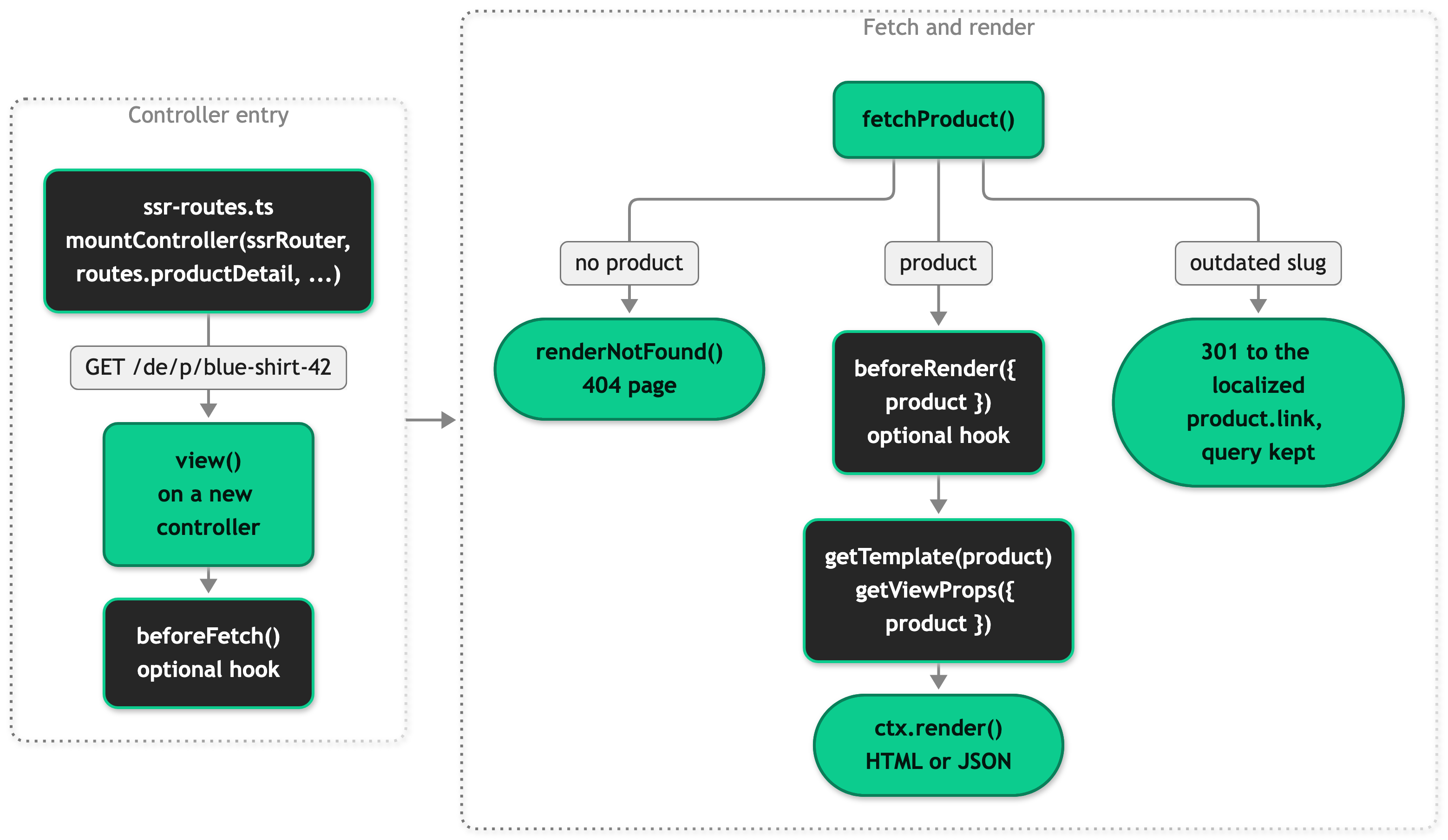
The base class owns view(), so it decides when to fetch, when the page is missing, and when the URL is outdated. You fill in the hooks, and either optional hook ends the request when it returns a response. ctx.render() merges the shared props with your page props, resolves them, and answers with HTML on the first page load and with JSON on every Inertia visit after it, as described in Request Lifecycle. Inertia then renders src/client/pages/<Name>.vue for the name the controller returned.
What a controller does
A controller decides which Vue page renders, which props it receives, and whether the request ends before anything renders. It reads data through this.services and this.mappers, the registries built for each request, and never calls the SCAYLE Storefront API itself, as explained in Layers and Data Flow. Extending the SDK covers overriding the services and mappers it reads.
Every controller extends one of three kinds of base class from @scayle/storefront/controllers:
BaseControllerfor a page that fetches no domain entity, such as sign-in. Itsview()runsbeforeRender()and renders, and your hooks take no arguments.- A domain base class, such as
BaseProductDetailControllerorBaseBasketController, when the SDK ships one for your page. Itsview()fetches the entity, handles the ways that page can fail, and passes the entity to your hooks. FetchControllerfor a page that fetches data no domain base class covers. Itsview()is abstract, so you write the lifecycle yourself. It adds abeforeFetch()hook that does nothing until yourview()calls it, as the domain base classes built on it do before they fetch.
getTemplate() and getViewProps() are abstract on every base class, so you always write both, and getViewProps() returns the complete props of the page. Base controllers lists every class.
The type parameter ties the controller to its page. BaseController<'SignIn'> restricts getTemplate() to 'SignIn' and types the result of getViewProps() as Props<Components['SignIn']>. Components is an interface in src/shared/types/global.d.ts that maps every page name to the props its Vue component declares with defineProps. A missing required prop, a prop the page doesn't declare, and an unregistered page name all fail to compile.
Editorial pages often need no code: /content/<slug> renders the CMS entry content/<slug> through CmsContentController.
Props and when they load
Each value getViewProps() returns takes one of five forms, and the form decides when it resolves and which responses carry it.
A plain value is ready when getViewProps() runs, so use it for data the controller already holds, such as the fetched product. A function, such as meta: () => this.getMeta(), runs while the page renders, in parallel with the other props, and a partial reload that doesn't ask for the prop never runs it. getViewProps() itself is synchronous, so every prop that awaits something is a function.
Inertia.defer(callback, { group }) leaves the prop out of the first response, and the browser then requests each group in a request of its own. Props in one group arrive together, so the slowest one holds up the rest. Defer what the first paint can do without, such as recommendations, and anything customer-specific on a cacheable page, whose full render never reads the session.
Inertia.once(callback, ttl?) lets the browser keep the value. On the next Inertia visit, the browser lists the once props it holds, and the server skips their callbacks. Without a ttl in seconds, the browser keeps the value until the next full page load. With one, the browser stops listing the value when it expires, so the next visit resolves it again: the shared campaign passes CampaignsService.CAMPAIGN_CACHE_TTL_SECONDS, see Data cache TTLs. A partial reload that names a once prop resolves it again, which is how the basket stays current after a customer adds an item. Chain .defer({ group }) when the value shouldn't block the first paint, as the shared basket does.
Use once for shared props that rarely change, such as the navigation, and keep it off page props. The browser lists only the once props of the page it's leaving, so a once prop that one page declares resolves again whenever a customer comes back to that page. Between two pages of the same component, it keeps a stale value instead: moving from one product to the next, the server skips the callback, and the browser keeps the first product's value.
Inertia.serverOnly(callback) resolves on the first page load and is left out of every JSON response after it. Use it for data only the server-rendered <head> needs, such as hreflang links and structured data.
Inertia comes from @scayle/storefront. None of these helpers hides data from the browser: the first page load serializes every prop it resolves into the HTML, server-only props included, so keep sensitive values out of props.
Shared props reach every page next to its own props. sharedDataMiddleware in src/server/middleware/sharedData.ts declares them with the same helpers, and a page prop with the same name replaces the shared one on that page. Shared props lists them.
Layouts around a page
A layout is the Vue component around a page: the header, the footer, and everything else that stays in place from one page to the next. The page renders into the layout's default slot. Layouts live in src/client/layout/, and you own them like the pages.
The page resolver picks the layout. src/client/main.ts in the browser and src/client/ssr.ts on the server both look up src/client/pages/<Name>.vue and set its layout option to Layout.vue, unless the page sets the option itself. Only the key counts, so defineOptions({ layout: undefined }) renders a page without any layout. Error.vue does this, because the error page renders without shared props and Layout.vue reads them.
The application ships two layouts:
Layout.vue: the full frame, with the promotion ribbon, the header and its navigation, the footer, toast notifications, and the add-to-basket slide-in. Every page that sets no layout gets it.SimpleLayout.vue: a reduced header with the shop name and the checkout header navigation, and only the bottom row of the footer.Checkout.vueandSubscriptionCancellation.vueuse it.
Inertia renders the layout with the same props as the page, shared props included, and the layout declares the ones it reads with defineProps. Layout.vue reads only shared props, so it works on any page. SimpleLayout.vue also reads shopName and checkoutHeader, which aren't shared, so the controller of a page that uses it has to return them as page props. To change something for one page only, a layout reads the current page name from usePage().component: Layout.vue hides the promotion ribbon on the basket page this way.
A layout stays mounted while the customer moves between pages that use it, and only the page inside it is replaced, so the layout keeps its state across the visit. Moving to a page with another layout, such as from the basket to checkout, unmounts the layout and its state. Layouts in the Inertia documentation covers the mechanism.
Add your first page
This tutorial adds a delivery information page at /delivery that shows the delivery cost copy from the SCAYLE Panel, the same copy the basket summary shows. You write the Vue page before the controller, because its defineProps is the contract the controller is checked against.
Step 1: Add the route pattern
src/shared/routes.ts holds every mounted pattern next to the builders that produce links, so the two can't drift apart. Add the pattern without a country prefix:
A link to the page is <SFLink :to="routes.delivery">, which adds the country prefix, as described in Routing and Countries.
Step 2: Add the copy
Add the page's copy to the top level of the English messages:
Add the same keys to the other files in src/i18n/locales/, as described in Translate a new key in all locales. ESLint reports a key that a locale is missing, as a warning locally and as an error in CI.
Step 3: Write the Vue page
The file name is the page name. The page sets no layout, so it renders inside Layout.vue, with the header and the footer, as described in Layouts around a page. PageMetaHead writes the head tags from meta.
Step 4: Register the page name
Add the page to Components, so ctx.render() accepts the name and the controller sees the props:
ComponentProps reads the props from defineProps, so the Vue file stays the only place you declare them. Tracking sends a page_type with its events, and the map in src/shared/types/Tracking.ts needs one for every registered page, so pnpm typecheck fails until you add it:
Step 5: Write the controller
The page fetches no domain entity, so the controller extends BaseController and keeps its default view():
ShopConfigService caches the shop configuration for 15 minutes, and mapDeliveryCost() supplies the default copy. Each prop carries a one-line JSDoc comment, because the names and their comments are the page's data contract.
Step 6: Mount the controller
Step 7: Check the page
Run pnpm dev and open https://localhost:3000/de/delivery. Under the default path country selector, /delivery redirects there. The page shows the delivery copy, and its source carries the title, canonical link, and robots tag. pnpm typecheck passes, and fails once you remove deliveryCosts from getViewProps(), because the page declares the prop as required. The Inertia.js panel of Storefront DevTools lists the visit with its props, and nests the reload of a deferred prop under the visit that triggered it.
Every visitor sees the same copy, so you can add [routes.delivery]: 600 to cacheableRoutes, as described in Caching.
Common tasks
Change an existing page
Every shipped page has its controller in your fork, in src/server/controllers/ or, for the CMS pages, in src/server/cms/controllers/cms-page.ts. Change the page there:
- Add or change a prop: edit
getViewProps()and the page'sdefinePropsin the same change. - Change what the base class fetches: override a protected member, such as
fetchProduct(),fetchOrderSummaries(), or theproductsPerPagesetting of product listing and search. - End the request early: override
beforeFetch()orbeforeRender(), as in Redirect before the page renders. - Change the 404 of one page: override
renderNotFound(), as in Return a not-found page.
For example, this shows 48 products per page instead of the shipped 32:
Add a route with a parameter
Constrain the parameter in the pattern, so a URL that can't name an entity never reaches the controller, and add a builder for the links:
A URL such as /account/returns/abc matches no page route. The Storefront Application ships its order detail route in this shape, as accountOrderDetail and buildOrderDetailRoute. Routing and Countries covers the builders, and Pattern syntax the syntax.
In the controller, this.ctx.req.param('id') returns the value as a string, so convert and check it, as BaseAccountOrderDetailController does. Hono decodes percent-encoded characters, so one segment can arrive as a/b or .., which is why CmsContentController rejects both before it calls the CMS. Query parameters are on this.request.query.
Defer slow data
Wrap the prop in Inertia.defer() with a group. The product detail page loads both recommendation sliders in one request after the first paint:
On the page, declare each deferred prop optional, since it's undefined until it arrives. Wrap the markup that reads it in <Deferred :data="['similarProducts', 'trendingProducts']"> from @inertiajs/vue3, which renders its fallback slot, a skeleton slider in ProductDetail.vue, until every listed prop is there.
- Give a slow prop its own group. Props without a group share
defaultwith the sharedpromotionsprop. - Catch errors in the callback. A deferred prop that throws is logged and left out, and
<Deferred>stays on its fallback.fetchSimilarProducts()returns[]instead. - Defer customer data on cacheable pages. Caching explains why.
Add a shared prop
Declare the prop on SharedProps, importing DeliveryCosts from ./customData, because inertia.share() accepts declared keys only:
Then return it from the callback in src/server/middleware/sharedData.ts, importing ShopConfigService from @scayle/storefront/services. The callback receives storefront, request, mappers, and services, like a service factory:
Components read it as usePage().props.deliveryNotice, with usePage() from @client/composables/usePage, which types it from SharedProps. ESLint rejects the usePage of @inertiajs/vue3, because its props accept any key. Pick a name no page uses for its own prop, and keep data that one page needs in that page's getViewProps(), because every page carries every shared prop.
Use another layout on a page
Set the layout option in the page, as the checkout page does:
When the layout reads props that aren't shared, the page's controller has to return them. getViewProps() rejects a prop the page's entry in Components doesn't declare, so add them to that entry first. Checkout.vue doesn't read shopName and checkoutHeader itself, so its entry picks both from the layout's props:
CheckoutController then returns both from getViewProps(), and leaving out checkoutHeader, which the layout declares as required, fails to compile.
Add a layout
Create a component in src/client/layout/ that renders the page in its default slot. Keep these parts of the shipped layouts:
<SFAnalyticsHead />: it loads the consent management script and Google Tag Manager, so a page on a layout without it loads neither.<SFSkipLink />andid="main-content": the skip link jumps to the element with that ID, so put it, withtabindex="-1", on the element around the slot.<SFLiveAnnouncer />anduseRouteAnnouncer():Layout.vuehas both, andSimpleLayout.vueleaves them out. On a layout without them,announce()is silent and a page visit is not announced to a screen reader. See Accessibility.
Then set it on each page that uses it, as in Use another layout on a page. To make it the default for every page instead, change the Layout import in both src/client/main.ts and src/client/ssr.ts. The server and the browser have to resolve the same layout, or the browser's first render doesn't match the HTML the server sent.
Redirect before the page renders
Return a response from beforeRender(), which receives the fetched entity, and the base class sends it instead of the page. The shipped beforeRender() of the product detail page only calls super.beforeRender(data). This example adds a redirect for a sold-out product:
this.inertia.navigate(target, status) defaults to 302. Pass routes and entity links unprefixed, see Redirect to a localized path. this.ctx.redirect() does not localize, and an ESLint rule rejects it in src/server/controllers/ and src/server/ssr-routes.ts.
To redirect before anything is fetched, override beforeFetch(), which every domain base class except search calls before it fetches. A route that only redirects needs no controller: /account is a plain ssrRouter.get() handler that calls ctx.get('inertia').navigate(routes.accountOrders, 302). Redirects you manage in the SCAYLE Panel run before any controller, as described in Redirects.
Redirect to the canonical URL
The product detail and product listing pages already answer an outdated URL with a 301, see Product Detail Page and Product Listing Page. For an entity of your own, call getRedirectToCanonicalPath(this.ctx.req.url, this.storefront, link) from @scayle/storefront/shared in beforeRender(). It returns the localized path with the query string, or undefined when the request is already on it. Send the result with this.inertia.navigate(target, 301).
Return a not-found page
Return this.ctx.notFound() from a hook such as beforeRender(), or this.renderNotFound() on a domain base class. Not-found pages shows the code and what the handler renders.
Set the page's SEO meta
Return a meta prop of the SEOMeta type from src/shared/types/SEO.ts and pass it to PageMetaHead, as in step 5 of the tutorial. Set robots on every page. The shipped controllers build meta in a getMeta() helper and pass it as meta: () => this.getMeta(), so a partial reload that doesn't need it skips the lookup. Declare hreflangs and jsonLd optional in defineProps, because an Inertia visit leaves them out. SEO covers the canonical link, the hreflang and structured data props, and how PageMetaHead renders them.
Require a signed-in customer
Put the route under /account/, where src/server/ssr-routes.ts registers createAuthGuardMiddleware({ redirectTo: routes.signin }). It sends a visitor who isn't signed in to the sign-in page, with the original path as redirectUrl. For a route elsewhere, pass the guard in the middleware option of mountController. Keep the route out of cacheableRoutes: a cacheable route never reads the session, so the guard would send every visitor to sign in. Account covers account pages and their menu entries.
Common mistakes
Start no fetch in getViewProps()
getViewProps() runs on every request to the page, partial reloads included, before the renderer picks the props that request needs. A promise created in its body fetches even when nobody asked for the prop, so pass a function. When two props need one fetch, wrap it in lazyPromise() from @scayle/storefront, which starts it on first use and shares the result, as ProductListingController does for products and pagination:
Don't bundle independent fetches with Promise.all in one callback, because the slowest one then holds back the rest.
Return null for a value that can go empty
Inertia leaves a prop whose value is undefined out of the response, and the browser keeps what it held before. The shared customer resolves to null after sign-out for this reason.
Rename a deferred prop everywhere
The browser requests deferred props by name, as strings. A rename in getViewProps() and defineProps type-checks, but every <Deferred :data> list and partial reload only list that names the old key stops working. Update them in the same change.
Controller reference
Base controllers
Every base class and its view data type, such as ProductDetailViewData, comes from @scayle/storefront/controllers.
| Base class | What view() fetches | When it ends early | Shipped controllers |
|---|---|---|---|
BaseController | Nothing | When beforeRender() returns a response | SignInController, AccountProfileController, AccountSubscriptionsController, SubscriptionCancellationController |
FetchController | Whatever your view() fetches | Whatever your view() decides | None directly. Every domain base class except search extends it |
BaseProductDetailController | The product from the identifier parameter | No product: renderNotFound(). Outdated slug: 301 | ProductDetailController |
BaseProductListingController | The category, plus page, filters, and sorting | No category: renderNotFound(). Outdated slug: 301 | ProductListingController |
BaseSearchController | Nothing. It parses the term, page, and filters | No filters[term]: renderNotFound() | SearchController |
BaseBasketController | The session basket | A failed fetch renders the error page with a 500 | BasketController |
BaseWishlistController | The session wishlist | A failed fetch renders the error page with a 500 | WishlistController |
BaseCheckoutController | The session basket | A failed fetch goes to the error handler | CheckoutController |
BaseOrderSuccessController | The order for the cbd query parameter | No cbd: error page with a 400. A failed fetch shows the empty state | OrderSuccessController |
BaseAccountOrdersController | The customer's order summaries | Only through the hooks | AccountOrdersController |
BaseAccountOrderDetailController | The order for the id parameter | Invalid id or a 404 from the API: renderNotFound() | AccountOrderDetailController |
BaseCMSPageController | The CMS payload for the page's slug | No slug or no payload: renderNotFound() | CmsHomepageController, CmsContentController |
Controller hooks
| Hook | Declared on | Required | Returns | Default |
|---|---|---|---|---|
getTemplate(entity) | BaseController | Yes | The page name | None |
getViewProps(data) | BaseController | Yes | Props<Components[TTemplate]>, synchronously | None |
beforeRender(data) | BaseController | No | A Response to send instead, or undefined | undefined |
beforeFetch() | FetchController | No | A Response to send instead, or undefined | undefined. Runs only when view() calls it |
renderNotFound() | Five domain base classes | No | The not-found Response | this.ctx.notFound() |
view() | BaseController | Only on a direct FetchController subclass | Promise<Response> | Runs beforeRender(), then renders |
A domain base class passes what it fetched as entity and data, such as { product }, and BaseController passes nothing. A hook may return its Response as a promise. renderNotFound() exists on the product detail, product listing, search, account order detail, and CMS page base classes.
The hooks read the request through protected members:
this.servicesandthis.mappers: the registries built for each request.this.storefront: the config, active country, Storefront API client, and cache.this.request: headers,query, the publicurl, and the session.this.inertia: the request's Inertia instance, fornavigate().this.ctx: the Hono context.
mountController(router, pattern, ControllerClass, options?) registers a GET handler only, so other methods fall through to later routes. options.middleware takes Hono middleware that runs for the same pattern ahead of the handler. Any class whose constructor takes the Hono context and whose view() returns a Promise<Response> can be mounted.
Prop helpers
| Form | First page load | Inertia visit | Options |
|---|---|---|---|
| A plain value | Included | Included | None |
| A function | Resolved | Resolved | None |
Inertia.defer(callback, options?) | Left out, requested per group after mount | Left out, requested per group after mount | group, default 'default'. clientOnly: true resolves it on the first page load |
Inertia.once(callback, ttl?) | Resolved | Skipped while the browser holds an unexpired value | ttl in seconds. Without one, the value lasts until the next full page load |
Inertia.serverOnly(callback) | Resolved | Left out | None |
Shared props
storefront comes from the SDK runtime. The others are declared in src/server/middleware/sharedData.ts and typed on SharedProps in src/shared/types/global.d.ts. The Error page renders without them, as described in Errors and Logging.
| Prop | Kind | Holds |
|---|---|---|
storefront | Plain value | Public config, active country, and public origin |
navigation | Once | Header navigation tree, [] when the fetch fails |
footer | Once | Footer link columns and the legal row below them |
campaign | Once, with a TTL | Active campaign, or null |
cmsEditorData | Once | CMS editor context, present only in editor or preview mode |
availableCountries, availableLanguages | Once | Entries for the shop switcher |
promotions | Once, with a TTL, deferred in default | Active promotions, [] when the fetch fails |
basket, wishlist | Once, deferred in customer-data | Session basket and wishlist, null when the fetch fails |
customer | Once, deferred in customer on a cacheable render | Signed-in customer with its segments, or null |
shopSuggestion | Once, deferred in customer | Shops to suggest for the detected country, or null |


