

Search
Search lets users find products by typing a term. The Storefront Application V3 ships suggestions in the header as the user types, a search results page, and a resolve step that sends a term straight to the one product, category, or navigation item it names.
Why it matters
A user who searches already knows what they want. Suggestions show matching products, categories, and navigation items before the user submits. Resolve skips the results page when a term clearly names one thing, which removes a click from the path to that page.
Try it
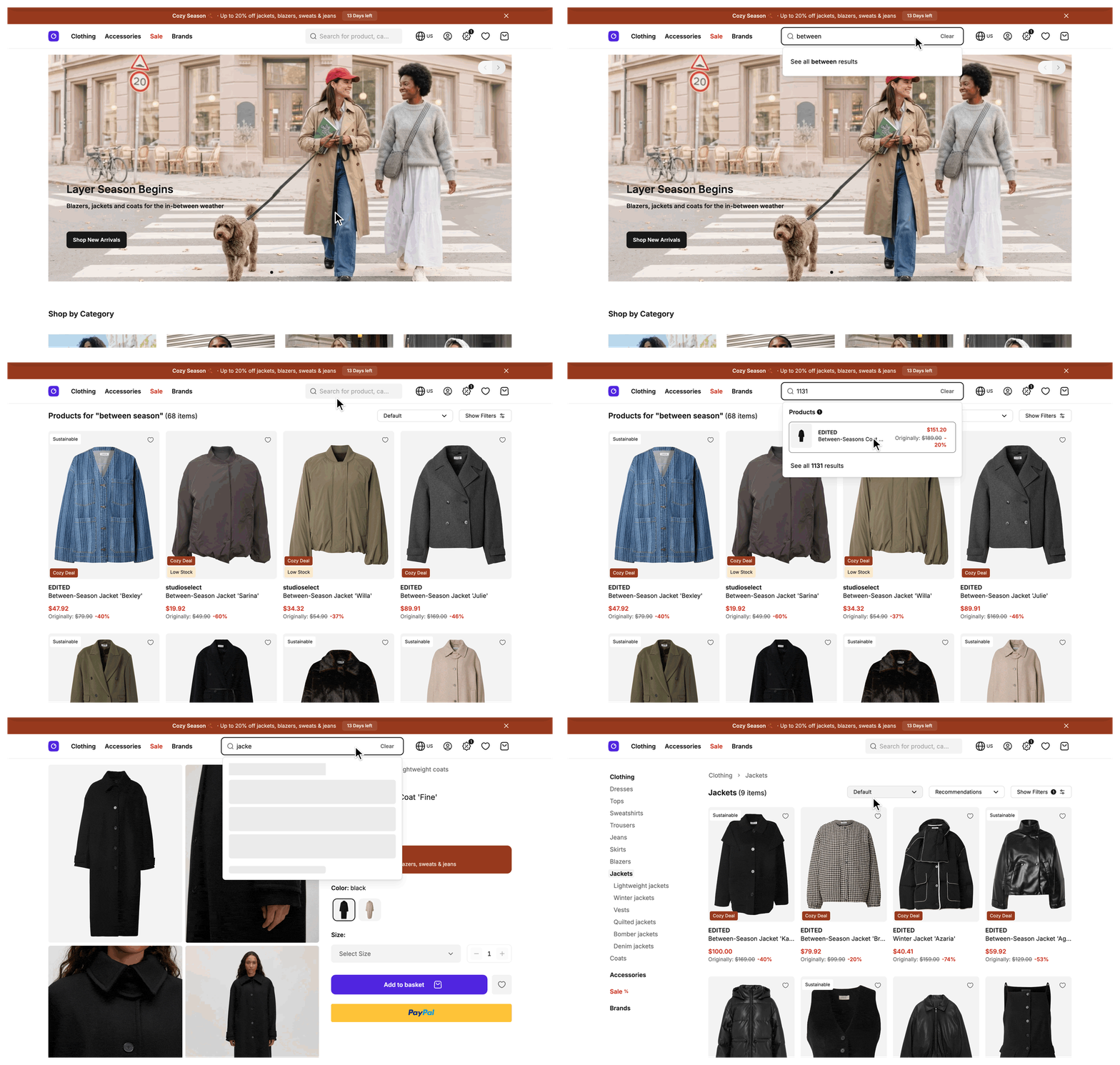
Type a term into the search field and select "See all results" to reach a live results page.
What's included
- Header search field: Suggestions grouped into products, categories, and navigation items, requested 300 ms after the user stops typing. The dropdown opens from the third character and supports arrow keys, Enter, and Escape.
- Current suggestions only: Each request aborts the one before it, and a response for a term that no longer matches the input is discarded.
- Show all results link: A server-generated link to the results page for the term of the latest suggestions.
- Resolve: A Storefront API lookup that turns a term into the single product, category, or navigation item it names. The search field runs it on submit, and the results page request runs it again on the server.
- Search results page: A page at
/searchwith filtering and pagination. It reads the term from thefilters[term]query parameter and fetches products and filters through the sameproductListingservice as the category page. - No results state: When a search finds nothing,
SFSearchNoResultsshows search tips, links to the homepage and the main categories, and a "Reset filters" button while filters are applied. - Search engine handling: The results page sends
noindex, nofollowand renders anItemListof the result products as JSON-LD in the server-rendered HTML. - Tracking: The field and the results page push tracking events for the search outcome and for suggestions that are shown or selected.
What you can change
Configure
- What users can search for and how the search behaves can be controlled in the SCAYLE Panel. See Configuration.
Theme
- The look and copy of the search field, the suggestions dropdown, the results page, and the no-results state, in
SFSearchField.vue,SFSearchResultsContainer.vue,Search.vue, andSFSearchNoResults.vue.
Extend
- What a suggestion or a resolve result contains, by overriding the search mapper.
- When the results page request redirects, by overriding
beforeRender. - Which terms the results page rejects with a hint, by overriding
isTermRejectedonSearchController. The default follows the Storefront API limits. - The 300 ms input delay (
DEBOUNCED_SEARCH_DURATION) and the three-character condition that opens the dropdown, by editingSFSearchField.vue. - The minimum term length, by rebuilding the suggestions RPC.
- Page size, sold-out products, and sellable-for-free products, with the properties listed under Configuration.
- The category a search is scoped to. Pass
categoryIdin thesearch.getSuggestionsandsearch.resolvecalls inuseSearch(). Both RPCs already accept it, anduseSearch()sends only the term.
Replace
- Rank search with Constructor instead of SCAYLE Search. See Constructor.
Constraints and limits
Permanent
- Search results have no sort control. The Storefront API orders search results by relevance and matches across terms with OR logic, so a user-selected sort order would mislead. The results page hides sorting in the filter panel.
- The results page needs a term. A request to
/searchwithout afilters[term]value renders your not-found page.
Known limitations
- Suggestions need a term of at least 3 characters after trimming. The
search.getSuggestionsRPC rejects a shorter term, and the dropdown stays closed until the third character. The field still sends the request for one or two characters, anduseSearch()setsstatusto'error'for it. Resolve accepts a term of 1 character, so a short term still redirects on submit. To change the minimum, see Change the minimum term length. - A resolve answer stays in the data cache for up to 5 minutes, and that includes "no single match". A catalog change can take that long to change whether a term redirects. See Data cache TTLs.
- The results page request attempts a resolve only on the first page, with no filters applied, in a main request. A main request is a full page load or a full Inertia visit, not a partial reload. A page beyond the first, a filtered search, or a partial reload renders the results page without a lookup.
- A failed or rejected suggestions request keeps the previous response. A submit right after the user shortens the term to one or two characters, or inside the 300 ms delay, can open the results page of the earlier term.
- The Storefront API rejects a term over 60 bytes or over 10 words. The suggestions and resolve calls then skip the request and return no suggestions or no match. The results page shows a hint to use a shorter term instead of results, and does not count the term as a zero-result search. The
isTermRejectedhook ofBaseSearchControllerdecides this. - With Constructor, suggestions hold products only and resolve never matches.
ConstructorSearchServiceignorescategoryId. See Constraints and limits on the Constructor page for the other differences.
How it works
The SearchService calls the Storefront API for both suggestions and resolve. SearchService and the search.getSuggestions and search.resolve RPCs ship in @scayle/storefront. The RPCs reach your shop because src/server/api/index.ts adds createSearchRouter(base) to apiRouter. A mapper turns the Storefront API response into the shape your pages use (see Extending the SDK), and your SearchMapperService supplies the URL of your results page and the Storefront API fields to request.
Suggestions
SFSearchField waits 300 ms after the last input, then calls useSearch().getSearchSuggestions(). That calls the search.getSuggestions RPC, which calls SearchService.fetchSuggestions. The service does not cache suggestions, so they stay live as the user types. The mapper groups the entities into products, categories, and navigation items and adds the show all results link. Category links come from your category mapper.
Submit
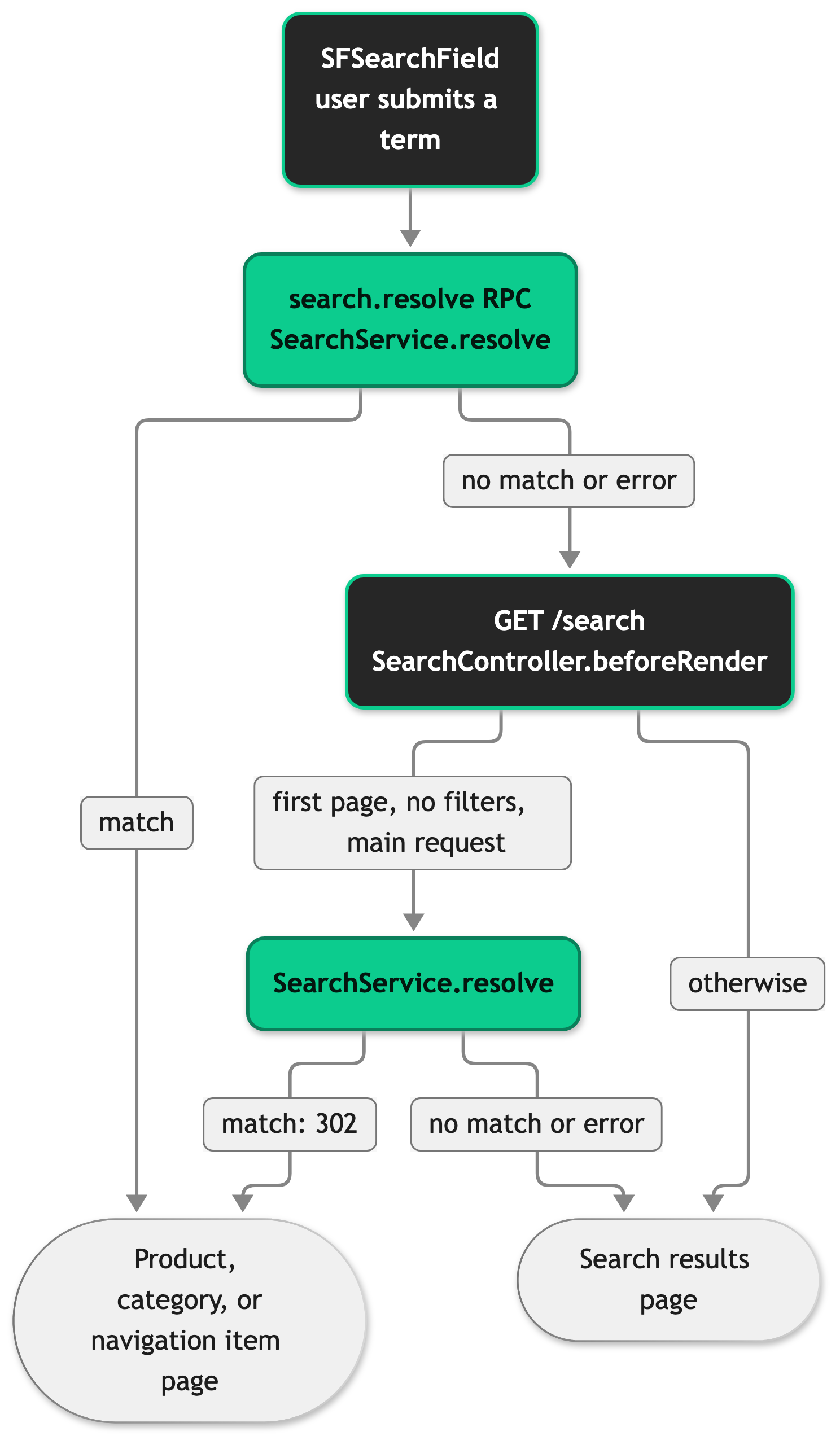
The field resolves first. A match navigates to the target page. No match, or a failed call, navigates to the show all results link, and that request runs the second resolve in SearchController.beforeRender. The link comes from the latest suggestions response. The field builds the link for the current term only when it has no suggestions. A failed resolve on the server is logged and the results page renders, because the redirect is optional.
Results page
SearchController extends BaseSearchController, which parses the term, the page number, and the filters from the query string and renders the not-found page when no term is present. SearchController supplies the Inertia props, the title, and the SEO meta. The results are products and pagination, the jsonLd prop exists only in the server-rendered page, and filters are deferred, so the page renders before they arrive. A rejected term has no filters, and the controller sends an empty list. The controller restates the SDK defaults for productsPerPage, includeSoldOut, and includeSellableForFree, so you change them in one place.
The /search route is in cacheableRoutes in the Storefront Application V3, see Configure cacheable routes. The 302 from beforeRender is never stored in a shared cache, because the response cache sends no-store for any response outside 2xx. The results page for a term is stored, and a shared cache serves it for the route lifetime without a new resolve.
The redirect in beforeRender uses this.inertia.navigate, which localizes the link for the active country and sends an external link as a full page load.
Configuration
SCAYLE Panel
In the SCAYLE Panel you configure which navigation items, searchable attributes and synonyms (category, attribute group, word and navigation) the search uses. You can also set typo tolerance, stop words, smart sorting and exact attribute search, and keep categories and products out of the results. See Search Configuration in SCAYLE Panel.
Navigation items appear in search suggestions when the "Include to Search" property is enabled for the item in SCAYLE Navigation. SCAYLE Panel: Shops ➜ Storefront ➜ Navigation. See Search Configuration in SCAYLE Panel.
Results page properties
These properties are declared on SearchController in src/server/controllers/search.ts. Each one overrides the property of the same name on BaseSearchController.
| Property | Default | Effect |
|---|---|---|
productsPerPage | 32 | Number of products fetched per results page. |
includeSoldOut | false | Keeps sold-out products in the results when set to true. |
includeSellableForFree | false | Includes products sellable at zero price when set to true. |
Customization guides
Override the search mapper
SearchMapperService extends SearchMapper from @scayle/storefront/mappers. It implements two abstract members. getSearchResultsPath builds the results URL with buildSearchRoute, and the Includes getter lists the Storefront API fields to request for suggestions and resolve. To change what a suggestion list or a resolve result contains, override mapSuggestions or mapResolveResult next to it and start from super:
The class is already registered on the search mapper slot in src/server/registries.ts. An override that skips super.mapSuggestions(...) must build every field of GroupedSearchSuggestions itself: categories, products, navigationItems, and showAllResultsLink. Starting from super keeps the Storefront API mapping and the show all results link. With Constructor, ConstructorSearchService builds the suggestions itself and mapSuggestions is not called.
Change when the results page redirects
Override beforeRender on SearchController to change which requests resolve and which results redirect. This version redirects only when the term names a product:
Return this.inertia.navigate(...), not ctx.redirect, so the link is localized for the active country. The search field redirects on its own. In SFSearchField.vue, goToSearchResolutionOrSearchPage navigates to any resolved link. Apply the same condition there, otherwise a submit from the field still opens a category.
Change the minimum term length
The search.getSuggestions RPC validates the term, and SFSearchField.vue decides when the dropdown opens. Change both. Rebuild the RPC from the SDK definition with a new term schema:
Then change the condition in the search field to match:
Best practices
Build the search results URL with buildSearchRoute
buildSearchRoute(term) produces the filters[term] query parameter that the results page reads. It builds the show all results link, and useSearch() falls back to it. A hand-written /search?... string can misspell the parameter, and the request then lands on your not-found page.
Treat resolve as a redirect
Use resolve only to skip the results page. Do not use it to supply data for rendering.
Keep suggestions uncached
SearchService does not cache suggestions. If you override fetchSuggestions, keep it uncached so suggestions stay current as the user types.
Troubleshooting
A search for what looks like an exact product name shows the results page instead of redirecting
Possible causes: The Storefront API returned no single best match, so the term names more than one entity or none. A failed resolve call has the same effect, and the server logs Failed to resolve search term for it.
Solution:
- Search the server logs for
Failed to resolve search term. An entry means the resolve call failed on the server during the results page request, in the Storefront API call or in the cache. A failed resolve from the search field is not logged there, because the field gets an error from the RPC and goes to the results page. - Call the
search.resolveRPC for the term and read the response. Aresultofnullmeans the Storefront API found no single match. The data cache keeps that answer, so a catalog change takes a while to show. See Constraints and limits.
Prevention: A redirect is a shortcut for clear cases. The results page is the fallback for every other term.

