

Order Confirmation
The order confirmation page shows your customer what they bought right after paying, and it loads the order only when the callback token from SCAYLE Checkout is genuine. When the token is forged, altered, or too old, the page shows a calm empty state and never exposes an order. A request without a token gets a 400 error page.
Why it matters
A customer who just paid wants proof that the payment worked and a record of what is on its way. This page is that proof. It is also where the Storefront Application fires the purchase Tracking event, so it feeds your conversion numbers. The SCAYLE Checkout web component posts its own purchase, and the Storefront Application drops that copy so a purchase is not counted twice. See Keep the purchase event on the confirmation page.
The page holds one customer's addresses and order details, and no sign-in sits in front of it. The signed token in the URL is the only thing that allows the lookup.
Try it
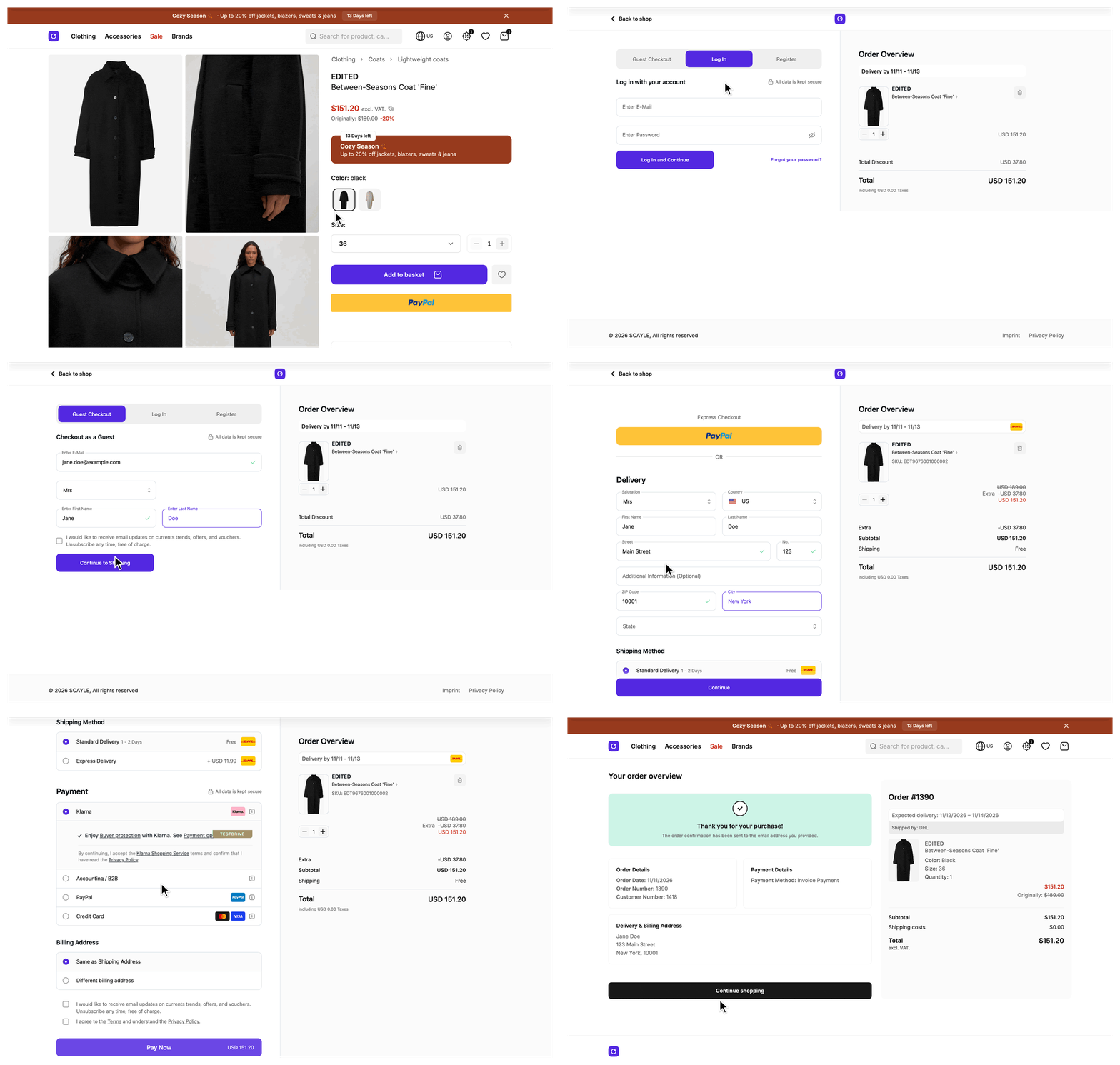
Try it: complete a checkout in the demo shop to reach the order confirmation page
The page opens only after a real purchase, because it needs the token that SCAYLE Checkout adds to the URL.
What's included
- Order Success route:
/success, mounted byOrderSuccessControllerinsrc/server/ssr-routes.ts. A country selector mode that uses a path prefix mounts the route under that prefix, for example/de/success, wheredeis thepathof the country. - Token check and order lookup:
BaseOrderSuccessControllerfrom@scayle/storefront/controllersreads thecbdquery parameter, the callback data token that SCAYLE Checkout adds to the redirect.OrderService.getOrderFromCBD()verifies the signature, checks the age of the token, and fetches the order from the Checkout API with your shop's checkout credentials. - Order summary:
OrderSuccess.vueshows a thank-you message, the order number, the payment method, the addresses, the items grouped by delivery, and the cost summary. The cost summary lists a row for non-delivery fees when the order has fees, and ends with an including or excluding VAT label. An "Order details" button appears for customers who have an account. - Empty state:
SFOrderSuccessEmptyState.vuereplaces the summary when the order cannot be resolved, with a button back to the home page. - Page meta: The
robotsvalue isnoindex, nofollow, the copy differs between the order and the empty state, and the title carries the shop name when the shop configuration can be read. - Purchase event:
OrderSuccess.vuecallstrackPurchasefromuseOrderEventsafter the page mounts with an order.
What you can change
Configure
- The Order Success route that SCAYLE Checkout redirects to, set in the SCAYLE Panel. See SCAYLE Panel.
- The checkout user, token, and secret of each country, set in environment variables. See Storefront Application.
Theme
- Restyle
OrderSuccess.vueand theSFOrderSuccess*components insrc/client/components/orderSuccess/. - Reword the page, meta, and empty state copy in the
order_success_pagelocale keys.
Extend
- Show a product attribute on each order line by overriding
mapProductinOrderMapperService. - Change how long a token stays valid by overriding
getOrderFromCBDin a subclass ofOrderService. - Send a signed-in customer to the order history from
beforeRender. - Return another prop from
getViewPropsand declare it indefinePropsofOrderSuccess.vue. See Hooks on the controller. - Change the title, description, or
robotsvalue by editinggetMetainsrc/server/controllers/orderSuccess.ts. The method is private, so you edit it in place and do not override it. - Move the page to another path by changing
routes.successinsrc/shared/routes.ts, and enter the same route in the SCAYLE Panel.
Constraints and limits
Permanent
- A request without a
cbdquery parameter gets a 400 error page. There is nothing to look up without the token. - The SDK compares the signature in constant time before it decodes the payload, checks the token age, or fetches the order. A forged or altered token never reaches the Checkout API.
- The order lookup signs its request with the
checkout.userandcheckout.tokenof the country, and does not use the customer's session. The page therefore works for guest customers and for Express Checkout, which redirect here without an access token. checkout.secretmust be the same value SCAYLE Checkout signs the token with. A different value fails every signature check, so every customer of that country sees the empty state. Change the secret on both sides in the same release.- The Order Success route in the SCAYLE Panel and
routes.successin the application must name the same route. When they differ, the customer lands on whatever the Panel route points to, and a path the application does not mount answers with the not-found page. - The route is not in
cacheableRoutesinstorefront.config.tsand has to stay out of it, because the page holds one customer's order.
Known limitations
- A bad signature, an expired token, a Checkout API error, a network failure, and an error while mapping the order all render the same empty state. The customer cannot tell them apart. The cause goes only to the server log, as
Failed to fetch order success datain theorder-successlogger namespace. Itserrfield readsInvalid signaturefor a wrong secret or an altered token, andCBD token has expiredfor a token past its window. - A token is valid for 7200 seconds (
DEFAULT_CBD_EXPIRATION_SECONDS).view()passes no options togetOrderFromCBD(), so changing the window needs the override in a subclass ofOrderService. After the window, a reload of the link shows the empty state. TheexpirationSecondsoption accepts0, which turns the age check off and keeps the signature check. trackPurchaseremembers the order ID in session storage when the customer gavegoogle-analyticsconsent, and it skips a repeat in the same tab. A reload of the link sends thepurchaseevent again only in another tab, after the browser cleared its storage, or without consent. A shorter token window limits those repeats.
How it works
After payment, SCAYLE Checkout redirects the customer's browser to your Order Success route and adds a cbd query parameter. The same redirect happens after Express Checkout. The cbd value is the callback data token, written as <payload>.<signature>. The payload is base64 encoded JSON, and the signature is an HMAC with SHA-256 over the encoded payload, keyed with checkout.secret. The SDK reads only order_id and issued_at from the payload.
The Storefront Application V3 and the SDK share the work like this:
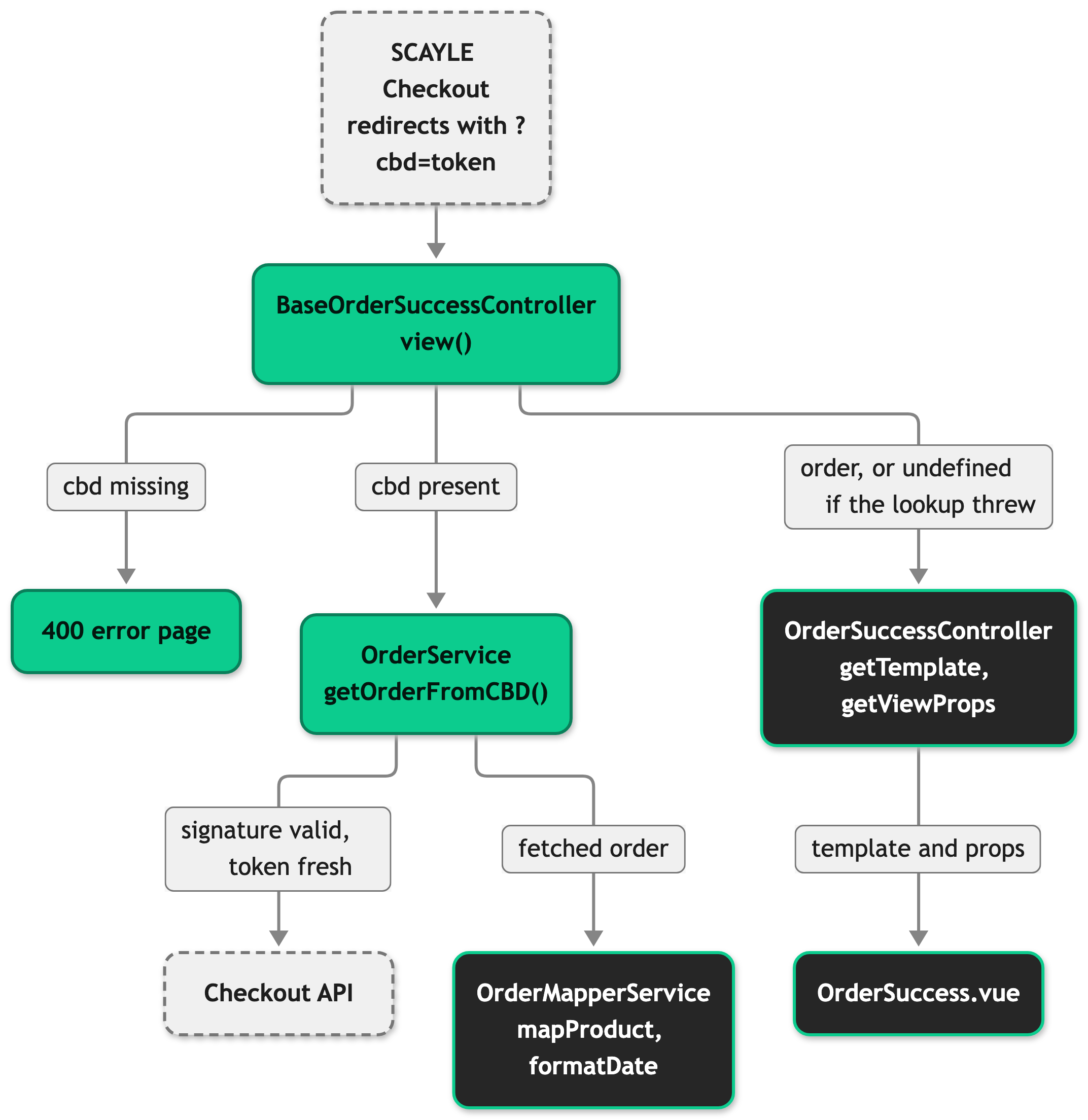
When the lookup succeeds, view() passes the mapped order to your controller. When the lookup throws for any reason, view() logs the error and passes undefined, and the page renders the empty state.
What the mapper builds
The mapped Order holds the order id, the confirmation date, the addresses, the cost, the customer (id and guest flag), the deliveries with their items, the payments, and the status. A mapper turns the raw Checkout API response into this shape on the server, so the page never reads the raw response.
OrderMapperService in src/server/services/mappers/order-mapper.ts extends the SDK OrderMapper and overrides formatDate and mapProduct, see Order Details. The same order mapper builds the order on the account order detail page, so a change to it shows up on both pages.
Hooks on the controller
OrderSuccessController extends BaseOrderSuccessController and implements the abstract methods getTemplate and getViewProps. It also has a private getMeta that builds the head meta from the order or from undefined.
getViewProps({ order }: OrderSuccessViewData): Props<Components['OrderSuccess']>returns every prop the page receives. The prop types come fromdefinePropsinOrderSuccess.vue, so a prop you return but the page does not declare, or a required prop you leave out, fails the typecheck.beforeFetch(): Promisable<Response | undefined>runs after thecbdcheck and before the signature check and the lookup. Nothing is resolved yet, so it has no order to read.beforeRender(data: OrderSuccessViewData): Promisable<Response | undefined>runs after the lookup, withdata.orderset toundefinedwhen the lookup failed.
A Response returned from beforeFetch or beforeRender replaces the page. Returning undefined continues the request.
Setup
The order confirmation page ships with the Storefront Application V3, so there is nothing to install. To make it work in your shop:
- Enter the Order Success route of each country in the SCAYLE Panel. With a country selector that uses a path prefix, that is the prefixed route, such as
/de/success. See SCAYLE Panel. - Set
STOREFRONT_COUNTRIES_<CODE>_CHECKOUT_USER,STOREFRONT_COUNTRIES_<CODE>_CHECKOUT_TOKEN, andSTOREFRONT_COUNTRIES_<CODE>_CHECKOUT_SECRETfor every country, with<CODE>as the country code, for exampleDE. See Storefront Application. - Complete a test purchase.
You land on /success, or on the prefixed route such as /de/success, with the order summary. If you see the empty state instead, follow Troubleshooting.
Configuration
SCAYLE Panel
Open Settings ➜ Checkout ➜ Routes & Domains ➜ Order Success and enter your success route. SCAYLE Checkout redirects customers to this route after payment.
With a country selector that uses a path prefix, every country that carries a path prefix needs its own prefixed route, such as /de/success, or a Shop Domain that carries the prefix. A bare /success redirects to the default country, so an order from another country is verified with the default country's checkout.secret and fetched with its credentials and shop ID.
Storefront Application
Each entry of countries in storefront.config.ts needs a checkout block with the user, token, and secret. The Checkout page lists the fields and the environment variables that fill them. This page uses the user and token for the Basic Auth request that fetches the order from the Checkout API, and the secret to verify the cbd token.
The path of the page is routes.success in src/shared/routes.ts. It is /success by default.
Customization guides
Reword the confirmation page copy
You end with your own wording in the page heading, the head title and description, and the empty state.
- Open
src/i18n/locales/en_GB.jsonand edit the values underorder_success_page. - Make the same change in the other locale files your shop uses. The
translate-localesskill in.claude/skills/does this for every locale.
The keys are:
titleis the page heading.meta.titleandmeta.descriptionare the head title and description when the order resolved.no_order_found.titleandno_order_found.descriptionare the empty state heading and text. The empty state description is also the head description of that state.no_order_found.meta.titleis the head title of the empty state. It links tono_order_found.title, so a change to that title changes both until you replace the link.go_to_order_detailsis the label of the "Order details" button.
The thank-you message lives under order_success_page_greeting. The next confirmation page shows your text.
To change more than copy, edit getMeta in src/server/controllers/orderSuccess.ts.
Show a product attribute on each order line
You end with a material label under the color on each item of the order summary. Replace material with an attribute group key that exists in your shop, and product_attribute.material with your own label key.
- Declare the field in a new file,
src/shared/types/Order.ts: - Fill the field in the
mapProductoverride ofOrderMapperService. The override builds every field itself and does not callsuper, so add the field to its return value: - Add
"material": "Material"underproduct_attributeinen_GB.json, then sync the other locale files as in the previous guide. - Render the field in
SFOrderSuccessProductCard.vue, next to the color: - Run the typecheck. The field is required, so it points to every place that builds an
OrderProduct, such as the fixtures insrc/test/mock-data/orders.ts.
The next confirmation page shows the material of each item. The account order detail page receives the field too, because it uses the same mapper. A key that does not exist in your shop is not an error: getFirstAttributeValue returns undefined and the field stays '', so check the key in your SCAYLE Panel when the line never appears. See Add a field to a mapped entity for the general pattern.
Change how long a token stays valid
You end with a confirmation link that stops working after ten minutes instead of two hours. getOrderFromCBD verifies the signature first, so a shorter window never skips that check.
- Create
src/server/services/order-service.tswith a subclass ofOrderService: - Register the subclass in the
orderslot of the service registry, and removeOrderServicefrom the import there when nothing else uses it:
A customer who opens the link after ten minutes sees the empty state, and the server log shows CBD token has expired. The override keeps the signature of the base method. Spreading opts last lets a caller that passes its own expirationSeconds win. See Extend an existing service for the registration pattern.
Send a signed-in customer to the order history when the lookup fails
You end with a signed-in customer landing on their order history instead of the empty state when the confirmation link has expired. The order is listed there. Users who are not signed in still see the empty state.
- Add the import and the
beforeRenderoverride toOrderSuccessController. The file already importsOrderSuccessViewData:
An expired link opened by a signed-in customer redirects to /account/orders, with the country prefix of the active country. inertia.navigate localizes the path, so pass it without a prefix. Redirect from a controller with inertia.navigate. ESLint rejects ctx.redirect there. The condition on order matters: a response returned for a resolved order skips the render, and with it the purchase event.
Best practices
Keep the purchase event on the confirmation page
The SCAYLE Checkout web component posts its own purchase event, and the checkout tracking bridge (useCheckoutTracking), which forwards the web component's tracking events to your dataLayer, drops it. This page is the only source of purchase. If you replace OrderSuccess.vue, call trackPurchase from useOrderEvents in your page instead of building the payload inline. A response from beforeFetch or beforeRender for an order that resolved also drops the event for that order, see the order history guide.
Add to the order only what the page renders
Every page prop is public. Inertia.serverOnly, Inertia.defer and Inertia.once change when a prop is sent, not who can read it. A prop you return from getViewProps is in the initial HTML and the Inertia payload of the full page request. A deferred prop (Inertia.defer) arrives by a later request instead, and anyone with the link can read it too. A field you add to the order is readable by anyone who holds the confirmation link, so leave out fields the page does not show.
Write the empty state for a customer who paid
A customer who reaches the empty state has most likely paid. Keep the copy calm and point to the confirmation email, as the default text does.
Troubleshooting
Customers see the empty state after paying
Issue: The page shows "The order information could not be found." instead of the order summary, although the payment went through.
Possible causes: The lookup threw and view() caught the error. A wrong checkout.secret and an expired token are covered in Constraints and limits. The remaining causes depend on runtime state: a Checkout API error, a network failure, a response or token payload that is not valid JSON, or an error while mapping the order.
Solution:
- Search your server logs for
Failed to fetch order success data. The entry sits in theorder-successlogger namespace, and itserrfield names the cause. Failed to fetch orderfollowed by the HTTP status text, for exampleNot Found, means the Checkout API rejected the request. Check thecheckout.userandcheckout.tokenof that country and whether the Checkout API is reachable.- Any other message, except
Invalid signatureandCBD token has expired, comes from a failed network request, an unreadable payload, or the order mapping. Check yourOrderMapperServiceoverrides first.
Prevention: Alert on Failed to fetch order success data in your log monitoring, so a wrong secret shows up after the first purchase and not after the first customer complaint.


