

Checkout
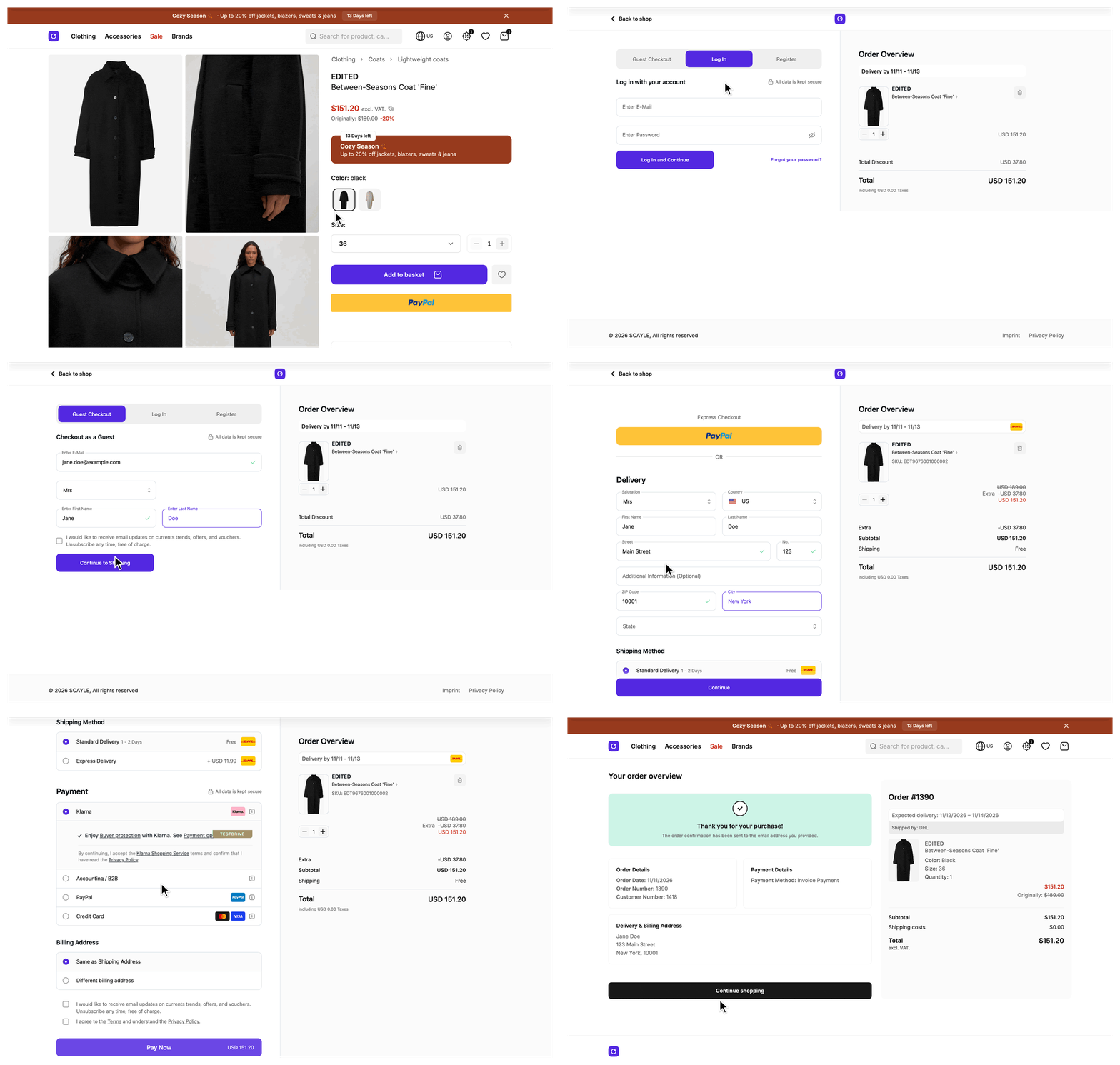
The checkout takes a customer from a priced basket to a confirmed order. The Storefront Application V3 hands the whole flow to the SCAYLE Checkout web component, which renders address entry, shipping method, payment, and order submission inside <scayle-checkout> on the /checkout page. Your shop keeps the page around it, the tokens that start the session, and the tracking events the flow produces. Two related flows sit alongside it: Express Checkout from the product detail page and the basket, and the Order Confirmation page the purchase ends on.
Why it matters
Checkout is where a browsing customer becomes a paying one, so every extra step or unclear error costs conversions. The checkout web component handles address validation and payment provider integration, so none of that code lives in your shop. What stays with you is what surrounds it: who may enter checkout, which basket and claims go into the signed token, and which events reach your analytics.
Try it
Try it: open the checkout on a demo instance (requires at least one product in the basket)
What's included
- Checkout page (
/checkout): Mounts<scayle-checkout>with a signed checkout JWT, which names the basket to check out, and the customer's OAuth access token when there is one. - Simplified page frame:
SimpleLayout.vuereplaces the full shop chrome with a header that has a back-to-shop link, the logo, and, from themdbreakpoint up, the links from the navigation tree with the reference keycheckout_header, plus the bottom footer. - Token handling: A checkout JWT signed on each page load and on each token reload, an access token that is refreshed when it would expire within 30 minutes, and a reload of both when a customer signs in inside the checkout.
- Tracking bridge: Forwards
add_to_cartandremove_from_cartfrom the checkout web component onto your shop'sdataLayer, and reloads the basket after those two events. - Consent and tracking context: Passes the consent state and the tracking context to the checkout web component, so it can send its own events to SCAYLE Analytics.
What you can change
Configure
- Checkout styling, layout, text, Dynamic Fields, guest checkout, and payment methods in the SCAYLE Panel. See SCAYLE Panel.
- The checkout credentials and the OAuth client ID in
storefront.config.ts, set through environment variables. See Configuration. - The links in the simplified header come from the navigation tree with the reference key
checkout_header. Keep the checkout header to a few short links explains how many fit.
Theme
- The frame around the checkout web component is your own Vue code:
src/client/layout/SimpleLayout.vue, the header insrc/client/components/ui/navigation/header/SFSimpleHeader.vue, and the container insrc/client/pages/Checkout.vue.
Extend
- Override
beforeRenderon yourCheckoutControllerto redirect or stop before the page renders, for example to send a customer with an empty basket back to the basket page. See Run logic before the checkout page renders. - Override
getCustomDataonOrderCustomDataServiceand register the subclass on theorderCustomDataservice slot insrc/server/registries.tsto attach the same order custom data to every checkout and every basket call. - Project your own content into the named placeholders the checkout web component defines, called dynamic slots. See Dynamic Slots.
- Change which events the tracking bridge forwards or how it rewrites them in
src/client/composables/tracking/useCheckoutTracking.ts.
Constraints and limits
Permanent
- The checkout web component owns every step of the flow, and
Checkout.vueonly mounts it. There is no per-step extension point in your code. Dynamic slots are the one exception, and the checkout web component defines which slots exist. Fields beyond the Dynamic Fields the SCAYLE Panel offers, a different step order, and new steps cannot be added from your code. - The checkout JWT and the callback token on the order confirmation page are two separate tokens. Both use the per-country
checkout.secret. The JWT goes to the checkout web component, and the callback token comes back on/success. - The checkout JWT is valid for one hour from signing. It uses HS256 and the lifetime is not configurable.
Checkout.vuerequests a new one when the page loads and after the checkout auth API reportsauth:success, and at no other time. A customer who keeps the page open for more than an hour holds an expired JWT until one of those two happens. - The checkout web component mounts in the browser only. The server renders the page frame and an empty container, because the script that registers the component loads after the page mounts.
- With the default
cacheableRoutesinstorefront.config.ts,/checkoutis not cached. Itsnoindex, nofollowis arobotsmeta tag in the page head, not a response header. - The bridge forwards only two events,
add_to_cartandremove_from_cart. Tracking messages lists every rule. - The bridge forwards neither
add_shipping_infonoradd_payment_info, so GA4 does not receive them from the checkout. See Events from the checkout web component. - The bridge rewrites every forwarded payload instead of passing it through. Events from the checkout web component lists the changes.
OrderCustomDataServiceresolves the order custom data once per request.getCustomData()runs at most once, and every basket call and the checkout JWT read the same value.- A throw from
getCustomData()fails every basket call and every checkout JWT. The service does not fall back to no custom data, because an order that silently misses required metadata is worse than a visible error. The sharedbasketprop insrc/server/middleware/sharedData.tscatches the failure, logs it, and sendsnull. The basket page, the checkout page, and the basket procedures do not, so they surface the error. Catch inside your override and returnundefinedif requests should always proceed. - The checkout JWT is signed, not encrypted, so the customer can read the order custom data inside it. Keep secrets out of it, and do not put the value into page props or oRPC output.
Known limitations
- The page reloads the basket after a forwarded
add_to_cartorremove_from_cartmessage, and after a customer signs in inside the checkout web component. Nothing else on the page reacts to other changes made inside the checkout web component.
How it works
The controller builds the props on your server. Checkout.vue mounts the checkout web component in the browser and bridges its messages.
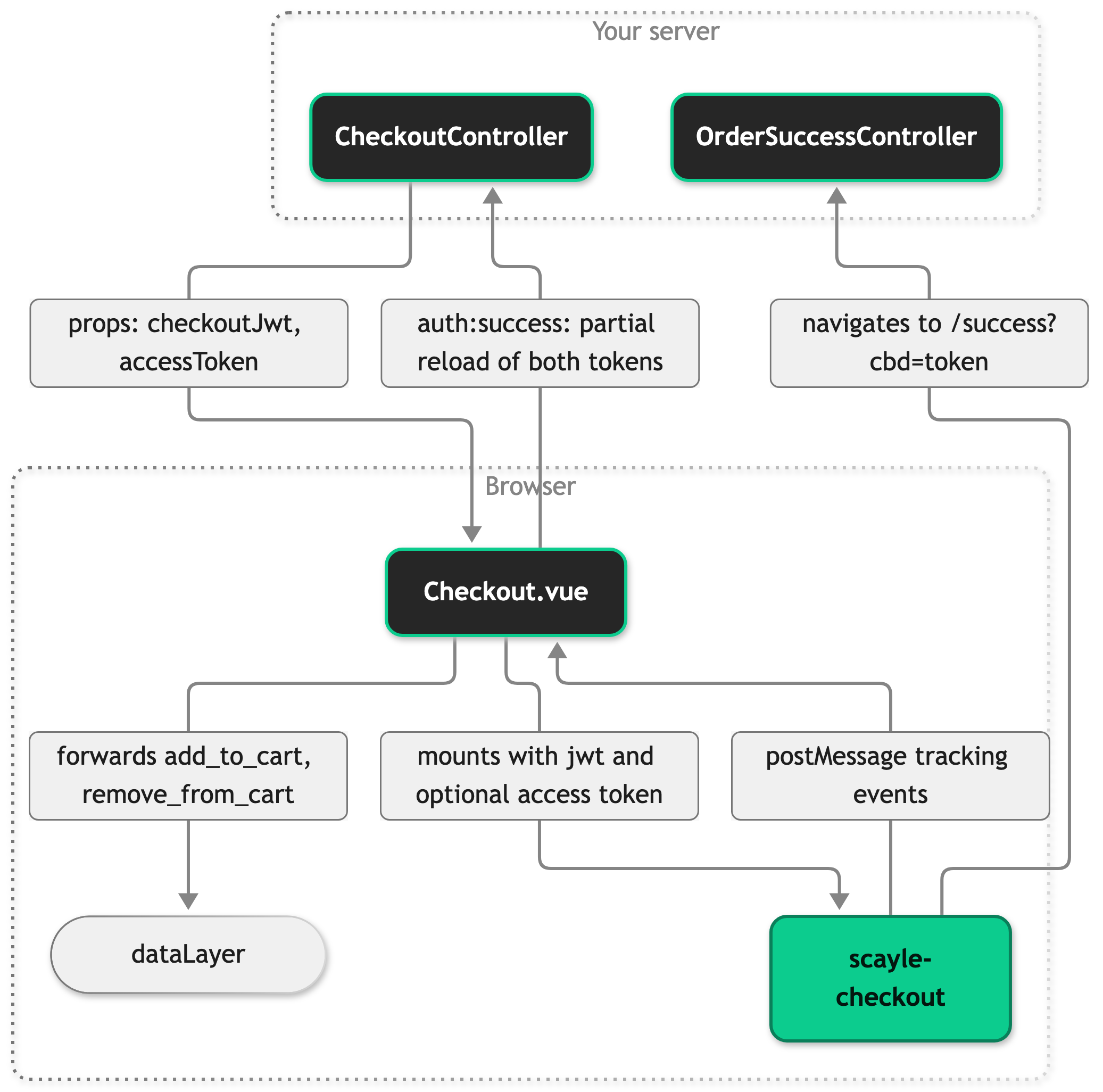
CheckoutController extends BaseCheckoutController, which fetches the basket, runs the hooks, and renders the page.
Props the controller sends
CheckoutController returns five props, and the server resolves all of them before it sends the HTML. The basket and the signed-in customer reach the page through Inertia shared data, so they are not page props.
meta: the head metadata withnoindex, nofollow.checkoutJwt: a signed JWT for the session's basket. It includes the key of the active campaign when there is one.accessToken: the session's OAuth access token, refreshed first when it would expire within 30 minutes. It isundefinedwhen the session has no access token, as for a user, and also when a refresh is due but the session has no refresh token. A user has no access token, and that is normal.shopNameandcheckoutHeader: the content of the simplified header. A failed navigation fetch gives an empty list.
The page template
Checkout.vue passes the two tokens to the checkout web component as attributes and forwards the transactionId query parameter when it is present. The header-element attribute is a CSS selector that matches the id of the header in SFSimpleHeader.vue. The visually hidden h1 gives the page its main heading, because the checkout web component starts its own heading outline at an h2. Keep it if you replace Checkout.vue.
The component mounts only after the checkout auth API, the browser-side interface the script registers for signing in, has initialized and while no token reload is running. Keep both halves of the mount guard explains why.
Consent and tracking context
Checkout.vue also sets two attributes so the checkout web component can gate PayPal and Klarna on consent and send its own SCAYLE Analytics events. consent holds the consent of paypal, klarna, and scayleAnalytics from the consent manager, and tracking-context holds the same context object as your Tracking events. The consent-missing event opens the consent dialog when a customer picks a payment provider that is still gated. Checkout web components explains the attributes.
In a country that requires consent, PayPal and Klarna stay gated until the customer consents. Without a consent attribute, the web component treats both as consented.
Script loading
useCheckoutWebComponentScript appends the checkout web component script to document.head from onMounted, so it runs in the browser only. It skips the work when a script tag with its marker attribute already exists, and Inertia's own head handling does not touch the tag, so it survives navigation. SignIn.vue, Checkout.vue, and SFExpressCheckoutBase.vue each call it, which means the script can already be present when a customer reaches /checkout. The script address comes from the shop country's ID and your tenantSpace.
When the script fires scayle.auth.ready, useCheckoutWebComponent initializes the checkout auth API. Sign in and register explains how.
Token reload after sign-in
A user who signs in inside the checkout gets a new access token, and signing in moves the basket to a new key. The JWT names a basket key, so the page needs a new JWT too. On auth:success it unmounts the checkout web component and runs an Inertia partial reload, a request that refetches only the props you name, for accessToken and checkoutJwt. The partial reload goes through your controller again, so beforeRender runs on it as well. When the request finishes, the page mounts the component again with the new values. Checkout.vue registers this listener without a check of the event's source, so it runs for every source the auth API reports.
The same event also reaches useAuthentication, which for a sign-in source (not init) starts a second partial reload for the customer, basket, wishlist, and promotions props. Both reloads run at the same time. Sign in and register describes the second one.
The same file registers reloadTokens on the auth API once it is ready and removes it again with onScopeDispose.
Tracking messages
The checkout web component posts its tracking events with window.postMessage. Checkout.vue listens for message events and passes each one to forwardCheckoutTrackingMessage with your shop's origin. The function drops the message unless all of these hold:
event.originequals your shop's origin.- The message is a
{ type: 'tracking' }envelope with an innereventobject. - The inner event is
add_to_cartorremove_from_cart. The Storefront Application firesbegin_checkout,purchase,login, andsign_upitself, so forwarding a copy from the checkout web component would count each of them twice. - The inner event's
correlation_idwas not seen before on this page visit. A message without acorrelation_idis forwarded every time it arrives.
A message that passes is rewritten as Tracking Events describes and pushed onto the dataLayer. For add_to_cart and remove_from_cart, Checkout.vue then calls reloadBasket() so the basket state on the page matches the checkout web component.
Setup
The Storefront Application V3 ships the checkout page, the route, and the script loading. You add your credentials and open the page.
Prerequisites: the SCAYLE Checkout API user, token, and secret for each country, and the numeric OAuth client ID your shop uses for the checkout auth API.
- Set
STOREFRONT_OAUTH_CLIENT_IDandSTOREFRONT_OAUTH_CLIENT_SECRET. The page parses the client ID as a number. - For every country, set
STOREFRONT_COUNTRIES_<CODE>_CHECKOUT_USER,STOREFRONT_COUNTRIES_<CODE>_CHECKOUT_TOKEN, andSTOREFRONT_COUNTRIES_<CODE>_CHECKOUT_SECRET.<CODE>is the country code, for exampleDE. - Restart the server.
storefront.config.tsreads these variables when the server boots. - Open
/checkout, with the country prefix if your country selector uses one.
The page frame renders first. Once the script loads and the checkout auth API initializes, the checkout web component appears in the container. The OAuth client ID is required. The config schema rejects an unset or empty oauth.clientId, so the server stops at boot with a config validation error instead of serving the page.
Configuration
SCAYLE Panel
The SCAYLE Panel controls the look, the fields, and the behavior of the checkout under Settings ➜ Checkout. See Customize checkout in SCAYLE Panel.
Storefront Application
The checkout block sits on each entry of the countries array in storefront.config.ts. The config schema requires it on every country. storefront.config.ts reads the environment variable of each field by name, in the pattern STOREFRONT_COUNTRIES_<CODE>_CHECKOUT_<FIELD>. The SDK does not derive these names, so a country you add needs the same three process.env reads.
| Field | Type | Description |
|---|---|---|
checkout.user | string | SCAYLE Checkout API username (from STOREFRONT_COUNTRIES_<CODE>_CHECKOUT_USER). Used with the token for Basic Auth when fetching an order by its callback token. |
checkout.token | string | SCAYLE Checkout API token (from STOREFRONT_COUNTRIES_<CODE>_CHECKOUT_TOKEN). Used with the user for Basic Auth. |
checkout.secret | string | HMAC secret (from STOREFRONT_COUNTRIES_<CODE>_CHECKOUT_SECRET). Signs the checkout JWT and verifies the callback token on /success. |
The three variables have no default. The server reads them when it starts, so a change needs a restart and no rebuild. An unset variable stops the boot with a config validation error. An empty one passes the check, see Validation at startup.
The OAuth client sits at the top level of the same file.
| Field | Type | Description |
|---|---|---|
oauth.clientId | string | Numeric client ID (from STOREFRONT_OAUTH_CLIENT_ID) that initializes the checkout auth API in the browser. Required: the server does not start without it. |
Customization guides
Run logic before the checkout page renders
beforeRender runs after the controller has fetched the basket and before the page renders. Override it to redirect or stop the request. Returning a Response ends the request with that response. Returning undefined renders checkout as usual.
CheckoutViewData holds the resolved basket. beforeFetch is the sibling hook for work that must happen before the basket fetch. Redirect before the page renders covers both hooks.
This override sends a customer with an empty basket back to the basket page:
The snippet shows the new method only. The // ... stands for the existing getTemplate, getViewProps, and getMeta methods, which stay in the class. The hook also runs on the partial reload after a customer signs in.
Best practices
Keep both halves of the mount guard
Mount the checkout web component only when authApiInitialized is true and isReloadingTokens is false. Without the first condition, the component mounts before the checkout auth API has initialized. Without the second, a customer who signs in sees the emptied pre-login basket until the new JWT arrives.
Key the checkout web component by both tokens
The page keys <scayle-checkout> on `${accessToken}-${checkoutJwt}`. A change in either value remounts the component with clean internal state, instead of asking it to react to a prop change in the middle of a flow.
Keep the message listener and its origin check
The message listener in Checkout.vue reloads the basket after a basket event and is the path the checkout web component's tracking events take to your dataLayer. Keep the listener and the origin check in forwardCheckoutTrackingMessage. The check keeps other windows from pushing events into your analytics. See Tracking messages for everything the function verifies.
Troubleshooting
The checkout page shows an empty area where the form should be
Issue: /checkout loads the header and footer, but no checkout form appears.
Possible causes: The checkout web component script did not load, for example because a browser extension or network rule blocks the SCAYLE Checkout host. Or the checkout auth API failed to initialize.
Solution:
- Open the network tab and look for the request to
/frontend/checkout-wc/js. If it failed, fix whatever blocks it. - Open the browser console and look for
Failed to initialize the checkout auth API. The error that follows names the cause.
Prevention: Send browser errors to your error monitoring and alert on Failed to initialize the checkout auth API.
Tracking events or basket updates from checkout never arrive
Issue: A customer adds or removes an item inside the checkout, but the basket on the page does not change and no event reaches the dataLayer.
Possible causes: forwardCheckoutTrackingMessage dropped the message because it failed one of the checks listed under Tracking messages.
Solution:
- Log
event.originandevent.datain themessagelistener inCheckout.vue. - Compare
event.originwithwindow.location.origin. If they differ, the bridge ignores the message by design. - Check
event.dataagainst the other rules under Tracking messages.
Prevention: Test any change to the page's origin handling against a basket event.


