

Subscriptions
Let your customers buy eligible products on a recurring schedule. The Storefront Application V3 adds a subscription section to the product detail page, where the customer picks an interval and a delivery day. The basket and the order pages show both choices. Customers manage or cancel a subscription in web components that SCAYLE hosts, which the Storefront Application embeds on two pages.
Why it matters
A customer who subscribes gets the product delivered on a schedule and does not have to reorder. The subscription option sits below the regular add-to-basket controls, so customers see both choices on one page.
Try it
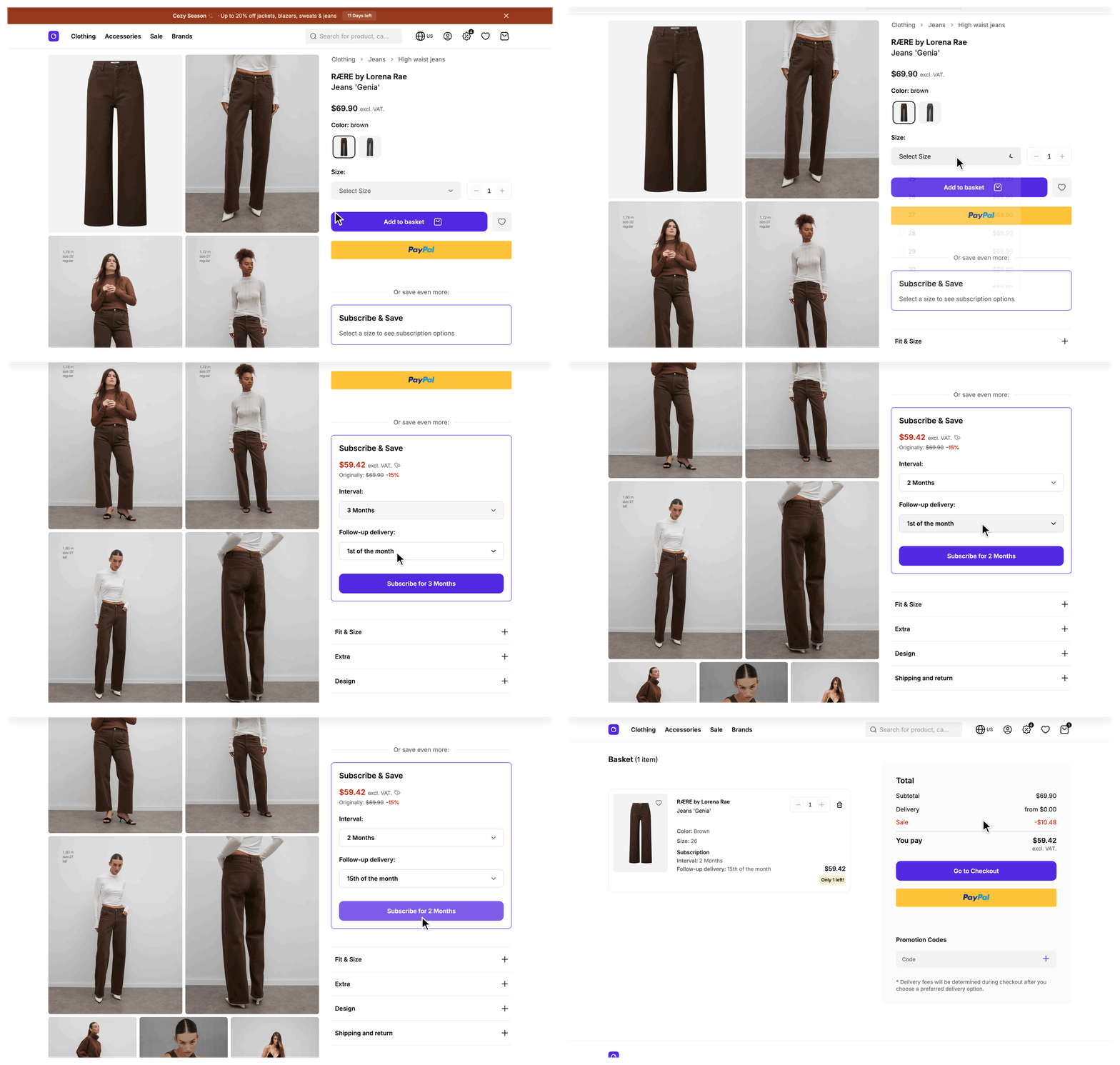
Subscriptions are off until you turn them on for a shop country, so a new Storefront Application shows no subscription section. Follow Setup, then open a product detail page with an eligible variant and select a size. The recording shows the result.
What's included
- Product detail page subscription section: An eligible variant shows its available intervals, the preferred delivery days, and the discounted subscription price. The default delivery days are the 1st and the 15th of the month. The customer picks an interval and a delivery day, then adds the item to the basket. A variant that is not eligible shows a notice instead. While no variant is selected, the section asks for a size.
- Server-side verification: The server checks the chosen interval against the variant. It takes the term and the cancellation policy from the variant, not from the browser.
- Basket and order display: Subscription items show their interval and delivery day in the basket, on the order detail page, and on the order success page. When an order contains a subscription item, the order detail page also shows a notice that links to the account subscriptions page.
- Account subscriptions page (
/account/subscriptions): A page for signed-in customers that embeds the SCAYLE subscription overview web component. - Subscription cancellation page (
/subscription-cancellation): A public page that needs no sign-in. It embeds the SCAYLE subscription cancellation web component. - Subscription price: The product detail page shows the discounted subscription price. It loads shortly after the rest of the page, and the basket uses the same price. See how a price gets reduced for details.
- Per-country switch: One flag per country turns subscriptions on. A country without it has no subscription section and no subscriptions entry in the account tabs, the side menu, or the header account link. Both subscription pages answer with a 404 there.
What you can change
Configure
- Turn subscriptions on or off for each country with its
STOREFRONT_COUNTRIES_<COUNTRY>_SUBSCRIPTION_ENABLEDenvironment variable. - Choose which variants allow subscriptions. In the SCAYLE Panel, you can set their intervals, minimum term, cancellation policy, and subscription price.
Theme
- Restyle the subscription section with the Tailwind classes of
SFProductSubscriptionandSFProductSubscriptionSelection. Both components have Storybook stories you can use to preview changes.
Extend
- Add a row to the basket and order summary in
SFBasketCardSubscriptionData. - Change the delivery-day format in
formatDeliveryDay(). - Add a note to the subscription section with a new translation key.
- Offer other delivery days by editing
PREFERRED_DELIVERY_DAYSinsrc/shared/constants/subscription.ts. - Send extra data with a subscription item as a sibling key of
subscriptionDefinitionincustomData. - Add your own fields next to
subscriptionon a variant by overridingmapVariantinProductMapperService(src/server/services/mappers/product-mapper.ts) and typing the field through theProductVariantaugmentation insrc/shared/types/Product.ts. Callsuper.mapVariant(variant)first and spread it. An override that leaves it out still type-checks and dropssubscription, so every variant looks not eligible. - Change how subscription prices are fetched by subclassing
SubscriptionServicefrom@scayle/storefront/services, overridingfetchVariantPrices(productId: number): Promise<Record<number, VariantPrice>>, and registering the subclass in thesubscriptionslot ofsrc/server/registries.ts. Return an empty record to show the section without a price. - Change which basket lines share an item group by subclassing
BasketServicefrom@scayle/storefront/servicesand overriding its protectedresolveItemGroup(basketKey, params), then registering the subclass in thebasketslot ofsrc/server/registries.ts. The item group is what marks a line as a subscription for the backend and checkout, so a wrong group merges or splits lines the customer expects to stay apart. - Add rules or change the page head of the two subscription pages by overriding
beforeRender()orgetViewProps()inAccountSubscriptionsControllerorSubscriptionCancellationController. Keep thesubscriptionEnabledcheck inbeforeRender(). See Keep the country check when you overridebeforeRenderfor details.
Constraints and limits
Permanent
- The SCAYLE Subscription API and the two web components are hosted by SCAYLE. Pausing, changing an interval, and cancelling happen inside the web components, not in your shop code. The script URLs point at the latest version, so SCAYLE can update the components without a release of your shop. Your shop pins no version and adds no integrity hash to these scripts.
- Subscription eligibility, intervals, minimum term, cancellation policy, and the subscription price come from the SCAYLE Panel. The storefront reads them and has no setting that overrides them. A rule such as a minimum term for one customer group has to exist in the Panel first.
- The browser cannot name the price promotion key, the item group, or promotions of a basket line. The
basket.addroute is reachable without sign-in, and a key named by the caller would give out the subscription price without a subscription. The server sets the keysubscriptiononce it has verified the definition. A server-side caller ofBasketService.addItemcan pass its own key and promotions. A subscription add throughbasket.addhas its item group resolved by the server, which ignores a group passed in. - The server stores only the four fields of
subscriptionDefinition. Any other field inside it is dropped, and the term and cancellation policy are replaced with the values of the variant. - A subscription basket line cannot change its size. The definition was verified against the variant the line was added with, so
changeItemVariantrefuses a different variant withSubscriptionItemNotEditable, which thebasket.changeVariantRPC reports asSUBSCRIPTION_ITEM_NOT_EDITABLE. The basket page shows no size selector for these lines. To change the size, the customer removes the line and adds the other size as a new subscription. - The order history list leaves out orders that the Customer Account API links to a subscription, because those orders belong on the account subscriptions page. Customers find them there.
Known limitations
- The subscription section and both web components render in the browser only, so the server-rendered HTML contains none of them.
- An order item can arrive from the Customer Account API with a reduced product fragment that has no images. The order mapper falls back to the top-level product name, so the item shows and links to the right product but without an image. Fetch the product separately if you need its images or full attributes in the order view.
- The price promotion key cannot be configured, see Configuration. Using another key needs your own
SubscriptionServiceandBasketServiceoverrides. - If you override
ProductMapperService.VariantIncludes, keep the subscription attribute keys in it, for example...SUBSCRIPTION_ATTRIBUTE_KEYSfrom@scayle/storefront. Without them every variant maps as not eligible and the subscription section does not render, without an error. - The express checkout route
basket.createOneTimeCheckoutTokenaccepts the samecustomDataasbasket.addwithout sign-in, and it always adds withresolveItemGroup: false. A server-side caller that passesresolveItemGroup: falseand noitemGrouptoBasketService.addItemdoes the same. Both store a verified definition without an item group. Checkout does not treat that line as a subscription, and the service logs a warning. - A
customData.subscriptionDefinitionthat has the wrong shape is treated as ordinary custom data and also logs a warning. Thebasket.addandbasket.createOneTimeCheckoutTokenroutes reject such a payload through their input schema.
How it works
A subscription purchase uses the same basket and checkout as a regular purchase. The difference is a subscriptionDefinition object in the customData of the basket item. It holds the interval and the delivery day the customer chose, plus the term and cancellation policy of the variant.
Product detail page
The SDK product mapper attaches a subscription object to a variant when the variant is eligible. A variant without subscription is not eligible, so its presence is the eligibility signal for every component. The object has three fields: intervals as label and value pairs, term, and cancellationPolicy. The mapper reads them from four variant attributes that you set in the SCAYLE Panel:
subscriptionEligibilitymakes the variant eligible when its value is"true".subscriptionAvailableIntervalsis a multi-select attribute that lists the interval options.subscriptionTermis a raw string such asNo_minimum_termand reaches the browser unchanged.subscriptionCancellationPolicyis a raw string such asCan_cancel_anytimeand reaches the browser unchanged.
ProductDetail.vue renders the subscription section when the active country sets subscriptionEnabled and at least one variant of the product is eligible.
The subscription price needs a second product fetch with the price promotion key subscription, so it does not arrive with the product. The controller adds a deferred prop named subscriptionPrices in the subscription group, a record of prices keyed by variant id, under the same two conditions. Any other product detail page makes no request for subscription prices. The component renders a price only once the prop holds one for the active variant and never shows the regular price in its place. If the fetch fails, SubscriptionService logs the error and returns an empty record, so the section renders without a price.
Adding a subscription to the basket
When the customer clicks the subscribe button, SFProductSubscription builds the definition from the selection and from the variant:
The page sends it as customData: { subscriptionDefinition: definition } with the variant id and quantity. The basket.add RPC converts subscriptionDeliveryDate to a string and accepts whole days from 1 to 31. When customData carries a definition, BasketService.addItem verifies it before it adds anything. The diagram shows the order of the steps and where a rejection happens.
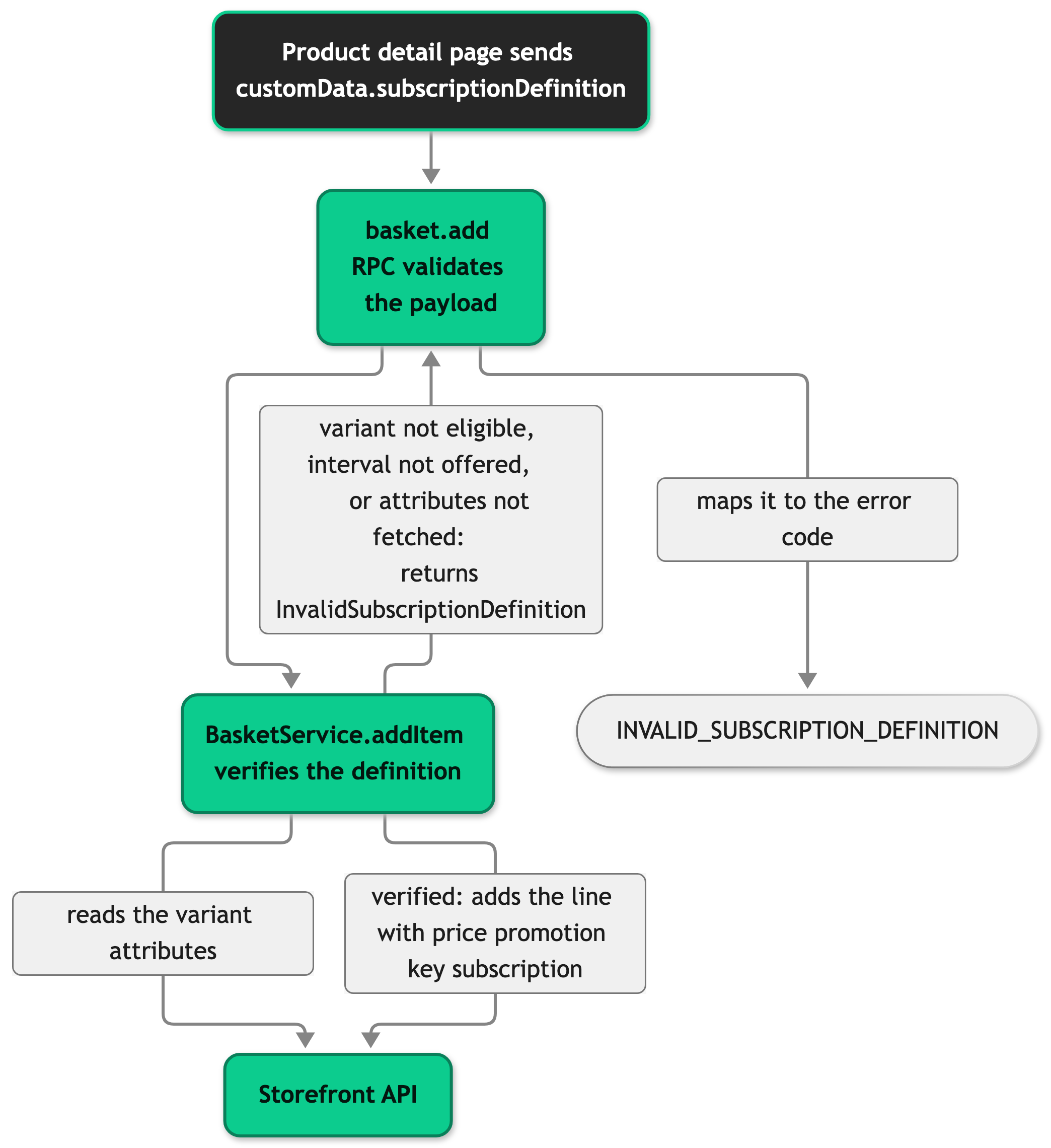
The verification keeps the interval and the delivery day from the browser and replaces the term and cancellation policy with the values of the variant. The server then resolves the item group against the current basket. Adding the same variant with an identical definition reuses the group, so the quantities merge. A different definition gets a new group, so the same variant can sit in the basket once as a regular item and once or more as a subscription.
Basket and order display
SFBasketCardSubscriptionData builds the interval and delivery-day rows from the subscriptionDefinition of the item and the subscription of its variant. SFBasketCard, SFOrderDetailProductCard, and SFOrderSuccessProductCard render it, so all three views match. The interval row shows the variant's label for the stored interval and falls back to the stored value when the variant has no matching option, because order items can arrive with a reduced variant. The delivery day is a localized ordinal such as "15th of the month", built with Intl.PluralRules.
Order Details explains how the order mapper reads the definition and when the subscription notice shows.
Account subscriptions page
AccountSubscriptionsController renders AccountSubscriptions.vue at /account/subscriptions, under the country prefix when your country selector mode sets one. The /account/* auth guard sends customers who are not signed in to the sign-in page. The controller passes the customer's access token and the Subscription API base URL to the page. The page hands both, together with the shop country id, to the <subscription-overview> web component. If the token is missing or expired, the page renders its headline without the web component. Customers can view their subscriptions there and change status, interval, or the date of the next order, as the Subscription Add-on guide describes.
Subscription cancellation page
SubscriptionCancellationController renders SubscriptionCancellation.vue at /subscription-cancellation, under the same country prefix. The page is public and has no auth guard. It uses the slim layout the checkout page uses and embeds the <subscription-cancellation> web component with the Subscription API base URL and the shop country id, but no customer token. Per the Add-on guide, the customer submits name, email address, and subscription id, and SCAYLE validates the combination and confirms by email. You add a link to this page yourself, for example in the footer navigation of your shop. Both subscription pages send noindex, nofollow as their robots meta.
Web component scripts
Both pages call useSubscriptionWebComponentScript in their <script setup> block, with 'overview' on the account page and 'cancellation' on the cancellation page. The composable appends the script to document.head once per component when the page mounts and keeps it there across Inertia visits. It sits outside Inertia's head management on purpose. The web component's initializer reads document.currentScript.parentNode, which is null when Inertia has already removed the script tag, and the initializer then throws.
The Content Security Policy lists the add-on origin for scripts and connections only on requests whose country sets subscriptionEnabled. The policy ships report-only. Both controllers also return a 404 for a country without the flag, so the script never loads there.
Setup
Turning subscriptions on takes a flag per country and the matching configuration in the SCAYLE Panel. Afterward, eligible products show a subscription section and the two subscription pages answer instead of returning a 404.
Prerequisites:
- The Subscription Add-on is active for your shop. Follow the configuration guide and request the activation from your SCAYLE Account Manager.
- Your shop runs the Storefront Application V3 with a working
storefront.config.ts.
Steps:
- In the SCAYLE Panel, mark products and variants that are eligible for subscription. Follow the configuration guide to set the available intervals per variant, the minimum term, and the cancellation policy, and to link the subscription price to the price promotion key
subscription. The storefront reads these settings as variant attributes and as a variant price. - Set
STOREFRONT_COUNTRIES_<COUNTRY>_SUBSCRIPTION_ENABLEDtotruefor each country that sells subscriptions, with the country code in place of<COUNTRY>. The defaultstorefront.config.tsreads it forDE,US, andAT. The value is case-insensitive, and any other value or no value leaves subscriptions off. - For a country you add to
storefront.config.ts, give it its own flag with the country code in the variable name. A country withoutpublicFieldskeeps subscriptions off. A country withpublicFieldshas to setsubscriptionEnabled, becausePublicCountryFieldsdeclares it as required and the typecheck fails without it. - Restart the server. It reads
process.envvalues instorefront.config.tsat startup.
You do not set a host for the web components or the Subscription API. Both derive from your shop's SCAYLE space. See Add-on URLs for details.
To check the setup, open a product with an eligible variant. It shows the subscription section after you select a size. The account area lists a subscriptions entry, and /subscription-cancellation renders instead of a 404.
Configuration
Settings
| Setting | Where | Default | Effect |
|---|---|---|---|
subscriptionEnabled | publicFields of each country in storefront.config.ts, from STOREFRONT_COUNTRIES_<COUNTRY>_SUBSCRIPTION_ENABLED | Off | Turns the section, the navigation entries, and both pages on for the country. The server reads the variable when it starts, so a change needs a restart and no rebuild. |
PREFERRED_DELIVERY_DAYS | src/shared/constants/subscription.ts | [1, 15] | Days of the month the picker offers. Whole numbers from 1 to 31. The first entry is preselected. The picker is the only limit: the server accepts any day from 1 to 31. |
subscription.ordinal_suffix | src/i18n/locales/*.json | st, nd, rd, th in en_GB.json | The ending of a day number, such as st in "1st" or th in "15th". One suffix per ordinal plural form (one, two, few, other). Intl.PluralRules picks the form for the day. |
STOREFRONT_TENANT_SPACE | Environment variable that storefront.config.ts reads | None | Sets the host of the add-on origin. Required by the Storefront Application V3 for every shop. |
The price promotion key is always subscription (SUBSCRIPTION_PRICE_PROMOTION_KEY in @scayle/storefront/shared) and cannot be configured. A subscription price in the SCAYLE Panel linked to a different key is not requested.
The subscription strings live under the top-level subscription key of src/i18n/locales/en_GB.json. The two account menu labels sit under account.tabs and account.tabs.short. Write new keys in en_GB.json first, then run the translate-locales skill to copy them into the other locales.
Add-on URLs
getSubscriptionOrigin from @scayle/storefront/shared builds the add-on origin as https://<your-space>-subscription.addon.scayle.cloud, where <your-space> is the value of STOREFRONT_TENANT_SPACE. Every URL below starts with it.
| URL | Purpose |
|---|---|
<origin>/libs/subscription-overview/latest/subscription-overview.umd.js | Script of the <subscription-overview> web component. |
<origin>/libs/subscription-cancellation/latest/subscription-cancellation.umd.js | Script of the <subscription-cancellation> web component. |
<origin>/storefront-api | Subscription API base URL that the controllers pass to both web components. It is an API endpoint, not a script. |
Customization guides
Add a note to the subscription section
This guide adds a line of text under the interval and delivery-day dropdowns, for example "Auto-renews unless canceled".
Prerequisites: a subscription-eligible variant in your shop and the translate-locales skill.
- Add the key
subscription.product.auto_renew_noteundersubscription.productinsrc/i18n/locales/en_GB.json, then run thetranslate-localesskill to copy it into the other locales. - Add the paragraph after
<SFProductSubscriptionSelection />, inside the eligible-state<template v-else>:
The note now appears in the subscription card once a customer selects an eligible variant.
Offer other delivery days
This guide makes the delivery-day dropdown list the days you choose.
- Edit the constant:
- Keep every entry a whole number from 1 to 31. The server rejects other values, and the first entry is the preselected day. The server does not check a day against your list, so another client can still send a day you do not offer. To reject those days, rebuild
addToBasketDefinitionwith a narrowersubscriptionDeliveryDateschema and replacebasket.addinapiRouter. See Change an SDK procedure for details.
The dropdown now lists "1st of the month", "10th of the month", and "20th of the month" for the en_GB locale. The basket and order views show any stored day in the same format.
Send extra data with a subscription item
This guide stores an extra value, for example a loyalty program choice, on the basket line next to the subscription.
- Add a sibling key of
subscriptionDefinitionin theitemToAddcomputed ofSFProductSubscription.vue.selectedLoyaltyProgramis a ref you add to the component: - To type the key on basket items, declare it on
BasketItemCustomDatain the existingdeclare module '@scayle/storefront-api'block:
Do not put the value inside subscriptionDefinition. The server stores only its four fields.
The basket item that the Storefront API returns now carries customData.loyaltyProgram next to customData.subscriptionDefinition.
Add a row to the basket and order summary
This guide adds an extra row, for example the minimum term, to the basket card, the order detail card, and the order success card.
- Add the label key
subscription.termundersubscriptioninsrc/i18n/locales/en_GB.json, then run thetranslate-localesskill. - Push a row in the
attributescomputed ofSFBasketCardSubscriptionData.vue:
All three cards now show a "Term" row for subscription items.
Change the delivery-day format
This guide changes how a delivery day is shown, for example "15" instead of "15th".
- Edit
formatDeliveryDay()insrc/shared/utils/subscription.ts. Keep its signature(day, locale, t), because both callers pass those three arguments. - Check the product detail page and a basket with a subscription item.
SFProductSubscription.vueandSFBasketCardSubscriptionData.vueboth call the function, and the basket, order detail, and order success cards render the second one.
The picker, the basket, and the order views now all show the new format.
Best practices
Defer extra subscription data
The subscription price needs its own Storefront API request, so it arrives as a deferred prop and does not block the page. Give any further data of that kind its own Inertia.defer() callback in ProductDetailController, inside the same condition that guards subscriptionPrices. Pages without subscriptions then make no extra request.
Treat variant.subscription as the eligibility signal
The mapper sets subscription on a variant only when the variant can be subscribed to. Gate your own subscription markup on it instead of reading attributes again, and never build a subscription add for a variant without it. The server rejects such an add with INVALID_SUBSCRIPTION_DEFINITION.
Keep the country check when you override beforeRender
Both subscription controllers answer with a 404 from beforeRender() when the country has no subscriptionEnabled flag. If you override the method, keep that check. Without it the pages render for countries that have no add-on, and the web component calls an API the country does not offer.
Troubleshooting
The subscription section is missing for an eligible product
Issue: The country has the flag set, but the subscription section does not appear on the product detail page.
Possible causes:
- The variant's
subscriptionEligibilityattribute is not set to"true".
Solution:
- Open the SCAYLE Panel and navigate to the product variant.
- Confirm that the subscription add-on is enabled for this variant.
- Set
subscriptionEligibilityto"true"and save. - Reload the product detail page and select a size.
Prevention: Mark products and variants as subscription-eligible in the SCAYLE Panel before you make them available in your shop.
The subscription price is not visible even though the section renders
Issue: The section renders with the interval and delivery-day dropdowns, but it shows no price.
Possible causes:
- The fetch for the subscription prices failed. The page keeps working and the section renders without a price.
- The variant has no price linked to the price promotion key
subscriptionin the SCAYLE Panel.
Solution:
- Open the Network tab of your browser and reload the product page.
- Find the request that loads the
subscriptionPricesprop, which is part of thesubscriptiondeferred group. - If the response status is not 200, search your server logs for
Failed to fetch subscription prices. - If the request succeeded, check that the variant has a price linked to the key
subscriptionin the SCAYLE Panel.
Prevention: Link a subscription price with the key subscription to every eligible variant.
The account subscriptions or cancellation page shows no web component
Issue: The page renders its layout, but the web component does not appear.
Possible causes:
- The web component script failed to load from the add-on origin.
- On
/account/subscriptions, the customer's access token is missing or expired. The page then renders its headline without the web component. The cancellation page needs no token.
Solution:
- Open the Network tab and look for the web component script,
/libs/subscription-overview/latest/subscription-overview.umd.json the account page or/libs/subscription-cancellation/latest/subscription-cancellation.umd.json the cancellation page. - If the request fails, check that the host starts with your SCAYLE space name. If your shop enforces the Content Security Policy, also check that the browser console shows no violation for it.
- On the account page, ask the customer to sign out and sign in again to get a fresh access token.
Prevention: Test both pages in a staging environment with a test account before you go live.


