

Amplience
Your editors manage the homepage, content pages, and category page content in Amplience, and the Storefront Application V3 renders it with a live preview inside the Amplience Dynamic Content app. The integration reads content from Amplience Content Delivery 2 by delivery key, the unique key you set on each content item. It caches published content and serves drafts only to editors who preview them.
Why it matters
Editors open a content item, see your real storefront render it in a preview frame, and, where drafts are enabled, watch the page update as they type. Your developers keep one rendering path for published and preview content.
Content is localized per content item, so each locale has its own item and delivery key. The Storefront Application V3 already ships the content model, generated types, and block components, so you start from working blocks and change them instead of building a content model first.
What's included
- Content pages by delivery key: The homepage at
/and/homepageand the content pages at/content/:slugfetch one content item each. The storefront builds the delivery key as{locale}/{slug}from the shop country's locale, for examplede-DE/homepageoren-GB/content/about. - Category page content: A category page fetches the item with the key
{locale}/c/c-{categoryId}, for exampleen-US/c/c-91825. Teaser blocks render above the product grid and SEO blocks below it. The service resolves by delivery key and not by the Amplience Filter API, because Content Delivery 2 locale filters drop items that have no explicit locale assignment. - SEO fields from the page content type: The
getPageMetafunction insrc/server/cms/providers/amplience/service.tsreadsmetaTitle,metaDescription, androbotsfrom the page content type. The category page content type has no meta fields, so category pages use the storefront's own metadata. - Draft preview: A visualization is a preview URL you register on an Amplience content type. The Dynamic Content app loads it in an iframe with a Virtual Staging Environment domain, which is the staging domain Amplience issues for each editing session, and the open item's delivery key. With drafts enabled, the storefront reads the draft from that staging environment and skips the cache.
- Live preview while editors type: The
useAmplienceEditorcomposable subscribes to form changes throughdc-visualization-sdk, so the page updates on every valid change and not only on save. The SDK loads only inside an editor session. - Category visualization redirect: Amplience cannot put a category ID into a visualization URL. The category content type opens a placeholder path and the storefront redirects it to the real category route.
- Content Security Policy for preview: Requests in an editor session allow the Dynamic Content app origins to frame the storefront and allow the hosts of Dynamic Media, the Amplience media service, for video metadata requests. The response replaces the baseline
frame-ancestorsvalue and dropsX-Frame-Optionsso the frame can load. - Dynamic Media URLs and block components: Your application builds the image and video URLs for Dynamic Media and owns the Vue components that render each block, which the block table lists. The service returns content only.
- Content model, type generation, and a setup command: The content types and schemas live in
.scayle/cms/contentModel/amplience/.pnpm cms:syncregenerates TypeScript types from the hub,pnpm cms:importpushes the model to a hub, and the Storefront CLI writes your environment variables.
What you can change
Configure
- Which Amplience hub the storefront reads from, with
AMPLIENCE_CMS_HUB_NAME. The hub name is also the delivery subdomain. - Whether editor sessions can see drafts, with
STOREFRONT_CMS_ALLOW_DRAFTS.
Theme
- The block components in
src/client/cms/providers/amplience/components/.
Extend
- Which origins editors preview on, by adding visualization entries to the content types in
.scayle/cms/contentModel/amplience/content-types/and importing them. - How Dynamic Media image and video URLs are built, in
src/client/cms/providers/amplience/utils/media.ts. - Change the delivery key layout by overriding
buildPageDeliveryKeyandbuildListingDeliveryKeyin theAmplienceCMSServicesubclass insrc/server/cms/providers/amplience/service.ts, called your service subclass on this page. - Change which fields feed the page title, description, and robots directive by editing
getPageMetainsrc/server/cms/providers/amplience/service.ts. - Give each locale its own page path in hreflang links, the link tags that tell search engines which URL serves which country, by implementing
getAlternatePathson your service subclass. See the hreflang limitation. - Pass more data to your client-side editor code by overriding
getCMSEditorDataand adding the fields toCMSEditorDatawith adeclare module '@scayle/storefront/cms'block. - Allow more hosts in preview by overriding the
cspConfigproperty on your service subclass. Your value replaces the shipped one, so repeat the Amplience origins it holds. The CMS page describes which directives reach the response. - Add a block type in two steps. First add the content type to the content model and to the
oneOflist of each parent schema that may hold it, such aspage-component-schema.json, then regenerate the types. Editors can only add the block where a parent schema lists it. Second add an entry for it to theBLOCKSmap inAmplienceBlockDispatch.vue. The map is type-checked against the generated block types, so a type without an entry fails the typecheck.
Replace
- Amplience for a different CMS provider, which you select with
CMS_PROVIDERas the CMS page describes.
Constraints and limits
Permanent
- Every locale needs its own content item with its own delivery key, and outside a draft preview the item must be published. A locale without a matching item renders the 404 page for content pages and no CMS content for category pages. Each key segment may hold only letters, digits, hyphens, underscores, and dots. Any other character, and a segment that is only
.or.., is treated as not found, because the delivery SDK inserts the key into the request URL without encoding it. For a content page, the server log entryCMS content not foundholds the requested key indetails.deliveryKey, so compare it with the key of the item in Amplience. Areasonofinvalid-delivery-keymarks a key with a character outside the allowed set. A category page logs nothing for a missing item, because most categories have no CMS content. - Amplience can put only its own tokens, such as
{{delivery.key}}, into a visualization URL, never a field of your content. The category visualization therefore opens/c/cms-preview-0and passes the delivery key askey. The storefront reads the category ID from that key, so the key must end inc/c-{categoryId}. A key in any other shape leaves the request on the placeholder path. - Every visualization URL must carry
key={{delivery.key}}. Without it, a draft preview shows the item that the URL path maps to and not the item the editor has open. - With
STOREFRONT_CMS_ALLOW_DRAFTSoff, a leaked visualization URL serves published content only. The preview Content Security Policy still follows thevseparameter and not this setting, so any request whosevsematches the Amplience staging domain pattern allows the Dynamic Content app origins to frame the page. The CMS page covers the draft setting.
Known limitations
- Content pages and the homepage emit one hreflang link per shop country, plus
x-defaulton the default country. Every link points at the same page path in that country's URL, because the shipped page content type has no per-locale paths for the service to read. A country without an item for its locale still gets a link. If your content uses different slugs per locale, add a field for them to your content model and implementgetAlternatePaths(data)on your service subclass. It returns a map from a locale such asde-DE, a language such asde, or a country path to a page path, for example{ 'de-DE': '/content/ueber-uns' }. - The service caches published content per delivery key. The CMS page says how long a change takes to show.
- The Storefront Application V3 reads one hub name from
AMPLIENCE_CMS_HUB_NAMEand changing it needs a server restart with the new value, not a rebuild. If your shops read from different hubs, editcreateCMSServiceinsrc/server/cms/providers/amplience/service.tsto choose the hub name per shop.
How it works
Content resolution
A content route calls services.cms.fetchPageData(slug, request). The locale comes from the shop country that the request resolved to, not from an argument. The service builds the delivery key, looks for the delivery key in the cache, and fetches from Content Delivery 2 on a miss. The delivery SDK returns objects whose toJSON hooks do not survive Inertia serialization, so the service converts the result to plain objects before it reaches the page.
A missing item raises a not-found error. The page controller renders the 404 page and logs the delivery key. Any other Amplience error is rethrown with the delivery key in its message and is not turned into a 404.
A category page calls services.cms.fetchListingPageData(categoryId, request), which follows the same steps with the delivery key {locale}/c/c-{categoryId}. The service turns a missing item into undefined because most categories have no CMS content. The listing controller also logs any other error and renders the page without the CMS content, so an Amplience outage costs the teaser and not the category page.
Virtual Staging Environment and editor mode
Amplience loads your storefront in an iframe from a visualization. The URL carries two query parameters.
vse(or_vsefor older visualization templates): The Virtual Staging Environment domain that Amplience issues for the editing session. The service accepts only domains that match<session>.staging.bigcontent.io, after it strips a leading scheme and a trailing slash. Any other value is logged as a warning and treated as absent. The domain becomes the base URL the delivery SDK fetches from, so an unchecked value would let anyone make your server fetch from a host they choose.key: The delivery key of the open item, which Amplience fills in from{{delivery.key}}.
A request is in editor mode when it carries a valid vse or _vse. Drafts need one more condition: STOREFRONT_CMS_ALLOW_DRAFTS must be true. The diagram shows how the two decide where the content comes from.
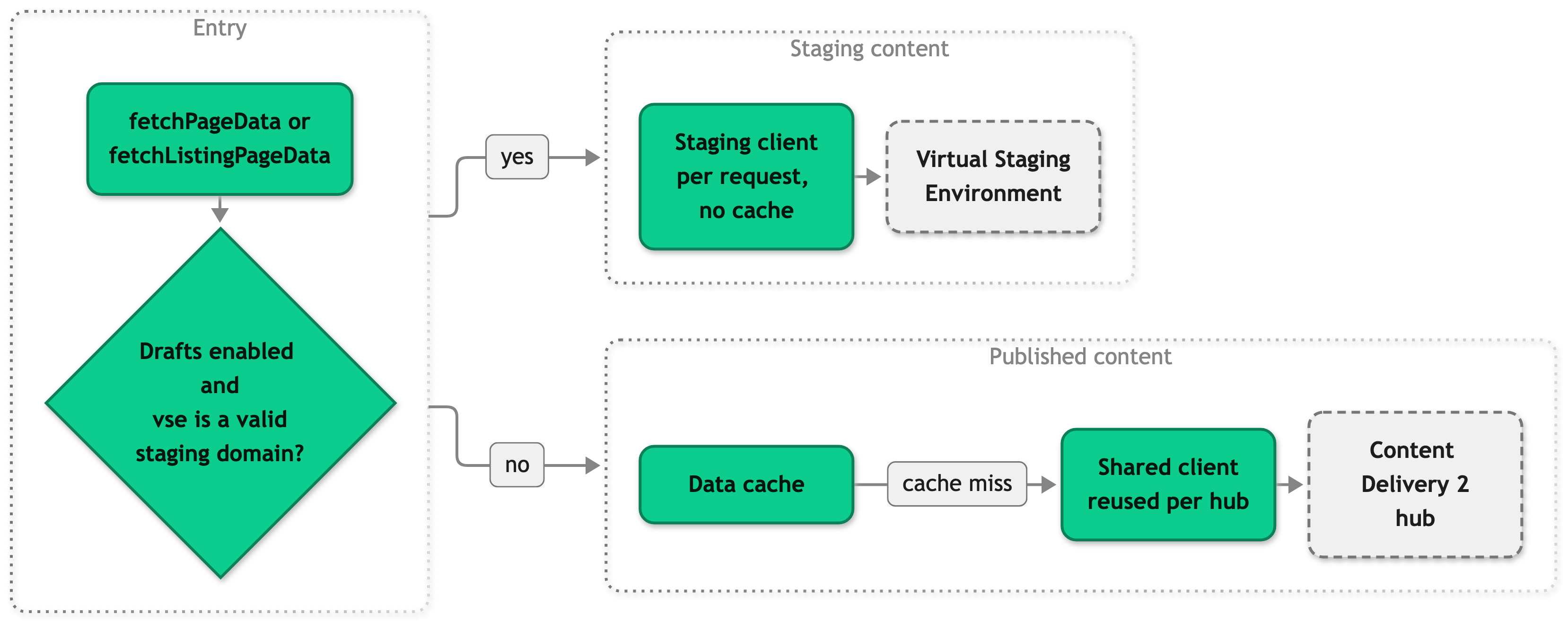
On the staging path, the key parameter wins over the key derived from the URL, so the editor sees the item they have open. The service builds a new staging client for every request, because Amplience issues the domain per session and a shared client would serve one editor's drafts to another. The published client is shared and created once per hub name.
The editor data for the browser follows the same rule. getCMSEditorData(request) returns the staging hostname and the open delivery key only on the staging path, and undefined otherwise. The server adds it to the shared data under the name cmsEditorData, as a once prop, and useAmplienceEditor reads it to decide whether to connect. isEditorMode(request) is wider than that. It is true for any valid vse, with or without drafts, and the Content Security Policy middleware and the preview redirect use it.
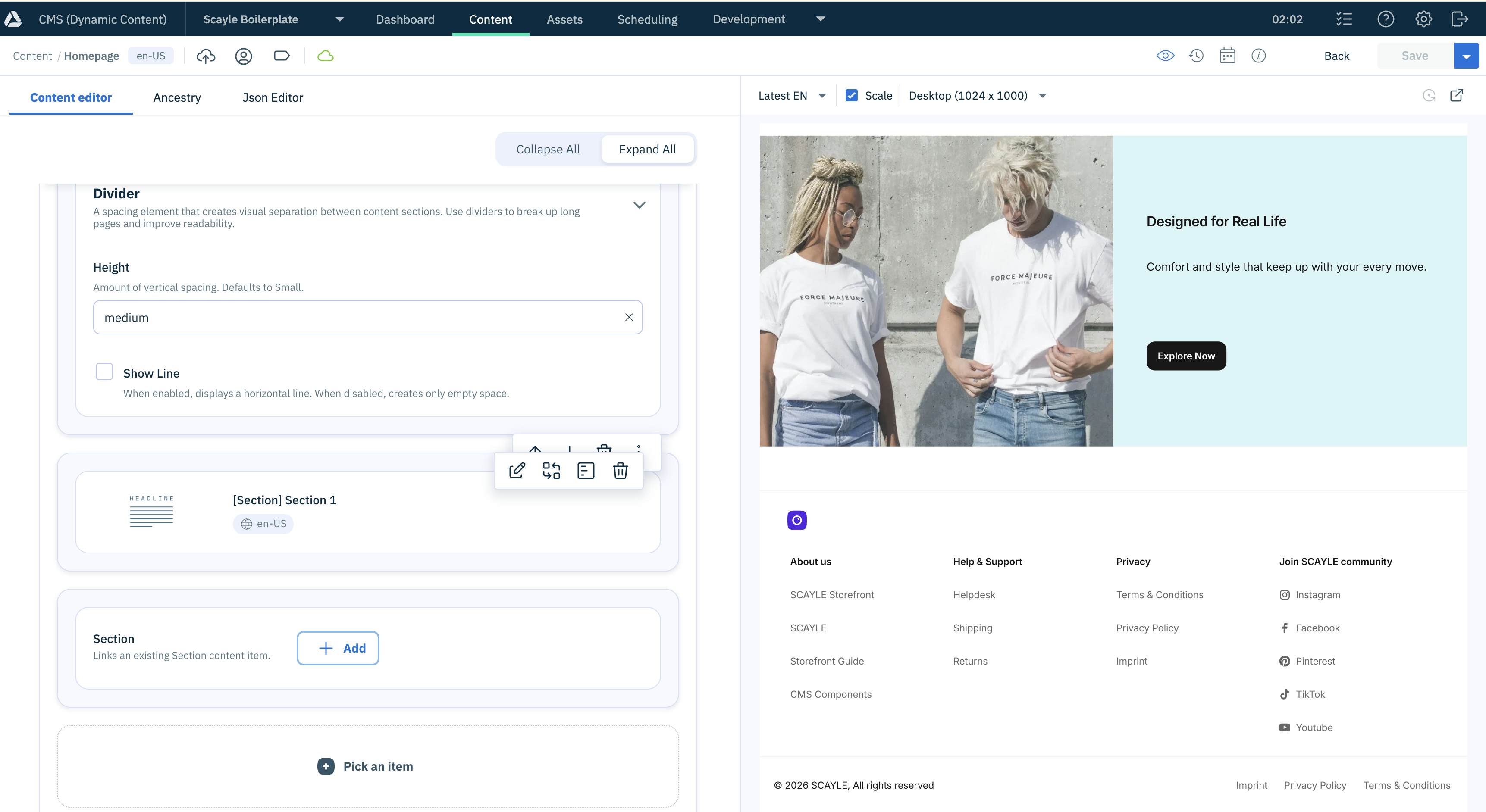
Editor mode
Category preview redirect
The category content type opens /c/cms-preview-0 and the redirect middleware asks the service for a better path. The service parses the category ID from the key parameter and rewrites the last path segment, so a request for /de/c/cms-preview-0 becomes /de/c/cms-preview-50350 and keeps its country prefix and query string. The middleware sends a 302 redirect and only for GET requests.
The service skips the redirect when the request is not in editor mode, when the path is not a category route, when there is no key or the key holds no category ID, and when the path already ends in the category ID that the key names. A page item opened on a category path has no category ID in its key, so it keeps its path. The last case matters because the listing controller redirects a non-canonical category slug to the canonical one, and rewriting back would bounce between the two paths.
Dynamic Media URL building
The src/client/cms/providers/amplience/utils/media.ts file builds image and video URLs, and your components turn the image-link and video-link objects from Amplience into URLs with it. Each provider has its own utils/media.ts, and they share the breakpoint logic in src/client/cms/shared/image.ts. The service never builds a media URL.
A staging response sets the media host to the staging domain, which a browser image request cannot authorize. The builders swap a staging host for cdn.media.amplience.net, so images render in preview.
Setup
Using the setup command
The setup cms amplience command of the Storefront CLI writes the Amplience variables to your .env file and can import the bundled content model into your hub. It looks for your project root from the current directory upward, so you can run it anywhere inside your project.
The command prompts for every value you leave out. Add --non-interactive in CI, so a missing value fails the run instead of waiting for input.
The flags and the variables the command writes are listed in setup cms flags. --hub-name is the Content Delivery 2 hub name and not the hub ID.
The command also sets CMS_PROVIDER=amplience. Rebuild the application afterwards, because CMS_PROVIDER is read at build time.
Setting up manually
- Set
CMS_PROVIDER=amplienceandAMPLIENCE_CMS_HUB_NAME=<hub-name>in.env, then rebuild the application. TheCMS_PROVIDERvalue selects the Amplience code in your build, and the Storefront Application V3 already depends on the@scayle/storefront-cms-ampliencepackage. - Give every content item a delivery key in the form
{locale}/{path}, for examplede-DE/homepage,en-GB/content/about, orde-DE/c/c-100. The delivery key appears in the item details underDelivery. - Import the content model if your hub does not have it yet, as described below.
- Register a visualization on each content type for every origin where editors preview. The shipped content types show the shape. Use your own origin and country path in place of
https://localhost:3000/de. The category content type uses the same entry with/c/cms-preview-0added after the country path.
The path must resolve a shop country, so use the country path prefix or the domain of your shop, depending on your country selector mode (path, path_except_default, or domain). The service takes the locale for the delivery key from that country.
Importing the content model
Run CMS_PROVIDER=amplience pnpm cms:import to push .scayle/cms/contentModel/amplience/ to your hub. It needs AMPLIENCE_CMS_HUB_ID and AMPLIENCE_CMS_PERSONAL_ACCESS_TOKEN. The shipped content types list the repositories content and contentde, so change the repositories array in each content type file if your hub names them differently.
The import writes to your hub and does not merge. It replaces each content type's settings (label, icons, visualizations) and repositories with the committed files, and it rewrites the schemas of every parent type that can hold a changed block. Anything you configured only in the Dynamic Content app is lost. Run it against a new hub, or against a hub where every content type setting is already in the committed files.
Syncing content types
Run CMS_PROVIDER=amplience pnpm cms:sync after you change the content model in Amplience. It only reads from your hub. It exports the schemas and content types into .scayle/cms/contentModel/amplience/ and regenerates the TypeScript types in src/shared/types/cms/amplience/gen/. To regenerate the types from the local schemas without contacting the hub, run node ./scripts/generate-amplience-types.mjs. Do not edit the generated files by hand.
Both cms:sync and cms:import run dc-cli configure, which stores your personal access token in ~/.amplience/dc-cli-config.json in cleartext. Rotate the token if the machine is shared.
Configuration
CMS_PROVIDER and STOREFRONT_CMS_ALLOW_DRAFTS work the same for every provider. Set CMS_PROVIDER to amplience. The CMS page describes both.
| Variable | Required | Default | A change needs | Description |
|---|---|---|---|---|
AMPLIENCE_CMS_HUB_NAME | Yes | None | A server restart | The Content Delivery 2 hub name, used as the delivery subdomain. A missing or empty value stops the server start. |
AMPLIENCE_CMS_HUB_ID | For cms:sync and cms:import | None | The next sync or import run | The hub ID from the hub settings, not the hub name. The running storefront does not read it. |
AMPLIENCE_CMS_PERSONAL_ACCESS_TOKEN | For cms:sync and cms:import | None | The next sync or import run | A personal access token for the Amplience management API. The running storefront does not read it. |
The Storefront Application V3 maps AMPLIENCE_CMS_HUB_NAME and STOREFRONT_CMS_ALLOW_DRAFTS onto the service options hubName and draftContentEnabled in createCMSService, in src/server/cms/providers/amplience/service.ts. The package never reads environment variables itself. The server entry calls parseCmsEnv from the same file at startup, which validates AMPLIENCE_CMS_HUB_NAME and names the invalid variable in its error.
No Amplience setting lives in the SCAYLE Panel. Content structure, item locales, and delivery keys are managed in Amplience.
Customization guides
Change the delivery key layout
Override buildPageDeliveryKey and buildListingDeliveryKey when your hub organizes delivery keys differently from {locale}/{slug} and {locale}/c/c-{categoryId}. Both are protected methods of AmplienceCMSService and the fetch methods call them, so the cache, the preview handling, and the not-found handling stay as they are.
A concrete case is one German content set for de-DE and de-AT, with keys that start with the language, such as de/homepage. Override both methods in the service subclass of your application.
Your keys must still follow the rules under Constraints and limits. In a draft preview the key parameter replaces the derived key, so your layout only matters for published content.
Best practices
Override the key builders, not the fetch methods
The fetch methods hold the cache calls, the staging check, the key validation, and the not-found handling. Overriding only the key builders keeps all four, and a later package update still reaches your application.
Keep secrets out of editor data
In a draft editor session, every field in CMSEditorData ships in the server-rendered HTML. Add coordinates your client code needs, such as a hostname, and never a token.
Troubleshooting
The preview does not update while the editor types
Issue: The preview changes only after the editor saves, or does not change at all.
Possible causes:
- The page is open in its own browser tab and not inside the Amplience content form, so the visualization SDK has no parent frame to connect to.
- A required field is empty. The SDK emits changes only while the form content is valid, so the page keeps the last valid state.
Solution:
- Open the preview from the content form in the Dynamic Content app.
- Check the browser console for
Failed to initialize the Amplience visualization SDK. That entry confirms the first cause. - Fill in every required field of the item.
Prevention: Preview from the content form. A tab opened by hand still renders the draft on the server.
The storefront returns an error with "Amplience API request failed"
Issue: A content page returns a server error, and the log message starts with Amplience API request failed and names a delivery key.
Possible causes:
AMPLIENCE_CMS_HUB_NAMEdoes not name a Content Delivery 2 hub.- Amplience is not reachable from your server.
Solution:
- Read the rest of the log message. It carries the original error and the delivery key.
- Check the value of
AMPLIENCE_CMS_HUB_NAMEin the runtime environment of the server, then restart the server if you changed it. - Test that your server can reach Amplience.
Prevention: Set AMPLIENCE_CMS_HUB_NAME through the deployment configuration of every environment.


