

Pricing
Every product, basket line, and order line price your shop renders comes from one mapped shape. It holds integer amounts, display strings already formatted for the country, and flags that tell a component which price lines to show and which to strike through. The server makes all of those decisions, so a component never compares prices to find out whether something is on sale.
Why it matters
A wrong price is visible the moment a customer sees it. A rounding slip or a unit mismatch shows up on a product card, in the basket, or in both. Mapping each price on the server keeps the number on the product card and the number in the basket line from drifting apart, because both come from the same builder.
Some markets, the EU among them, expect a sale price to appear next to the lowest price of the last 30 days. This page calls that amount the lowest prior price. The Storefront API decides whether a reduction may be advertised, and the mapper turns that decision into flags. Your components follow the flags and do not re-derive the rule. Whether your shop meets the rules of a market still depends on your SCAYLE Panel settings and on rendering the lines the flags ask for.
Try it
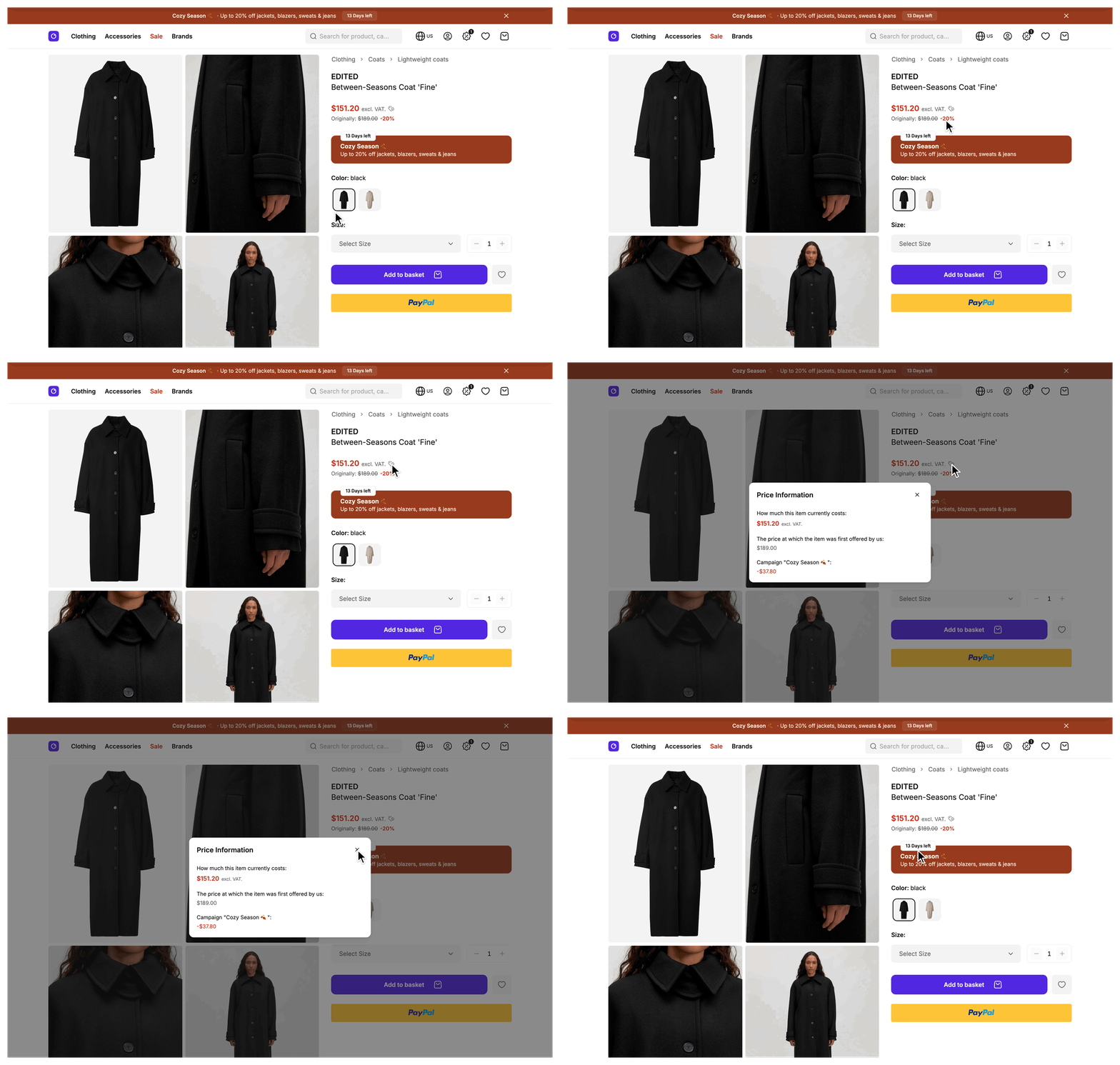
Try it: open the sale category in the demo shop
Pick a reduced product and compare its card with its detail page.
What's included
- One price shape:
VariantPricedescribes the price of a variant, a basket line, and an order line.ProductPriceaddshasDifferentPricesand describes the price of a product. Both types come from@scayle/storefront/types. - Amounts and display strings:
finalPriceInCentsandoriginalPriceInCentsare integer minor units.finalPriceandoriginalPricehold the same amounts formatted for the shop country.currencyholds the ISO currency code, andtotalReductionInCentsholds the combined reduction in cents when the Storefront API reports one. - Sale decision:
isOnSaleistruewhen the Storefront API allows the reduction to be advertised.totalReductionholds the reduction text, for example-41%, and is set only for a price that is on sale. - Reference lines:
showOriginallyandshowLowestPriorPriceLinesay which lines to render below the price.strikeOriginallyandstrikeLowestPriorPricesay which of them to strike through.lowestPriorPriceholds the formatted amount inwithTax. - Reduction breakdown:
saleReductionInCents,campaignReductionInCents, andpromotionReductionInCentshold the with-tax amount of the first reduction in each category.saleReduction,campaignReduction, andpromotionReductionhold the same amounts formatted. A category with no reduction leaves both fieldsundefined. - Strike-through ladder:
strikeThroughPriceshas one entry per applied reduction, the most recent first. Each entry carries the formatted reductionvalue, itscategory(sale,campaign,promotion, orvoucher), itstype(relativeorabsolute), the formattedoriginalPricefrom before that reduction, and apromotionIdfor promotion entries.hasCampaignReductionistruewhen any entry has thecampaigncategory. - Starting-from flag:
hasDifferentPricesistruewhen the cheapest and the most expensive variant of a product differ in price, so a card can show a "starting from" label. - VAT breakdown:
taxholds the formatted VAT amount, the amount in cents, and the formatted rate. It is set only when the Storefront API returns both the amount and the rate. - Price components:
SFProductPrice.vuerenders the price and its reference lines, andSFPriceInfoModal.vueexplains the reduction in a dialog. Both live insrc/client/components/product/in the Storefront Application V3.
What you can change
Configure
- Which currency each country prices in, how many fraction digits it shows, and how the currency is displayed, in
countriesinstorefront.config.ts. See Configuration and Show whole currency units for one country. - Lowest prior price enforcement per country and reduction category, and the percentage below which a reduction is not advertised as a sale, in the SCAYLE Panel.
Theme
- Which price lines your components show and how they look: colors, layout, and text. Edit
SFProductPrice.vueandSFPriceInfoModal.vue. The mapped price stays the same. - How an amount you derive from an
InCentsfield is formatted, with the per-call options offormatCurrency. See Best practices.
Extend
- Change how a mapped price is produced by overriding a price hook on your product, basket, or order mapper.
Constraints and limits
Permanent
- Every field that ends in
InCentsis an integer in minor units, such as cents, on shared types and over the network. The display strings come fromformatCurrency, which divides by 100 and formats for the request's country.currency.fractionDigitschanges how many digits show, not the unit. - The tracking payload and the structured data the server builds for SEO carry decimal amounts instead, see Ecommerce item shape.
toCurrencyUnitsinsrc/shared/utils/price.tsconverts cents to decimal units for them. isOnSalefollows the Storefront API'sreductionsRelativeTofield. It says whether your shop may advertise the reduction, not whether a reduction exists, so a variant can carry a reduction and still haveisOnSaleset tofalse. Do not compareoriginalPriceInCentswithfinalPriceInCentsto decide it.- A price that is not on sale can still show the original price or the lowest prior price as plain lines, but it never strikes either of them.
strikeThroughPricesand the per-category reduction fields come from the applied reductions and ignore the sale decision. They can hold values whileisOnSaleisfalse, so checkisOnSalebefore you render them.- A category with no applied reduction leaves its fields
undefined. Check for presence with!== undefined, because a truthiness check also skips an amount of0. - The SDK does not compute the lowest prior price.
lowestPriorPriceisundefinedwhen the Storefront API returns none.
Known limitations
- Product includes must request
priceRange, and product and variant includes must requestlowestPriorPrice. WithoutpriceRange,ProductMapperthrows an error that includes the product ID when it maps the price. WithoutlowestPriorPrice, a price has no lowest prior price line. A reduction that the Storefront API measured against the lowest prior price then keepsisOnSaleattruewhile both strike flags stayfalse, and the Storefront Application V3 components show neither the strike-through nor the reduction percentage. The product mapper in the Storefront Application V3 already requests both, so keep them when you write your own includes. - Each per-category reduction field holds the first reduction in its category. When a price carries several reductions of one category, such as two promotions, read
strikeThroughPricesto see every one. - Order lines carry no lowest prior price, because the checkout order payloads do not expose it. On an order line
isOnSaleistruewhenever any reduction was applied,showLowestPriorPriceLineandstrikeLowestPriorPriceare alwaysfalse, andlowestPriorPriceis unset. The order mapper also never setstotalReduction,totalReductionInCents,tax, or the per-category reduction fields on an order line. - Each surface has its own price hook. Overriding the variant hook of the product mapper leaves listing cards and order lines unchanged. A basket line keeps its
unitPriceandtotalPrice, but the price on its nestedvariantfollows the override.
How it works
The Storefront API sends each price as an amount with tax, an optional price from before the sale, a list of applied reductions, and a reductionsRelativeTo field that names the amount a reduction is measured against. A mapper hook turns that into the price shape. Which hook runs depends on where the price shows up.
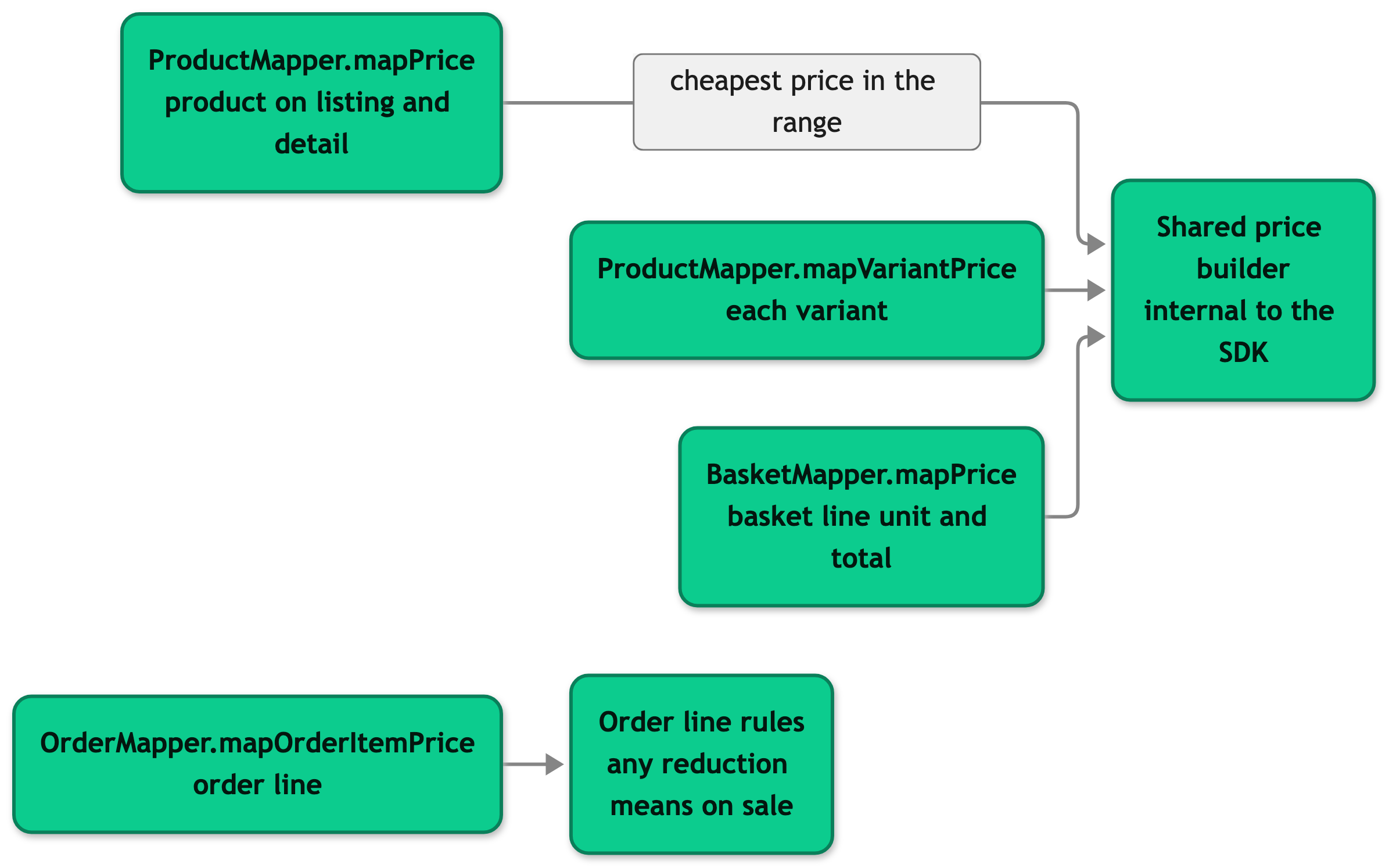
Each hook is a method on an SDK mapper that your own mapper subclass can override. The shared price builder is internal to @scayle/storefront, so you reach it by calling super from a hook. A basket line gets a unitPrice and a totalPrice, both built by the same hook. The basket's cost summary is a separate shape with its own reduction summary and no sale flags.
How a price gets reduced
Four things can reduce a price, and a price can carry several of them at once. Each one has its own page.
- A sale is a reduction you set up in the SCAYLE Panel. It comes with the price from the Storefront API and needs no request input.
- A campaign is a time-limited reduction. The SDK looks up the running campaign and sends its key as
campaignKeywith Storefront API requests. A campaign applies to all products or to selected ones. - A promotion is a rule-based discount that a customer earns, for example by filling the basket. A product attribute links the promotion to its products.
- A promotion code is a text code a customer enters in the basket to apply a promotion that is not active on its own.
A price promotion key is a fifth input, and it differs from all four. It names a price that you attach to a variant in the SCAYLE Panel, such as the subscription price. A request that passes the key gets that price in place of the base price. When the request also carries a campaignKey, the Storefront API applies the promotion price first and the campaign reduction on top of it, see Manage Prices for an example. The SDK sends the key subscription for the subscription price, and Recently Viewed Products accepts a key of your own. The product detail service puts the key into its cache key, see Rules for cached values.
Sale decision and reference lines
The mapper reads the sale decision from the Storefront API and does not recompute it from the reductions. reductionsRelativeTo is null when nothing may be advertised, so isOnSale is false. Otherwise it names either the price from before the sale or the lowest prior price, and that amount is the one that gets the strike. originalPriceInCents holds the price from before the sale, or the final price when the Storefront API returns none.
Three rules decide which reference lines show. The original price shows when a price from before the sale exists and differs from the current price. The lowest prior price shows when one exists and differs from the current price, or when the original price shows next to it. When both lines would show the same amount, only the lowest prior price line stays. The strike then lands on whichever line carries the amount the Storefront API measured against.
Take a variant that costs 60.00 and was 100.00 before the sale. Its lowest prior price is 80.00, and reductionsRelativeTo names the lowest prior price. isOnSale is true and both lines show. Only the lowest prior price line is struck through, because 80.00 is the amount the Storefront API measured against.
Reductions and the ladder
strikeThroughPrices is built from the applied reductions, starting with the most recent. Each entry stores the price before that reduction, so the last entry holds the final price plus every reduction. A relative reduction is formatted as a percentage, such as -20%, and an absolute reduction as a negative amount. The three per-category fields come from the same list and take the with-tax amount of the first reduction in each category.
Formatting
Every display string except the values of the price filter is formatted for the request's country with formatCurrency and formatPercentage, both available from @scayle/storefront/shared. The Storefront Application V3 re-exports them from @shared/utils/formatter, so both import paths work. The country's currency settings and locale decide the result. See Configuration. formatCurrency reads the country's locale and currency, which the number formatting of vue-i18n does not, and formatPercentage reads the country's locale.
Pass formatCurrency an amount in minor units and the active country. In a mapper the country is this.context.country, and in a component it is storefront.country from the shared props. formatCurrency(1999, country) returns $19.99 for the United States and 19,99 € for Germany. Set signed: true to prefix a minus sign for a deduction. formatPercentage(0.14, country) returns 14%.
Setup
There is nothing to install. The price mapping ships in the SDK mappers, and the price components ship in the Storefront Application V3.
Configuration
SCAYLE Panel
Lowest prior price enforcement (strict mode) is configured per shop country and separately for base sale prices and campaign prices. See Manage Prices for how the lowest prior price reaches the Storefront API.
Lowest prior price enforcement is set in the SCAYLE Panel under Shops, Internationalization, Countries. Open a country and find the Sale Indicator Rules section. It has one option for sale prices and one for campaign prices, and each one limits sale indicators to prices below the lowest price of the last 30 days. See Countries in SCAYLE Panel. The sub-threshold reduction percentage, below which a reduction is not advertised as a sale, is set in the SCAYLE Panel under Settings, General, Configuration, Sale Calculation.
The currency and tax rules for a country are set on the shop in the SCAYLE Panel. The currency setting of the Storefront Application is for display formatting only and must match the Panel's currency for that shop country, or prices display with the wrong symbol.
Storefront Application
Each entry in countries in storefront.config.ts has a currency object:
| Field | Type | Description |
|---|---|---|
currencyCode | string | The ISO 4217 currency code, for example EUR. Required. |
fractionDigits | number (optional) | The maximum number of fraction digits formatCurrency shows for this country. 0 shows whole units only. |
display | 'symbol' | 'name' | 'code' | 'narrowSymbol' | How the currency appears in formatted prices. Optional, and symbol is the default. |
A call to formatCurrency can override the country defaults through its third argument:
| Option | Type | Description |
|---|---|---|
locale | string | The locale for this call. Defaults to the country's locale. |
currencyFractionDigits | number | The maximum fraction digits for this call. Overrides currency.fractionDigits. |
currencyDisplay | Intl.NumberFormatOptions['currencyDisplay'] | How the currency appears in this call. Overrides currency.display. |
currency | string | The currency code for this call. Defaults to the country's currency. Not available with style: 'decimal'. |
style | 'currency' | 'decimal' | 'currency' is the default. 'decimal' omits the currency symbol. |
signed | boolean | Prefixes a minus sign. Pass a positive amount. Use it for a reduction shown as a deduction. |
Customization guides
Show whole currency units for one country
You end up with whole-unit prices in one country, without touching a component. A price of 19.99 then reads $20.
- Open
storefront.config.tsand setfractionDigitson the country'scurrency. Every price the mappers format for that country then shows whole units. Adddisplayif you also want a different currency style, such as'narrowSymbol': - Restart the dev server, or build the application again for a deployment. The build bundles
storefront.config.ts.
Every price in that country now shows whole units. The amounts stay integer minor units in shared types and in API responses, so only the display is rounded. A total can therefore differ from the sum of its rounded line prices.
The price filter on a listing page is the exception. Its range inputs format their values in the browser from the country's locale and currency code, so they ignore fractionDigits and display.
Change the price reduction text
The Storefront API returns reductions as whole percentages, so the default reduction text reads -41% and never -41.67%. formatPercentage itself prints up to two decimals, so a fractional value from another source would show them. To change the text, for example to drop the minus sign for a badge that reads "41% off", override the hook that produces a variant price on your product mapper.
The hook is protected mapVariantPrice(variant: StorefrontAPIVariant): VariantPrice on ProductMapper. Override it when you need to change a field the default mapper sets. Call super.mapVariantPrice(variant) first so every other field stays as the SDK builds it.
If you skip super and build the object yourself, TypeScript flags a missing required field. It does not flag the optional ones, such as tax, lowestPriorPrice, and the per-category reductions, which then arrive as undefined.
The product detail page reads the price of the selected variant, so this override changes its reduction text once a variant is selected. A listing card reads the product price instead, which comes from a different hook. Override each hook your shop needs:
ProductMapper:protected mapPrice(product: StorefrontAPIProduct): ProductPriceproduces the price of a product on listing and detail pages.BasketMapper:protected mapPrice(price: MappableApiVariantPrice, lowestPriorPrice?: StorefrontAPILowestPriorPrice): VariantPriceproduces the unit and total price of each basket line.OrderMapper:protected mapOrderItemPrice(...)produces the price of an order line from the checkout order payload. It applies its own rules instead of the ones described under How it works.
Best practices
Show a reference line only when its flag is true
Gate the original price on showOriginally and the lowest prior price on showLowestPriorPriceLine, not on the field being present. lowestPriorPrice can be set while its flag is false, for example when it equals the current price and no original price shows next to it. SFProductPrice.vue renders the lowest prior price line only when the flag is true, the field is set, and the showLowestPriorPrice prop is true. The prop defaults to false, so pass it wherever you want the line. The component also hides the line when showStrikeThroughPrice is set.
Format derived amounts with formatCurrency
When a component needs an amount the mapper does not format, such as a reduction shown as a deduction, call formatCurrency with the shop country. The formatter applies the country's locale and currency settings, which a manual division by 100 skips. SFPriceInfoModal.vue formats the sale reduction this way. The excerpt keeps only the lines that format it.
Troubleshooting
A product has a reduction but isOnSale is false
Issue: A variant is reduced in your commerce data, but its mapped price has isOnSale: false and no totalReduction.
Possible causes: The Storefront API returned reductionsRelativeTo: null for that price. Your lowest prior price and sale threshold settings in the SCAYLE Panel can cause it. See Configuration.
Solution:
- Log
variant.price.reductionsRelativeToandvariant.price.totalAppliedReductionsin amapVariantPriceoverride on your product mapper. - If
reductionsRelativeToisnull, the mapper reports the Storefront API's answer correctly. Review the pricing settings in the SCAYLE Panel instead of changing the mapper.
Prevention: Reproduce the raw values before you change a mapper. A mapper change cannot make the Storefront API advertise a reduction.
A product card shows a different price than the basket line
Issue: A product card or detail page shows a price that differs from the basket line for the same variant.
Possible causes: A shared cache, such as a CDN, serves a page from before the price changed. The Storefront Application V3 sends public with an s-maxage of 600 seconds for the routes in cacheableRoutes in storefront.config.ts. That list includes the product detail, listing, and search routes. A customer who is logged in and a partial Inertia update skip it, and the basket route is not in the list.
Solution:
- Check the
Cache-Controlheader of the page response. - Purge the page in your CDN, or wait for the
s-maxageto run out. - Lower the value for the route in
cacheableRoutesif the delay is too long for your shop.
Prevention: Choose a value that matches how long your shop can tolerate a stale price, especially around the start and end of a campaign.

